
AI Workflows for Kubernetes Cluster Troubleshooting
How AI workflows detect, diagnose, and safely remediate Kubernetes failures — the tools, the safety layers, a production rollout plan, and what AI can't fix.
- #kubernetes
- #ai
- #troubleshooting
- #sre
- #automation
Stuck on this Kubernetes & Helm error? Get the free incident triage checklist
A one-page PDF — the exact steps to isolate, fix, and verify a production error like this one. No spam, unsubscribe anytime.

AI workflows for Kubernetes cluster troubleshooting are automated pipelines that combine AI agents, diagnostic tools, and remediation logic to detect, diagnose, and fix cluster failures without manual triage. Tools like K8sGPT, Kube-AutoFix, and Claude-based agents now handle everything from reading pod events to patching misconfigured manifests. This article covers which tools to use, how to design safe remediation workflows, how to implement them in production, and which failure types AI handles best. If you manage Kubernetes at scale and still triage every CrashLoopBackOff by hand, this is the workflow shift worth making.
What AI tools are essential for Kubernetes troubleshooting workflows?
The standard industry term for this category is AI-assisted SRE automation. The tools range from lightweight analyzers to fully autonomous debugging agents, and picking the right one depends on how much autonomy you want to hand off.
K8sGPT scans your cluster, identifies anomalies in pod states, events, and resource configs, and returns plain-language explanations. It is the fastest way to get a first-pass diagnosis without writing a single kubectl command. Kube-AutoFix goes further. It operates as an autonomous debugging agent that uses structured LLM outputs to generate deterministic, validated remediations within defined namespace boundaries. Think of it as a staff-level SRE that reads your logs, proposes a fix, and applies it within the guardrails you set.

KubeHealer sits in a similar space to Kube-AutoFix, with a focus on self-healing pod failures. Claude-based dynamic workflows take a different approach entirely. Instead of a single-pass diagnosis, they fan out subtasks to parallel subagents that verify and refute findings until results converge. That parallel verification model produces more reliable results on complex multi-component failures than any single-agent run.
| Tool | Autonomy level | Primary use case | Kubernetes API integration |
|---|---|---|---|
| K8sGPT | Read-only analysis | Anomaly detection and explanation | Yes, via kubeconfig |
| Kube-AutoFix | Semi-autonomous | Automated pod remediation | Yes, with RBAC scoping |
| KubeHealer | Semi-autonomous | Self-healing pod failures | Yes, namespace-scoped |
| Claude agents | Configurable | Complex multi-step diagnosis | Via custom tooling |
- K8sGPT is the right starting point for teams new to AI-assisted diagnosis.
- Kube-AutoFix suits teams ready to automate remediation with hard safety limits.
- KubeHealer works well for self-healing patterns in stateless workloads.
- Claude-based agents are best for complex incidents requiring parallel investigation.
Pro Tip: Run K8sGPT in analyze mode against your staging cluster weekly. It surfaces misconfigurations before they become production incidents.
How do you design AI workflows that safely remediate Kubernetes issues?
Safe AI remediation is not just about RBAC. The most common mistake I see is teams that lock down service account permissions but leave no guardrails on what the AI agent can actually propose. You need defense in depth.
The first layer is human-in-the-loop (HITL) approval. HITL remediation is standard practice in SRE workflows, where AI tools surface fixes via interactive approvals rather than applying changes automatically. This controls the blast radius of every AI action. For anything touching production namespaces, HITL is not optional.
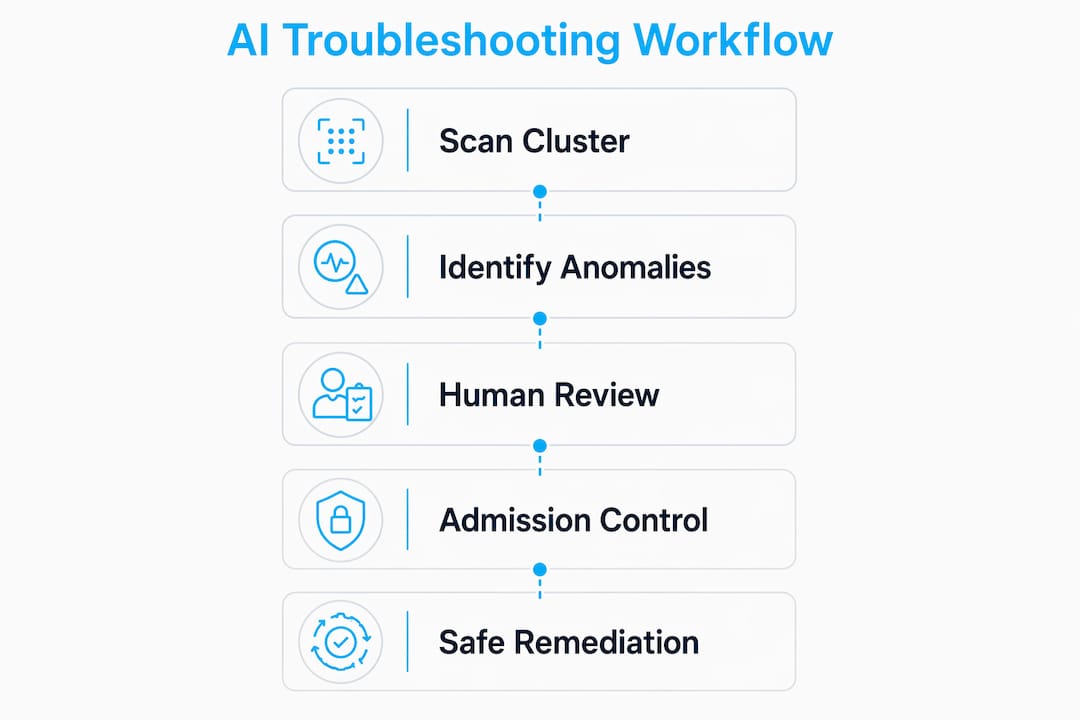
The second layer is admission control enforcement. RBAC tells Kubernetes what a service account can do. OPA Gatekeeper (or Kyverno) tells Kubernetes what nobody should do, including your AI agent. Enforcing remediation policies at the admission control layer blocks AI agents from altering kube-system, enabling hostNetwork, or mutating critical resource types that RBAC alone cannot prevent. Write your admission policies before you deploy any remediation agent.
The third layer is remediation loop hard caps. A good agent enforces a configurable limit of 5–10 retries per remediation attempt. Without this, an agent that cannot fix a failure will retry indefinitely, compounding the problem. Set your hard cap before your first production run.
Additional safety practices worth building into every workflow:
- Scope all AI agents to specific namespaces. Never grant cluster-wide write access.
- Use dry-run mode for every new remediation rule before enabling live apply.
- Log every AI-proposed change to an audit trail separate from your cluster logs.
- Define escalation paths for failures the AI cannot resolve within the retry cap.
The goal is not full automation. The goal is faster, safer resolution with a human still in the loop for anything that matters.
Pro Tip: Before enabling live remediation, run your AI agent in dry-run mode for two weeks. Review every proposed fix. You will catch policy gaps before they cause an outage.
What steps are involved in implementing AI troubleshooting in production?
Deploying AI workflows into a live Kubernetes environment is a process, not a switch you flip. I have seen teams skip the mapping phase and automate chaos. Do not do that. AI is often misapplied to broken processes. Fix the process first, then automate it.
Here is the sequence that works:
- Map your current troubleshooting process. Document the most common failure types in your cluster, how long each takes to resolve, and where the bottlenecks are. This is your baseline.
- Identify one high-frequency, well-understood failure type.
CrashLoopBackOfffrom misconfigured liveness probes is a good first target. It is common, diagnosable, and the fix is usually a manifest patch. - Run a focused 30-day pilot. Define your success metric upfront: mean time to resolution, number of manual interventions, or alert-to-fix duration.
- Deploy your chosen AI tool in read-only mode first. Let it analyze your cluster for a week. Review its findings against your own incident log. If it is catching what you catch, move to the next phase.
- Enable HITL remediation for your pilot failure type. Apply the safety layers from the previous section: namespace scoping, admission-control constraints, and a retry hard cap.
- Monitor and iterate. Track your success metric weekly. Adjust remediation policies based on what the agent gets right and wrong.
| Implementation phase | Key action | Success signal |
|---|---|---|
| Process mapping | Document failure types and resolution times | Baseline metrics established |
| Pilot scoping | Select one failure type, define success metric | Clear measurable goal set |
| Read-only deployment | AI analyzes cluster, no changes applied | Agent findings match known issues |
| HITL remediation | AI proposes fixes, human approves | Resolution time drops, no regressions |
| Policy iteration | Adjust constraints based on agent performance | Increasing auto-approval confidence |
One critical detail on cluster management: management-cluster instability risks your entire fleet. Your AI observability stack needs its own metrics, logs, and stable control plane. Do not run your AI troubleshooting agent on the same cluster it is monitoring without a fallback.
Pro Tip: Keep your AI agent’s observability stack on a separate management cluster. If the cluster it monitors goes down, you still have visibility and can intervene manually.
Which Kubernetes failures can AI workflows detect and resolve?
AI workflows handle a specific class of failures well. Knowing the boundary between what AI can fix and what it must escalate is the difference between a useful tool and a false sense of security.
Common pod failures that AI detects and often auto-fixes include:
- CrashLoopBackOff: AI reads exit codes, container logs, and liveness probe configs. Common fixes include adjusting
initialDelaySeconds, correcting environment variable references, or patching resource limits. - OOMKilled: AI identifies memory limit mismatches by comparing pod metrics to configured limits. The fix is usually a resource patch increasing the memory ceiling.
- ImagePullBackOff / ErrImagePull: AI checks the image name, tag, and registry credentials. Typos in image names and missing
imagePullSecretsare the most common causes, and both are auto-fixable. - Misconfigured manifests: AI compares deployed YAML against known-good patterns and flags issues like missing
tolerations, incorrectnodeSelectorvalues, or absent readiness probes.
How AI identifies root causes matters. The best agents pull pod logs, kubectl describe events, and the raw YAML manifest together before generating a diagnosis. Reading each source in isolation produces shallow results. The combination is what surfaces the actual cause.
Where AI cannot auto-fix and must escalate: network policy conflicts, persistent volume claim binding failures on custom storage backends, and multi-cluster federation issues. These require context the agent does not have. Build your escalation path for these cases before you go live.
For a deeper look at how AI reads and audits manifests before remediation, the Kubernetes manifest auditing workflow walks through the full process, and how to use AI to troubleshoot Kubernetes clusters faster covers the hands-on capture-and-prompt loop.
Key takeaways
AI-assisted Kubernetes troubleshooting works when you combine the right tools, safety layers, and a focused pilot before scaling automation cluster-wide.
| Point | Details |
|---|---|
| Start with the right tool | K8sGPT for analysis, Kube-AutoFix or KubeHealer for semi-autonomous remediation. |
| Safety requires three layers | HITL approval, admission-control enforcement, and hard caps on retry loops. |
| Pilot before scaling | Run a 30-day focused test on one failure type with a defined success metric. |
| Know AI’s limits | Auto-fix works for CrashLoopBackOff, OOMKilled, and ImagePullBackOff. Escalate network and storage failures. |
| Protect your observability stack | Run your AI agent’s monitoring on a separate management cluster to avoid recursive failure. |
What I have learned running AI workflows against real clusters
I will be direct: the first time I deployed an AI remediation agent without proper admission controls, it tried to patch a resource in kube-system. Nothing broke, but it was close. That experience shaped how I think about this entire category of tooling.
The teams that get the most value from AI-assisted troubleshooting are not the ones who automate the most. They are the ones who map their failure patterns first, pick one problem to solve well, and build trust in the agent incrementally. The 30-day pilot model is not bureaucracy. It is how you build the confidence to expand automation without waking up to a degraded cluster at 3 AM.
The other thing I keep coming back to is the value of parallel workflows for complex incidents. A single-pass diagnosis on a multi-service failure is almost always incomplete. When I have used Claude-based agents with fan-out verification, the quality of the root cause analysis is noticeably better. It is slower, but for incidents that matter, slower and right beats fast and wrong.
One pitfall I see constantly: teams automating their existing broken process. If your current triage workflow is inconsistent, your AI agent will automate that inconsistency at scale. Fix the process, document it, then hand it to the agent.
For AI-assisted incident response that goes beyond cluster troubleshooting, the 3 AM incident response guide covers the full workflow, and AI-assisted Kubernetes troubleshooting explained goes deeper on the tooling.
— James
Ready to build smarter Kubernetes workflows?
DevOps AI ToolKit is built for engineers who manage real production infrastructure, not demo clusters. The AI Prompt Library for DevOps Engineers includes prompts purpose-built for Kubernetes and infrastructure automation, including the Bash Leveled Logging Library for structured script output and the Bash Dependency Preflight Check for validating tool dependencies before any automated workflow runs. These are the building blocks that make AI-assisted Kubernetes automation reliable in production, not just in theory.
If you are starting your AI workflow pilot or hardening an existing one, the prompt library gives you tested, production-ready starting points that cut setup time significantly.
FAQ
What is K8sGPT and how does it help Kubernetes troubleshooting?
K8sGPT is an AI-powered cluster analyzer that scans Kubernetes resources, identifies anomalies, and returns plain-language explanations of issues. It integrates directly with your kubeconfig and requires no write access, making it a safe first step for AI-assisted diagnosis.
How do you prevent AI agents from making unsafe cluster changes?
Use three layers: HITL approval for production changes, admission control (OPA Gatekeeper or Kyverno) to block unauthorized mutations, and hard caps of 5–10 retries per remediation loop. RBAC alone is not sufficient to constrain AI agent behavior.
Which Kubernetes errors can AI workflows fix automatically?
AI workflows reliably auto-fix CrashLoopBackOff, OOMKilled, ImagePullBackOff, and misconfigured manifests by patching resource limits, correcting image references, or updating probe settings. Network policy conflicts and storage binding failures typically require human escalation.
How long should a Kubernetes AI workflow pilot run?
A focused 30-day pilot on a single failure type is the recommended baseline. Define your success metric before you start, such as mean time to resolution, and measure weekly to decide whether to expand scope.
Do AI troubleshooting agents work with existing Kubernetes tooling?
Yes. Tools like Kube-AutoFix and K8sGPT integrate with standard Kubernetes APIs via kubeconfig and work alongside Prometheus, Grafana, and existing RBAC policies without requiring cluster-level architectural changes.
Recommended
- Auditing Kubernetes Manifests With AI: A Practical Workflow
- How to Use AI to Troubleshoot Kubernetes Clusters Faster
- Deploying to Kubernetes From GitLab CI Without Losing Your Mind
- AI-Assisted Kubernetes Troubleshooting Explained
Fixed it? Get 500 Kubernetes & Helm & DevOps AI prompts — free
500 battle-tested, copy-paste AI prompts engineered by a senior systems engineer — every one with fill-in placeholders and safety/back-out notes. Drop your email and it's yours.
- 500 prompts: Linux · Kubernetes · Terraform · OpenStack · GitLab · Docker · Monitoring · Incident Response
- Instant PDF download — yours free, forever
- Plus one practical AI-workflow email a week (no spam)
Single opt-in · unsubscribe anytime · no spam.
Stuck on this? Start guided troubleshooting
Open an interactive diagnostic session with this error already loaded. Work a step-by-step plan, record what each check returns, land on a root cause, and export a clean incident summary — no account needed to start.
Did this fix your issue?
Solved it a different way?
Share the fix that worked for you — reviewed, then published to help the next engineer.
That looks like it may contain a secret (key, token, password, or connection string). Please remove it — a note with a detected secret can’t be published.
Thanks — that helps. Published notes appear after a quick review.
Trending errors this week
The error guides other engineers are actually reading right now.
- 1mount: wrong fs type, bad option, bad superblock
- 2mount: wrong fs type, bad option, bad superblock
- 3Kernel panic - not syncing: VFS: Unable to mount root fs on unknown-block
- 4gpg: keyserver receive failed: No data
- 5Docker 'failed to set up container networking': Fix the Bridge and IP Pool
- 6Docker 'failed to create shim task': How to Fix the containerd Runtime Error
Get 500 Battle-Tested DevOps AI Prompts — Free
500 battle-tested, copy-paste AI prompts engineered by a senior systems engineer — every one with fill-in placeholders and safety/back-out notes. Drop your email and it's yours.
- 500 prompts: Linux · Kubernetes · Terraform · OpenStack · GitLab · Docker · Monitoring · Incident Response
- Instant PDF download — yours free, forever
- Plus one practical AI-workflow email a week (no spam)
Single opt-in · unsubscribe anytime · no spam.