
Why Kubernetes Upgrades Fail: A Triage-First Guide
Discover why Kubernetes upgrades fail and learn essential commands to troubleshoot effectively. Enhance your upgrade success today!

Most Kubernetes upgrade failures trace to four root causes: deprecated API removals in the target release, admission webhooks intercepting system-level operations, add-on version drift (CoreDNS, kube-proxy, CNI plugins), and PodDisruptionBudgets blocking node drains. Before you dig into logs, run these three commands immediately:
kubectl get events --all-namespaces --sort-by='.lastTimestamp'— surfaces recent cluster-wide errors in chronological order.kubectl get nodes -o wide— shows node status, version skew, and which nodes are stuck inNotReadyorSchedulingDisabled.- Check your provider’s operation logs:
gcloud container operations listfor GKE,az aks showfor AKS, oraws eks describe-updatefor EKS — these tell you whether the control plane reached a stable state before the failure.
Tools like Pluto and kube-no-trouble catch deprecated APIs before they bite you in production. The Kubernetes project’s supported release window covers a limited range of recent minor versions — falling outside that range increases the upgrade delta and risk of failure, multiplying the chance of hitting removed APIs. The sections below walk through each failure mode, the exact commands to run, and how to recover when things go sideways.
Table of Contents
- What should you check first when a Kubernetes upgrade fails?
- What actually breaks during Kubernetes upgrades?
- Where do you find the actual error message?
- How should you sequence node pool upgrades to avoid failures?
- What should you audit before upgrading a Kubernetes cluster?
- How do you recover after a Kubernetes upgrade fails?
- Proven practices that prevent Kubernetes upgrade failures
- Key Takeaways
- The pattern that keeps repeating
- Devopsaitoolkit has the upgrade playbooks you need
- Useful sources
What should you check first when a Kubernetes upgrade fails?
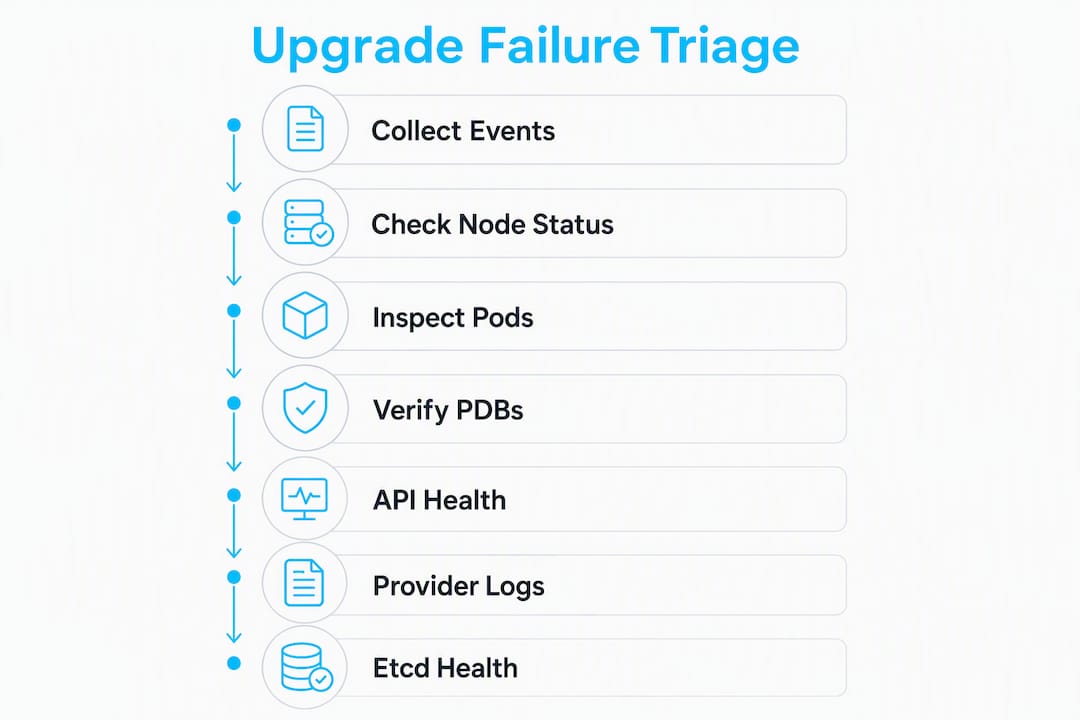
Triage in the first 10–30 minutes is about gathering signals, not fixing things. Resist the urge to restart pods or delete webhooks until you know what you’re dealing with.
Step 1: Collect cluster-wide events
kubectl get events --all-namespaces --sort-by='.lastTimestamp' | tail -50Look for FailedCreate, BackOff, Unhealthy, or any admission webhook denial messages. These appear within seconds of a failed operation.
Step 2: Check node and component status
kubectl get nodes -o wide
kubectl get componentstatuses
kubectl version --short
Version skew between client, server, and nodes is a fast indicator of a partial upgrade. A node still running the previous minor version while the control plane is ahead is expected during a rolling upgrade — but if it stays that way, something blocked the drain.
Step 3: Inspect pods in non-running states
kubectl get pods --all-namespaces -o wide | grep -v Running | grep -v Completed
kubectl describe pod <pod-name> -n <namespace>
Pay attention to Events: at the bottom of describe output. Admission webhook denials and image pull failures both surface here.
Step 4: Check PodDisruptionBudgets
kubectl get pdb --all-namespaces -o wideA PDB with ALLOWED DISRUPTIONS: 0 on a single-replica workload will hang a drain indefinitely.
Step 5: Examine API service health
kubectl get apiservices | grep -v AvailableAny False entries here mean API discovery is broken, which cascades into webhook failures and controller errors.
Step 6: Pull provider operation logs
For GKE: gcloud container operations describe <op-id> --zone <zone>
For AKS: az aks show --resource-group <rg> --name <cluster> --query "provisioningState"
For EKS: aws eks describe-update --name <cluster> --update-id <id>
These logs tell you whether the managed control plane completed its rolling update or stalled mid-operation.
Step 7: Check etcd health before any destructive action
ETCDCTL_API=3 etcdctl endpoint health
ETCDCTL_API=3 etcdctl endpoint status --write-out=table
If etcd is unhealthy, stop. Restore from backup before attempting anything else.
Pro Tip: Before touching webhooks, CRDs, or etcd, snapshot your cluster state: kubectl get all --all-namespaces -o yaml > cluster-snapshot.yaml and take an etcd snapshot with etcdctl snapshot save. You’ll want that forensic baseline if the fix makes things worse.
What actually breaks during Kubernetes upgrades?
The failure modes below cover the vast majority of upgrade incidents. Each one has a pattern you can recognize quickly.
Deprecated API removals
Deprecated APIs are the most common cause of upgrade failures. When a minor version removes a beta API (e.g., extensions/v1beta1 Ingress, batch/v1beta1 CronJob), any manifest or Helm chart still referencing that API silently fails to re-create resources after the upgrade. Pods go Pending, controllers throw resource not found in group errors, and the connection between the error and the upgrade isn’t always obvious.

Immediate fix: Run kubectl get apiservices and compare against the target release’s removal list. Update manifests to use the stable API version.
Deeper fix: Audit all Helm charts, operators, and raw manifests with Pluto or kube-no-trouble before the next upgrade window. Add this scan to your CI pipeline so it catches regressions before they reach production.
Admission webhooks blocking system operations
This one catches teams off guard because the webhook was working fine before the upgrade. The problem is that a new Kubernetes minor version often introduces new cluster-scoped resources via post-start hooks on the kube-apiserver. If a ValidatingWebhookConfiguration or MutatingWebhookConfiguration intercepts those resources and can’t resolve the new API type, the apiserver deadlocks during startup.
A documented example involves the v1.32→v1.33 upgrade, where new default-enabled APIs like ServiceCIDR are created by post-start hooks but get rejected by webhooks that haven’t been updated to recognize the new resource type. The GKE troubleshooting docs confirm this pattern: webhooks intercepting system-level resources are the hidden cause of stuck upgrades.
Immediate fix: Set failurePolicy: Ignore on the blocking webhook temporarily, or add namespaceSelector rules to exclude kube-system, kube-node-lease, and kube-public.
Deeper fix: Use CEL matchConditions (available since v1.28) to scope webhooks precisely. Test webhook behavior against the target API version in staging before production upgrades.
Un-upgraded add-ons (CoreDNS, kube-proxy, CNI)
Add-ons rarely auto-upgrade with the control plane, even in managed environments. A cluster can report a successful control-plane upgrade while CoreDNS is still running a version incompatible with the new kubelet. The result is intermittent DNS failures and network connectivity drops that are genuinely hard to trace back to the upgrade.
Immediate fix: Check add-on DaemonSet and Deployment versions with kubectl get pods -n kube-system -o wide. Cross-reference against the target release’s compatibility matrix.
Deeper fix: Document your add-on versions and their compatible Kubernetes ranges. Upgrade add-ons explicitly as part of the upgrade sequence, not as an afterthought.
PodDisruptionBudgets blocking node drains
A PDB with minAvailable: 100% or maxUnavailable: 0 on a single-replica workload will prevent node eviction entirely. Managed services like GKE and EKS wait for the drain to succeed before moving to the next node, so a single misconfigured PDB can stall an entire node pool upgrade.
Immediate fix: Identify blocking PDBs with kubectl get pdb --all-namespaces -o wide, then either scale the affected Deployment to 2+ replicas or temporarily remove the PDB.
Deeper fix: Review PDB settings as part of your pre-upgrade checklist. For single-replica workloads that genuinely can’t tolerate disruption, schedule a maintenance window and coordinate the drain manually.
IP address exhaustion and resource quotas
In VPC-native clusters (GKE, EKS with VPC CNI), node upgrades require new nodes to be provisioned before old ones are drained. If your subnet CIDR is nearly full or your ENI limits are hit, new nodes can’t get IP addresses and pods go Pending with Insufficient IP or node.kubernetes.io/not-ready errors.
Immediate fix: Free IPs by removing unused nodes or expanding the subnet. Check resource quotas with kubectl describe resourcequota --all-namespaces.
Deeper fix: Size your CIDRs with upgrade headroom in mind. Autoscaling guides for Karpenter and Cluster Autoscaler cover capacity planning strategies that account for surge node requirements.
Storage and etcd compatibility problems
etcd latency spikes, data corruption, or missing keys during an upgrade usually point to a storage driver incompatibility or under-resourced etcd nodes. These are the scariest failures because they can make the cluster unrecoverable without a backup.
Immediate fix: Stop further writes, snapshot etcd immediately, and check etcd member health. Don’t attempt a control-plane restart until you have a clean snapshot.
Deeper fix: Validate storage driver compatibility against the target release, increase etcd disk I/O resources, and automate etcd backups on a schedule — not just before upgrades.
Custom controllers and operators
Controllers that use leader election or watch cluster-scoped resources can enter reconciliation loops during a rolling control-plane upgrade. If an operator was built against an older API version, it may throw errors or fight with the new apiserver.
Immediate fix: Scale down or pause the controller during the upgrade window with kubectl scale deployment <controller> --replicas=0 -n <namespace>.
Deeper fix: Check operator release notes for the target Kubernetes version. Many operators publish explicit compatibility matrices.
| Failure Mode | Key Symptom | Fastest Unblock |
|---|---|---|
| Deprecated APIs | resource not found in group | Update manifests to stable API |
| Admission webhook | apiserver deadlock, DeployPatch failed | Set failurePolicy: Ignore temporarily |
| Add-on drift | Intermittent DNS, network drops | Upgrade CoreDNS/CNI explicitly |
| PDB-blocked drain | Node stuck SchedulingDisabled | Relax PDB or scale replicas |
| IP exhaustion | Pods Pending, Insufficient IP | Free subnet IPs or expand CIDR |
| etcd issues | API unavailable, data errors | Restore from snapshot |
| Controller loops | Reconciliation errors in logs | Scale controller to 0 replicas |
Where do you find the actual error message?
Reading the right log at the right time cuts diagnosis from hours to minutes. Here’s where to look across self-managed and managed clusters.
- kubectl events (cluster-wide):
kubectl get events --all-namespaces --sort-by='.lastTimestamp'— start here every time. Admission webhook denials, image pull failures, and eviction events all appear within seconds. - Pod-level detail:
kubectl describe pod <pod> -n <namespace>— theEvents:section at the bottom shows the exact failure reason, including webhook denial messages and scheduler errors. - kube-apiserver logs:
kubectl logs -n kube-system <kube-apiserver-pod>— look forpost-start hookerrors,admission webhook denied, andfailed to list/watchmessages. For managed clusters, these are in the provider’s log sink. - API discovery errors:
kubectl get apiservicesandkubectl get customresourcedefinitions—Falsestatus on an API service means discovery is broken, which cascades into webhook and controller failures. - Audit logs for forensic analysis: Enable kube-apiserver audit logging to capture every API call with timestamps. This is invaluable for post-incident analysis when you need to reconstruct exactly what happened and when.
Provider-specific log commands:
For GKE, use Logs Explorer with filter resource.type="k8s_cluster" and look for upgradeMaster or upgradeNodes operation entries. The gcloud container operations describe <op-id> command gives you the full operation status and any error detail.
For AKS, check the Activity Log in the Azure portal or run az aks get-upgrades --resource-group <rg> --name <cluster>. The AKS upgrade troubleshooting docs cover DeployPatch failed and No agent available errors specifically.
For EKS, aws eks describe-update --name <cluster> --update-id <id> returns the update status and error codes. Correlate with CloudTrail events to see which API calls preceded the failure.
Log snippets to search for:
admission webhook denied the request— webhook is blocking a system operationresource ... not found in group— deprecated API still in useDeployPatch failed— AKS node pool patch operation failedNo agent available— AKS node pool has no healthy agents to drain toeviction blocked by PodDisruptionBudget— PDB is preventing drainpost-start hook failed— apiserver startup hook was rejected
Forensic snapshot command:
kubectl get all --all-namespaces -o yaml > cluster-snapshot-$(date +%Y%m%d-%H%M).yamlCapture this before making any changes. Pair it with an etcd snapshot for a complete recovery baseline.
How should you sequence node pool upgrades to avoid failures?
Node pool upgrades are where most of the wall-clock time goes, and where PDB and capacity issues surface. The sequence matters.
Recommended upgrade order:
- Upgrade the control plane and verify it reaches
RUNNINGor equivalent stable state before touching nodes. - Validate control plane stability — run
kubectl get componentstatuses, check apiserver logs for errors, and confirm API discovery is healthy. - Upgrade add-ons (CoreDNS, kube-proxy, CNI, metrics-server) one at a time, verifying each before moving to the next.
- Upgrade node pools in small waves using surge settings — start with a non-critical node pool to catch issues before they affect production workloads.
- Validate workloads after each node pool completes — check pod restarts, DNS resolution, and service connectivity.
Why PDBs hang drains. A PDB set to minAvailable: 100% on a Deployment with a single replica means zero pods can be evicted. The drain command waits, the managed service times out per-node, and the upgrade stalls. The fix isn’t always to delete the PDB — often the right answer is to scale the Deployment to 2 replicas before the upgrade window, which gives the PDB room to allow one eviction.
Surge vs. parallel drains. Higher maxSurge values reduce total upgrade time by provisioning replacement nodes before draining old ones, but they temporarily increase your node count and cost. For clusters with tight subnet CIDRs, a high surge can trigger IP exhaustion. Tune maxSurge and maxUnavailable to match your SLO targets and available IP space.
Unblocking a stuck drain quickly:
# Find blocking PDBs
kubectl get pdb --all-namespaces -o wide

# Cordon the node to prevent new scheduling
kubectl cordon <node-name>

# Drain with daemonset and local-data flags (confirm consequences first)
kubectl drain <node-name> --ignore-daemonsets --delete-emptydir-data --timeout=300s
Understanding how readiness probes affect pod rescheduling during drains is worth reviewing before a major upgrade — a misconfigured probe can cause evicted pods to never reach Ready on the new node, which stalls the next drain cycle.
Pro Tip: Keep at least one node’s worth of free CPU and memory before starting any node pool upgrade. If your cluster is running at 90%+ utilization, surge nodes will have nowhere to schedule evicted pods, and the drain will stall regardless of PDB settings.
| Upgrade Phase | Key Validation Check | Common Failure |
|---|---|---|
| Control plane | kubectl get componentstatuses | Webhook deadlock |
| Add-on upgrades | kubectl get pods -n kube-system | Version incompatibility |
| Node pool surge | kubectl get nodes -o wide | IP exhaustion |
| Node drain | kubectl get pdb --all-namespaces | PDB blocking eviction |
| Workload validation | Pod restarts, DNS checks | Add-on drift |
What should you audit before upgrading a Kubernetes cluster?
Running a pre-upgrade audit in staging catches 80% of production failures before they happen. Here’s the checklist and the tools that make it fast.
- Scan for deprecated APIs with Pluto:
pluto detect-files -d ./manifestsorpluto detect-helm -o widescans your Helm releases for APIs that will be removed in the target version. Pluto outputs a clear table of deprecated resources and their replacement API versions. - Scan with kube-no-trouble:
kubent(thekube-no-troublebinary) connects to your live cluster and scans all deployed resources for deprecated API usage. Run it against your staging cluster first, then production before the upgrade window. - Check CRDs and API services:
kubectl get crdsandkubectl get apiservices— confirm all custom resource definitions have a compatible API version in the target release. Missing CRDs after an upgrade cause controller crashes. - Verify add-on versions:
kubectl get pods -n kube-system -o wide— cross-reference CoreDNS, kube-proxy, and your CNI versions against the target release compatibility matrix. For kubeadm-managed clusters,kubeadm upgrade planshows you exactly which add-ons need updating. - Audit PDB and HPA settings:
kubectl get pdb --all-namespaces -o wideandkubectl get hpa --all-namespaces— flag any PDB withALLOWED DISRUPTIONS: 0and any HPA that might scale down replicas during the upgrade window. - Test webhook exclusions: Simulate API calls that create system resources and verify your webhooks exclude
kube-system,kube-node-lease, andkube-publicnamespaces. A webhook that passes staging tests but intercepts system namespaces in production is a common trap. - Confirm etcd backups are current: Don’t start an upgrade without a verified, restorable etcd snapshot from the last 24 hours.
For auditing Kubernetes manifests at scale, AI-assisted workflows can surface deprecated API patterns across large manifest repositories faster than manual grep searches.
Checklist order:
- Backup etcd
- Run
plutoandkubentdeprecated-API scans - Validate add-on versions against target release
- Review PDB and HPA settings, adjust replica counts
- Test webhook namespace exclusions
- Run the full upgrade sequence in a staging clone
- Promote to production only after staging completes cleanly
How do you recover after a Kubernetes upgrade fails?
Recovery depends on how far the upgrade got and what broke. Here’s the ordered playbook.
-
Stop the upgrade operation. In managed clusters, cancel or pause the upgrade job via the provider console or CLI before it makes further changes. For self-managed clusters, stop any running
kubeadm upgradeprocesses. -
Take a forensic snapshot. Run
kubectl get all --all-namespaces -o yaml > forensic-snapshot.yamland capture apiserver logs immediately. If you haven’t already, take an etcd snapshot now. -
Assess the control plane state. Run
kubectl get componentstatusesand check apiserver logs. If the control plane is responding, you have options. If it’s not, you’re in restore territory. -
Try targeted fixes before restoring. If the control plane is up but workloads are broken, work through the failure modes: relax blocking webhooks, upgrade incompatible add-ons, fix PDB settings, and free IP capacity. Many “failed upgrades” are actually partial upgrades that can be completed after fixing the blocker.
-
When to restore from etcd backup. Restore only if etcd is corrupted, the control plane is unrecoverable, or you’ve confirmed data loss. A restore wipes all state since the snapshot, so it’s a last resort, not a first response.
-
Provider-specific recovery notes. GKE and AKS both surface operation status in their respective CLIs and consoles. Check whether the control plane reached a stable state before the failure — if it did, the issue is likely in add-ons or node pools, not the control plane itself. Consult vendor docs for forced retry options before attempting a restore.
-
Rollback constraints. Control-plane downgrades are not supported in Kubernetes. If you need to return to the previous version, the path is to provision a fresh cluster on the old version and restore workloads from backups. This is why a tested restore runbook matters more than any other pre-upgrade preparation. The upgrade planning approach used for OpenStack applies here too: treat rollback as a first-class plan, not an afterthought.
-
Post-incident checklist. Record the exact timestamps, commands run, which APIs or webhooks caused the failure, and what fixed it. Update your pre-upgrade checklist and automation scripts so the same failure can’t repeat.
Proven practices that prevent Kubernetes upgrade failures
- Upgrade regularly, one minor version at a time. The Kubernetes project’s supported release window covers three minor versions. Staying current means smaller API removal deltas and fewer surprises per upgrade.
- Run deprecated-API scans before every upgrade. Pluto and kube-no-trouble both take under a minute to run and catch the most common failure mode before it reaches production.
- Follow the sequence: control plane → add-ons → nodes. Teams that treat upgrades as a multi-stage orchestration see fewer incidents. Skipping the add-on step is how you end up with intermittent DNS failures that take days to trace.
- Don’t rely on vendor auto-upgrades for add-ons. Managed services like GKE and EKS will upgrade the control plane automatically, but add-ons often lag or require explicit action. Verify each add-on version explicitly after every control-plane upgrade.
- Keep automated etcd backups and a tested restore runbook. A backup you’ve never restored is not a backup. Staging upgrades with a restore test as part of the runbook is the single highest-value practice for reducing incident severity.
- Scope admission webhooks tightly. Exclude system namespaces, use
matchConditionswhere supported, and test webhook behavior against the target API version in staging. Admission webhooks are the most overlooked cause of stuck upgrades. - Maintain capacity headroom before upgrades. Clusters running above 85% utilization are at high risk of stalled drains and Pending pods during surge operations. Plan your upgrade windows around lower-traffic periods and pre-scale if needed.
- Track multi-cluster version skew actively. In environments with multiple clusters, version drift between clusters compounds upgrade risk and makes cross-cluster debugging harder.
Key Takeaways
Most Kubernetes upgrade failures are preventable: deprecated APIs, admission webhooks, add-on drift, and PDB-blocked drains account for the majority of incidents, and all four are detectable before you start the upgrade.
| Point | Details |
|---|---|
| Run triage commands first | Start with kubectl get events --all-namespaces and provider operation logs before touching anything. |
| Top four failure modes | Deprecated APIs, admission webhooks, add-on drift, and PDB-blocked drains cause most upgrade incidents. |
| Audit before every upgrade | Run Pluto and kube-no-trouble in staging; scope webhooks to exclude system namespaces. |
| Sequence matters | Upgrade control plane first, then add-ons, then node pools — verify at each step before proceeding. |
| Devopsaitoolkit playbooks | Devopsaitoolkit’s upgrade playbooks and audit automation templates cover deprecated-API scanning, webhook scope checks, and node drain sequencing. |
The pattern that keeps repeating
Here’s what I keep seeing across production upgrade incidents: the failure wasn’t caused by Kubernetes itself. It was caused by deferred maintenance. A team skips one minor version, then another, and by the time they upgrade, the API removal delta is large enough that three or four manifests break simultaneously. Add an un-scoped admission webhook that nobody has touched in 18 months, and you have a deadlock that looks mysterious until you know the pattern.
The other recurring theme is the gap between “the control plane upgraded successfully” and “the cluster is healthy.” Those are not the same thing. A control plane upgrade completing is step two of a five-step process. Teams that treat it as the finish line end up debugging intermittent DNS failures for days, not realizing that CoreDNS is still running the old version.
The fix isn’t complicated. It’s a short automation check in your CI/CD pipeline: run kubent on every manifest change, scope your webhooks to exclude system namespaces, and keep your etcd backup schedule honest. None of that requires a major process overhaul. It requires treating upgrades as a repeatable, audited workflow rather than a one-time event. The teams that do this consistently have shorter upgrade windows, fewer incidents, and a lot less of their Friday afternoons eaten by production fires.
Devopsaitoolkit has the upgrade playbooks you need
If you’ve read this far, you already know what to fix. The harder part is building the automation so you don’t have to remember it next time.

Devopsaitoolkit’s AI DevOps tools and upgrade playbooks give you ready-to-run kubectl command snippets, deprecated-API scan templates for Pluto and kube-no-trouble, webhook scope audit checklists, and node drain sequencing guides — all structured for production use, not tutorial demos. The playbooks cover the full upgrade sequence from pre-audit through post-incident postmortem, so your team runs the same disciplined process every time rather than improvising under pressure.
You can start with the free resources, or check the pricing page for the full automation toolkit and consulting options. If you’d rather have an expert review your cluster’s upgrade readiness directly, book an infrastructure audit and get a concrete remediation plan before your next upgrade window.
Useful sources
- Kubernetes cluster upgrade docs — the official upgrade guide covering the supported release window, version skew policy, and kubeadm upgrade steps. Start here for any self-managed cluster upgrade.
- Kubernetes version skew policy — defines the supported component version differences between kube-apiserver, kubelet, kubectl, and controller-manager. Essential reading before any multi-component upgrade.
- GKE upgrade troubleshooting — covers GKE-specific upgrade errors including control plane rolling update behavior, node pool drain timeouts, and operation log interpretation.
- AKS upgrade and scaling troubleshooting — Microsoft’s troubleshooting page for AKS upgrade failures, including
DeployPatch failedandNo agent availableerror patterns. - Pluto — CLI tool for detecting deprecated Kubernetes API versions in Helm charts and manifest files. Run before every upgrade.
- kube-no-trouble (kubent) — scans a live cluster for deprecated API usage. Faster than manual manifest review for large clusters.
- Admission webhook deadlock issue (kubernetes/kubernetes #137356) — documents the v1.32→v1.33 deadlock caused by webhooks intercepting new default-enabled APIs. Useful reference for understanding the webhook trap.
- Solving stuck GKE upgrades: the admission webhook trap — practical walkthrough of diagnosing and fixing webhook-blocked GKE upgrades, with real log examples.
- Free automation and tooling resources — curated list of lightweight utilities useful for manifest checks and upgrade automation tasks.
Recommended
- Planning OpenStack Upgrades Safely Without Downtime — DevOps AI ToolKit
- Managing Multiple Kubernetes Clusters Without Losing Track
- Why Kubernetes Readiness Probes Matter for Stability
- Surviving Terraform Provider Version Upgrades
Get 500 Battle-Tested DevOps AI Prompts — Free
500 battle-tested, copy-paste AI prompts engineered by a senior systems engineer — every one with fill-in placeholders and safety/back-out notes. Drop your email and it's yours.
- 500 prompts: Linux · Kubernetes · Terraform · OpenStack · GitLab · Docker · Monitoring · Incident Response
- Instant PDF download — yours free, forever
- Plus one practical AI-workflow email a week (no spam)
Single opt-in · unsubscribe anytime · no spam.