
Why Kubernetes Readiness Probes Matter for Stability
Discover why Kubernetes readiness probes matter for stability. Ensure your applications are error-free and ready to serve traffic effectively.

A Kubernetes readiness probe is a periodic health check that tells Kubernetes when a pod is ready to receive application traffic. Without it, the Kubernetes scheduler routes requests to pods that are still initializing, warming caches, or waiting on database connections. The result is user-facing errors before your application has even had a chance to start. Understanding why Kubernetes readiness probes matter is the difference between a deployment that looks healthy in the dashboard and one that actually serves users without errors. The EndpointSlice controller acts on probe signals instantly, making readiness probes the primary traffic gate in every Kubernetes service.
Why Kubernetes readiness probes matter: traffic control and pod lifecycle
Readiness probes control traffic by removing a pod’s IP from Services when the probe fails. The pod keeps running. The container does not restart. Kubernetes simply stops sending new requests to that pod until it passes the probe again. This is the core mechanic that separates readiness probes from every other health check type in the Kubernetes ecosystem.
The EndpointSlice controller updates Service endpoints immediately when a readiness probe fails. That update propagates to kube-proxy and any Ingress controller watching the cluster. Traffic reroutes to healthy pods within seconds, not minutes.

Contrast this with liveness probes. A liveness probe failure triggers a container restart. That is a destructive action. A readiness probe failure is non-destructive. The pod stays alive, preserves its in-memory state, and rejoins the endpoint pool the moment it recovers. That reversible behavior is what makes readiness probes the right tool for transient conditions like dependency timeouts, temporary overload, or slow cache warming.
Here is a quick breakdown of how the three probe types divide responsibility:
- Readiness probe: Controls traffic routing. Failure removes pod from Service endpoints. No restart.
- Liveness probe: Controls container health. Failure triggers a container restart.
- Startup probe: Protects slow-starting containers. Disables readiness and liveness probes until the container passes startup.
A readiness probe failure is a traffic signal, not a death sentence. The pod stays alive, retains state, and automatically rejoins the Service when it recovers. That reversible nature is what enables graceful degradation at scale.
How readiness probes enable zero-downtime deployments
Zero-downtime deployments depend entirely on readiness probes blocking traffic until critical startup phases finish. Cache warming, database connection pool initialization, and dependency handshakes all take time. Without a readiness probe, Kubernetes sends traffic the moment a pod reaches the Running state, which is far too early.
Without readiness probes, initial pod failure rates during startup can reach 50–100%. That is not a theoretical edge case. It happens every time a rolling update deploys a new pod before the application is actually serving requests. Users hit HTTP 503 errors, and the on-call engineer gets paged at 2 AM.
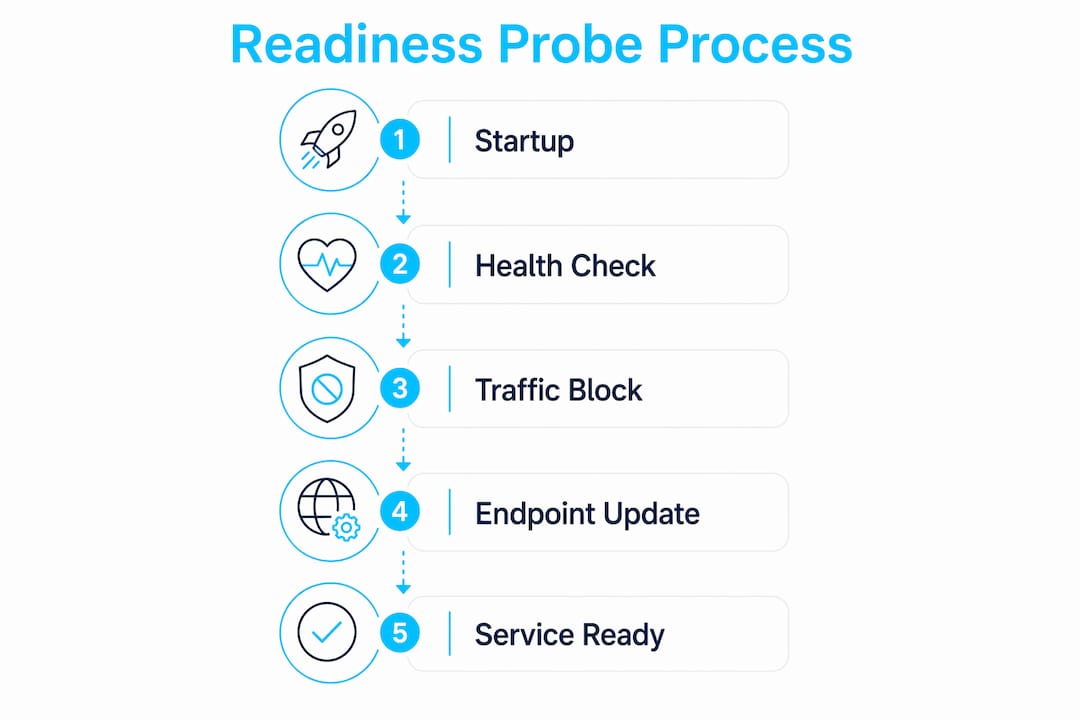
Readiness probes solve this by holding the pod out of the Service endpoint pool until the application signals it is ready. A rolling update then proceeds pod by pod, with each new pod only receiving traffic after passing its readiness check. The old pod stays in rotation until the new one is confirmed healthy. That handoff is what makes a rolling update actually zero-downtime.
Pro Tip: Set initialDelaySeconds to match your application’s typical cold start time. If your app takes 15 seconds to warm up, start with initialDelaySeconds: 20 to give it a buffer before the first probe fires.
The scenarios where readiness probes prevent failures during deployment include:
- Cache loading: Application reads a large dataset into memory before serving requests.
- DB connection pooling: App establishes a minimum pool of database connections before accepting traffic.
- Dependency handshake: App waits for a downstream service to confirm availability.
- JVM warmup: Java applications need JIT compilation cycles before reaching acceptable latency.
- Config loading: App fetches remote configuration and validates it before starting request handling.
Each of these scenarios produces a window where the pod is Running but not ready. A readiness probe closes that window precisely.
Best practices and common pitfalls in readiness probe configuration
Effective readiness probes must be “business-aware.” A probe that returns HTTP 200 because the web server is accepting connections tells you almost nothing about whether the application can actually serve user requests. A readiness probe that returns OK when dependencies aren’t ready routes traffic to a pod that will immediately fail those requests. That is worse than no probe at all.
The most dangerous pitfall is checking shared external dependencies inside readiness probes. If your readiness endpoint queries Redis and Redis goes down, every pod in the deployment fails its readiness check simultaneously. The EndpointSlice controller removes all pods from the Service. You get a total outage caused by the health check itself, not the underlying failure. Shallow checks at the application layer are safer than deep dependency checks.
Timing parameters deserve the same attention as the probe logic itself. Kubernetes default settings of periodSeconds: 10 and failureThreshold: 3 mean it takes 30 seconds to detect a readiness failure. For most production services, that is too slow. Tuning these values down reduces detection time but increases false positive risk.
Pro Tip: Start with periodSeconds: 5 and failureThreshold: 2 for latency-sensitive services. Monitor false positive rates for a week before tightening further. Aggressive intervals catch failures faster but can flap pods during brief GC pauses.
| Configuration approach | When to use it | Risk |
|---|---|---|
| Shallow HTTP check (app layer only) | Most stateless services | Low. Misses dependency failures. |
| Business-aware check (app + internal state) | Services with warmup requirements | Medium. Requires careful endpoint design. |
| Deep dependency check (app + external services) | Avoid in most cases | High. Cascading failures across all pods. |
| Startup probe + readiness probe | Slow-starting containers (JVM, large models) | Low. Startup probe protects initialization window. |
Startup probes complement readiness probes by giving slow-initializing containers extra time without disabling liveness checks permanently. While a startup probe is running, both readiness and liveness probes are disabled. Once the startup probe passes, readiness and liveness take over. This pattern is the right answer for Java services, ML model servers, and any container that takes more than 30 seconds to initialize.
Real-world scenarios where readiness probes prevent production failures
The most common incident pattern I see is this: a team deploys a new version, the pods reach Running state, and within 60 seconds the error rate spikes. The readiness probe was either missing or too shallow. Deployments without proper readiness probes increase HTTP 5xx errors by approximately 10% during rollout. That number compounds across multiple deployments per day in a busy CI/CD pipeline.
A more subtle failure mode involves dependency outages. Consider a microservice that checks its database connection in the readiness endpoint. The database has a brief network partition. Every pod fails its readiness check. The Service endpoint pool empties. Users see a complete outage. The database recovers in 45 seconds, pods pass their readiness checks, and traffic resumes. The reversible nature of readiness probes saved the service from needing a manual rollback or pod restart. The system healed itself.
Graceful degradation under load is another scenario where readiness probes earn their place. When a pod is temporarily overloaded and response times spike past acceptable thresholds, a well-designed readiness endpoint can return a failure to shed load. The pod drops out of rotation, the remaining pods absorb the traffic, and the overloaded pod recovers. This is self-healing infrastructure working as designed.
The scenarios where readiness probes directly prevent user impact include:
- Dependency failure isolation: Pod detects a broken downstream connection and removes itself from traffic before users hit errors.
- Overload shedding: Pod signals unreadiness when its internal queue depth exceeds a threshold, preventing cascading timeouts.
- Graceful rolling updates: New pods only receive traffic after passing readiness, old pods drain cleanly before termination.
- Config reload windows: Pod temporarily marks itself unready during a live configuration reload to avoid serving stale or partial config.
Each of these patterns requires the application to honestly report its readiness state. Health checks that lie or oversimplify cripple Kubernetes’ ability to manage applications effectively. The probe is a contract. The application must honor it.
Key Takeaways
Readiness probes are the primary traffic control mechanism in Kubernetes, and misconfiguring them causes more production incidents than most engineers realize.
| Point | Details |
|---|---|
| Traffic gate, not restart trigger | Readiness probe failure removes a pod from Service endpoints without restarting the container. |
| Zero-downtime deployments require probes | Without readiness probes, initial pod failure rates during startup can reach 50–100%. |
| Avoid deep dependency checks | Checking shared external services in probes risks cascading failures across all pods simultaneously. |
| Tune timing parameters deliberately | Default settings take 30 seconds to detect failure; tune periodSeconds and failureThreshold for your SLA. |
| Use startup probes for slow containers | Startup probes disable readiness and liveness during initialization, protecting slow-starting apps from premature restarts. |
The contract most teams sign without reading
I’ve watched teams spend hours debugging intermittent 503 errors during deployments, only to find the readiness probe was a single TCP connect check that passed the moment the process started. The application wasn’t ready. The probe said it was. Kubernetes believed it.
That gap between “process is running” and “application is ready to serve users” is where most readiness probe failures live. The probe is a contract between your application and Kubernetes. Your application promises to report its true state. Kubernetes promises to act on that signal. When either side breaks the contract, users pay the price.
The trend I see in 2026 cloud-native environments is teams adding readiness probes as an afterthought, copying a template from a getting-started guide, and never revisiting the logic. A /healthz endpoint that returns 200 unconditionally is not a readiness probe. It is a lie with a Kubernetes label on it.
My recommendation: treat your readiness endpoint as a first-class feature of your application. Version it. Test it. Make sure it reflects actual user-facing readiness, not just process health. If you want to go deeper on debugging service connectivity when probes behave unexpectedly, that is a good next step after getting the probe logic right.
The engineers who get this right ship deployments that just work. The ones who skip it spend their on-call rotations chasing ghosts.
— James
Kubernetes readiness probe tools from Devopsaitoolkit
Getting readiness probe configuration right the first time is faster with the right AI prompts behind you. Devopsaitoolkit builds prompt libraries and automation guides specifically for engineers managing production Kubernetes clusters.

The Linux Admin Prompt Pack includes 100 battle-tested AI prompts covering Kubernetes health checks, probe tuning, and deployment readiness workflows. When a probe is misbehaving and you need structured diagnostics fast, the Bash logging library prompt helps you build leveled logging into your readiness scripts so you can see exactly what the probe is evaluating at each check interval. Both tools are built for engineers who manage real infrastructure, not tutorial clusters.
FAQ
What is a Kubernetes readiness probe?
A Kubernetes readiness probe is a periodic health check that determines whether a pod is ready to receive traffic. When the probe fails, Kubernetes removes the pod’s IP from Service endpoints without restarting the container.
How does a readiness probe differ from a liveness probe?
A readiness probe controls traffic routing and does not restart the container on failure. A liveness probe monitors container health and triggers a restart when it fails, making them suited for different failure scenarios.
What happens when a readiness probe fails?
The Kubernetes EndpointSlice controller removes the pod from the Service endpoint pool immediately. Traffic routes to healthy pods, and the failing pod automatically rejoins when its readiness probe passes again.
Why should I avoid checking external dependencies in readiness probes?
Checking shared external services like Redis or a database in readiness probes risks simultaneous failure across all pods. If the dependency goes down, every pod fails its probe at once, emptying the Service endpoint pool and causing a total outage.
When should I use a startup probe alongside a readiness probe?
Use a startup probe for containers that take more than 30 seconds to initialize, such as JVM-based services or ML model servers. While the startup probe runs, readiness and liveness probes are disabled, preventing premature restarts during the initialization window.
Recommended
- Pod Security Standards in Practice: Hardening Workloads at
- Kubernetes Security Hardening: Pods, RBAC, and Network Policy That Actually Contain a Breach — DevOps AI ToolKit
- Debugging Kubernetes Service Connectivity With an AI Copilot
- Securing a Kubernetes Cluster: Pod Security and Admission
Get 500 Battle-Tested DevOps AI Prompts — Free
500 battle-tested, copy-paste AI prompts engineered by a senior systems engineer — every one with fill-in placeholders and safety/back-out notes. Drop your email and it's yours.
- 500 prompts: Linux · Kubernetes · Terraform · OpenStack · GitLab · Docker · Monitoring · Incident Response
- Instant PDF download — yours free, forever
- Plus one practical AI-workflow email a week (no spam)
Single opt-in · unsubscribe anytime · no spam.