
Why Canary Releases Matter for Safer DevOps Rollouts
Discover why canary releases matter in DevOps. They minimize risks, provide real-user feedback, and enable safer rollouts—learn more!

Canary releases matter because they shrink the blast radius of a production change while giving you real-world validation before you commit to a full rollout. Instead of shipping to every user and hoping for the best, you expose a small slice of traffic to the new version, watch the signals, and only promote it when the data says it’s safe. Google SRE defines canarying as a partial, time-limited deployment evaluated against a control population — and that framing captures exactly why the pattern is worth the setup cost.
Here’s what you get in practice:
- Reduced blast radius: a bug in a 5% canary touches 5% of users, not all of them
- Real-user feedback: production traffic reveals integration failures that staging never surfaces
- Fast, clean rollback: reverting a canary means redirecting traffic, not unwinding a global migration
- Error-budget preservation: proportional exposure keeps SLO burn rate low while you validate
- Capacity validation: you confirm resource behavior under live load before scaling the change
- Confidence and velocity: teams ship more often when each release carries less catastrophic risk
Key Takeaways
Canary releases reduce deployment risk by limiting blast radius, preserving error budgets, and providing real-user validation that staging environments cannot replicate.
| Point | Details |
|---|---|
| Blast radius control | A 5% canary limits a regression to 5% of users, keeping SLO burn proportionally low. |
| Automate analysis and rollback | Manual inspection misses subtle degradations; pre-configure thresholds and wire automated rollback before you start. |
| Size canaries for signal | A canary too small to generate meaningful P99 data within your evaluation window teaches you nothing. |
| Separate canaries from A/B tests | Canaries validate technical correctness; A/B tests measure user preference — mixing them contaminates both signals. |
| Devopsaitoolkit accelerates setup | The automation prompt library and Argo Rollouts prompt pack cut canary pipeline setup from hours to minutes. |
Table of Contents
- Why canary releases matter: definition, origin, and purpose
- Concrete benefits that make canary deployments worth the effort
- When should you use a canary release?
- Planning your canary: a preflight checklist
- How do you know if a canary succeeded?
- Implementing a canary release: steps and tooling
- How do canary releases compare with rolling deployments and feature flags?
- SRE-backed best practices and pitfalls to avoid
- My approach: when I reach for a canary and how I run one
- Devopsaitoolkit speeds up your canary implementation
- An SRE’s honest take on canary releases
- Sources
Why canary releases matter: definition, origin, and purpose
The name comes from the coal-mining practice of sending a canary into a shaft before miners descended. If the bird died, the air was bad. Your canary deployment plays the same role: it enters production first, and if it shows distress, you pull it back before the rest of your users are affected.
Technically, a canary release routes a defined percentage of production traffic to the new version while the remainder continues hitting the stable control version. The two versions run simultaneously, and you compare their signals over an evaluation window before deciding to roll forward or abort.
The core insight: staging environments can’t reproduce all production interactions. Real users, live integrations, and actual data volumes expose failure modes that no test suite fully anticipates. Canarying is the final validation layer under real production inputs — not a substitute for unit or integration tests, but the check that catches what they miss.
The pattern became standard in cloud-native teams partly because distributed systems amplify the cost of a bad release. A monolith rollback is painful but contained. A bad microservice deployment can cascade across dozens of downstream consumers. Canaries give you a circuit breaker before that cascade starts, and they let you preserve your error budget proportionally: a small canary exposing errors causes only a proportionally smaller impact on overall errors, compared to the full 20% you’d absorb from a global rollout.
Concrete benefits that make canary deployments worth the effort
The risk-reduction argument is the most obvious one, but it’s not the only reason experienced SREs reach for canaries.
Fidelity of feedback. Staging parity is a myth for most teams. Netdata’s deployment guide makes the point directly: canaries let you observe real user behavior and downstream interactions that synthetic tests simply can’t model. A payment gateway that works perfectly in staging can fail under the specific combination of browser version, session state, and third-party API latency that only shows up in production.

Rollback simplicity. Rolling back a canary is a traffic routing change. Rolling back a global deployment that touched a database schema is a different problem entirely. Keeping the change small and time-limited means your rollback path stays clean.
Error-budget math. If your SLO allows 0.1% error rate and your canary is at 5% of traffic, even a complete failure in the canary only burns roughly 0.005% of your global error budget per minute. That headroom lets you observe longer and gather more signal before pulling the trigger.
Real incident prevention. Waze’s operational experience with Spinnaker and Kayenta found that canary analysis prevented approximately a quarter of incidents on their services. That’s not a theoretical benefit — it’s a measurable reduction in pages, postmortems, and user-facing outages.
Resource efficiency versus blue-green. Blue-green deployments require a full duplicate environment running continuously. A canary handling a small fraction of traffic costs significantly less, making it practical for teams without unlimited cloud budget.
The Computer also highlights a less-discussed benefit: team morale. When engineers know a bad deploy won’t wake up the whole company at 2 AM, they ship more confidently and more often.
When should you use a canary release?
Canaries fit some situations well and others poorly. Getting this decision right saves you from adding complexity where it adds no value.
Good fits:
- High-risk changes to stateful microservices where an outage has direct revenue impact
- Configuration or database migrations that can be applied incrementally without breaking the control version
- AI/ML model updates in Dover, Delaware where live user behavior is the only reliable validation signal
- Any change where staging coverage is known to be incomplete
- Payment, authentication, or checkout flows where even a 1% regression is unacceptable
Poor fits:
- Very low-traffic services where a 5% canary generates fewer than a few hundred requests per hour — you won’t have enough data to validate P99 latency or error ratios within a reasonable window
- One-off migrations that can’t run side-by-side (e.g., a destructive schema change that breaks the old version)
- Systems with heavy sticky-session constraints where splitting users across versions creates inconsistent state
- Changes so small and low-risk that the overhead of a canary outweighs the protection
A practical heuristic: if you’d feel comfortable shipping this change to all users at 11 PM on a Friday with no monitoring, you probably don’t need a canary. If that sentence made you uncomfortable, you probably do.
Octopus Deploy’s canary deployment guide also flags session pinning as a real operational concern. Once a user hits the canary version, they should stay on it for the duration of the evaluation window to avoid inconsistent experiences and noisy signals.
Planning your canary: a preflight checklist
Before you run a canary, answer these questions. Skipping them is how teams end up with a canary that teaches them nothing.
Prerequisites to confirm:
- Automated rollback is wired and tested — not just documented
- Health checks and readiness probes are in place on the canary version
- SLIs and SLOs are defined and measurable for this service
- Your routing layer (Istio, Envoy, nginx, or a load balancer rule) can split traffic by percentage
- Feature flags or routing rules can pin specific users to the canary if needed
- Monitoring dashboards are live and show canary-specific metrics separately from the control
Checklist before each canary:
- Pick your starting canary size (1% or 5% depending on traffic volume and risk tolerance)
- Define your evaluation window (30 minutes to 4 hours is typical; longer for low-traffic services)
- Set your bake time — the minimum duration you’ll hold a stage before promoting
- Confirm minimum traffic thresholds: Amazon ECS guidance notes that a canary too small to generate statistically significant P99 data is essentially a false sense of safety
- Configure automated analysis thresholds before you start, not during
- Identify your rollback trigger criteria in writing
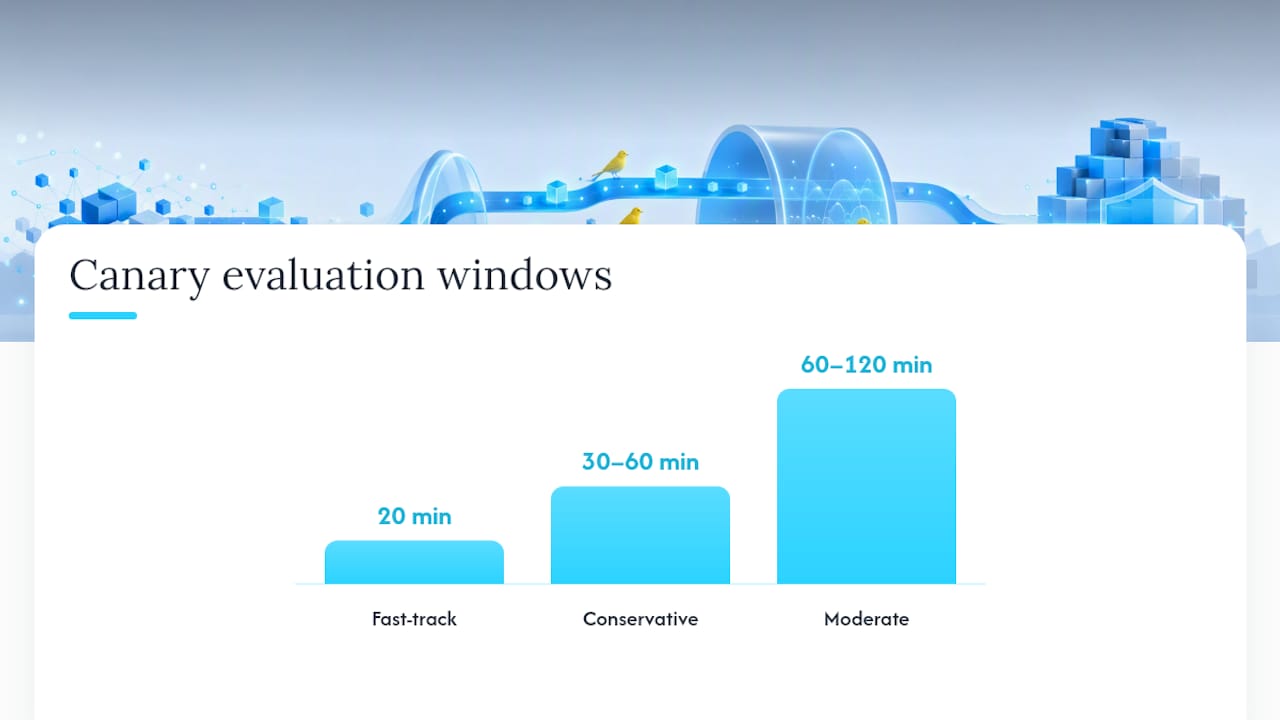
Typical promotion cadence:
- Conservative:
1% → 10% → 50% → 100%with 30–60 minute bake times at each stage - Moderate:
5% → 25% → 100%with 1–2 hour evaluation windows - Fast-track (low-risk changes only):
10% → 100%with a 20-minute window
Cost overhead to plan for:
- Running two versions simultaneously increases compute and memory usage proportionally to canary size
- Operational attention during the evaluation window is non-trivial — someone needs to be watching
- Martin Fowler’s canary release notes point out that cross-version state handling adds complexity, especially with databases and session stores
Common CI/CD pipeline mistakes often surface during canary setup — misconfigured health checks and missing rollback automation are the two that bite teams most often.
How do you know if a canary succeeded?
The answer is in your SLIs, not in your gut. Human inspection of canary graphs is unreliable — Google Cloud’s SRE guidance is explicit that operators rationalize minor anomalies and miss subtle degradations. Automated detectors with pre-configured thresholds are the right answer.
Primary technical SLIs to compare (canary vs. control):
- Error rate ratio: canary errors / control errors, not just absolute error count
- Request latency: p50, p95, and p99 deltas between canary and control
- Saturation: CPU, memory, and connection pool usage under canary traffic
- Downstream error ratios: errors propagated to dependent services
Business KPIs worth watching for high-value flows:
- Checkout conversion rate (for e-commerce or payment flows)
- API success rates on revenue-critical endpoints
- Session duration or engagement metrics for UX-sensitive changes
Avoiding false positives:
Run an A-A test before you trust your canary analysis setup. Route two identical versions of the current release as “canary” and “control” and confirm your analysis system reports no significant difference. If it fires alerts on identical code, your thresholds are too tight or your baseline is noisy.
Pro Tip: Set two alert tiers: a canary-specific alert that fires when the canary’s metrics diverge from the control, and a global alert that fires when overall service health degrades. The first catches regressions early; the second is your last-resort safety net if the canary grows faster than expected.
For catching subtle regressions that standard dashboards miss, the silent degradation detection guide on Devopsaitoolkit covers SLI selection patterns worth reading alongside this.
Implementing a canary release: steps and tooling
The sequence is consistent regardless of which orchestration layer you use.
High-level steps:
- Build and push the canary image; run smoke tests in staging
- Deploy the canary version to a small replica set (1–5% of capacity)
- Configure traffic split at the routing layer to send the target percentage to the canary
- Start automated canary analysis against your pre-configured thresholds
- Hold at the initial stage for the full bake time
- If metrics pass, promote to the next traffic percentage and repeat
- On threshold breach, trigger automated rollback and page the on-call
- On full pass, complete promotion and decommission the control version
Tooling options:
- Argo Rollouts is the most widely adopted Kubernetes-native option. It handles traffic splitting natively with Istio, Envoy, or nginx ingress, supports automated analysis via
AnalysisRunobjects, and integrates with Prometheus metrics out of the box. The Argo Rollouts prompt pack on Devopsaitoolkit gives you pre-built prompts for generating rollout manifests, analysis templates, and rollback triggers. - Harness provides a managed canary deployment pipeline with built-in verification steps, Prometheus/Datadog/New Relic integrations, and approval gates. It’s a strong choice for teams that want a SaaS control plane rather than self-managed Kubernetes controllers.
- Spinnaker with Kayenta is the mature, battle-tested option that came out of Google and Netflix’s operational experience. Kayenta automates canary analysis using statistical comparison, but configuring and maintaining Spinnaker carries real overhead — plan for it.
Integration notes:
- For session affinity, configure your ingress or service mesh to hash on a stable user identifier (user ID or session cookie) so users don’t flip between versions mid-session
- For database migrations, use expand-contract patterns: add new columns in one release, migrate data in the canary, remove old columns only after full promotion
- Wire rollback triggers to your CI/CD pipeline so a threshold breach automatically reverts the traffic split without requiring a human to be watching
Automate these first: traffic split configuration, Prometheus alert rules scoped to the canary, and rollback triggers. Everything else can be manual initially. The automated rollback strategies guide covers the Kubernetes and GitLab patterns in detail.
For GitLab CI specifically, progressive delivery with canary and blue-green patterns walks through the pipeline configuration end to end.
How do canary releases compare with rolling deployments and feature flags?
These three patterns solve related but distinct problems, and conflating them is a common source of noisy signals and missed regressions.
| Approach | Primary purpose | Failure mode | Best for |
|---|---|---|---|
| Canary release | Technical validation under real traffic | Slow rollout if analysis is misconfigured | High-risk changes, SLO-sensitive services |
| Rolling deployment | Instance-by-instance version replacement | No traffic control; all users hit new version gradually | Low-risk updates where traffic splitting is impractical |
| Feature flag rollout | Gradual UX experiment or behavioral change | Permanent flag debt; A/B signal contamination | Product experiments, gradual feature exposure |
Martin Fowler’s canary release entry makes the clearest case for keeping these goals separate: canaries test technical correctness, A/B tests test user preferences. Mixing them produces signals that answer neither question cleanly.
Common mistakes:
- Using a canary to run an A/B experiment simultaneously, which contaminates both the technical signal and the product signal
- Assuming a green canary means staging parity — it means the change survived real traffic, not that staging was accurate
- Setting the canary at 1% on a service that gets 50 requests per hour, then promoting after 30 minutes with no statistically meaningful data
Decision heuristic: use canaries for technical validation before full rollout, feature flags for controlled UX experiments that need to run longer, and rolling deployments when your infrastructure can’t support traffic splitting but the change is low-risk enough that gradual instance replacement is sufficient protection.
SRE-backed best practices and pitfalls to avoid
A few patterns separate teams that get real value from canaries from teams that go through the motions.
Automate analysis and rollback. Manual inspection is not a substitute for automated detectors. Google SRE’s guidance is direct: humans rationalize anomalies, especially under pressure to ship. Pre-configure your thresholds, wire your rollback trigger, and treat human review as a secondary check, not the primary gate.
Size your canary to produce signal. A 1% canary on a service with 200 requests per hour gives you 2 requests per hour in the canary. That’s not enough to validate P99 latency. Amazon ECS’s canary deployment guidance recommends sizing to the minimum traffic needed to generate meaningful error and latency statistics within your evaluation window.
- Run one canary at a time where possible. Concurrent canaries contaminate each other’s signals and make postmortems harder.
- Capture canary signals in your postmortem even when the canary passes. False negatives — where the canary passed but a regression slipped through — are how you improve your thresholds over time.
- Never skip the bake time to ship faster. The bake time exists because some failure modes take minutes to manifest under sustained load.
Pro Tip: Before trusting your canary analysis in production, run an A-A test: deploy two identical versions of the current release as “canary” and “control” and confirm your analysis system reports no significant difference. If it fires, your baseline or thresholds need tuning.
Octopus Deploy’s best practices also flag monitoring quality as a prerequisite, not an afterthought. If your observability stack can’t distinguish canary traffic from control traffic at the metric level, your canary analysis is guesswork.
My approach: when I reach for a canary and how I run one
I reach for a canary when three conditions align: the service handles user-facing traffic, the change touches a code path I can’t fully exercise in staging, and a regression would directly burn error budget. That covers most meaningful backend changes and almost every payment or auth flow I’ve worked on.
My default cadence is 1% → 10% → 100% with 30-minute bake times at each stage for a high-traffic service. For lower-traffic services, I’ll go 5% → 25% → 100% with 1-hour windows to get enough requests at each stage to trust the P99 numbers.
During the 1% stage, I’m watching error rate ratio and p99 latency delta in a side-by-side dashboard. I set my automated analysis to page me if the canary error rate exceeds 1.5x the control rate for more than 5 minutes. If it fires, the rollback runs automatically — I don’t wait for a human decision.
I use the Argo Rollouts prompt pack from Devopsaitoolkit to generate the AnalysisTemplate and Rollout manifests quickly. What used to take me an hour of YAML archaeology takes about 10 minutes with the right prompts. The automation prompt library covers the CI/CD pipeline steps for wiring the traffic split and rollback triggers into GitLab or GitHub Actions.
The runbook lives in the repo alongside the deployment manifests. If I’m paged during a canary, the first three steps are already written down — I’m not reconstructing the rollback procedure at 2 AM.
Devopsaitoolkit speeds up your canary implementation
Canary releases deliver real protection, but the setup work — writing AnalysisTemplate manifests, configuring Prometheus alert rules, building rollback runbooks, and wiring CI/CD pipeline gates — eats hours you’d rather spend shipping.

Devopsaitoolkit’s automation prompt library gives you 88 copy-paste AI prompts for exactly these tasks: traffic split configuration, automated rollback triggers, observability query templates, and canary pipeline steps for GitLab and GitHub Actions. The Argo Rollouts prompt pack specifically covers progressive delivery manifests, AnalysisRun templates, and Prometheus-backed canary analysis. These aren’t generic prompts — they’re built for engineers running real Kubernetes production infrastructure. Start with the automation library and have your first canary pipeline wired in an afternoon.
An SRE’s honest take on canary releases
The conventional wisdom treats canaries as a risk-mitigation checkbox. Ship to 1%, watch for a minute, promote. That’s not a canary strategy — it’s theater.
What actually makes canary releases valuable is the combination of three things most teams underinvest in: a meaningful canary size, an automated analysis system with pre-configured thresholds, and a rollback trigger that fires without human intervention. Get all three right and a canary genuinely changes your deployment risk profile. Get one wrong and you’re adding complexity without protection.
The part I see teams skip most often is the A-A test. Before you trust your canary analysis in production, you need to know it can distinguish signal from noise on identical code. That test takes 30 minutes and saves you from false confidence in a system that would have passed a bad release anyway.
Canaries also don’t replace good observability — they depend on it. If your Prometheus dashboards can’t separate canary traffic from control traffic at the metric level, your analysis is comparing apples to a bag of mixed fruit. Fix the observability first, then run the canary.
The teams I’ve seen get the most out of this pattern are the ones who treat the first canary as a learning exercise for their analysis setup, not a validation of their code. The code is usually fine. The thresholds, the baseline, and the rollback trigger are where the real work is.
Sources
- Canary Release: Deployment Safety and Efficiency | Google SRE
- Canary analysis: Lessons learned and best practices from Google and Waze | Google Cloud Blog
- CanaryRelease — Martin Fowler
- What Is Canary Deployment? Benefits, Metrics & Setup | Netdata
- Canary Deployments: Pros, Cons, And 5 Critical Best Practices | Octopus Deploy
- Computer
Recommended
- Progressive Delivery in GitLab CI: Canary and Blue-Green
- AI-Assisted Blue-Green Deployments with NGINX Upstreams
- Canary Tokens: Catching Intruders With Bait They Can’t
Get 500 Battle-Tested DevOps AI Prompts — Free
500 battle-tested, copy-paste AI prompts engineered by a senior systems engineer — every one with fill-in placeholders and safety/back-out notes. Drop your email and it's yours.
- 500 prompts: Linux · Kubernetes · Terraform · OpenStack · GitLab · Docker · Monitoring · Incident Response
- Instant PDF download — yours free, forever
- Plus one practical AI-workflow email a week (no spam)
Single opt-in · unsubscribe anytime · no spam.