
Workload Identity in Kubernetes: A 2026 Engineer's Guide
Discover what is workload identity Kubernetes and how it enhances security with ephemeral tokens. Simplify your cloud authentication today!

What is workload identity in Kubernetes?
Workload identity gives each Kubernetes pod a short-lived, pod-specific digital identity it can use to authenticate to cloud services, with no static secrets involved. Instead of embedding API keys or long-lived credentials in your manifests or environment variables, the pod receives an ephemeral JWT token that cloud IAM systems validate through OIDC federation. When the token expires, it’s gone. There’s nothing to rotate manually, nothing to accidentally commit to Git.
The mechanism relies on Kubernetes Service Accounts as the identity principal for each pod. A Kubernetes workload is any application process running in one or more pods, and service accounts are the distinct security principals those pods use, separate from human user accounts. By annotating a service account with a cloud IAM identity, you create a trust link that lets the pod prove who it is without ever holding a permanent credential.
Major cloud platforms have built first-class support around this model. On Azure, Microsoft Entra Workload ID integrates directly with AKS. Google Cloud has Workload Identity Federation for GKE, and AWS offers IAM Roles for Service Accounts (IRSA) for EKS. All three follow the same OIDC-based pattern.
Key characteristics at a glance:
- Tokens are ephemeral and automatically rotated, reducing credential leakage risk
- No sidecar containers or custom CRDs required in modern implementations
- Works across Azure, Google Cloud, and AWS through standard OIDC protocols
- Replaces static Kubernetes Secrets and embedded API keys
- Supports fine-grained IAM policies at the pod level
- Aligns with Zero Trust security principles by default
Table of Contents
- How workload identity authentication works technically
- What you need before enabling workload identity
- How to configure workload identity step by step
- Limitations and how workload identity compares to other approaches
- Why workload identity is where Kubernetes authentication is heading
- Security benefits and real-world use cases
- Best practices for managing credentials with workload identity
- How workload identity integrates with cloud provider IAM systems
- Troubleshooting common workload identity setup issues
- Key Takeaways
- Automate your Kubernetes security workflows with Devopsaitoolkit
How workload identity authentication works technically
The flow starts the moment a pod is scheduled. Kubernetes injects a projected service account token into the pod’s filesystem via the Token Request API. This token is a signed JWT with a short expiration, scoped to a specific audience that matches what the cloud provider expects.

Azure Workload Identity uses Service Account Token Volume Projection to deliver these tokens directly into the pod volume, so your application code never has to request one manually. Cloud SDKs like the Azure Identity client library or MSAL detect the token file automatically and handle the exchange. No sidecars, no intercepting IMDS traffic, no custom pods.
Here’s the full authentication flow:
- Kubernetes issues a signed JWT to the pod via projected volume
- The pod’s SDK reads the token from the mounted file path
- The SDK sends the token to the cloud IAM endpoint (e.g., Microsoft Entra ID, Google STS)
- The cloud provider fetches the cluster’s OIDC public signing keys to verify the token’s signature
- If the audience claim matches and the signature is valid, the provider issues a cloud-native access token
- The pod uses that access token to call cloud APIs (Azure Key Vault, Google Cloud Storage, AWS S3, etc.)
The OIDC issuer URL is the linchpin here. Your cluster exposes a well-known OIDC discovery endpoint, and the cloud provider uses it to fetch the public keys needed for verification. Get that URL wrong and the whole chain breaks silently.
Pro Tip: Annotate your service account with the exact cloud identity reference before creating the federated credential on the cloud side. The order matters. If the federated credential doesn’t exist yet, the token exchange will fail even if everything else is configured correctly.
A minimal service account annotation for AKS looks like this:
apiVersion: v1
kind: ServiceAccount
metadata:
  name: my-app-sa
  namespace: default
  annotations:
    azure.workload.identity/client-id: "<YOUR_CLIENT_ID>"
And the pod spec needs the label that tells AKS to apply workload identity:
spec:
  serviceAccountName: my-app-sa
  labels:
    azure.workload.identity/use: "true"
What you need before enabling workload identity
Getting workload identity running requires a few things to be in place before you touch any YAML. Skipping a prerequisite is the fastest way to spend an afternoon chasing a generic permission denied error.
Cluster requirements:
- AKS: version 1.22 or higher; OIDC issuer must be enabled on the cluster
- GKE: Workload Identity must be enabled at cluster or node pool level
- EKS: OIDC provider must be associated with the cluster; IRSA enabled
Tooling and permissions:
- Azure CLI version 2.47.0 or later (
az --versionto check,az upgradeto update) - Sufficient IAM permissions to create federated identity credentials and assign roles
- Access to create and annotate Kubernetes service accounts in the target namespace
Identity provider setup:
- A registered application or managed identity in your cloud provider’s IAM system
- A federated identity credential configured to trust tokens from your cluster’s OIDC issuer
- The correct audience value set on the federated credential (e.g.,
api://AzureADTokenExchangefor Azure)
Application-side dependencies:
- Azure Identity SDK or MSAL for Azure workloads
- Google Cloud client libraries with Application Default Credentials for GCP
- AWS SDK v2 with web identity token support for EKS
Both Linux and Windows node pools are supported on AKS, so you’re not limited to Linux-only workloads.
How to configure workload identity step by step
The configuration splits into two sides: the Kubernetes side (service account annotation and pod label) and the cloud IAM side (federated credential). Both have to match exactly.
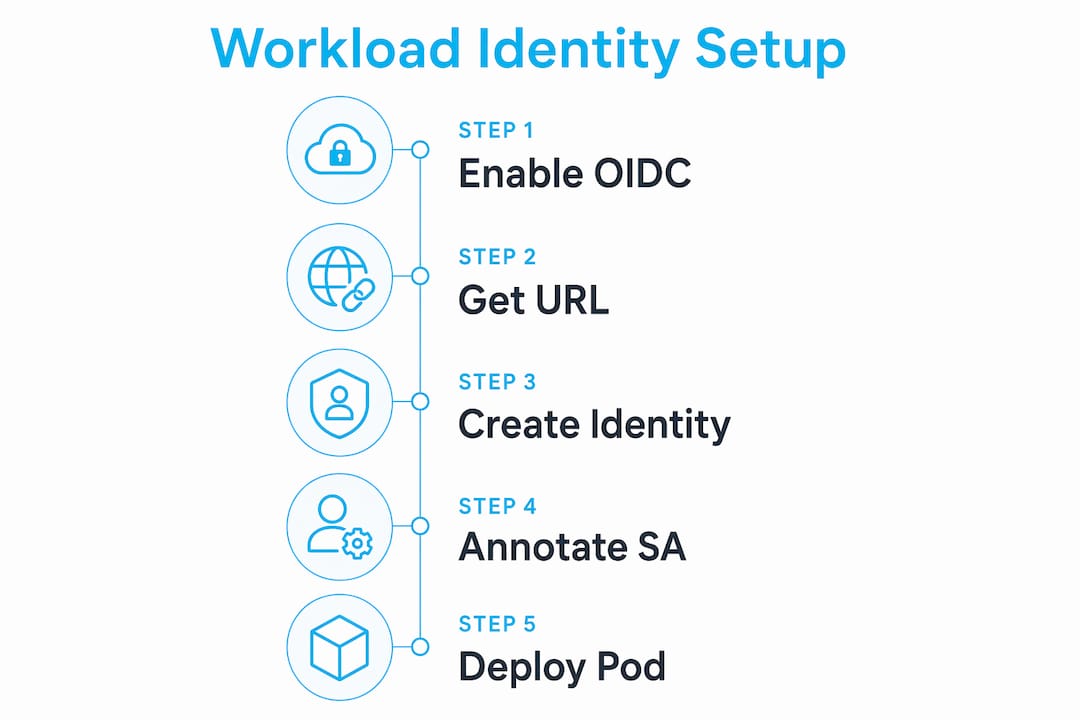
Azure AKS configuration
Step 1: Enable OIDC issuer and workload identity on your cluster
az aks update \
  --resource-group myResourceGroup \
  --name myAKSCluster \
  --enable-oidc-issuer \
  --enable-workload-identity
Step 2: Get the OIDC issuer URL
AKS_OIDC_ISSUER=$(az aks show \
  --name myAKSCluster \
  --resource-group myResourceGroup \
  --query "oidcIssuerProfile.issuerUrl" -o tsv)
Step 3: Create a managed identity and federated credential
az identity create \
  --name myWorkloadIdentity \
  --resource-group myResourceGroup

az identity federated-credential create \
  --name myFederatedCredential \
  --identity-name myWorkloadIdentity \
  --resource-group myResourceGroup \
  --issuer "${AKS_OIDC_ISSUER}" \
  --subject "system:serviceaccount:default:my-app-sa" \
  --audiences "api://AzureADTokenExchange"
Step 4: Annotate the Kubernetes service account
kubectl annotate serviceaccount my-app-sa \
  --namespace default \
  azure.workload.identity/client-id="<CLIENT_ID>"
Step 5: Deploy your pod with the workload identity label
apiVersion: v1
kind: Pod
metadata:
  name: my-app
  labels:
    azure.workload.identity/use: "true"
spec:
  serviceAccountName: my-app-sa
  containers:
    - name: app
      image: my-app:latest
For GKE, the pattern is similar: annotate the Kubernetes service account with iam.gke.io/gcp-service-account, bind the GCP service account to the Kubernetes one using roles/iam.workloadIdentityUser, and enable Workload Identity on the node pool. EKS uses an IAM role with a trust policy referencing the cluster’s OIDC provider ARN, then annotates the service account with eks.amazonaws.com/role-arn.
Pro Tip: On AKS Automatic clusters, workload identity and the OIDC issuer are preconfigured by default. You can skip the cluster-level setup entirely and go straight to annotating your service account and creating the federated credential.
Key procedural steps to keep straight:
- Always create the federated credential before deploying the pod
- Match the
subjectfield exactly:system:serviceaccount:<namespace>:<serviceaccount-name> - Assign the cloud IAM role to the managed identity, not to the pod directly
- Use the Azure Identity SDK’s
DefaultAzureCredentialorWorkloadIdentityCredentialin your app code
Limitations and how workload identity compares to other approaches
Workload identity is the right model for most production clusters, but it’s not without rough edges. Knowing where it falls short saves you from debugging the wrong thing.
| Dimension | Workload Identity | Managed Identity | Azure AD Pod Identity | Kubernetes Secrets |
|---|---|---|---|---|
| Credential type | Ephemeral JWT (OIDC) | Provider-managed token | Ephemeral (via NMI pod) | Static, long-lived |
| Scope | Pod-level, per service account | Resource-level (VM/node) | Pod-level | Namespace-level |
| Rotation | Automatic | Automatic | Automatic | Manual |
| Sidecar required | No | No | Yes (NMI DaemonSet) | No |
| Multi-cloud support | Yes (OIDC standard) | No (provider-specific) | No | Yes |
| CRD dependency | No | No | Yes | No |
| Performance overhead | Low | Low | Higher (traffic interception) | None |
Azure AD Workload Identity is the direct successor to Azure AD Pod Identity, and the improvement is significant. Pod Identity relied on a Node Managed Identity (NMI) DaemonSet that intercepted IMDS traffic, introduced latency, and required custom CRDs. Workload Identity drops all of that.
Managed identity operates at the resource level, meaning it’s attached to the VM or node rather than the pod. That’s fine for node-level operations, but it doesn’t give you pod-level isolation. Every pod on that node shares the same managed identity, which violates least-privilege at the workload level.
Kubernetes Secrets are the weakest option. They’re base64-encoded (not encrypted at rest by default), they don’t expire, and they require manual rotation. A leaked secret stays valid until someone notices and revokes it. Workload identity tokens expire on their own.
Known limitations to plan around:
- OIDC issuer misconfiguration causes authentication failures that surface as generic permission errors
- Token audience mismatches fail silently at the federation layer, not at the application layer
- Identity bindings (a preview feature on AKS) are needed for large-scale environments where per-cluster federated credentials become unmanageable
- Direct federation and identity binding tokens are not interchangeable; using the wrong token file causes
AADSTS700212errors
Why workload identity is where Kubernetes authentication is heading
The industry consensus around workload identity isn’t just vendor preference. It reflects a genuine shift in how security teams think about credential risk.
Workload identity aligns with Zero Trust by treating every token as short-lived and revocable. There’s no persistent secret to steal. If a pod is compromised, the attacker gets a token that expires in minutes, not an API key that works until someone remembers to rotate it. That’s a fundamentally different risk profile than static credentials.
The multi-cloud capability matters too. Because workload identity uses standard OIDC protocols, the same Kubernetes cluster can federate with Azure, Google Cloud, and AWS simultaneously. You’re not locked into a single provider’s identity model.
Key reasons practitioners are moving to workload identity:
- Eliminates the secret sprawl that comes with managing per-service API keys
- Removes the operational burden of manual credential rotation
- Provides audit trails tied to specific pod identities, not shared service accounts
- Integrates natively with Kubernetes without requiring custom controllers
- Microsoft Entra Workload ID is actively developed and backed by Microsoft’s security roadmap
The adoption of workload identity is driven by Zero Trust principles that treat short-lived, automatically rotated tokens as the baseline, not the exception. Legacy pod identity solutions required too much operational overhead to be practical at scale. Workload identity removes that friction.
Security benefits and real-world use cases
The security case for workload identity comes down to one thing: you can’t leak a secret that doesn’t exist. Workload identity federation lets pods access services like Azure Key Vault or Google Cloud APIs without any embedded secrets in the container image, environment variables, or mounted files.
Common production use cases:
- Secrets retrieval: A pod fetches database credentials from Azure Key Vault at runtime, using its workload identity token. No credentials are stored in the cluster.
- Storage access: A data pipeline pod reads from Google Cloud Storage using a GCP service account federated to its Kubernetes service account.
- CI/CD pipelines: Build pods authenticate to container registries or artifact stores without storing registry credentials in the cluster.
- Cross-service communication: Microservices authenticate to each other’s APIs using pod-level identities, enabling fine-grained RBAC enforcement.
The security improvement over static credentials is real and measurable in operational terms. Incident response is faster because there’s no credential to revoke manually. Blast radius from a compromised pod is limited to the token’s remaining lifetime. And your compliance posture improves because you can demonstrate that no long-lived secrets exist in the cluster.
For teams managing Kubernetes RBAC, workload identity provides the identity layer that makes least-privilege access actually enforceable at the pod level.
Best practices for managing credentials with workload identity
Workload identity handles rotation automatically, but there are still operational decisions that affect how well it works in practice.
Scope service accounts narrowly. One service account per application, not one per namespace. This gives you pod-level audit trails and limits the blast radius if a workload is compromised. Shared service accounts are a shortcut that creates shared risk.
Set explicit token expiration. The default projected token lifetime is sufficient for most workloads, but you can configure shorter lifetimes for high-sensitivity applications. Shorter tokens mean a smaller window of exposure if a token is somehow intercepted.
Audit federated credentials regularly. Federated identity credentials on the cloud IAM side should be reviewed periodically. Stale credentials tied to decommissioned clusters or deleted service accounts are a quiet risk. Automate this audit as part of your cluster lifecycle process.
Use separate identities per environment. Don’t reuse the same managed identity or GCP service account across dev, staging, and production. Environment isolation at the identity layer prevents a misconfigured dev workload from touching production resources.
Monitor token exchange failures. Set up alerts on authentication failures at the cloud IAM layer. A spike in failed token exchanges often signals a misconfiguration before it becomes a production incident. On Azure, these show up in Microsoft Entra sign-in logs.
For teams working on cloud infrastructure security, these practices apply broadly across any workload identity implementation, not just Kubernetes.
How workload identity integrates with cloud provider IAM systems
The integration model is consistent across providers, even though the terminology differs. In every case, you’re establishing a trust relationship between your Kubernetes cluster’s OIDC issuer and the cloud provider’s identity system.
Azure (AKS + Microsoft Entra Workload ID): The AKS cluster acts as the token issuer. Microsoft Entra ID uses the cluster’s OIDC discovery endpoint to fetch public signing keys, verifies the service account token, and exchanges it for a Microsoft Entra access token. Your application uses the Azure Identity client library’s DefaultAzureCredential, which automatically detects the projected token file and handles the exchange. Assign Azure RBAC roles to the managed identity, and the pod inherits those permissions.
Google Cloud (GKE Workload Identity): GKE binds a Kubernetes service account to a GCP service account using an IAM policy binding with roles/iam.workloadIdentityUser. The GKE metadata server intercepts token requests from pods and returns GCP access tokens. Applications use Google Cloud client libraries with Application Default Credentials, which work transparently.
AWS (EKS + IRSA): EKS associates an OIDC provider with the cluster. You create an IAM role with a trust policy that allows the cluster’s OIDC provider to assume it, scoped to a specific Kubernetes service account. Annotate the service account with the role ARN, and the AWS SDK picks up the projected token automatically via the AWS_WEB_IDENTITY_TOKEN_FILE environment variable.
All three providers follow the same OIDC token exchange pattern. The OIDC federation model that works for GitLab CI pipelines is the same model that powers workload identity in Kubernetes clusters, which is why engineers familiar with keyless CI auth pick this up quickly.
Troubleshooting common workload identity setup issues
Most workload identity failures fall into a small set of categories. The hard part is that they often surface as generic permission denied errors, which sends you looking in the wrong place.
OIDC issuer URL mismatch. The issuer URL in your federated credential must exactly match the cluster’s OIDC issuer URL, including trailing slashes. Fetch the actual URL with az aks show --query "oidcIssuerProfile.issuerUrl" and compare it character by character with what’s in the federated credential. A single character difference breaks the whole chain.
Wrong audience claim. Tokens must carry the correct audience value for the cloud provider’s federation to accept them. For Azure, that’s api://AzureADTokenExchange. If you’re using identity bindings, the audience is different and the tokens are not interchangeable. Mixing them produces AADSTS700212 errors.
Subject claim mismatch. The subject field in the federated credential must exactly match system:serviceaccount:<namespace>:<serviceaccount-name>. A typo in the namespace or service account name causes silent failures at the federation layer.
Missing pod label on AKS. The label azure.workload.identity/use: "true" must be present on the pod spec, not just the service account. Without it, AKS doesn’t inject the projected token volume, and the SDK finds nothing to exchange.
Service account annotation missing or wrong. The azure.workload.identity/client-id annotation on the service account must match the client ID of the managed identity or app registration. Check with kubectl describe serviceaccount <name> and compare against the identity in the Azure portal.
Debugging workflow:
- Confirm the OIDC issuer is enabled:
az aks show --query "oidcIssuerProfile.enabled" - Check pod events:
kubectl describe pod <pod-name>for volume mount errors - Verify the projected token file exists inside the pod:
kubectl exec <pod> -- ls /var/run/secrets/azure/tokens/ - Check Microsoft Entra sign-in logs for the specific error code
- Validate the federated credential subject and issuer match exactly
For teams doing deeper Kubernetes security auditing, AI-assisted manifest review can catch annotation mismatches before they reach production.
Key Takeaways
Workload identity in Kubernetes eliminates static credential management by federating pod-level service accounts with cloud IAM systems through OIDC, giving each pod a short-lived, automatically rotated token.
| Point | Details |
|---|---|
| No static secrets | Pods authenticate using ephemeral JWT tokens, removing the risk of long-lived credential leakage. |
| OIDC is the foundation | Every major cloud provider (Azure, GCP, AWS) uses OIDC federation to validate Kubernetes service account tokens. |
| Annotation order matters | Create the federated credential on the cloud IAM side before deploying pods, or token exchange will fail. |
| Audience claim is critical | A mismatched audience value in the JWT causes silent federation failures, not obvious permission errors. |
| Zero Trust by design | Short-lived tokens with automatic rotation align workload identity with least-privilege and Zero Trust principles. |
Automate your Kubernetes security workflows with Devopsaitoolkit

Managing workload identity configuration across multiple clusters and cloud providers gets complex fast. Devopsaitoolkit’s Linux Admin Prompt Pack gives you 100 battle-tested AI prompts for infrastructure tasks, including credential auditing, RBAC configuration, and cluster security workflows. If you’re spending time on repetitive Kubernetes security tasks, these prompts cut that time down considerably. Check the full toolkit pricing to find the plan that fits your workflow.
Recommended
- The Role of Scheduler Kubernetes: 2026 Deep Dive
- Kubernetes Jobs and CronJobs Patterns That Hold Up
- Managing Multiple Kubernetes Clusters Without Losing Track
- Running StatefulSets in Production Without Surprises
Get 500 Battle-Tested DevOps AI Prompts — Free
500 battle-tested, copy-paste AI prompts engineered by a senior systems engineer — every one with fill-in placeholders and safety/back-out notes. Drop your email and it's yours.
- 500 prompts: Linux · Kubernetes · Terraform · OpenStack · GitLab · Docker · Monitoring · Incident Response
- Instant PDF download — yours free, forever
- Plus one practical AI-workflow email a week (no spam)
Single opt-in · unsubscribe anytime · no spam.