
What Is Pipeline as Code? A DevOps Practitioner's Guide
Discover what is pipeline as code and how it automates workflows for better efficiency and reliability in your DevOps practices.
- #pipeline-as-code
- #ci-cd
- #gitlab-cicd
- #iac
- #devops

Pipeline as Code is the practice of encoding build, test, and deployment workflows into versioned files stored directly alongside your application source code. The industry term for this methodology is Pipeline as Code, often abbreviated as PaC. You get automation that is reproducible, auditable, and reviewable through the same source control process you already use for application logic. Files like a Jenkinsfile, a GitLab CI/CD .gitlab-ci.yml, or an AWS CodePipeline definition replace the point-and-click pipeline configurations that break silently and leave no paper trail. If you have ever inherited a Jenkins instance where the pipeline lived only in the GUI, you already know exactly why PaC exists.
What is pipeline as code, and how does it differ from traditional configuration?
Traditional pipeline configuration lives in a GUI or in ad-hoc shell scripts that nobody versioned. When something breaks, you are reading logs and guessing what changed last Tuesday. Pipeline as Code solves this by treating your delivery workflow the same way you treat application code.
Version-controlling pipeline configurations gives you instant rollbacks, peer review, and a full change history tied to the same commits as your app releases. That means when a deployment breaks after a pipeline change, you can git diff your way to the answer in seconds instead of interviewing teammates.

The contrast is stark. A GUI-based pipeline is invisible to your version control system. Nobody reviews it before it ships. Nobody gets notified when it changes. A PaC definition, by contrast, goes through a merge request, gets linted, and lands in the same branch history as the feature it supports.
Pro Tip: Keep your pipeline definitions in the same repository as the application code they build. Cross-repo pipeline definitions create dependency drift and make rollbacks significantly harder to coordinate.
Pipeline sprawl happens when conditional logic and external dependencies pile up over time, turning your pipeline into the same kind of technical debt you fight in application code. Keeping definitions declarative and modular from day one is the only reliable defense.
What are the technical components of a Pipeline as Code file?
A pipeline definition file specifies stages, jobs, dependencies, triggers, and environment bindings. Each element has a distinct role, and understanding the separation keeps your pipeline readable as it grows.
The most common formats are YAML (used by GitLab CI/CD, GitHub Actions, and Tekton) and Groovy-based DSL (used by Jenkins via Jenkinsfile). YAML is declarative by nature, which makes it easier to lint and reason about. Groovy gives you more programmatic control but also more rope to hang yourself with.
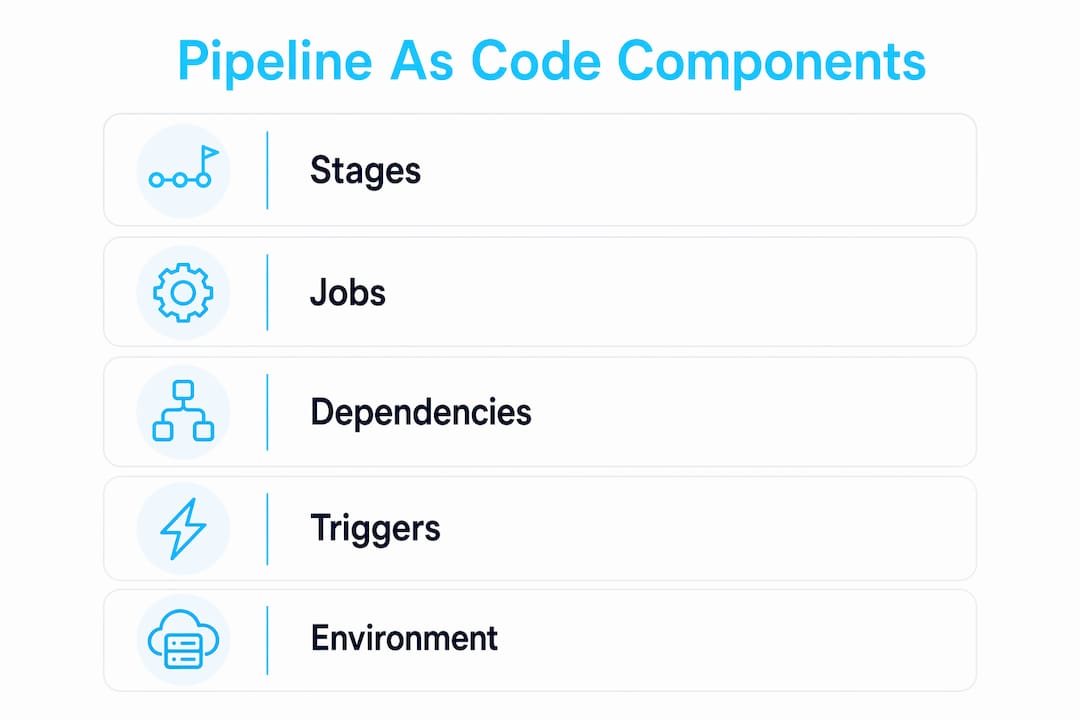
Effective pipeline definitions must separate pipeline logic, secrets references, environment configurations, and policies into distinct concerns. Mixing them creates files that are hard to test, hard to reuse, and nearly impossible to audit cleanly.
Pipelines must also be idempotent. Replaying a pipeline should produce predictable, consistent results every time. If your pipeline behaves differently on a retry, you have a reproducibility problem that will surface at the worst possible moment, usually during an incident.
What tools and platforms implement Pipeline as Code?
GitLab CI/CD, Jenkins, GitHub Actions, AWS CodePipeline, and Tekton are the most widely deployed platforms supporting PaC. Each parses a version-controlled config file and executes the defined workflow on build agents or runners.
One distinction matters here. AWS CodePipeline is an orchestration engine, not the pipeline definition itself. It executes pipeline definitions but does not define the code-based pipeline methodology. Understanding that difference prevents a lot of confusion when teams say “we use CodePipeline” and mean something different from “we practice Pipeline as Code.”
A typical CI/CD toolchain looks like this:
- Source repository (GitLab, GitHub, Bitbucket): stores the pipeline definition file alongside app code
- CI/CD platform (GitLab CI/CD, Jenkins, GitHub Actions): parses the file and schedules execution
- Build agents or runners: execute individual jobs in isolated environments
- Artifact registry (Harbor, AWS ECR, GitLab Container Registry): stores build outputs
- Secrets manager (HashiCorp Vault, AWS Secrets Manager): provides credentials at runtime without exposing them in the file
GitLab CI/CD uses .gitlab-ci.yml and supports multi-project pipeline orchestration natively. Jenkins uses a Jenkinsfile written in Groovy DSL. Tekton defines pipelines as Kubernetes custom resources, making it a natural fit for teams already running workloads on Kubernetes clusters.
Pro Tip: Run a local YAML linter like yamllint or the GitLab CI lint API before pushing pipeline changes. Catching syntax errors locally is dramatically faster than waiting for a cloud runner to fail 90 seconds into a job.
What best practices should DevOps teams follow with Pipeline as Code?
The biggest mistake teams make is treating the pipeline file as a throwaway config. Pipeline debt parallels technical debt in applications. Complex, imperative pipelines degrade maintainability and are harder to debug than declarative ones.
Follow these practices to keep your pipelines healthy:
- Use declarative definitions over imperative scripts. Declarative YAML is easier to lint, review, and reason about than embedded shell logic.
- Never store secrets inline. Inline secrets in version control create compliance and security risks that are difficult to remediate after the fact. Reference HashiCorp Vault, AWS Secrets Manager, or GitLab CI/CD variables instead.
- Keep conditional logic minimal. Every
if/elsebranch in your pipeline is a maintenance burden. Favor separate pipeline files for distinct workflows over one file with dozens of conditions. - Lint and validate automatically. Policy-as-code tools and CI lint APIs catch errors before they reach production. Treat pipeline linting as a required check, not an optional one.
- Modularize with templates. GitLab CI/CD supports
includedirectives. Jenkins supports shared libraries. Use them to avoid copy-pasting the same job definitions across dozens of repositories.
Feedback cycles slow down when syntax errors only surface on cloud runners after a multi-minute queue wait. Local validation tools close that gap and keep developers in flow. Pair local linting with a DevSecOps security scan in your pipeline to catch credential leaks and misconfigured permissions before they reach production.
How does Pipeline as Code change team culture and collaboration?
Pipeline as Code shifts teams from siloed manual configurations to shared infrastructure ownership. That is not just a workflow change. It is a cultural one.
Here is how the collaboration model changes in practice:
- Pipeline changes go through merge requests. Every modification is visible, reviewable, and tied to a specific author and timestamp. No more mystery changes at 11 PM.
- Knowledge spreads across the team. When pipeline definitions live in the repository, every engineer can read, understand, and contribute to them. The “only Bob knows how the pipeline works” problem disappears.
- Continuous improvement becomes systematic. Teams can iterate on pipeline performance, add new stages, and remove dead jobs through the same review process they use for features.
- Auditability satisfies compliance requirements. A full Git history of pipeline changes is evidence for SOC 2, ISO 27001, and similar frameworks. Pair this with compliance as code automation to close the loop on audit evidence collection.
- GitOps integration becomes natural. When your pipeline is code, connecting it to GitOps automation with Argo CD or Flux is a logical next step. The same Git-driven workflow governs both delivery and deployment.
PaC adoption enhances transparency, knowledge sharing, and continuous process improvement across the entire delivery organization. Teams that treat pipeline definitions as first-class code assets consistently outperform teams that treat them as configuration afterthoughts.
Key Takeaways
Pipeline as Code is the practice of version-controlling your CI/CD definitions alongside application code, making delivery workflows reproducible, auditable, and collaborative through standard Git processes.
Why pipeline debt is the problem nobody talks about enough
I have spent a lot of time debugging pipelines that nobody wanted to touch. Not because they were broken, but because they had grown into something nobody fully understood anymore. Three hundred lines of Groovy with nested conditionals, environment-specific overrides baked into the middle of the file, and secrets that were “definitely not in there” until they were.
The pipeline debt concept is real, and it accumulates faster than application debt because pipelines are often treated as infrastructure rather than code. Teams refactor their application logic regularly. They rarely schedule time to refactor their Jenkinsfile.
My honest take: the teams that get PaC right are the ones who enforce the same code quality standards on pipeline files as they do on application code. That means linting, review requirements, and a policy against merging pipeline changes that nobody else on the team understands.
The emerging trend I am watching is AI-assisted pipeline generation. Tools that can draft a .gitlab-ci.yml from a project description or suggest optimizations based on historical run times are already useful. They are not a replacement for understanding what your pipeline does, but they do lower the barrier to getting a solid starting point. If you are managing GitLab monorepos, the combination of AI-assisted dynamic child pipelines and proper PaC discipline is genuinely powerful.
Start simple. Get the basics versioned and reviewed. Then add complexity only when you have a clear reason for it.
— James
Take your pipeline automation further with Devopsaitoolkit
If you are ready to move beyond the basics, Devopsaitoolkit builds AI-powered workflows specifically for cloud engineers managing real production infrastructure.
The AI workflows and prompt packs at Devopsaitoolkit cover GitLab CI/CD, Kubernetes, Terraform, and Linux automation. You get battle-tested prompt libraries and automation guides built by engineers who run these stacks daily. Whether you are writing your first .gitlab-ci.yml or untangling a pipeline that has grown into a maintenance nightmare, the DevOps prompt packs give you a structured starting point that cuts hours off the work.
FAQ
What is the pipeline as code definition in simple terms?
Pipeline as Code is the practice of writing your CI/CD build, test, and deployment workflow as a versioned file stored in your source repository. It makes your delivery automation reproducible, reviewable, and auditable through standard Git processes.
What file formats does Pipeline as Code use?
The most common formats are YAML (used by GitLab CI/CD, GitHub Actions, and Tekton) and Groovy DSL (used by Jenkins via Jenkinsfile). YAML is declarative and easier to lint; Groovy offers more programmatic control.
How does Pipeline as Code differ from AWS CodePipeline?
AWS CodePipeline is an orchestration engine that executes pipeline definitions. Pipeline as Code is the methodology of defining those workflows as versioned code. The two concepts work together but are not the same thing.
Why should secrets never be stored in a pipeline file?
Storing secrets inline in a version-controlled file exposes them to anyone with repository access and creates compliance violations that are difficult to remediate. Always reference a dedicated secrets manager like HashiCorp Vault or AWS Secrets Manager instead.
What is pipeline sprawl and how do you prevent it?
Pipeline sprawl occurs when conditional logic and external dependencies accumulate until the pipeline becomes fragile and hard to maintain. Prevent it by favoring declarative definitions, keeping conditional logic minimal, and using shared templates to avoid duplication across repositories.
Recommended
- Compliance as Code: Turning SOC 2 and CIS Evidence Into a
- Best DevSecOps Security Tools for CI/CD Pipeline Protection — DevOps AI ToolKit
- CI/CD Pipeline Supply-Chain Hardening Prompt — DevOps AI ToolKit
- Using AI to Explain and Document an Inherited GitLab
Get 500 Battle-Tested DevOps AI Prompts — Free
500 battle-tested, copy-paste AI prompts engineered by a senior systems engineer — every one with fill-in placeholders and safety/back-out notes. Drop your email and it's yours.
- 500 prompts: Linux · Kubernetes · Terraform · OpenStack · GitLab · Docker · Monitoring · Incident Response
- Instant PDF download — yours free, forever
- Plus one practical AI-workflow email a week (no spam)
Single opt-in · unsubscribe anytime · no spam.