
OpenStack Architecture: A Practitioner's Technical Guide
Discover what OpenStack architecture is and how its modular design helps efficiently manage compute, storage, and networking resources.

OpenStack is a modular, service-oriented cloud operating system that controls pools of compute, storage, and networking resources through a collection of independent services, each exposing its own REST API and communicating through a shared identity layer, message broker, and relational database. If you’re mapping the architecture for the first time, here’s the canonical service roster:
- Nova — compute engine; manages VM lifecycle and hypervisor drivers (KVM is the most common)
- Neutron — virtual networking; handles provider and tenant networks, routers, and security groups
- Cinder — block storage; provisions persistent volumes for instances
- Swift — object storage; stores unstructured data at scale with eventual consistency
- Glance — image service; stores and retrieves VM disk images
- Keystone — identity service; authenticates every service-to-service and user-to-service call
- Horizon — web dashboard; gives admins and tenants a GUI over the API layer
- Heat — orchestration; deploys and manages stacks of resources via templates
Every service authenticates through Keystone, exposes a REST API, uses RabbitMQ (or a compatible AMQP broker) for internal process communication, and persists state in MariaDB or MySQL. That four-part pattern — REST API, Keystone, RabbitMQ, MariaDB — repeats across the entire platform and is the single most useful mental model you can carry into a deployment.
Key Takeaways
OpenStack’s modular, service-oriented architecture means you deploy only the services you need, scale each one independently, and isolate failures to individual components rather than the entire platform.
| Point | Details |
|---|---|
| Modular by design | Deploy only Nova, Neutron, Glance, Keystone, and Cinder for a minimal private cloud; add Swift and Heat when needed. |
| Keystone is the backbone | Every service-to-service and user-to-service call authenticates through Keystone; token TTL and application credentials matter for automation. |
| Broker and DB reliability | RabbitMQ queue depth and MariaDB Galera replication lag are the two most common root causes of API slowdowns; monitor both from day one. |
| Control plane sizing | Three controller nodes is the production minimum; underprovisioning here is the most common cause of operational instability at scale. |
| Devopsaitoolkit resources | AI prompt libraries, triage tools, and consulting engagements at devopsaitoolkit.com accelerate OpenStack deployment and incident response. |
Table of Contents
- What is OpenStack architecture, and how are its layers organized?
- Core OpenStack services: what each one does and how to deploy it
- How do OpenStack services communicate with each other?
- How does physical topology map to OpenStack node roles?
- How do users and applications interact with OpenStack?
- Which deployment tools should you use for OpenStack?
- When does OpenStack make sense for your infrastructure?
- Security architecture beyond Keystone
- Why OpenStack’s modularity matters more than most teams realize
- How Devopsaitoolkit helps you deploy and operate OpenStack faster
- Sources
What is OpenStack architecture, and how are its layers organized?
OpenStack’s logical architecture divides into three planes, and understanding which services live in each plane is what separates a clean deployment from a sprawling one.
Control plane hosts the API processes, Keystone, the message broker, and the database cluster. Nova API, Neutron server, Cinder API, Glance API, and Heat API all run here. This plane is the brain: it accepts requests, validates identity, writes state, and dispatches work. Losing the control plane stops new operations but does not kill running workloads, which is a critical distinction for HA planning.
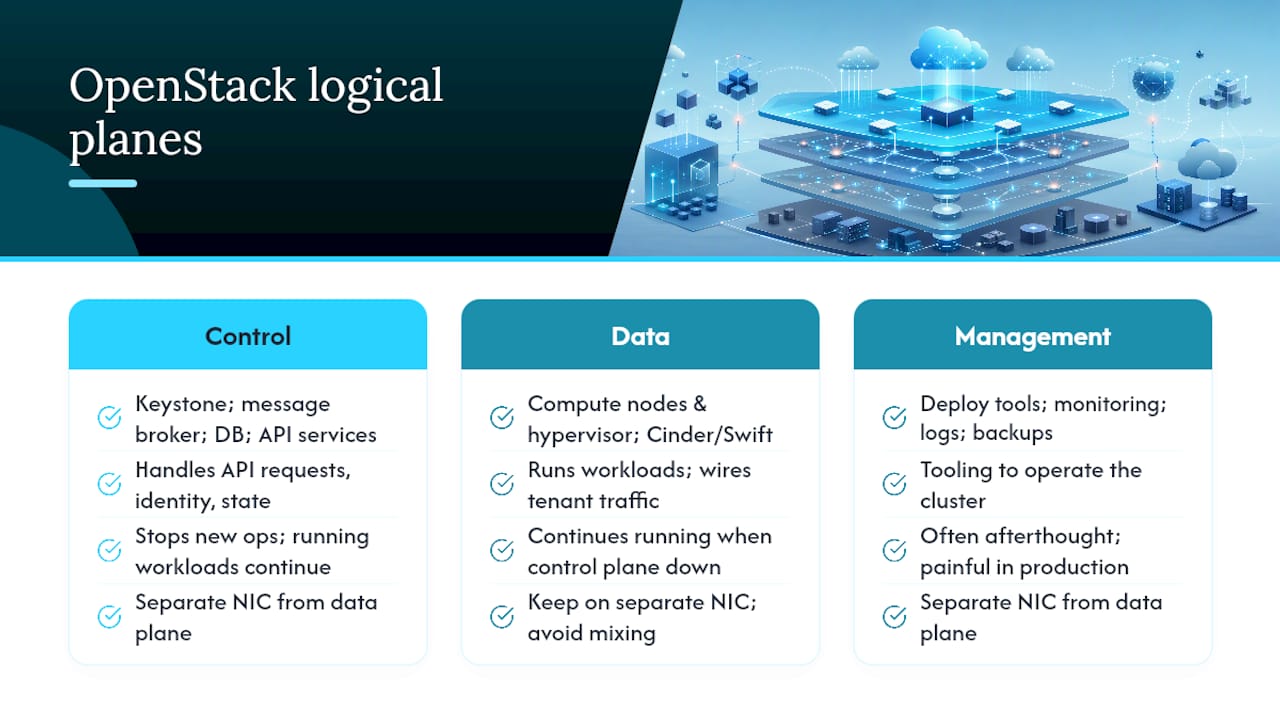
Data plane is where actual workloads run. Compute nodes run nova-compute and the hypervisor. Storage nodes run Cinder volume backends or Swift object servers. Network nodes (or compute nodes with DVR enabled) run Neutron agents that wire up tenant traffic. The data plane can keep running even when the control plane is temporarily unavailable.
Management plane covers the tooling you use to operate the cluster: deployment automation (Kolla-Ansible, TripleO, OpenStack-Ansible), monitoring pipelines (Prometheus, Grafana, or Gnocchi), log aggregation, and backup systems. This plane is often an afterthought in early designs and a major pain point in production.
External integrations slot in at the edges: LDAP or Active Directory can back Keystone for enterprise identity; SDN plugins like OVN or ML2/OVS extend Neutron; Ceph is the most common unified backend for both Cinder block and Swift-compatible object storage.
A useful rule of thumb: draw your logical diagram with three horizontal bands (control, data, management), drop each service into its band, and then draw vertical arrows for API calls and horizontal arrows for broker/DB traffic. That diagram will surface every dependency before you write a single line of configuration.
Pro Tip: Keep the control plane and management plane on separate network interfaces from the data plane. Mixing management traffic with tenant data traffic on the same NIC is one of the fastest ways to create a noisy-neighbor problem that’s hard to diagnose under load.
Core OpenStack services: what each one does and how to deploy it
Each OpenStack service runs as a collection of Linux processes that typically share a MariaDB or MySQL database for persistent state and a RabbitMQ exchange for internal work distribution. Here’s the practical breakdown:
| Service | Responsibility | Key processes | Persistence / queue |
|---|---|---|---|
| Nova | VM lifecycle, hypervisor scheduling | nova-api, nova-conductor, nova-scheduler, nova-compute | MariaDB + RabbitMQ |
| Neutron | Virtual networking, SDN | neutron-server, neutron-l3-agent, neutron-dhcp-agent, neutron-openvswitch-agent | MariaDB + RabbitMQ |
| Cinder | Block storage volumes | cinder-api, cinder-scheduler, cinder-volume | MariaDB + RabbitMQ |
| Swift | Object storage | swift-proxy, swift-account, swift-container, swift-object | Ring files (no RDBMS) |
| Glance | VM image registry | glance-api | MariaDB; image files on filesystem, Ceph, or Swift |
| Keystone | Identity, tokens, catalog | keystone (WSGI) | MariaDB |
| Horizon | Web dashboard | Django WSGI app | Session store (Memcached) |
| Heat | Orchestration templates | heat-api, heat-engine | MariaDB + RabbitMQ |
A few deployment notes worth keeping in mind:
- Nova uses
nova-conductoras a DB proxy so compute nodes never touch the database directly. This is a security boundary, not just an architectural nicety. KVM is the default hypervisor; QEMU is used for nested virt in test environments. - Neutron is the service most likely to have multiple agents running across different node types. ML2 with OVN is the direction most operators are moving; legacy OVS with L3 agent is still common in older deployments.
- Swift is architecturally different from the others: it uses consistent hashing rings instead of a relational database, which makes it independently scalable but also requires its own operational discipline around ring management.
- Glance needs a reliable backend. Storing images on a local filesystem works in a lab; in production, point it at Ceph RBD or a shared NFS mount so images are available to all compute nodes. For large-scale image management, see managing Glance images at scale.
- Heat templates (HOT format) let you define entire stacks declaratively. Debugging failed stacks is a skill of its own — the Heat orchestration troubleshooting guide covers the most common failure patterns.
How do OpenStack services communicate with each other?
All OpenStack services authenticate through Keystone before completing any request. That’s the first rule of inter-service communication. The second rule: cross-service calls are REST API calls, while within-service calls go through RabbitMQ.
Here’s what a typical “create instance” flow looks like in practice:
- User submits a request via Horizon or
openstack server create(CLI). - The request hits Nova API, which validates the Keystone token.
- Nova API writes the instance record to MariaDB and publishes a
build_instancemessage to RabbitMQ. - Nova scheduler picks up the message, selects a compute host, and publishes a
run_instancemessage. - Nova compute on the target host picks up the message, calls Glance (REST) to fetch the image, calls Neutron (REST) to provision the port, and then calls the hypervisor to start the VM.
- Status updates flow back through RabbitMQ to Nova conductor, which writes final state to MariaDB.
The practical implication: if your API responses are slow but CPU and memory look fine, check RabbitMQ queue depth and consumer counts first. Backpressure in the broker is the most common cause of sluggish API behavior in mid-to-large deployments — and it’s invisible if you’re only watching Nova metrics.
Troubleshooting focus points in this flow:
- Token expiry: Keystone tokens have a configurable TTL (default 3600 seconds). Long-running operations that span a token expiry will fail with 401 errors mid-flight. Use application credentials or service accounts for automation.
- API timeouts: usually a symptom of broker backpressure or a slow DB query, not a network issue.
- DB replication lag: in a Galera cluster, a lagging node can serve stale reads. Monitor
wsrep_local_recv_queueon every MariaDB node.
For deep dives into Keystone token flows and authentication errors, the Keystone debugging guide walks through the most common failure modes.
How does physical topology map to OpenStack node roles?
Translating the logical architecture into physical nodes is where most first-time deployers make sizing mistakes. The standard node roles are:
| Node type | Services hosted | HA / scale considerations | Minimum for production |
|---|---|---|---|
| Controller | Keystone, Nova API, Neutron server, Cinder API, Glance API, Heat API, Horizon, RabbitMQ, MariaDB | 3-node cluster (Galera + RabbitMQ quorum); API load balancer (HAProxy) in front | 3 nodes |
| Compute | nova-compute, Neutron agent, hypervisor | Scale horizontally; no shared state between nodes | 2+ nodes |
| Storage (block) | cinder-volume, Ceph OSD (if Ceph backend) | Ceph handles its own replication; Cinder scheduler is on controller | 3+ nodes (Ceph minimum) |
| Storage (object) | Swift proxy + account/container/object servers | Swift rings define replication factor; scale by adding nodes | 3+ nodes |
| Network | Neutron L3 agent, DHCP agent (if not DVR) | Can be collapsed onto controller or compute with DVR | 2 nodes (or DVR on compute) |
Key HA patterns for the control plane:
- Run three controller nodes minimum. Two is not HA — it’s a split-brain waiting to happen.
- Use HAProxy (or a hardware LB) in front of all API endpoints. Keepalived manages the VIP.
- Galera cluster for MariaDB with
wsrep_cluster_size=3. Monitorwsrep_cluster_statuscontinuously. - RabbitMQ in quorum queue mode (RabbitMQ 3.8+) or mirrored queues on older versions.
For compute scaling, there’s no upper bound in principle. Nova’s scheduler handles placement across hundreds of hypervisors. The practical ceiling is usually the control plane’s DB and broker throughput, not the compute nodes themselves. A production-ready OpenStack build guide covers topology decisions and capacity planning in more detail.
How do users and applications interact with OpenStack?
OpenStack supports multiple access methods including a web dashboard, CLIs, and SDKs for Go, Python, Ruby, and Java. In practice, most operators use a combination of all three depending on the task.
Horizon is the web dashboard built on Django. It’s useful for tenants who need a GUI and for operators doing quick visual checks. It’s not the right tool for automation — Horizon sessions time out, and scripting against a browser UI is fragile.
python-openstackclient (openstack CLI) is the unified command-line tool that replaced the per-service CLIs (nova, neutron, cinder, etc.). It’s the right tool for ad-hoc operations and shell scripts. Authentication works through environment variables (OS_AUTH_URL, OS_USERNAME, OS_PASSWORD, OS_PROJECT_NAME) or a clouds.yaml file.
For automation at scale, prefer the Python SDK (
openstacksdk) or direct REST calls over the CLI. The CLI spawns a new process and authenticates on every invocation, which adds latency and token overhead in loops. The SDK reuses connections and handles token refresh automatically.
A typical token-based automation pattern:
POST /identity/v3/auth/tokens   → returns X-Subject-Token
GET  /compute/v2.1/servers      → Authorization: X-Subject-Token <token>
For Keystone federation (SSO with an enterprise IdP), the flow adds a SAML or OIDC exchange before the token issuance step. The Keystone federation setup guide covers that configuration end to end.
Pro Tip: Store your clouds.yaml in ~/.config/openstack/clouds.yaml and use named cloud profiles. Switching between environments (openstack --os-cloud production server list) is much cleaner than juggling environment variable exports across terminal sessions.
For Horizon customization and operator-facing dashboard workflows, the Horizon debugging and customization guide is worth bookmarking.
Which deployment tools should you use for OpenStack?
Deployers commonly use Kolla-Ansible, TripleO, and OpenStack-Ansible, each with different trade-offs in lifecycle management and operational complexity. Here’s the honest comparison:
Kolla-Ansible containerizes every OpenStack service in Docker containers and deploys them with Ansible. It’s the most widely used community approach in 2026. Upgrades are cleaner than bare-metal installs because you swap container images rather than OS packages. The configuration surface is large, but the community is active and the documentation is solid.
TripleO (deployed via Red Hat OpenStack Platform or the community version) uses OpenStack itself to deploy OpenStack, with Ironic managing bare-metal nodes. It’s powerful for large-scale deployments with hardware lifecycle management requirements, but the operational complexity is significant. Most new deployments are moving away from TripleO toward Kolla-Ansible.
OpenStack-Ansible installs services directly on the host OS using Ansible roles, without containers. It gives you the most control over the OS-level configuration and is a good fit if your team is already deep in Ansible and prefers not to add a container runtime dependency.
OpenStack’s microservices-style architecture means you can deploy only the services your workload needs — a minimal deployment for a private compute cloud might include just Nova, Neutron, Glance, Keystone, and Cinder, skipping Swift and Heat entirely until they’re needed.
A practical deployment checklist:
- Preflight checks: validate NTP sync across all nodes, confirm network interface naming is consistent, and verify DNS resolution for all hostnames.
- Networking design: decide on provider vs. tenant network topology, choose ML2 driver (OVN recommended for new deployments), and plan your external network CIDR before touching Neutron config.
- Storage backend validation: test Ceph connectivity and pool permissions before deploying Cinder or Glance; a misconfigured Ceph backend is one of the most common deployment blockers.
- Identity federation plan: if you need LDAP or SAML integration, configure Keystone federation before deploying Horizon — retrofitting it later is painful.
- DB and broker clustering: deploy MariaDB Galera and RabbitMQ in clustered mode from day one. Migrating from single-node to clustered after the fact requires downtime.
- Upgrade ordering: sequence upgrades as Keystone first, then control-plane APIs, then workers, then compute and storage nodes in rolling batches.
Pro Tip: Run your first Kolla-Ansible deployment on a three-VM lab using the all-in-one inventory before touching production hardware. The configuration mistakes you’ll make in the lab are the same ones that would cost you hours in a real deployment.
For containerized platform architecture context, the cloud-native architecture overview from Vicedomini Softworks provides useful background on how containerized service deployment patterns translate across platforms.
When does OpenStack make sense for your infrastructure?
OpenStack is deployed in production by thousands of organizations and provides orchestration, fault management, and service management capabilities well beyond basic IaaS. But it’s not the right answer for every situation.
OpenStack fits well when you need:
- Full infrastructure control: custom SDN configurations, specialized hardware access (GPUs, FPGAs, SR-IOV NICs), or non-standard storage topologies that public clouds don’t expose.
- Data locality and compliance: regulated workloads (healthcare, finance, government) that require data to stay on-premises or in a specific jurisdiction.
- Predictable cost model: large, stable workloads where the per-hour public cloud pricing model is significantly more expensive than owning and operating hardware.
- Telco and edge infrastructure: OpenStack is widely used in NFV (Network Functions Virtualization) deployments where precise control over networking and hardware is required.
The honest trade-off: OpenStack gives you control, but control costs operational effort. A team of two engineers can run a small public cloud workload with near-zero infrastructure management. Running OpenStack at the same scale requires at least one engineer who knows the platform deeply. That’s not a knock on OpenStack — it’s a sizing reality.
For cost strategy context when evaluating private vs. public cloud economics, the cloud infrastructure cost reduction guide from Koritsu provides a useful framework for the build-vs-buy analysis.
Security architecture beyond Keystone
Keystone handles identity, but it’s only one layer of OpenStack’s security model. The others matter just as much in a production deployment.
Multi-tenancy isolation in OpenStack relies on Neutron’s network segmentation (VXLAN or VLAN tenant networks), Nova’s hypervisor-level isolation (separate VMs per tenant), and Keystone’s project/domain model. Tenants share the same physical hardware but should never be able to reach each other’s network traffic or storage volumes. The key risk is misconfigured security groups or shared provider networks that inadvertently expose tenant traffic.

Secure network design means separating traffic types onto dedicated interfaces: management traffic (API calls, RabbitMQ, MariaDB replication) on one network, tenant data traffic on another, storage traffic (Ceph replication, iSCSI) on a third, and external/provider traffic on a fourth. Collapsing these onto fewer interfaces is tempting in small deployments and creates serious security and performance problems at scale.
Secrets management deserves its own service. Barbican is OpenStack’s key manager, handling encryption keys, certificates, and secrets for other services. Using Barbican to store Cinder volume encryption keys and TLS certificates is significantly more secure than embedding secrets in configuration files. The Barbican secrets management guide covers integration patterns for common use cases.
Additional security practices worth implementing from day one:
- Enable TLS on all API endpoints and internal service communication. Kolla-Ansible can generate and manage certificates automatically.
- Use Keystone application credentials instead of username/password for service accounts and automation scripts. Application credentials can be scoped to specific roles and rotated without changing user passwords.
- Audit Neutron security group rules regularly. Default “allow all” security groups are a common misconfiguration in development environments that get promoted to production.
- Apply the principle of least privilege in Keystone role assignments. Most operators only need
memberrole in their project;adminshould be reserved for infrastructure management tasks.
Why OpenStack’s modularity matters more than most teams realize
Here’s what I’ve seen trip up teams who are new to OpenStack: they treat it like a monolith. They deploy everything, configure everything together, and then wonder why a Neutron agent restart takes down their monitoring pipeline. The modular architecture isn’t just a design philosophy — it’s an operational contract.
Each service has its own failure domain. A crashed heat-engine doesn’t affect running VMs. A misconfigured Glance backend doesn’t break Neutron. That isolation is genuinely valuable, but only if you operate each service as an independent unit with its own monitoring, alerting, and capacity plan. Most teams don’t do this at first. They set up a single “OpenStack is up” health check and call it done. That’s how you miss a slowly filling RabbitMQ queue until it’s a full outage.
The other mistake I see consistently: underprovisioning the control plane. Three controller nodes sounds like a lot until you’re running 200 hypervisors and your Nova scheduler is processing thousands of placement decisions per minute. The control plane is not where you cut costs. Compute nodes are commodity hardware; controller nodes are where your operational reliability lives.
The teams that run OpenStack well treat it the way good SREs treat any distributed system: instrument everything, plan for component failure, and test upgrades in a staging environment that mirrors production topology. The Red Hat architecture guide has solid guidance on HA patterns and upgrade sequencing that’s worth reading before your first production deployment, regardless of which installer you use.
How Devopsaitoolkit helps you deploy and operate OpenStack faster
Running OpenStack in production means managing Keystone token flows, RabbitMQ cluster health, Neutron agent states, and upgrade sequencing simultaneously. That’s a lot of context to hold, and it’s exactly where AI-assisted workflows pay off.

Devopsaitoolkit provides battle-tested prompt libraries, in-browser triage tools, and downloadable automation playbooks built specifically for engineers managing OpenStack, Kubernetes, Prometheus, and production Linux infrastructure. The AI DevOps tools cover incident triage workflows for the failure modes described in this article — RabbitMQ backpressure, Keystone auth failures, Cinder volume errors — with copy-paste prompts that cut diagnosis time significantly. For monitoring instrumentation, the Prometheus monitoring prompt library includes 165 ready-to-use prompts for alerting on control plane health, broker queue depth, and API latency. If you’re planning a deployment or audit, book a consulting engagement at Devopsaitoolkit to get a structured review of your topology, HA design, and upgrade strategy before you go to production.
Sources
The canonical references you’ll return to most often when implementing or troubleshooting OpenStack:
- Logical architecture — Installation Guide documentation
- Software
- Architecture Guide | Red Hat OpenStack Platform | 10 | Red Hat Documentation
- Behind the Scenes of OpenStack Microservice Architecture
Recommended
- How to Build a Production-Ready OpenStack Cloud (2026 Guide)
- Deploying OpenStack with Kolla-Ansible: A Practical Guide — DevOps AI ToolKit
- Debugging Heat Orchestration Stacks in OpenStack
- AI Ops in OpenStack Management: A 2026 Practical Guide
Get 500 Battle-Tested DevOps AI Prompts — Free
500 battle-tested, copy-paste AI prompts engineered by a senior systems engineer — every one with fill-in placeholders and safety/back-out notes. Drop your email and it's yours.
- 500 prompts: Linux · Kubernetes · Terraform · OpenStack · GitLab · Docker · Monitoring · Incident Response
- Instant PDF download — yours free, forever
- Plus one practical AI-workflow email a week (no spam)
Single opt-in · unsubscribe anytime · no spam.