
Network Access Control: A Practical Guide for IT Pros
Discover how network access control enhances security by ensuring only authorized users and compliant devices connect to your network.

Network access control (NAC) enforces who and what can connect to your network by verifying identity and device posture before granting access, then continuously re-checking compliance after the connection is live. Per NIST’s glossary, NAC allows access based on user credentials and health checks, tracing to NIST SP 800-41 Rev. 1.
- Pre-admission vs post-admission: NAC evaluates devices before they join the network, then keeps checking posture after they’re in. A device that passes at login can still get quarantined if it goes out of compliance an hour later.
- Enforcement outcomes: Depending on posture results, NAC assigns one of three outcomes: allow full access, quarantine to a restricted VLAN, or block entirely.
- Why it matters: With IoT connected devices growing rapidly and unmanaged endpoints multiplying across enterprise networks, NAC gives you the visibility and policy enforcement to reduce lateral movement risk before an incident forces the conversation.
Key Takeaways
Network access control enforces identity and device posture at the network layer through two phases: pre-admission checks before connection and continuous post-admission monitoring after.
| Point | Details |
|---|---|
| Two-phase enforcement | NAC runs posture checks before admission and continuously re-checks after; post-admission monitoring is where lateral movement risk is actually reduced. |
| Top use cases | BYOD, IoT/unmanaged endpoints, contractor access, and PCI/HIPAA segmentation deliver the clearest ROI from NAC deployment. |
| Selection criteria | Prioritize integration depth with your identity and EDR stack, policy lifecycle automation, and authentication scalability before evaluating UI or pricing. |
| Rollout sequence | Always follow discover, then monitor, then enforce; skipping the monitor phase is the primary cause of accidental outages and helpdesk escalations. |
| Operational reality | NAC requires ongoing policy lifecycle management; treat policies like code, review quarterly, and integrate NAC events into your SIEM pipeline. |
Table of Contents
- What is network access control and how does it work technically?
- What core capabilities should you expect from a NAC platform?
- Where does NAC deliver the most value in practice?
- How do deployment models and architecture choices affect your NAC rollout?
- How do you evaluate and choose the right NAC solution?
- What does a realistic NAC implementation look like step by step?
- What are the real operational pitfalls and how do you avoid them?
- How does NAC differ from ZTNA, MDM, and network segmentation?
- My honest take on where NAC actually fits
- Sources
What is network access control and how does it work technically?
The flow is straightforward: authenticate the device and user, run posture checks, make an allow/quarantine/block decision, then enforce it at the network layer. TechTarget’s overview describes both phases clearly, and the distinction between them is where most teams get tripped up.
Pre-admission: the gate
Before a device touches production resources, NAC runs three steps in sequence.
- Discovery and profiling. The NAC controller fingerprints the device using DHCP, MAC OUI, HTTP user-agent, and SNMP data. This is how it knows whether it’s looking at a managed Windows laptop, an unmanaged IP camera, or a contractor’s personal MacBook.
- Authentication. IEEE 802.1X with a RADIUS backend is the standard mechanism here. The supplicant on the endpoint exchanges credentials with the authenticator (a switch or wireless controller), which forwards the request to the RADIUS server. The NAC controller sits behind RADIUS and applies policy.
- Posture checks. The controller verifies whether the device meets your defined baseline: OS patch level, AV signature currency, disk encryption status, and so on. Fail any check and the device lands in a quarantine VLAN or hits a captive portal for remediation.
Post-admission: the ongoing check
Admission is not a one-time gate. After a device is on the network, NAC continues periodic or event-triggered posture re-evaluation. If a device moves between network zones, re-authentication fires. If AV definitions go stale mid-session, the controller can push the device back to quarantine automatically.
This is where dynamic ACLs and VLAN reassignment do the real work. The NAC controller signals the switch or wireless controller to change the device’s VLAN assignment or apply a restrictive ACL without dropping the physical connection. Lateral movement controls depend entirely on this post-admission loop being active.
Integration touchpoints matter here. A well-wired NAC deployment pulls posture signals from your EDR (CrowdStrike, SentinelOne), MDM (Jamf, Microsoft Intune), and identity store (Active Directory, LDAP). SIEM integration means NAC events feed directly into your incident response pipeline, so a quarantine action triggers an alert rather than disappearing into a log nobody reads.
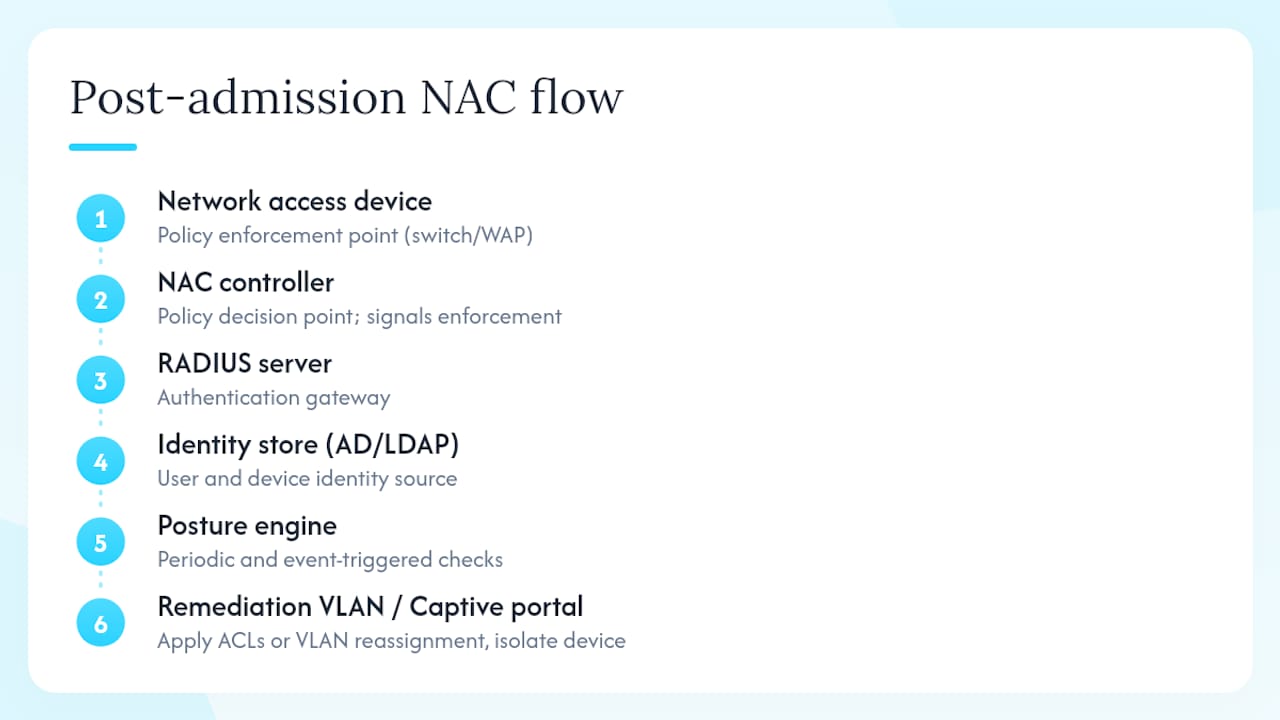
Diagram elements to expect in a NAC architecture: network access device (switch/WAP) → NAC controller → RADIUS server → identity store (AD/LDAP) → posture engine → remediation VLAN/captive portal. The controller is the policy decision point; the switch is the policy enforcement point.
What core capabilities should you expect from a NAC platform?
Cisco’s NAC guide and Check Point’s overview both frame NAC around a consistent capability set. Here’s what each one actually does for you operationally:
- Device discovery and profiling. Fingerprints every device on the network, managed or not. This is your asset inventory. Without accurate profiling, every downstream policy is guesswork.
- Posture assessment. Checks patch level, AV status, firewall state, and configuration baselines. Posture checks are what turn NAC from a VLAN tool into a compliance enforcement layer.
- Authentication and authorization. 802.1X/RADIUS handles the authentication handshake. Authorization maps identity and posture results to a specific access tier: full production, restricted guest, or quarantine.
- Guest and contractor access orchestration. Captive portals, sponsor-approval workflows, and time-limited credentials. This is often the first use case teams deploy because it’s low-risk and immediately visible.
- Remediation workflows. Automated or guided steps to bring a non-compliant device back into policy: push a patch, prompt the user, or route to a helpdesk ticket. Wikipedia’s NAC article notes that NAC aims to unify endpoint security technology, authentication, and network enforcement into a single control.
- Visibility and asset inventory. Continuous device tracking across wired, wireless, and VPN segments. This is the capability security teams undervalue until they’re doing incident response and can’t answer “what was connected at 2 AM?”
- Policy lifecycle management. The ability to version, test, and roll back access policies. Gartner’s definition frames NAC as policy-driven network control tied to authentication and endpoint configuration, which means policy management is a first-class concern, not an afterthought.
- Integrations. API-level connections to EDR, MDM, SIEM, and identity providers. In large-scale environments, this is non-negotiable. A NAC platform that can’t pull posture signals from your EDR is doing half the job.
For large environments, prioritize scalability of the control plane, high-availability controller clustering, and API depth. A platform that works fine at 500 endpoints can become a bottleneck at 10,000 if the RADIUS proxy isn’t distributed.
Where does NAC deliver the most value in practice?
The top use cases are BYOD, IoT and medical devices, guest and contractor access, PCI/HIPAA segmentation, campus Wi-Fi, and OT/ICS network segregation. Each one maps to a slightly different enforcement posture.
BYOD. Personal devices connecting to corporate Wi-Fi are the classic NAC problem. The enforcement posture typically starts in monitor-only mode to build a baseline, then moves to quarantine-on-fail once profiling is accurate. A non-compliant BYOD device gets redirected to a captive portal that explains what’s wrong and links to the MDM enrollment page. If the user doesn’t remediate within a defined window, the session drops.
IoT and medical devices. These endpoints usually can’t run an agent, so agentless profiling via DHCP fingerprinting and network behavior analysis is the primary detection method. The enforcement goal is segmentation: put IoT devices in a dedicated VLAN with firewall rules that allow only the specific ports they need. A network-connected infusion pump should never be able to reach a domain controller.

Guest and contractor access. Captive portal with sponsor approval is the standard pattern. Time-limited credentials, bandwidth throttling, and a separate internet-only VLAN keep guest traffic isolated. Contractors with managed devices can get a slightly elevated access tier after posture checks pass.
PCI DSS and HIPAA compliance. Both frameworks require demonstrable access controls and network segmentation. NAC provides the enforcement layer and the audit trail. The HIPAA Security Rule requires covered entities to implement technical safeguards controlling access to ePHI, and NAC’s VLAN enforcement and posture logging directly support that requirement.
OT/ICS segregation. Industrial control systems need strict isolation from IT networks. NAC in monitor-only mode first, then enforced segmentation, is the safest path. Agentless profiling is essential here because OT devices rarely support 802.1X supplicants.
How do deployment models and architecture choices affect your NAC rollout?
The four main axes are on-prem vs cloud-managed, and inline vs out-of-band enforcement. Your choice on each axis shapes operational overhead, latency, and resilience.
On-prem vs cloud-managed
On-prem appliances or virtual controllers give you full control over the policy decision plane and keep authentication traffic local, which matters for latency-sensitive environments. The trade-off is that you own the HA clustering, upgrades, and capacity planning.
Cloud-managed NAC (offered by vendors like Cisco and HPE/Aruba) moves the management plane to a SaaS controller. This reduces operational overhead significantly and simplifies multi-site deployments. The downside is that your policy enforcement depends on connectivity to the cloud controller, so you need a solid fallback posture for WAN outages.
Inline vs out-of-band
Inline enforcement means NAC sits in the data path. Every packet passes through the enforcement point, which gives you fine-grained control but introduces a potential bottleneck and a single point of failure if the appliance goes down.
Out-of-band enforcement keeps NAC off the data path. The controller communicates with switches and wireless controllers via RADIUS CoA (Change of Authorization) to reassign VLANs or apply ACLs. Traffic never flows through the NAC appliance itself. This is the more common architecture in enterprise deployments because it’s more resilient and scales better.
Agent vs agentless
Agent-based posture checks give you deep visibility into endpoint state: running processes, registry keys, installed software versions. The operational cost is agent deployment and lifecycle management across your fleet.
Agentless profiling uses network-observable signals (DHCP, MAC, HTTP, SNMP, NetFlow) to classify devices. Coverage is broader because it works on any device, but posture depth is shallower. Most mature deployments use both: agents for managed endpoints, agentless for IoT and unmanaged devices.
| Dimension | On-prem | Cloud-managed |
|---|---|---|
| Latency | Low (local auth) | Depends on WAN |
| Operational overhead | High | Low |
| Scalability | Manual capacity planning | Elastic |
| Resilience | HA clustering required | Built-in redundancy |
| Best for | High-security, low-latency environments | Multi-site, distributed teams |
The NIST NCCoE Zero Trust Architecture guidance positions network-layer controls like NAC as a foundational enforcement layer within a Zero Trust architecture, not a replacement for it. Your deployment model should reflect where NAC fits in that broader stack.
Pro Tip: Verify 802.1X and RADIUS CoA support on every switch and wireless controller model in your environment before committing to a NAC vendor. Inconsistent infrastructure support for these protocols is the most common source of integration friction, and discovering it during a PoC is far less painful than discovering it during rollout.
How do you evaluate and choose the right NAC solution?
The top three evaluation priorities are integration depth with your identity and EDR stack, policy lifecycle automation, and scalability under your expected authentication load. Everything else is secondary.
Here’s a prioritized checklist for procurement or PoC decisions:
- Interoperability. Does it support 802.1X/RADIUS natively? Does it have published APIs for your identity provider (AD, Okta, Azure AD), EDR, MDM, and SIEM? Verify this against your actual infrastructure, not the vendor’s compatibility matrix.
- Device profiling accuracy. Run the profiler against your existing network in passive mode. Measure the false-positive rate on device classification before you write a single enforcement policy.
- Agent vs agentless coverage. Confirm agentless profiling works for your IoT and OT device types. If the vendor’s agentless engine can’t fingerprint your specific IP cameras or HVAC controllers, you’ll have blind spots.
- Scalability and HA. Test authentication throughput at 2x your expected peak. Verify controller failover time. A 30-second auth outage during a controller failover is a helpdesk incident.
- Policy lifecycle management. Can you version policies? Test changes in a staging environment? Roll back a bad policy without a maintenance window? This is where most teams underinvest and end up with policy sprawl.
- Remediation workflow depth. Does the platform support automated remediation triggers (push a patch, send a user notification, open a ticket in ServiceNow)? Or is remediation manual?
- Visibility and reporting. Confirm the reporting layer gives you the audit trail your compliance team needs for PCI or HIPAA reviews.
- Total cost of ownership. Hardware or subscription cost is the visible number. Factor in professional services for initial deployment, helpdesk OPEX from user-facing quarantine events, and ongoing policy maintenance hours.
Leading platforms to evaluate: Cisco Identity Services Engine (ISE) is a dominant enterprise choice, known for its deep integration with 802.1X and a mature policy engine. HPE/Aruba ClearPass is strong in wireless-heavy environments and has solid agentless profiling. Fortinet FortiNAC integrates tightly with the FortiGate firewall ecosystem and is a natural fit if you’re already running Fortinet infrastructure.
PoC metrics to track: profiling false-positive rate, average authentication latency (target under 500ms), and remediation success rate (percentage of quarantined devices that self-remediate without a helpdesk ticket).
What does a realistic NAC implementation look like step by step?
The recommended sequence is discover, then monitor, then enforce. Skipping the first two phases is how teams accidentally block the CEO’s laptop on day one.
- Network readiness audit (Week 1–2). Inventory every switch, wireless controller, and firewall. Confirm 802.1X and RADIUS CoA support. Identify segments where enforcement is not feasible (legacy OT, unmanaged IoT) and plan agentless-only coverage for those.
- Deploy in monitor-only mode (Weeks 3–6). Stand up the NAC controller, configure passive profiling, and connect to your RADIUS and identity store. Do not write any deny rules yet. Let the profiler build a baseline of every device type on the network.
- Pilot scope selection (Week 7–8). Pick one user group and one VLAN for the first enforcement pilot. A single department’s wired segment is ideal. Define your posture policy for that scope only.
- Integration testing (Weeks 9–10). Test RADIUS authentication end-to-end. Verify AD group membership maps correctly to access tiers. Test EDR posture signal ingestion. Simulate a quarantine event and walk through the remediation workflow with your helpdesk team.
- Staged enforcement rollout (Weeks 11–16). Expand enforcement scope one segment at a time. Run each new segment in monitor-only for two weeks before enabling deny rules. Track false positives and remediation rates per segment.
- Full enforcement and post-deployment measurement (Week 17+). Measure profiling accuracy, auth latency, and helpdesk ticket volume from NAC-related events. Set a quarterly policy review cadence.
Cost drivers to budget: hardware or cloud subscription (varies by vendor and endpoint count), professional services for initial deployment (typically 40–80 hours for a mid-size environment), and ongoing helpdesk OPEX from user-facing quarantine events. Cloud-managed options reduce upfront hardware costs but add recurring subscription spend.
Pro Tip: Start every new network segment in monitor-only mode, even after you have a mature NAC deployment. The profiler needs two to four weeks of traffic to accurately classify device types. Enforcing deny rules on an under-profiled segment is the fastest way to generate a wave of helpdesk tickets and lose stakeholder trust in the project.
What are the real operational pitfalls and how do you avoid them?
NAC succeeds when you treat it as an ongoing operational capability, not a product you install and forget. The teams that get the most out of it are the ones that build policy lifecycle processes around it, not just firewall rules.
Common pitfalls:
- Enabling deny rules too early. The most common mistake. Profiling needs time. Enforce before your device inventory is accurate and you’ll block legitimate devices.
- Ignoring post-admission monitoring. Pre-admission checks are table stakes. The real value is in catching devices that go out of compliance after they’re already on the network.
- No EDR or MDM integration. A NAC platform without posture signals from your EDR is making decisions based on network-observable data alone. That’s better than nothing, but it misses a lot.
- Brittle agent dependence. If your posture policy requires an agent and the agent fails to install on a device class, that device either gets blocked or gets a free pass. Neither is acceptable. Plan your agentless fallback.
- Policy sprawl. Six months after deployment, teams often have dozens of overlapping policies that nobody fully understands. Treat NAC policies like code: version them, review them quarterly, and delete rules that no longer serve a purpose.
Best practices:
- Start with visibility. Use the profiling engine to build a complete asset inventory before writing a single enforcement rule. This is also the advice from TechTarget’s NAC guide on using NAC as a discovery engine first.
- Apply policy-as-code principles to your NAC policy lifecycle. Version your policies, test changes in a staging environment, and automate regression tests.
- Feed NAC events into your SIEM. A quarantine event that doesn’t trigger an alert is a missed detection opportunity.
- Measure policy drift quarterly. Compare your current enforcement rules against your original design intent. Rules that haven’t matched a device in 90 days are candidates for deletion.
Pro Tip: Before enabling enforcement on any segment, run a “shadow enforcement” test: simulate what would have been blocked over the past two weeks using your monitor-only logs. If the simulated block list includes more than 2–3% of active devices, your profiling isn’t ready.
If policy maintenance overhead starts exceeding your team’s capacity, that’s a signal to simplify the underlying architecture rather than add more NAC rules. Wikipedia’s NAC article makes this point directly: over-engineered NAC policies become shelfware. Microsegmentation or SASE may be a better investment at that point.
How does NAC differ from ZTNA, MDM, and network segmentation?
These tools overlap in purpose but operate at different layers. Choosing the right mix matters more than picking any single one.
**NAC enforces access at the network layer using VLAN assignment and dynamic ACLs, typically leveraging 802.1X protocols. ZTNA (Zero Trust Network Access) enforces access at the application layer, brokering connections to specific applications based on identity and device posture without putting the device on the network at all. They’re complementary: NAC controls what gets on the network; ZTNA controls what applications a device can reach once it’s there. The NIST NCCoE Zero Trust guidance treats network-layer controls as one component of a broader Zero Trust architecture, not a substitute for application-layer controls. For a practical implementation of Zero Trust mesh networking, the WireGuard Zero Trust mesh guide on Devopsaitoolkit covers the network-level side in detail.
NAC vs MDM. MDM (Mobile Device Management) manages the endpoint itself: configuration profiles, app deployment, remote wipe, compliance policy enforcement on the device. NAC enforces network access based on whether the device meets a posture baseline. MDM is the tool that sets the posture; NAC is the tool that checks it and enforces network consequences. They work best together, with MDM feeding compliance status into NAC’s posture engine via API.
NAC vs network segmentation. Static network segmentation (VLANs, firewall rules) divides the network into zones but doesn’t dynamically respond to device posture. NAC adds the dynamic layer: it can move a device between segments in real time based on posture changes. For cloud-native environments, Kubernetes network policies provide a similar dynamic enforcement model at the workload layer.
When to use NAC as the primary control: environments with mixed managed and unmanaged endpoints, regulatory requirements for network segmentation, and BYOD or contractor access at scale. When to invest in alternatives instead: fully cloud-native environments where SASE or ZTNA covers the access control surface, or small networks where static segmentation is sufficient and NAC operational overhead isn’t justified.
My honest take on where NAC actually fits
I’ve seen NAC projects go sideways in two predictable ways: teams that turn on enforcement before their profiling is accurate, and teams that deploy it, declare victory, and never touch it again. The first creates a wave of helpdesk tickets and erodes trust in the project. The second creates a false sense of security while the policy slowly drifts out of alignment with the real network.
The operational overhead is real. NAC is not a set-it-and-forget-it control. It requires a policy lifecycle process, integration maintenance as your EDR and MDM evolve, and someone who owns the quarterly policy review. If your team doesn’t have that capacity, a simpler architecture (static segmentation plus strong identity controls) will serve you better than a NAC deployment that nobody maintains.
That said, for environments with significant BYOD, IoT, or contractor access, NAC is one of the few controls that gives you both visibility and enforcement at the network layer simultaneously. The visibility alone, before you enforce a single deny rule, is often worth the deployment effort. You’ll find devices on your network that your asset inventory doesn’t know about. That’s not a NAC problem. That’s NAC doing exactly what it’s supposed to do.
For teams looking to automate the operational side, the DevOps security best practices guide on Devopsaitoolkit covers the policy lifecycle and monitoring practices that keep controls like NAC effective over time.
If you’re building out NAC runbooks, PoC scripts, or remediation automation, the Linux Admin Prompt Pack on Devopsaitoolkit gives you 100 battle-tested AI prompts for exactly this kind of infrastructure work. It’s the fastest way to turn a NAC implementation checklist into reproducible, documented automation.

Sources
These are the authoritative references for standards, technical detail, and market context on network access control.
- What is network access control (NAC) and how does it work?
- Network Access Control (NAC) - CSRC NIST
- What Is Network Access Control (NAC)? - Check Point Software
- Network access control (NAC) - Gartner glossary
- IoT connected devices worldwide - Statista
- NIST NCCoE — Implementing Zero Trust Architecture
Recommended
- Kubernetes Network Policies: Default-Deny and Beyond — DevOps AI ToolKit
- Rate Limiting and Traffic Shaping with Neutron QoS
- Debugging VPC Connectivity With AI: Routes, NACLs, and
- Hardening WireGuard for a Zero-Trust Mesh, Not a Flat
Get 500 Battle-Tested DevOps AI Prompts — Free
500 battle-tested, copy-paste AI prompts engineered by a senior systems engineer — every one with fill-in placeholders and safety/back-out notes. Drop your email and it's yours.
- 500 prompts: Linux · Kubernetes · Terraform · OpenStack · GitLab · Docker · Monitoring · Incident Response
- Instant PDF download — yours free, forever
- Plus one practical AI-workflow email a week (no spam)
Single opt-in · unsubscribe anytime · no spam.