
Cloud Native Architecture: A Guide for Architects and Developers
Discover how cloud native architecture transforms software development with containers and microservices, enhancing flexibility and resilience.

Cloud native architecture is an approach to building software as loosely coupled, containerized services that run on dynamic, automated infrastructure like Kubernetes rather than fixed servers. The Cloud Native Computing Foundation frames it around systems that are loosely coupled, observable, and resilient by design, not bolted onto after launch. If you’ve spent any time debugging a monolith at 2 a.m., you already know why this shift happened.
Here’s what you need to know before we go deeper:
- Cloud native rests on a handful of pillars: containers, orchestration, microservices, immutable infrastructure, declarative APIs, and observability.
- The Twelve-Factor App methodology remains the most practical checklist for making an app deployable this way.
- Kubernetes and Docker are the default runtime and packaging layer for most cloud native stacks today.
- The biggest risk isn’t the technology. It’s teams lifting a monolith into containers and calling it done.
- Adoption pays off in deploy frequency and recovery speed once teams commit to the operational changes, not just the tooling.
Microsoft’s cloud native guidance notes that organizations running this way often ship frequent deploys across large service fleets, a scale that’s simply unreachable with a single deployable monolith.
Key Takeaways
Cloud native architecture succeeds when teams decompose services, automate infrastructure lifecycle, and instrument observability before scaling, not after an incident forces the issue.
| Point | Details |
|---|---|
| Definition anchors the approach | Cloud native means loosely coupled, containerized services on automated infrastructure, per the CNCF’s definition. |
| Pillars reinforce each other | Containers, orchestration, microservices, immutable infrastructure, and observability work best adopted together, not piecemeal. |
| Lift-and-shift is not cloud native | Moving a monolith to cloud VMs keeps its scaling bottlenecks intact instead of resolving them. |
| Observability pays off first | Instrumenting tracing and logging early reduces debugging time more than any other single early investment. |
| Devopsaitoolkit accelerates the automation layer | Prompt packs and automation libraries from Devopsaitoolkit help teams script CI/CD, logging, and infrastructure tasks faster during adoption. |
Table of Contents
- What Is Cloud Native Architecture, Really?
- The Foundational Pillars You Need to Understand
- Which Architectural Patterns Should You Actually Use?
- How Is Cloud Native Different from Just Running in the Cloud?
- What Benefits Actually Justify the Complexity?
- What Trade-Offs Should You Expect?
- What Design Principles Should Guide Your Architecture?
- What Do Cloud Native Reference Architectures Look Like?
- How Do You Actually Start Adopting This?
- Sources
What Is Cloud Native Architecture, Really?
The CNCF’s official definition states that cloud native technologies “empower organizations to build and run scalable applications in modern, dynamic environments,” naming containers, service meshes, microservices, immutable infrastructure, and declarative APIs as the exemplars. Notice what’s missing from that sentence: no mention of a specific cloud provider. Cloud native describes an architectural style, not a hosting decision.
Cloud native practices produce systems that are loosely coupled, observable, portable, interoperable, and resilient. The goal is engineering velocity without sacrificing reliability at scale.
That’s the spirit behind the CNCF reference architecture, and it’s echoed almost word for word by the major vendors. Google Cloud describes cloud native as decomposing applications into loosely coupled services that lean on containers, orchestration, CI/CD, and observability to move faster without breaking things. AWS frames it similarly, as a combination of patterns and technologies that produce predictable, automated deployments. When three competing vendors converge on the same framing, that’s not coincidence. It’s consensus.
The history here matters more than most explainers admit. Before cloud native, most infrastructure ran on what engineers now call “pets”: named servers, hand-patched, nursed back to health when something broke. Microsoft’s cloud native guidance popularized the contrast with “cattle”: interchangeable, disposable instances you replace instead of repair. That mental shift, more than any specific tool, is what actually defines the cloud native era. You stop asking “how do I fix this server” and start asking “why did this instance need fixing at all.”
The Foundational Pillars You Need to Understand
Every cloud native system rests on the same handful of building blocks, whether it’s running on a hyperscaler or a private OpenStack cluster — learn practical guidance in the Scalable App Development Guide for Tech Entrepreneurs. Understanding cloud native starts with knowing what each pillar actually contributes, because teams that skip one usually pay for it later in an incident review.
- Containers: Package an app with its dependencies so it behaves identically everywhere. Docker remains the dominant packaging format, and the Open Container Initiative standards it follows keep runtimes interchangeable.
- Orchestration: Kubernetes schedules, heals, and scales containers automatically, which is why it became the default control plane rather than a nice-to-have.
- Microservices: Break a system into independently deployable services so one team’s bug doesn’t take down the whole product.
- Immutable infrastructure: Replace instances instead of patching them, which eliminates configuration drift entirely.
- Declarative APIs: Describe the desired state and let the platform reconcile reality to match it, instead of scripting every step imperatively.
- Service mesh: Tools like Istio handle service-to-service traffic, retries, and encryption outside application code.
- Observability: Metrics, logs, and traces (often instrumented through OpenTelemetry) that let you see inside a distributed system instead of guessing.
- CI/CD and automation: Pipelines that build, test, and ship changes without a human clicking “deploy” at midnight.
Pro Tip: If you can only invest deeply in one pillar first, make it observability. Every other pillar becomes debuggable once you can actually see what’s happening across services, and nearly impossible to debug if you can’t.
Each pillar reinforces the others. Immutable infrastructure only works if orchestration can reschedule replacement instances automatically. Microservices only stay maintainable if a service mesh handles the cross-cutting traffic concerns so your application code doesn’t have to. Skip one, and the rest start compensating in ways that add complexity rather than removing it.
Which Architectural Patterns Should You Actually Use?
Knowing the pillars is one thing. Choosing the right pattern for a given problem is where architects actually earn their keep. Here’s how the most common cloud native patterns break down, and when each one is the right call versus a self-inflicted wound.
- Microservices: Best when different parts of your system scale independently or belong to different teams. Overkill for a small product with three engineers and low traffic.
- Event-driven and asynchronous messaging: Decouples producers from consumers using brokers and protocols like AMQP. Ideal when you need resilience against downstream failures, since a queued message survives even if the consumer is temporarily down.
- API gateway: A single entry point that handles routing, auth, and rate limiting so individual services don’t reimplement the same logic. Worth adopting once you have more than a handful of services facing external clients.
- Sidecar pattern: Attach a helper process (logging agent, proxy, or service mesh component) alongside your main container. This is how Istio injects traffic management without touching application code.
- Strangler pattern: Gradually route traffic from a legacy monolith to new services until the old system can be retired. This is the honest way to migrate, versus a rewrite that stalls at 80% complete for two years.
- Serverless functions: Best for spiky, event-triggered workloads where you don’t want to manage a running process at all. Weakest fit for long-running, stateful, or latency-sensitive workloads.
The decision usually comes down to four variables: expected scale, latency tolerance, team size, and how much operational complexity you’re willing to own. A five-person startup adopting a full microservices mesh on day one is solving a problem it doesn’t have yet.
Pro Tip: Don’t reach for a message broker just because “event-driven” sounds more cloud native. If two services can call each other synchronously with acceptable latency, a direct API call is simpler to trace, debug, and reason about than an async queue.
Interoperability matters as much as the pattern choice itself. Container runtimes, orchestration APIs, and messaging protocols that follow open standards keep you portable across infrastructure providers. Lock yourself into a proprietary scheduler or a non-standard messaging format, and you’ve quietly rebuilt the vendor dependency that cloud native was supposed to eliminate.
How Is Cloud Native Different from Just Running in the Cloud?
This is the confusion that trips up more teams than any technical detail. Hosting your monolith on a cloud provider’s virtual machines makes it “cloud-hosted.” It does not make it cloud native. The difference shows up in deployment velocity, fault isolation, and how teams are organized around the system.
- Deployment model: Monoliths ship as one unit on a release schedule. Cloud native services deploy independently, often dozens of times a day.
- Scalability: Monoliths scale the entire application even if only one component is under load. Cloud native systems scale individual services, so you pay for exactly the capacity you need.
- Fault isolation: A bug in one monolith module can take the whole app down. A failing microservice degrades one feature while the rest keep running.
- Team structure: Monoliths typically map to one large team coordinating releases. Cloud native systems map to small, autonomous teams owning services end to end.
- Operational model: Monoliths get patched in place. Cloud native infrastructure gets replaced, following the immutable infrastructure pattern.
The practical consequence is that cloud native vs traditional isn’t a spectrum you can fake by adding containers to a monolith. A containerized monolith is still a monolith. It just ships in a slightly different box.
What Benefits Actually Justify the Complexity?
The benefits of cloud native are real, but they’re not automatic. They show up specifically when teams commit to the operational changes, not just the tooling changes.
- Faster delivery: Independent services with their own CI/CD pipelines mean teams ship changes without waiting on a shared release train.
- Independent scaling: Scale the checkout service during a flash sale without touching the rest of the platform, which controls infrastructure cost at scale.
- Better resilience: A well-designed cloud native system contains failures to the service that caused them instead of cascading outward.
- Improved observability: Distributed tracing and structured logging turn “something is slow somewhere” into “this specific service call is adding 400ms.”
- Reduced mean time to recovery: Automated health checks and orchestration reschedule failed instances before a human even gets paged.
- Cost efficiency at scale: Right-sizing individual services beats over-provisioning an entire monolith to handle its busiest component.
A retail platform that splits inventory, checkout, and recommendations into separate services can survive a recommendations outage without losing a single sale, something a monolith architecture can’t offer. A media company processing video uploads through event-driven pipelines can absorb traffic spikes by autoscaling just the transcoding service.
Here’s the catch: faster delivery and reduced recovery time require DevOps and CI/CD maturity, not just Kubernetes running somewhere. Cost efficiency and independent scaling, on the other hand, show up almost as soon as you decompose services correctly, even before your automation is fully mature.
What Trade-Offs Should You Expect?
No honest explainer skips this part. Cloud native architecture trades one set of problems for another, and pretending otherwise sets teams up for a rough first year.
- Distributed data complexity: Data that used to live in one database now spans multiple services, which makes consistency and joins genuinely harder. Bounded contexts and clear data ownership per service reduce the pain, but they don’t eliminate it.
- Testing complexity: Integration tests across a dozen services are slower and flakier than testing a monolith. Contract testing between services helps catch breakage before it hits production.
- Operational complexity: More moving parts means more failure modes. This is exactly why observability and SRE practices aren’t optional extras. They’re how you keep the system legible.
- Cost surprises: Orchestration overhead, cross-service network traffic, and observability tooling all cost money that a monolith never had to spend. Budget for it upfront.
- Larger blast radius from bad design: A poorly bounded microservice architecture can actually spread failures faster than a monolith would, since services now depend on each other over an unreliable network.
The single most common misconception, and it’s worth naming directly, is treating a lift-and-shift migration as cloud native adoption. The CNCF’s own reference architecture is explicit that true cloud native requires decomposing applications and investing in automation and observability, not just moving VMs to someone else’s data center. Teams that skip this step keep every scaling and reliability bottleneck they had before. They just pay a cloud bill for the privilege.
What Design Principles Should Guide Your Architecture?
Once the trade-offs are on the table, the actual design work comes down to a short list of principles that hold up across almost every cloud native system.
- Design for automation first: If a human has to manually intervene for a routine task, that’s a signal to automate it, not a signal to hire more ops staff.
- Be observable by default: Instrument services with tracing and structured logging from day one. Retrofitting observability onto a live distributed system is far more painful than building it in.
- Treat infrastructure as immutable: Replace, don’t patch. If you find yourself SSHing into a production instance to fix something, that’s a process gap, not a one-off exception.
- Keep teams small and autonomous: Conway’s Law is real. Your service boundaries will end up mirroring your team boundaries whether you plan for it or not.
- Design APIs, not integrations: Every service boundary should look like a stable, versioned API contract, not a set of implicit assumptions about internal behavior.
- Align with the Twelve-Factor App: Externalize config, treat backing services as attached resources, and keep processes stateless. It’s still the most concrete checklist available for making a service actually portable.
Pro Tip: Run a new service against the Twelve-Factor checklist before its first production deploy, not after an incident forces the question. It takes an afternoon and catches config-in-code mistakes that are painful to unwind later.
What Do Cloud Native Reference Architectures Look Like?
Three sketches cover most real-world starting points, and each comes with its own honest trade-offs.
- Kubernetes microservices stack: Containerized services orchestrated by Kubernetes, fronted by an API gateway, with a service mesh handling inter-service traffic. Strong fit for teams with steady-to-high traffic and multiple engineering teams. The cost is real operational overhead, so observability and a mature CI/CD pipeline aren’t optional here.
- Serverless event-driven stack: Functions triggered by events, connected through managed queues and API endpoints, with no servers to patch or scale manually. Strong fit for spiky, unpredictable workloads and small teams. Weak fit for long-running processes or workloads with strict latency requirements, and observability requires distributed tracing across function boundaries since there’s no persistent process to inspect.
- Hybrid on-prem and cloud composition: Infrastructure defined declaratively and composed across private and public environments, similar in spirit to Crossplane-style composition. Strong fit for regulated industries or existing OpenStack investments that can’t fully move to public cloud. Requires more sophisticated deployment pipelines to handle two environments consistently.
Whichever sketch fits your situation, the deployment pipeline and observability requirements scale with complexity, not with the label on the architecture.
How Do You Actually Start Adopting This?
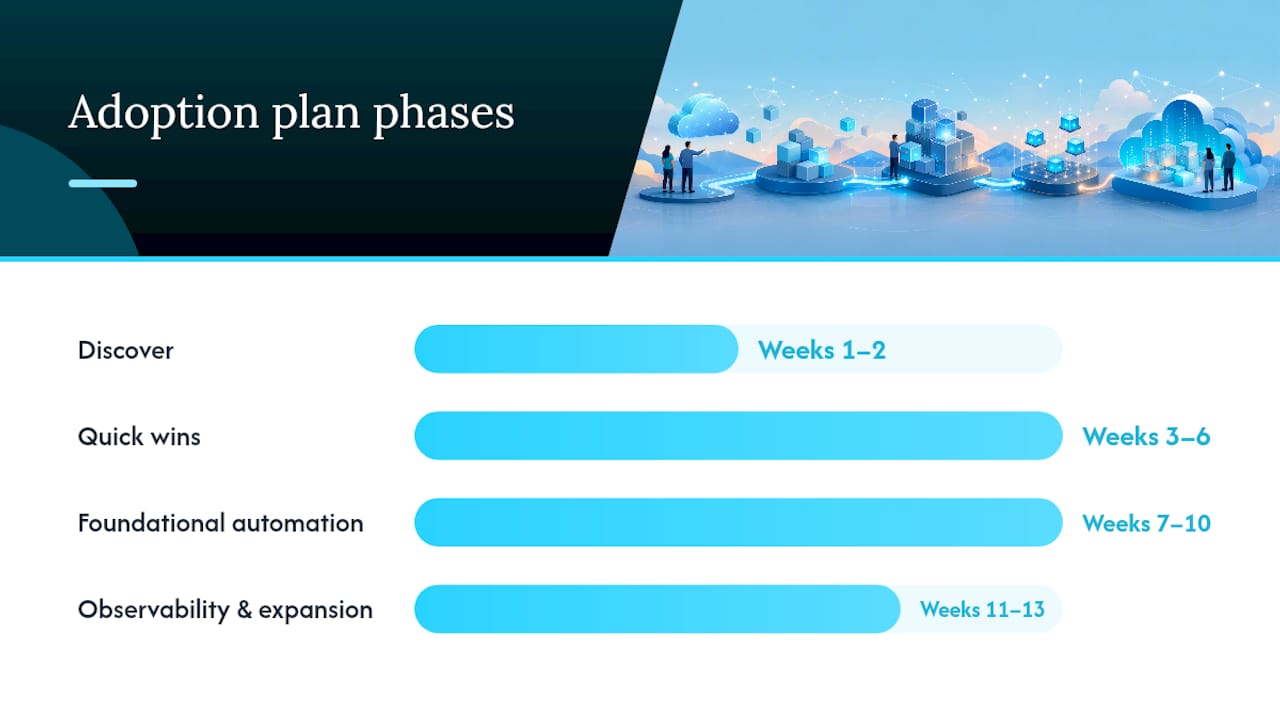
The first 90 days set the tone for everything that follows. Rushing straight to a full microservices rewrite is the single most common way teams burn goodwill and budget before seeing any payoff.
- Weeks 1 to 2, discover: Map your current architecture, identify the worst operational pain points, and pick one service as a pilot, not your most business-critical one.
- Weeks 3 to 6, quick wins: Containerize the pilot service and put it through a real CI/CD pipeline. Resist the urge to also introduce a service mesh at this stage.
- Weeks 7 to 10, foundational automation: Automate deployment and rollback for the pilot service, and start standing up centralized logging and tracing.
- Weeks 11 to 13, observability and expansion: Instrument distributed tracing properly, then use what you’ve learned to plan the second service migration.
Track deploy frequency, lead time for changes, error rate, and time to detect issues from week one. These four metrics tell you whether the adoption is actually working, long before “digital transformation” surveys would.
Pro Tip: Resist standing up a service mesh in month one. It solves problems you won’t have until you’re running more than a handful of services, and it adds operational overhead you don’t need yet.
What Engineers Commonly Get Wrong When Starting With Cloud Native
Three mistakes show up over and over. First, treating cloud native as a tooling exercise: installing Kubernetes without decomposing the application just relocates the monolith. Fix by starting with service boundaries, not infrastructure. Second, underinvesting in observability until an incident forces the issue, when instrumentation should come first, not last. Third, ignoring data gravity, assuming services can be split cleanly when their data can’t. Map data ownership before you split the service, not after.

Move Faster on Cloud Native With Battle-Tested Prompts
Reading about cloud native pillars is one thing. Writing the Kubernetes manifests, CI/CD pipeline configs, and observability instrumentation at 11 p.m. before a deploy freeze is another. Devopsaitoolkit builds prompt packs and automation libraries specifically for engineers doing that work, so you’re not starting from a blank prompt every time you need a Terraform module reviewed or a runbook automated.

The Linux Admin Prompt Pack covers 100 battle-tested prompts for the infrastructure layer underneath most cloud native stacks, and the automation prompt library helps teams script the CI/CD and deployment automation this article just walked through. If observability instrumentation is your current bottleneck, the structured logging prompt gets you a working logging library faster than writing one from scratch. Browse the prompt packs and pick whichever matches the pillar you’re automating this quarter.
Sources
Recommended
- OpenStack Architecture: A Practitioner’s Technical Guide
- How to Build a Production-Ready OpenStack Cloud (2026 Guide)
- The Role of CDN Cloud Infrastructure in Web Performance
- Crossplane Compositions: Building Your Own Internal Cloud
Get 500 Battle-Tested DevOps AI Prompts — Free
500 battle-tested, copy-paste AI prompts engineered by a senior systems engineer — every one with fill-in placeholders and safety/back-out notes. Drop your email and it's yours.
- 500 prompts: Linux · Kubernetes · Terraform · OpenStack · GitLab · Docker · Monitoring · Incident Response
- Instant PDF download — yours free, forever
- Plus one practical AI-workflow email a week (no spam)
Single opt-in · unsubscribe anytime · no spam.