
The Role of Scheduler Kubernetes: 2026 Deep Dive
Explore the role of scheduler Kubernetes in optimizing pod assignments, enhancing resource management, and resolving `Pending` states effectively.

The Kubernetes scheduler is the control plane component responsible for assigning unscheduled pods to the most suitable node in a cluster. Every pod that lands in a Pending state without a node assignment passes through the scheduler’s decision loop before it can run. The role of scheduler Kubernetes plays goes far beyond simple placement. It enforces resource constraints, respects affinity rules, and balances load across your entire cluster. Understanding how it works internally is the difference between guessing at Pending pod causes and fixing them in minutes.
How does the Kubernetes scheduling process work?
The Kubernetes scheduling process runs a three-stage pipeline on every unscheduled pod: Filter, Score, and Bind. Each stage has a distinct job, and a pod must pass all three before it gets a node.
-
Filter. The scheduler scans all nodes and removes any that cannot satisfy the pod’s requirements. Resource requests, node selectors, taints, tolerations, and affinity rules all act as filters. A node that fails even one constraint is dropped from consideration entirely.
-
Score. The remaining nodes get ranked. The default scoring strategy is LeastAllocated, which prioritizes nodes with the most remaining capacity. This spreads workloads across the cluster rather than packing them onto a few hot nodes. Other scoring plugins can run alongside it to weight GPU availability, zone balance, or custom metrics.
-
Bind. The scheduler writes a
Bindingobject to the Kubernetes API server, linking the pod to the winning node. The kubelet on that node picks up the binding and starts the pod. The scheduler never contacts the node directly.
One detail that surprises engineers: only a subset of nodes are evaluated in large clusters. The percentageOfNodesToScore parameter scales down as cluster size grows, with a floor of 5% of nodes evaluated. This keeps scheduling fast at scale without sacrificing meaningful placement quality.
Pro Tip: If your cluster has hundreds of nodes and you see unexpected placement patterns, check your percentageOfNodesToScore setting. A very low floor can cause the scheduler to miss better-fit nodes entirely.

What advanced scheduling features optimize workload management?
Basic Filter, Score, and Bind handles most workloads. For complex scenarios, Kubernetes offers two features that change the game: preemption and PodGroup scheduling.
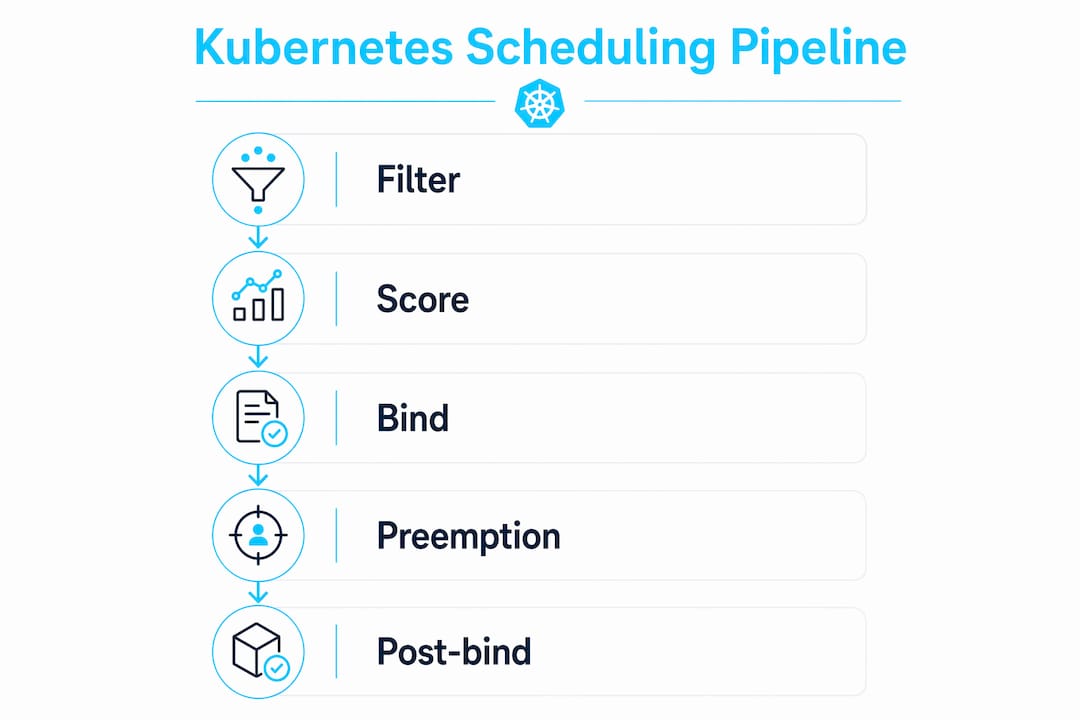
Preemption lets high-priority pods evict lower-priority pods when no node has enough free capacity. You define priority using PriorityClass objects. When a critical pod cannot be scheduled, the scheduler identifies nodes where evicting lower-priority pods would free enough resources. It then evicts those pods and places the critical one. This is not aggressive or random. The scheduler picks the node that requires the least disruption. You can read more about how priority-based eviction works in practice, including which pods get targeted first.
PodGroup scheduling solves a different problem: gang scheduling for tightly coupled workloads like distributed training jobs. Without it, a job that needs 10 pods might get 7 scheduled and then stall because no nodes remain for the other 3. That partial placement wastes resources and blocks progress. PodGroup uses minCount constraints to enforce all-or-nothing placement. If the cluster cannot fit the minimum number of pods, none are placed. This prevents deadlocks and resource waste.
Key behaviors to know about these features:
- Preemption respects
PodDisruptionBudgets. It will not evict pods if doing so violates a budget. - PodGroup scheduling requires the scheduler to hold pods in a waiting state until the group can be satisfied.
- Priority classes cascade. A pod with no explicit class gets the cluster default, which may be lower than you expect.
- Preemption does not guarantee immediate scheduling. The evicted pods must terminate before the new pod can bind.
Pro Tip: Always set explicit PriorityClass values for production workloads. Relying on cluster defaults means your critical pods compete on equal footing with batch jobs during resource contention.
How does the Kubernetes scheduler differ from autoscalers and other controllers?
This is where I see the most confusion in production environments. The scheduler assigns pods to nodes that already exist. It does not create nodes. When no node can satisfy a pod’s requirements, the pod stays Pending. That is the scheduler doing its job correctly.
Autoscalers, like Cluster Autoscaler and Karpenter, watch for Pending pods and respond by provisioning new nodes. They operate at the infrastructure layer, not the placement layer. Understanding cluster autoscaling roles makes this separation clear. The scheduler’s scope is deliberately narrow. Keeping placement logic separate from infrastructure provisioning reduces complexity and makes both systems easier to debug.
| Responsibility | Kubernetes scheduler | Autoscaler |
|---|---|---|
| Assign pod to node | Yes | No |
| Provision new nodes | No | Yes |
| Remove underused nodes | No | Yes |
| Enforce resource requests | Yes | Reads, does not enforce |
React to Pending pods | Places if node exists | Adds nodes when none fit |
Engineering teams misattribute Pending pod issues to scheduler bugs when the real cause is the interaction between scheduling decisions and autoscaler scaling policies. A pod stays Pending not because the scheduler failed, but because the autoscaler has not yet provisioned a node that meets the pod’s requirements. Debugging starts in the wrong place when you conflate these two systems.
The recommended approach is a layered model. The scheduler handles placement. The autoscaler handles node lifecycle. A separate rightsizing layer handles resource request tuning. Each layer has a single responsibility, and failures in one layer do not cascade into the others.
What operational nuances should DevOps engineers understand?
The scheduler is optimistic. It does not wait for confirmation that a pod is actually running before it moves on to the next pod in the queue. The scheduler writes a binding and considers its job done. If the kubelet fails to start the pod due to an image pull error, an OOMKill, or a failed liveness probe, the scheduler does not know. That gap between “scheduled” and “running” is where a lot of production surprises live.
Operational realities worth keeping in your mental model:
- The scheduler operates on a point-in-time cache snapshot of node state. It does not query nodes in real time. A node that looked healthy at scheduling time may have degraded by the time the kubelet acts.
- Debugging scheduling issues means looking at the API server’s scheduling queue and node cache, not kubelet logs or node SSH sessions. The scheduler never contacts nodes directly.
- Since Kubernetes v1.19, the scheduler framework supports plugins that customize filtering, scoring, and binding. If your team has specific placement requirements, writing a plugin is cleaner than hacking around the default behavior with complex affinity rules.
Pendingpods that have a node assigned but are not running are a runtime problem, not a scheduling problem. Check kubelet events, not scheduler logs.
“Scheduler issues often manifest only when failures occur, so understanding its internal workings is key to debugging and optimizing workloads.” — Kubernetes Scheduler Guide
For teams dealing with persistent Pending states, the fastest path to a diagnosis is kubectl describe pod <pod-name>. The Events section tells you exactly which stage failed and why. If the scheduler could not find a node, you see filter failure reasons. If the pod was bound but never started, the problem is downstream. You can also pair this with AI-assisted debugging of Pending pods to cut through the noise faster.
Topology spread constraints are another tool worth knowing. They let you control how pods distribute across nodes and availability zones without writing complex affinity rules. Combined with the scheduler’s scoring plugins, they give you fine-grained placement control that scales with your cluster.
Key Takeaways
The Kubernetes scheduler assigns pods to nodes through a Filter, Score, and Bind pipeline. It does not provision nodes, manage autoscaling, or confirm pod startup. Keeping that scope clear is the foundation of effective cluster operations.
| Point | Details |
|---|---|
| Three-stage pipeline | Every pod passes through Filter, Score, and Bind before receiving a node assignment. |
| LeastAllocated scoring | The default strategy spreads pods to nodes with the most remaining capacity for balance. |
| Preemption and PodGroup | High-priority pods can evict lower-priority ones; PodGroup enforces all-or-nothing placement. |
| Scheduler vs. autoscaler | The scheduler places pods on existing nodes; autoscalers provision new nodes when none fit. |
| Optimistic binding model | The scheduler binds a pod and moves on without confirming the kubelet started it successfully. |
What I’ve learned from years of scheduler debugging
The most common mistake I see engineers make is treating the scheduler as a black box and only looking at it when something breaks. By then, you are reading events after the fact and guessing at root causes. The scheduler’s behavior is actually very predictable once you internalize the three-stage pipeline and the optimistic binding model.
The boundary between scheduling and pod runtime is where I have spent the most time. A pod that shows as Scheduled in kubectl get pods but stays in ContainerCreating for minutes is not a scheduler problem. The scheduler did its job. The failure is in the kubelet, the container runtime, or the image registry. Conflating these two phases wastes hours.
My practical advice: set up monitoring on the gap between pod scheduling time and pod ready time. A growing gap is an early signal of node-level problems, not scheduling problems. Use the scheduler framework plugins when you have non-standard placement requirements. Writing a plugin is a one-time investment that pays off every time you avoid a gnarly affinity rule that nobody on the team remembers how to read six months later.
— James
Kubernetes workload optimization with Devopsaitoolkit
Scheduling decisions get complex fast, especially when preemption, PodGroups, and autoscaling interact. Devopsaitoolkit is built for engineers who need to move quickly through that complexity.
The AI workflows at Devopsaitoolkit cover Kubernetes workload management end to end. From prompt libraries that help you diagnose Pending pod states to automation guides for scheduling policy configuration, the toolkit puts practical answers in front of you without the wall of documentation. If you are managing production Kubernetes clusters and want faster, more reliable scheduling decisions, Devopsaitoolkit is where to start.
FAQ
What is the role of the scheduler in Kubernetes?
The Kubernetes scheduler assigns unscheduled pods to the most suitable node in a cluster using a Filter, Score, and Bind pipeline. It is a control plane component that handles placement decisions but does not provision nodes or manage pod lifecycle after binding.
How does the Kubernetes scheduler decide which node to use?
The scheduler first filters out nodes that cannot meet the pod’s resource requests, affinity rules, and taints. It then scores the remaining nodes using strategies like LeastAllocated and binds the pod to the highest-scoring node.
Why is my pod stuck in Pending even though the scheduler ran?
A pod stays Pending when no existing node passes the Filter stage. This usually means resource requests exceed available capacity, a required node label is missing, or the autoscaler has not yet provisioned a matching node.
What is the difference between the scheduler and the Cluster Autoscaler?
The scheduler places pods on nodes that already exist in the cluster. The Cluster Autoscaler provisions new nodes when pending pods cannot be placed on any existing node. These are separate systems with separate responsibilities.
Can you customize how the Kubernetes scheduler makes decisions?
Yes. Since Kubernetes v1.19, the scheduler framework supports plugins that modify filtering, scoring, and binding behavior. Teams with specific placement requirements can write custom plugins rather than relying solely on affinity rules and built-in strategies.
Recommended
- Scheduled Job Orchestration at Scale: Beyond Cron
- Kubernetes Jobs and CronJobs Patterns That Hold Up
- Using AI to Debug a Nova Scheduler That Won’t Place
- Event-Driven Autoscaling in Kubernetes With KEDA
Get 500 Battle-Tested DevOps AI Prompts — Free
500 battle-tested, copy-paste AI prompts engineered by a senior systems engineer — every one with fill-in placeholders and safety/back-out notes. Drop your email and it's yours.
- 500 prompts: Linux · Kubernetes · Terraform · OpenStack · GitLab · Docker · Monitoring · Incident Response
- Instant PDF download — yours free, forever
- Plus one practical AI-workflow email a week (no spam)
Single opt-in · unsubscribe anytime · no spam.