
Terraform State Recovery: 3 Decision Rules and a Compact Runbook
A practitioner playbook for engineers: three recovery decision rules, exact Terraform commands, and a compact incident checklist to cut state incident...

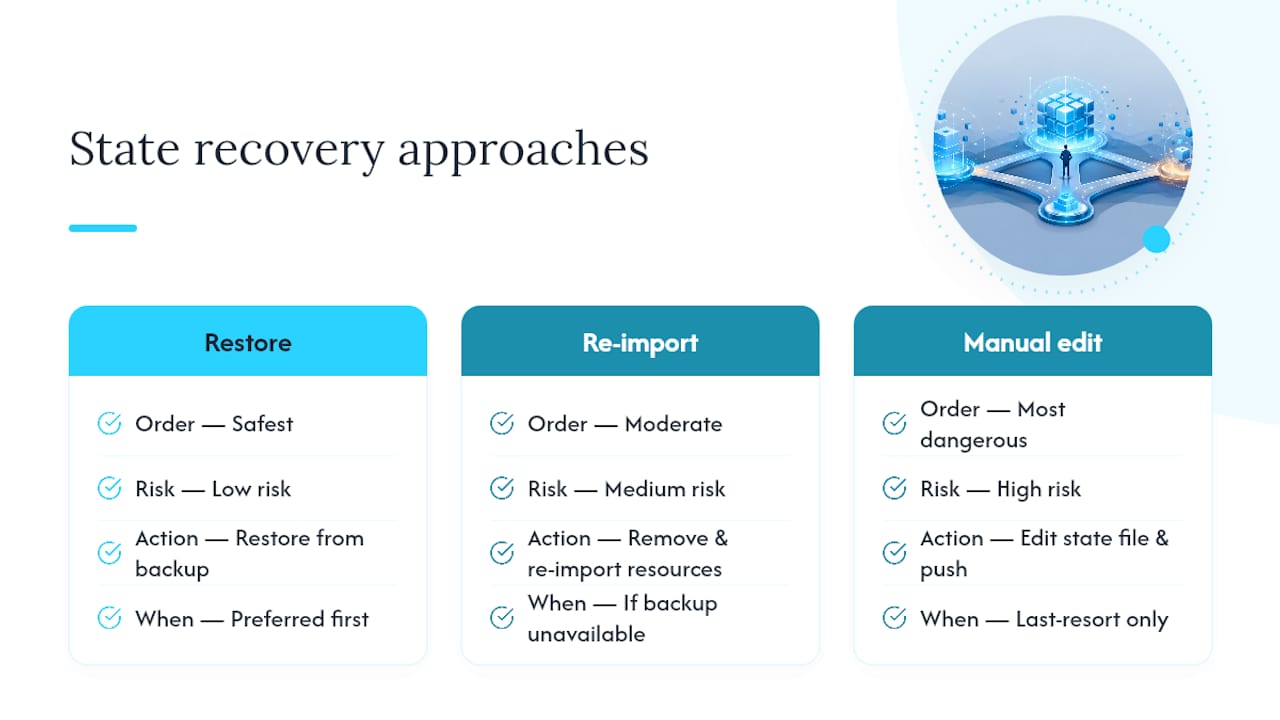
When Terraform state breaks, restore a known-good copy first, either your local terraform.tfstate.backup or a versioned object from your remote backend. If no clean backup exists, remove the broken resource with terraform state rm and re-import it. Reserve manual state push edits for genuine emergencies, and never unlock or write state without confirming no other process is touching it.
TL;DR:
- Restoring from backups or versioned remote state is fastest and least risky, but requires pre-enabled object versioning and careful validation before applying.
- Removing and re-importing affected resources minimizes disruption when only a few are broken, but requires precise manual inspection and updating configuration files.
- Manual state editing and pushing is risky and should only be a last resort after validating syntax and structure in a sandbox environment.
- Locking your backend and enabling versioning are essential preventive measures to avoid future state corruption.
- Automated tools and scripts streamline large-scale rebuilds and help reduce recovery time during incidents.
Table of Contents
- What Is Terraform State Recovery and Why Does It Matter?
- Restore Terraform State From a Backup or Versioned Backend
- How Do You Remove and Re-Import a Corrupted Resource?
- Advanced State Surgery: Pull, Edit, and Push Safely
- Tools and Strategies for Rebuilding State at Scale
- How Do You Prevent Terraform State Corruption in the First Place?
- Practical Recovery Checklist for Incident Response
- Why Terraform State Breaks More Often Than It Should
- How Devopsaitoolkit Helps You Recover Terraform State Faster
- Sources
- FAQ
What Is Terraform State Recovery and Why Does It Matter?
Terraform state recovery is the process of restoring, repairing, or rebuilding the JSON file (or remote object) that maps your configuration to real infrastructure. Terraform stores this mapping as plain JSON text, which is why a bad edit, an interrupted write, or a botched merge can corrupt it in seconds. Once that file goes bad, terraform plan starts lying to you, apply threatens to destroy resources that are perfectly healthy, and every teammate running Terraform is now flying blind.
You have three real options when this happens, and they carry very different risk profiles. HashiCorp’s own guidance narrows recovery down to three primary approaches: restore from backup, remove and re-import affected resources, or manually edit and push a corrected state file back to the backend. That third option is powerful and dangerous in equal measure, which is why it comes last on every sane list, including this one.
Before doing anything else, stop any automation that might touch state. A CI pipeline mid-apply, a teammate running terraform plan in another terminal, or a scheduled drift-detection job can all write to state while you’re trying to fix it. Recovery only works if you’re the only one holding the pen.
Restore Terraform State From a Backup or Versioned Backend
Local backends automatically keep a terraform.tfstate.backup file every time state changes, which makes it your first stop for recovering a corrupted local state. The catch: that backup file gets overwritten on the very next write, so the moment you notice something is wrong, copy it somewhere safe before you touch anything else.
Pro Tip: Rename the backup to something timestamped, like terraform.tfstate.backup.2026-03-12, before running a single other command. Practitioners who skip this step often watch their last known-good state disappear on the next accidental apply.
Here’s the sequence for a local restore:
- Copy
terraform.tfstate.backupto a timestamped file outside your working directory. - Move the corrupted
terraform.tfstateaside (don’t delete it yet). - Rename your backup copy to
terraform.tfstate. - Run
terraform state pull > current_state.jsonto capture what Terraform now sees. - Validate the JSON structure with
jq . current_state.jsonorterraform show -jsonto catch syntax errors before they cascade. - Run
terraform planand read every proposed change carefully.
If you’re on a remote backend, the process shifts to object versioning. S3, Google Cloud Storage, and Azure Blob Storage all support versioning and soft-delete features that let you pull a prior version of the state object and promote it back to current. Without that versioning turned on, your remote state is a single mutable object with no history to fall back on, which is a genuinely uncomfortable position to be in during an incident.
One catch with any restore: the version you recover might predate resources created since that snapshot. Run terraform plan immediately after restoring and expect Terraform to flag anything created after the backup point as “not in state.” That’s drift, not corruption, and it’s fixable with a targeted import rather than a full recovery cycle. Our guide on fixing state drift before it bites you covers that reconciliation step in more depth.
How Do You Remove and Re-Import a Corrupted Resource?
Sometimes only a handful of resources are actually broken, and nuking the whole state file to fix a couple of bad entries is overkill. Surgical removal and re-import is faster and lower-risk when the damage is contained.
Start by finding exactly what’s wrong:
- Run
terraform state listto see every resource Terraform currently tracks. - Run
terraform state show <resource_address>on anything suspicious to inspect its attributes. - Confirm the resource still exists in your cloud provider’s console with the ID Terraform has on record.
- If the entry is stale, mismatched, or garbled, remove it with
terraform state rm <resource_address>. This only forgets the resource in state; it does not touch the real infrastructure. - Re-import the real resource with
terraform import <resource_address> <resource_id>. - Run
terraform planand compare the diff against your actual configuration.
Import does not update your configuration files, which trips people up constantly. If your .tf code doesn’t already describe the resource’s real attributes, the next plan will show a pile of “changes” that are really just Terraform trying to force your infrastructure to match code that was never written to match reality. Update the configuration to reflect the imported resource’s actual state before you run apply, not after.
Pro Tip: Import resources one at a time when you’re dealing with anything that has dependencies, like a subnet tied to a route table. Batch imports on interdependent resources are how “quick fixes” turn into afternoon-long cleanup jobs.
Advanced State Surgery: Pull, Edit, and Push Safely
Pulling state, hand-editing the JSON, and pushing it back is the last resort, not a shortcut. It works when backup restoration and re-import both fail, or when you need to fix something structural, like a resource address that got renamed and left orphaned references behind.
Treat every step here as one-way unless you’ve archived first:
- Run
terraform state pull > state_backup_$(date +%s).jsonbefore touching anything, and store that file somewhere outside your working directory. - Validate the edited file with
jq . state_backup.jsonfor syntax andterraform show -jsonfor structural sanity before you even think about pushing. - Test the edit in a sandbox workspace with
terraform workspace new state-repair-testfirst, never directly against production. - Coordinate a downtime window with your team; a
state pushmid-deploy is how two people end up fighting over the same infrastructure. - Run
terraform planimmediately after the push and treat any unexpected diff as a reason to stop, not proceed.
HashiCorp is direct about the risk here: state push writes over the entire remote state object, and there’s no partial or transactional version of that operation. Get it wrong and you’ve corrupted a state file that was probably fine ninety seconds earlier.
Tools and Strategies for Rebuilding State at Scale
When you’re missing dozens or hundreds of resources instead of a handful, manual import stops being practical. This is where automated reconstruction earns its keep, and where it also introduces new risk if you skip verification.
- Use scripted imports (a loop over a resource ID list feeding
terraform import) when the resource type is uniform and predictable. - Reach for community bulk-import tools when you’re facing a large, mixed inventory and manual mapping would take days; expect to spend real time pruning and vetting whatever code and state they generate.
- Use
importblocks in your configuration to declare imports as code, so the process runs cleanly through CI instead of as a one-off local command. Our walkthrough on importing existing infrastructure at scale covers the block syntax in detail. - Pair
importblocks withmovedblocks when resources have been renamed or refactored, which our guide on large Terraform refactors walks through step by step. - After any bulk reconstruction, run
terraform planagainst the full set and manually spot-check a sample of resource IDs against your provider console. Automated tools are fast, not infallible.
How Do You Prevent Terraform State Corruption in the First Place?
The best recovery is the one you never have to perform. Most state disasters trace back to a small, repeatable set of failures, and nearly all of them are preventable with configuration you set up once.
- Enable state locking on your backend. DynamoDB for S3, Consul, or HCP Terraform all support locking that prevents two applies from writing simultaneously, which is the single most common cause of corruption.
- Turn on object versioning for your state storage bucket, so every write creates a recoverable prior version instead of overwriting history permanently.
- Route every apply through a single CI pipeline with concurrency controls, rather than letting engineers run
applyfrom their laptops whenever they feel like it. - Set retention and immutability policies on your state backups so a compromised credential or a ransomware event can’t wipe your recovery path along with production.
- Schedule a recovery drill every quarter: restore a prior state version in a sandbox and time how long it actually takes your team, then fix whatever gaps that drill exposes.
Pro Tip: Document your recovery time objective and recovery point objective for state specifically, not just for the infrastructure it manages. A five-minute restore from versioned S3 and a two-day manual reconstruction are both “recovery,” but only one of them survives a production incident with your job intact.
If your team keeps hitting stale locks in CI rather than corruption itself, that’s a different but related problem worth fixing separately, covered in our piece on troubleshooting Terraform state lock timeouts. And if your backend setup was improvised rather than designed, our guide on structuring state and remote backends that scale is the fix for that root cause.
Practical Recovery Checklist for Incident Response
Copy this into your incident runbook before you need it, not while you’re mid-crisis.
- Triage: Stop CI, pull current state, archive it, identify your best backup candidate, and confirm nobody else is writing to state.
- Validate: Check JSON syntax, run a
terraform plandry run, and cross-check a sample of resource IDs against your cloud provider’s console. - Recover: Follow the backup-restore, remove-and-reimport, or state-surgery path that matches your actual damage.
- Harden: Turn on versioning and locking if they weren’t already active, update the runbook with what you just learned, and schedule a drill.
Why Terraform State Breaks More Often Than It Should
Most state disasters I’ve seen trace back to the same handful of causes: concurrent applies without locking, a CI job that got killed mid-write, or someone hand-editing state because they were in a hurry. Recovery time depends entirely on which failure you’re dealing with. Restoring from a versioned backup takes minutes. Surgical remove-and-reimport takes hours. Full reconstruction from scratch can eat days. Resist the urge to skip validation just because production is down. A rushed state push under pressure is how a ten-minute incident becomes a three-day one.
— James
How Devopsaitoolkit Helps You Recover Terraform State Faster
There are tools available that provide commands and validation sequences from this playbook packaged as ready-to-run scripts, so you’re not reconstructing them from memory during an actual incident. That’s the real difference: a recovery runbook you read once versus automation scripts and prompt packs you run directly against a broken state file at 2 a.m.

The downloadable playbooks and AI-driven automation kits cover import scripting, state validation, and drift detection for Terraform, along with the broader Linux, Kubernetes, and OpenStack workflows most infrastructure teams also carry. If your team is dealing with a large-scale reconstruction or a recurring corruption pattern that a checklist alone won’t fix, the incident triage and automation tools are built for exactly that kind of complexity. Browse the current playbook and toolkit pricing and pick the one that matches the recovery scenario you’re actually facing this week.
Sources
- State | Terraform | HashiCorp Developer
- Terraform State Restoration Overview – HashiCorp Help Center
FAQ
How Do I Recover a State File in Terraform?
Restore from terraform.tfstate.backup locally or a prior versioned object on your remote backend, then run terraform plan to confirm nothing is missing before applying anything.
Is Terraform’s State File a JSON File?
Yes. Terraform stores workspace state as plain JSON, which is why tools like jq and terraform show -json work for inspecting and validating it during recovery.
What’s the Difference Between Terraform Refresh and Import?
terraform refresh (now handled through -refresh-only plans) updates existing state entries to match real infrastructure, while terraform import creates a brand-new state entry for a resource Terraform doesn’t yet track. Use refresh for drift, import for missing resources.
Why Are Some Teams Moving Away From Terraform?
Some teams cite state management complexity, vendor lock-in concerns, or a preference for provider-native infrastructure-as-code tools, but Terraform remains the dominant multi-cloud provisioning tool, and the state recovery patterns in this guide apply regardless of which direction your team leans.
What Can Replace Terraform?
No single tool has replaced Terraform’s multi-cloud provisioning model; alternatives like OpenTofu (a Terraform fork) or cloud-native tools such as AWS CloudFormation and Pulumi serve overlapping but distinct use cases, each with its own state handling approach.
Recommended
- Structuring Terraform State and Remote Backends That Scale
- Using AI to Plan a Safe Terraform State Migration
- Importing Existing Infrastructure Into Terraform at Scale
- Retiring Resources Safely With the Terraform removed Block
Get 500 Battle-Tested DevOps AI Prompts — Free
500 battle-tested, copy-paste AI prompts engineered by a senior systems engineer — every one with fill-in placeholders and safety/back-out notes. Drop your email and it's yours.
- 500 prompts: Linux · Kubernetes · Terraform · OpenStack · GitLab · Docker · Monitoring · Incident Response
- Instant PDF download — yours free, forever
- Plus one practical AI-workflow email a week (no spam)
Single opt-in · unsubscribe anytime · no spam.