
Terraform Provider Lock File: A CI-Ready Guide
Master your Terraform provider lock file to ensure consistent installations for every team member and CI runner with this essential guide.

The .terraform.lock.hcl file pins the exact provider versions and package checksums your configuration resolved, so every teammate and every CI runner installs the same providers, every time. Three commands cover most of what you need. Run terraform init to create or update the lock file after a normal configuration change. Run terraform init -upgrade when you deliberately want newer provider versions within your constraints. Run terraform providers lock when you need surgical control, like pre-populating checksums for a platform you don’t develop on, or locking a provider you pull from a private mirror.
- Commit the lock file. Treat it like
package-lock.jsonorGemfile.lock, not a scratch file. - Don’t hand-edit it. Let Terraform regenerate it; manual edits break the checksum guarantees it exists to provide.
- Review before you merge. Check the
terraform planoutput and the provider versions in the diff before approving any pull request that touches the lock file.
Pro Tip: Never approve a lock-file change based on the diff alone. Run terraform plan against it first. A version bump that looks harmless in a diff can silently change resource defaults or deprecate arguments you rely on.
Key Takeaways
Consistent Terraform deployments depend on committing .terraform.lock.hcl and using terraform providers lock deliberately for multi-platform and mirror scenarios rather than leaving version resolution to chance.
| Point | Details |
|---|---|
| Commit the lock file | Include .terraform.lock.hcl in version control so every machine and CI runner installs identical providers. |
| Separate init from upgrade | Use terraform init for routine work and terraform init -upgrade only when intentionally bumping versions. |
| Pre-populate multi-platform hashes | Run terraform providers lock -platform=<os>_<arch> for every OS/architecture your team and CI actually use. |
| Prefer origin-signed checksums | Run providers lock without mirror flags at least once to capture official signed hashes as a trust baseline. |
| Review before merging | Read the terraform plan output on every lock-file pull request instead of approving the diff alone. |
Table of Contents
- What Does the Terraform Dependency Lock File Actually Store?
- How Does Terraform Update the Lock File Over Time?
- When Should You Use Terraform Providers Lock Instead of Init?
- Why Do Lock Entries List Multiple Checksum Types?
- How Do You Lock In-House and Mirrored Providers?
- What Does a Reliable CI Workflow for the Lock File Look Like?
- How Do You Fix Common Terraform Lock File Errors?
- Quick Commands You Can Copy Right Now
- Why Lock-File Discipline Separates Calm Deployments From Chaotic Ones
- Frequently Asked Questions
- Sources
What Does the Terraform Dependency Lock File Actually Store?
The dependency lock file lives in your root working directory, next to your .tf files, and it applies to the root module only. It is not something you generate on purpose. Terraform writes it automatically the first time you run terraform init against a configuration with a required_providers block.
Three pieces of information live inside it for every provider your configuration uses. First, the exact version Terraform selected, which is a single version, not a range. Second, a human-readable record of the constraints Terraform considered when it made that selection, which helps you audit later why a particular version was chosen. Third, a set of package checksums, called hashes, that Terraform checks every future install against to confirm the downloaded package matches what was locked.
Here’s a trimmed example of what one provider block looks like inside the file:
provider "registry.terraform.io/hashicorp/aws" {
  version     = "5.42.0"
  constraints = "~> 5.40"
  hashes = [
    "h1:Xk3v9mQnR2z8bJp6WaTgYc4LdF7kNsPq1Ez0BvHtM3g=",
    "zh:04a1a...9f8c",
  ]
}| Field | What it means |
|---|---|
version | The exact provider version Terraform resolved and installed. |
constraints | The version range from required_providers that produced this selection. |
hashes | Checksums Terraform accepts for this package across the platforms it has verified. |
Per HashiCorp’s own documentation, the file exists specifically so installs stay consistent across machines and CI, and the recommendation is to include it in version control unless your team has a deliberate reason to generate it per machine. Most teams don’t have that reason. Commit it.
One scope note worth flagging early: the lock file only tracks provider dependencies. It does not pin remote module versions, so if you need exact module pinning, that has to happen through version arguments in your module blocks, not through .terraform.lock.hcl.
How Does Terraform Update the Lock File Over Time?
The lock file isn’t static. It changes every time your provider requirements change, and understanding when it changes (and when it shouldn’t) is the difference between predictable upgrades and a surprise production incident.
Running terraform init on its own is the default, low-drama path. Per the terraform init command reference, it writes the selected provider versions and checksums to the lock file as a side effect of provider installation. If the lock file already satisfies your required_providers constraints, init won’t touch it. It only updates when something changed, like a new provider added to your configuration, a constraint tightened or loosened, or a lock entry missing a platform you’re now building on.
Running terraform init -upgrade is the deliberate path. It tells Terraform to ignore the currently locked version and re-select the newest version that still satisfies your constraints, then rewrite the lock file accordingly. The provider-versioning tutorial frames this as the standard way to intentionally bump provider versions, and it explicitly recommends reviewing the resulting plan before you commit the change.
Three situations trigger lock entry changes you should recognize on sight:
- New provider added. A fresh entry appears with its own version, constraint, and hashes.
- Version changed. An existing entry’s
versionandhashesboth update, usually after-upgradeor a constraint edit. - Provider removed. The entry disappears entirely, which matters if resources in state still reference that provider.
The workflow that keeps this safe is short: make the change in a disposable workspace or branch, run terraform plan, read the output line by line, and only commit the lock file once the plan matches what you expect.
Pro Tip: Gate lock-file commits behind a pull request that includes the plan output, not just the diff. Never let an automation agent commit lock-file changes without a human reading the plan first. That one habit catches more provider-upgrade surprises than any linter.
When Should You Use Terraform Providers Lock Instead of Init?
terraform providers lock exists for the moments when the automatic behavior of terraform init isn’t enough. It adds provider selection information to the lock file without actually initializing those providers, which makes it the right tool for pre-populating checksums or working with mirrors.
The flags that matter:
-platform=<os>_<arch>— pre-populates hashes for a platform other than the one you’re running on, repeatable for multiple targets (e.g.,-platform=linux_amd64 -platform=darwin_arm64).-fs-mirror=<path>— sources providers from a local filesystem mirror instead of a registry.-net-mirror=<url>— sources providers from a network mirror endpoint.- Naming a specific provider on the command line locks only that provider, leaving the rest of the lock file untouched.
Use terraform providers lock instead of -upgrade in three recurring scenarios:
- Multi-platform CI/CD. Your laptop is
darwin_arm64, but your CI runners arelinux_amd64. Init alone won’t populate hashes for a platform you never run locally. - Mirror or private registry work. You need checksums sourced from a filesystem or network mirror rather than the public Terraform Registry.
- Surgical fixes. You want to touch one provider’s lock entry, like resolving a checksum mismatch, without triggering a full re-resolution of every provider in the configuration.
A sample command to lock every provider for three common platforms looks like this:
terraform providers lock \
  -platform=linux_amd64 \
  -platform=darwin_arm64 \
  -platform=windows_amd64
Run this locally or in a dedicated CI job whenever you add a new deployment target. It’s the cleanest way to guarantee that a developer on macOS and a runner on Linux both have valid, verified hashes in the same lock file.
Why Do Lock Entries List Multiple Checksum Types?
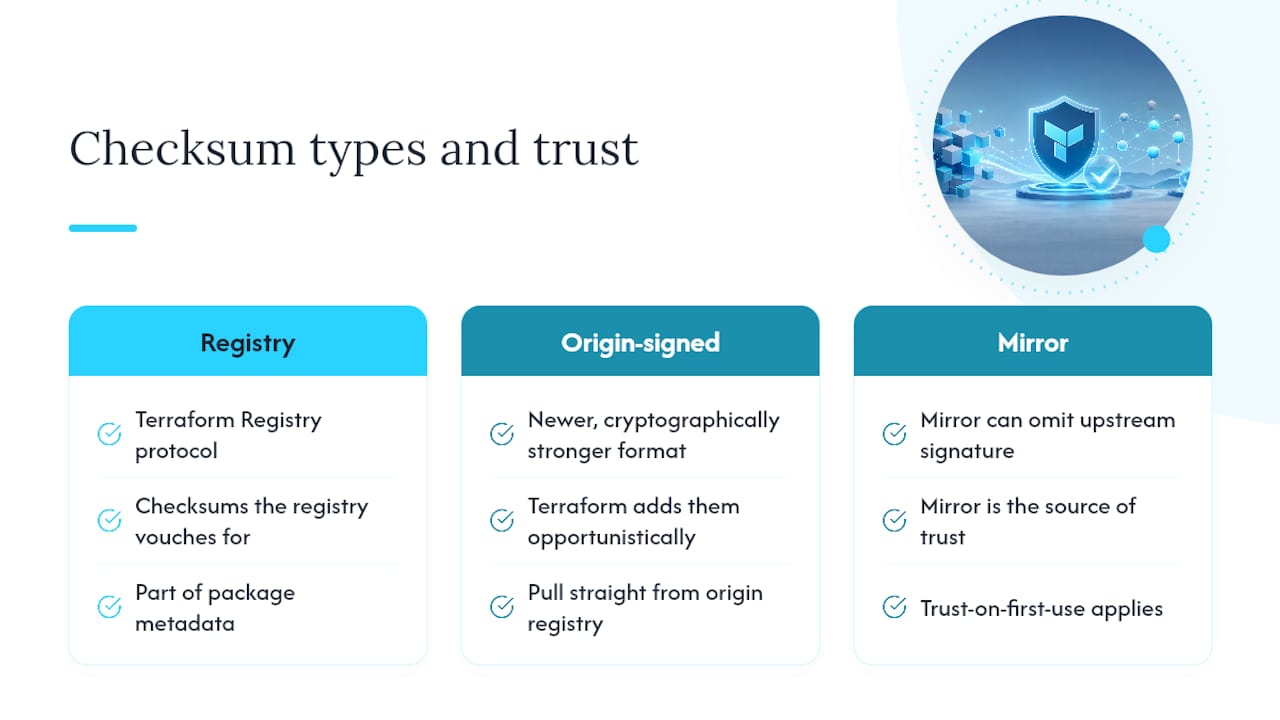
Open any lock file and you’ll notice each provider’s hashes array usually holds more than one string, often prefixed h1: or zh:. These aren’t redundant. They represent different verification schemes, and understanding the difference tells you how much you can trust a given checksum.
The zh: hashes come from the Terraform Registry protocol itself, essentially checksums the registry vouches for as part of its normal package metadata. The h1: hashes are a newer, cryptographically stronger format, and Terraform adds them opportunistically as it verifies packages against origin registries over time. The dependency lock file documentation notes that if you want origin-signed checksums populated across every platform your team uses, you should run providers lock without any mirror flags, which pulls straight from the origin registry rather than an intermediary.
This distinction has real security weight. A filesystem or network mirror can serve you a provider package without the official upstream signature attached, because the mirror itself is the source of trust at that point, not HashiCorp’s registry. That’s a workable tradeoff for internal providers you control, but it’s a meaningfully different trust model than pulling from the public registry. The trust-on-first-use concept applies directly here: the first time you lock a provider from a mirror, you’re extending trust to that mirror’s checksums going forward.
Pro Tip: When security policy requires origin-signed checksums, run terraform providers lock without -fs-mirror or -net-mirror at least once against the origin registry, even if your day-to-day workflow uses a mirror. That gives you a verified baseline to compare mirror-sourced hashes against.
How Do You Lock In-House and Mirrored Providers?
Private providers, the ones your platform team builds and distributes internally, don’t live in the public Terraform Registry, so terraform init can’t discover them the normal way. You need terraform providers lock pointed at wherever that provider actually lives.
- For a filesystem mirror, run something like
terraform providers lock -fs-mirror=/opt/terraform-mirror example.com/internal/widget-provider, naming the exact provider address from yourrequired_providersblock. - For a network mirror, the equivalent is
terraform providers lock -net-mirror=https://mirror.internal.example.com example.com/internal/widget-provider. - Remember that mirror-sourced checksums are only as trustworthy as the mirror itself. There’s no origin registry signature backing them unless you’ve deliberately synced those signed hashes into the mirror.
- If your team maintains several in-house providers, publishing them to an internal Terraform-compatible registry rather than relying purely on filesystem paths tends to simplify both locking and day-to-day installation, since it behaves like the public registry from Terraform’s perspective.
What Does a Reliable CI Workflow for the Lock File Look Like?
A lock file that only exists on one engineer’s laptop protects nobody. The workflow that actually holds up in production distributes the same verified file to every developer machine and every CI runner, and treats changes to it as first-class pull request content, not a side effect nobody reviews.
- Generate the lock file across every platform your team and CI actually run on, using
terraform providers lockwith repeated-platformflags. - Open a pull request that includes the lock-file diff alongside the configuration change that caused it.
- Let CI run
terraform initagainst the committed lock file, thenterraform plan, and fail the build on any checksum mismatch. - Require a human reviewer to read the plan output, not just approve the diff, before merging.
HashiCorp’s own lock file management guidance frames this as a choice between per-machine lock files and one shared, multi-platform file distributed to the whole team. For anything running in CI, the shared file wins almost every time, since per-machine files reintroduce the exact “works on my laptop” problem the lock file was built to eliminate.
- Assign a rotating “lock file maintainer” or a scheduled job that runs
providers lock -upgradeon a cadence, rather than letting version drift build up unnoticed. - Document which signer keys or registries your team trusts, especially if you mix public and internal providers.
- Treat a CI failure reporting “missing or corrupted provider plugins” as a signal to re-run
terraform init, not a signal to bypass the lock file.
Pro Tip: If your GitLab pipelines run Terraform, wire the lock-file check into the same review gate you use for plan approval — a mismatched checksum should block a merge exactly like a failed plan does.
How Do You Fix Common Terraform Lock File Errors?
Most lock-file errors trace back to one of three causes: a stale Terraform version, a constraint that no longer matches the locked version, or a checksum that doesn’t match what got downloaded.
- Checksum mismatch: re-run
terraform providers lockfor the affected platform, or verify the mirror you’re pulling from actually has the package you expect. - “Missing or corrupted provider plugins”: run
terraform initagain with your current Terraform CLI version; this often clears up cache corruption from an interrupted install. - Unexpected provider upgrade: check that your
required_providersconstraints and the lock file actually agree; a loose constraint like>= 5.0will let-upgradejump much further than a scoped one like~> 5.4. - Triage order: confirm your Terraform version first, then check constraints in
required_providers, then inspect thehashesentries in.terraform.lock.hcl, then re-runproviders lockwith explicit-platformflags if the problem persists. - Don’t commit a lock-file change until
terraform plansucceeds cleanly. A failing plan means the lock file isn’t ready, no matter how clean the diff looks.
If you’re dealing with imported resources whose provider dependencies got tangled during a large migration, the troubleshooting patterns in importing existing infrastructure at scale cover related state and provider mismatches worth ruling out first.
Quick Commands You Can Copy Right Now
terraform init— creates or updates the lock file for your current platform.terraform init -upgrade— refreshes providers to the newest versions matching your constraints.terraform providers lock -platform=linux_amd64 -platform=darwin_arm64— pre-populates checksums for CI and local dev in one pass.terraform providers lock -fs-mirror=/opt/mirror example.com/internal/provider— locks a single in-house provider from a local mirror.terraform providers lock -net-mirror=https://mirror.example.com example.com/internal/provider— same, from a network mirror.
Success looks like a clean lock-file diff and a terraform plan with no unexpected resource changes. If plan shows drift you didn’t cause, stop and re-check your constraints before merging.
Why Lock-File Discipline Separates Calm Deployments From Chaotic Ones
I’ve watched a single unchecked provider upgrade take down a CI pipeline for most of a day, not because the new version was broken, but because nobody had pre-populated checksums for the Linux runners the pipeline actually used. The fix that day wasn’t clever. It was running terraform providers lock with the right -platform flags before merging, the same command most teams only discover after their first incident.

Lock-file discipline is unglamorous work, which is exactly why it gets skipped until it can’t be. Every hour spent reviewing a plan before merging a lock-file change is an hour you don’t spend at 2 AM figuring out why a provider behaves differently in production than it did on your laptop. Treat the lock file as production configuration, because it is.
Frequently Asked Questions
Does the Terraform provider lock file also pin module versions? No. The dependency lock file tracks provider dependencies only. Remote module versions need to be pinned separately through version arguments in your module blocks.
Should I ever manually edit .terraform.lock.hcl?
Avoid it. Manual edits can desync the recorded checksums from what Terraform actually verifies, defeating the purpose of the file. Use terraform init, terraform init -upgrade, or terraform providers lock to make changes instead.
What’s the difference between terraform init -upgrade and terraform providers lock?
init -upgrade re-resolves every provider to the newest version matching your constraints. providers lock gives surgical control, letting you pre-populate checksums for specific platforms or lock a single provider without touching the rest.
Why does my lock file have both h1 and zh hashes for the same provider?
zh hashes come from the Terraform Registry protocol; h1 hashes are stronger cryptographic checksums Terraform adds as it verifies packages against origin registries over time. Having both is normal.
How do I keep CI and local development using the same provider versions?
Generate one lock file with terraform providers lock covering every platform your developers and CI runners use, commit it, and have CI run terraform init against that exact file rather than regenerating its own.
Sources
- Dependency Lock File (.terraform.lock.hcl) - Configuration Language | Terraform | HashiCorp Developer
- Terraform Lock File Management – HashiCorp Help Center
For teams putting these commands into a real pipeline, Devopsaitoolkit’s automation prompt library has ready-made prompts for scripting lock-file checks into CI, and the AI DevOps tools overview covers incident-response tooling built for exactly the kind of provider-upgrade failures described above. If your team is still figuring out version constraint strategy alongside lock-file management, taming the Terraform lock file and version constraints goes deeper on that pairing.
Recommended
- Taming the Terraform Lock File and Version Constraints for
- The Best Way to Learn Terraform for Real Infrastructure
- Surviving Terraform Provider Version Upgrades
- GitLab CI + Terraform: A Safe, Reviewable Infrastructure
Get 500 Battle-Tested DevOps AI Prompts — Free
500 battle-tested, copy-paste AI prompts engineered by a senior systems engineer — every one with fill-in placeholders and safety/back-out notes. Drop your email and it's yours.
- 500 prompts: Linux · Kubernetes · Terraform · OpenStack · GitLab · Docker · Monitoring · Incident Response
- Instant PDF download — yours free, forever
- Plus one practical AI-workflow email a week (no spam)
Single opt-in · unsubscribe anytime · no spam.