
Runbook vs Playbook: The Ops Team Decision Guide
Discover the key differences between a runbook and a playbook to enhance your Ops team's efficiency and incident response strategies.

A runbook is a step-by-step technical procedure for executing a discrete task; a playbook is the coordination framework that defines who does what, when to escalate, and how to communicate during an incident. Cutover explains this cleanly: runbooks are detailed technical procedures, while playbooks are higher-level coordination guides that include roles, escalation paths, and communications.
The practical split comes down to three quick rules:
- If you need a command to run, open the runbook. If you need to know who to page at 02:00, open the playbook.
- Runbooks are read by on-call engineers and automation systems. Playbooks are read by incident commanders, engineering managers, and comms leads.
- Runbooks live in code repos, wikis, or automation platforms. Playbooks live in incident management systems or Confluence.
Two quick examples: restarting a crashed application service is a runbook task (exact commands, expected output, rollback). Declaring a SEV-2 database outage is a playbook moment (who declares severity, which runbooks to trigger, when to notify customers).
Key Takeaways
A runbook fixes the technical problem; a playbook coordinates the humans. Teams that maintain both, linked and tested, resolve incidents faster than teams that rely on either alone.
| Point | Details |
|---|---|
| Core distinction | Runbooks execute discrete technical tasks; playbooks coordinate roles, escalation, and communications. |
| Start with the playbook | A one-page playbook covering severity levels, IC rotation, and comms templates reduces incident coordination time before any runbook is written. |
| Automate the repeat work | Any manual runbook step executed three or more times in a month is a candidate for scripting or SOAR automation. |
| Test both documents | Runbooks need staging validation; playbooks need tabletop exercises. A document last tested over 90 days ago should not be trusted in production. |
| Devopsaitoolkit templates | Devopsaitoolkit’s downloadable toolkits include copy-ready runbook and playbook skeletons with automation prompts for common infrastructure stacks. |
Table of Contents
- What a runbook actually is and why it matters
- What a playbook actually is and how it differs from a procedure
- Runbook vs playbook: a side-by-side comparison
- When to use a runbook, a playbook, or both
- How to create a runbook your on-call team will actually trust
- How to create a playbook that holds up during a real incident
- How runbooks and playbooks work together during an incident
- Runbook and playbook skeleton templates you can adapt today
- Purpose
- Prerequisites
- Steps
- Validation
- Rollback
- Automation hook
- Trigger
- Severity matrix
- Roles
- Initial actions
- Escalation path
- Runbook references
- Communication templates
- Post-incident
- A practical QA checklist for auditing runbooks and playbooks before production
- My honest take on where teams get this wrong
- Skip the blank page: Devopsaitoolkit has the templates ready
- Sources
What a runbook actually is and why it matters
TechTarget defines runbooks as standardized written procedures for repetitive IT processes that improve consistency and reduce downtime. The key word is standardized: a runbook removes the “what do I do next?” hesitation from a task an engineer has done ten times before.
A runbook covers one discrete, repeatable task. Its job is to be executable, not explanatory.
Common formats and storage locations:
- Plain text or Markdown files committed to a Git repo alongside the infrastructure they describe
- Executable scripts (Bash, Python, Ansible YAML) with embedded documentation
- Runbook automation platforms that trigger steps programmatically
- Wiki pages in Confluence or Notion, though these age faster without version control
Three runbook types you’ll encounter:
- Manual: An engineer reads and executes each step. Best for low-frequency, high-risk tasks like a database failover where human judgment still matters.
- Fully automated: A script or SOAR platform runs the steps on trigger. Common for log rotation, certificate renewal, or auto-scaling responses.
- Collaborative/hybrid: Automation handles the safe steps; a human approves the risky ones. A backup restore might auto-verify integrity but require a sign-off before promoting the restored data.
Who owns runbooks? On-call engineers own execution. SREs or automation owners own authoring and maintenance. The update rule is simple: any infrastructure change that affects a runbook’s commands or expected outputs requires an immediate update. A runbook that describes a server that no longer exists is worse than no runbook at all. The Devopsaitoolkit field guide on runbook types covers the full taxonomy with real-world examples worth bookmarking.
What a playbook actually is and how it differs from a procedure
A playbook is a higher-level response framework. It does not tell you which command to run; it tells you who runs it, under what conditions, and what happens if it fails. Think of it as the incident’s constitution: it defines the rules of engagement before anyone touches a keyboard.
Typical elements in a well-built playbook:
- A trigger and severity matrix (what conditions activate this playbook, and at what SEV level)
- Role assignments: Incident Commander (IC), communications lead, scribe, subject-matter experts
- Escalation rules and decision gates (e.g., “If resolution time exceeds 30 minutes, escalate to VP Engineering”)
- Communication templates for internal Slack updates and external customer status-page messages
- Links to the specific runbooks that engineers execute during the incident
Format and storage: Incident management systems like PagerDuty or Opsgenie, Confluence spaces, or dedicated runbook platforms. Playbooks need to be findable by people who are stressed and moving fast, so discoverability matters more than formatting elegance.
Typical owners: Incident managers, engineering managers, and ops leads author playbooks. They are not written by the engineer who will execute them under pressure; they are written by the person responsible for the outcome.
Playbooks are broadly used across enterprises for incident response and disaster recovery, often coordinating across legal, PR, support, and engineering simultaneously. Update cadence follows organizational change: when your team structure shifts, when SLAs change, or when a runbook referenced in the playbook gets a major revision.
Runbook vs playbook: a side-by-side comparison
TechTarget recommends treating documentation as a hierarchy: playbooks provide the strategic map, runbooks provide the turn-by-turn directions. The table below makes that hierarchy concrete across the dimensions ops teams actually care about.
| Dimension | Runbook | Playbook |
|---|---|---|
| Purpose / scope | Execute a specific, repeatable technical task | Coordinate a response across roles and systems |
| Level of detail | Exact commands, inputs, outputs, rollback steps | Decision gates, escalation rules, role assignments |
| Typical owners | On-call engineer, SRE, automation owner | Incident manager, engineering manager, ops lead |
| When to use | Routine ops, automated remediation, P1 technical fix | P1/P2 incident declaration, DR activation, security response |
| Automation potential | High — steps can be scripted or SOAR-triggered | Medium — decision logic can be encoded, but human judgment remains |
| Update cadence | On every infrastructure or config change | On org/process/SLA changes and after referenced runbooks change |
| Format / storage | Markdown in Git, YAML/Ansible, automation platform | Incident management system, Confluence/wiki |
| Audience | On-call engineer, automation system | IC, comms lead, engineering manager, exec stakeholders |
Quick decision rules:
- Use a runbook when the task is repeatable, has defined inputs and outputs, and could eventually be automated.
- Use a playbook when the situation requires cross-team coordination, severity classification, or external communication.
- Use both together when a P1 incident requires a human to declare severity (playbook) and an engineer to execute a fix (runbook).
- When a document starts growing role assignments and escalation paths, it has become a playbook, not a runbook. Split it.
Cortex notes that roughly 42% of IT leaders consider runbooks important for production readiness, which suggests a meaningful share of teams still lack them entirely. Getting both documents in place before an incident is the baseline.
When to use a runbook, a playbook, or both
Mapping the right document to the right scenario is where teams most often go wrong. Here is a practical breakdown by incident category.
Routine operations:
- Certificate renewal: runbook (scripted steps, cron-triggered or manual)
- Scheduled database backup: runbook (automated, with validation steps)
- Capacity scaling before a product launch: playbook (cross-team coordination) plus runbooks for the actual scaling commands
P1/P2 incidents:
- Service is down, cause unknown: playbook first (declare severity, assign IC, open war room), then runbooks as the diagnosis narrows
- Known failure mode (e.g., memory leak on a specific service): runbook directly, since the path is already mapped
Disaster recovery:
- Full DR activation: playbook (who declares, who coordinates with cloud provider, who handles customer comms) plus a set of runbooks for each recovery step (restore from snapshot, promote replica, validate DNS)
Security incidents:
- Ransomware detection: playbook immediately (legal, PR, and security all need coordinating), with runbooks for isolation steps (network segmentation commands, snapshot preservation)
Planned maintenance:
- Database upgrade: runbook (step-by-step with rollback), plus a lightweight playbook if the maintenance window requires customer notification
Scenario walk-through: database primary failover
- Alert fires. On-call engineer opens the database failover playbook to confirm SEV level and notify the IC.
- IC assigns roles: one engineer executes the failover runbook, another monitors replication lag.
- Engineer opens the PostgreSQL primary failover runbook: promotes replica, updates connection strings, validates application connectivity.
- Comms lead sends a status-page update using the playbook’s communication template.
- IC closes the incident; both documents get a post-incident review note.
The edge case to watch: Some teams write runbooks that include role notes (“notify DBA team before step 4”). That is a sign the runbook is absorbing playbook responsibilities. Keep them separate. A runbook that tries to coordinate humans becomes unreadable under pressure.
How to create a runbook your on-call team will actually trust
A runbook that engineers skip at 03:00 is a liability, not an asset. The goal is a document so clear and so accurate that following it feels safer than improvising. Building runbooks engineers trust at 3 AM is a discipline, not a one-time writing task.
Step-by-step creation checklist:
- Define scope. One task per runbook. “Restart the API service” is a runbook. “Fix the API” is not.
- List prerequisites. Access requirements, environment variables, tool versions, and any state the system must be in before step one.
- Write exact commands. No paraphrasing. Include the full command with flags, the expected output, and what a failure looks like.
- Document expected results. After each step, state what success looks like. Engineers should never have to guess whether a step worked.
- Add failure modes. For each step, note what can go wrong and what to do. “If the service does not start within 60 seconds, check
/var/log/app/error.logfor OOM signals.” - Write rollback steps. Every runbook that modifies state needs a rollback section. No exceptions.
- Add automation hooks. If a step is safe to automate, note the script or SOAR trigger. This is how runbooks evolve toward full automation over time.
- Test the runbook. Run it in staging. Have a second engineer follow it cold, without verbal guidance. If they get stuck, the runbook needs revision.
Pro tips:
Pro Tip: Make steps idempotent where possible. A step that can be run twice without causing harm is far safer at 03:00 than one that requires a clean state.
Pro Tip: Store runbooks in version control alongside the infrastructure they describe. A runbook in a Git repo gets reviewed in pull requests; a runbook in a wiki gets forgotten.
The Devopsaitoolkit guide to runbook automation with AI covers when and how to convert manual runbook steps into automated scripts, including AI-assisted generation from incident postmortems.
When to convert to automation: If a runbook step has been executed manually more than three times in a month without variation, it is a candidate for scripting. If the entire runbook has been executed without modification for six months, evaluate full automation.
How to create a playbook that holds up during a real incident
A playbook written after an incident is better than none, but a playbook written before one is what actually reduces mean time to resolution. The structure below works for incident response, DR, and security scenarios.
Step-by-step creation checklist:
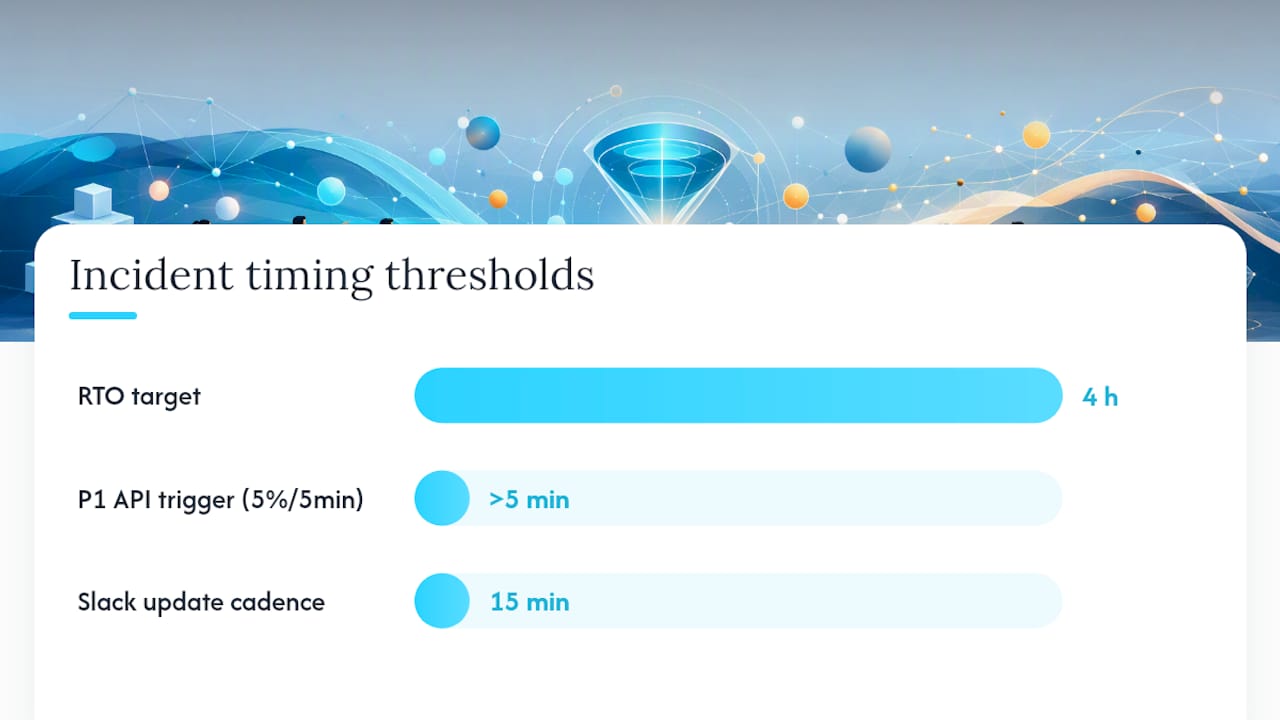
- Define incident scope and objectives. What does this playbook cover? What is the desired outcome? (e.g., “Restore primary database service within RTO of 4 hours.”)
- Map stakeholders and assign roles. Name the IC, communications lead, scribe, and SMEs. Include backup contacts.
- Build the severity and trigger matrix. Define what conditions activate this playbook. Be specific: “P1 if customer-facing API error rate exceeds 5% for more than 5 minutes.”
- Design escalation paths and decision gates. At what point does the IC escalate to VP Engineering? When does legal get looped in? Write these as explicit conditions, not judgment calls.
- Write communication templates. Internal (Slack war room update every 15 minutes) and external (status page, customer email). Templates reduce cognitive load when everyone is stressed.
- Link runbooks explicitly. Each action step in the playbook should reference the specific runbook by name and location. “Execute the PostgreSQL failover runbook (link).”
- Test with a tabletop exercise. Walk the team through a simulated incident using the playbook. Running effective tabletop exercises surfaces gaps before a real incident does.
Decision-tree example (simplified):
Alert fires →
  Is this a known failure mode?
    YES → Open the relevant runbook directly
    NO  → Open the incident response playbook
          → Assign IC
          → Classify severity
          → P1: page on-call + engineering manager
          → P2: page on-call only
          → Begin diagnosis → select runbook based on symptoms
Communication template example:
[TIME] Incident Update — [INCIDENT ID] Status: Investigating / Identified / Monitoring / Resolved Impact: [Brief customer-facing description] Current action: [What the team is doing right now] Next update: [Time of next update]
Keep the template short. Under pressure, people fill in short templates. Long ones get skipped.
How runbooks and playbooks work together during an incident
The two documents are not alternatives; they are layers. ManageEngine describes this clearly in SOC and SOAR contexts: playbooks orchestrate the incident lifecycle, while runbooks provide the specific analyst actions that can be automated or executed step by step.
Incident sequence from alert to closure:
- Alert fires → monitoring system (Prometheus, Datadog, CloudWatch) triggers a page
- Playbook opens → IC is assigned, severity is classified, war room is opened
- Diagnosis begins → playbook decision gate routes the team to the relevant runbook based on symptoms
- Runbook executes → on-call engineer follows steps, records outputs, flags deviations
- Verification → runbook’s validation steps confirm the fix; IC confirms service health
- Comms update → communications lead uses playbook template to update stakeholders
- Closure → IC closes the incident; both documents receive a post-incident note
Maintenance: who updates what and when
Runbooks need updating whenever the underlying infrastructure, configuration, or tooling changes. Playbooks need updating when team structure, SLAs, escalation contacts, or the runbooks they reference change significantly. The practical rule: after every major incident, review both documents. After every infrastructure change, update the relevant runbook immediately, then check whether any playbook references it and needs a corresponding note.
Store playbook links to runbooks as direct URLs, not as “see the runbook for X.” A broken or stale link during an incident costs minutes you cannot afford. AI-assisted runbook selection can help route alerts to the correct runbook automatically, reducing the cognitive load of that decision during high-stress moments.
Runbook and playbook skeleton templates you can adapt today
These skeletons are starting points. Annotate them for your environment and commit them to version control on day one.
Runbook skeleton
# Runbook: [Task Name]
**Version:** 1.0 | **Last tested:** [Date] | **Owner:** [Name/Team]

## Purpose
[One sentence: what this runbook does and when to use it.]

## Prerequisites
- Access: [required permissions, VPN, SSH keys]
- Tools: [versions of CLI tools, scripts required]
- State: [what must be true before step 1]

## Steps
### Step 1: [Action]
**Command:**
```bash
[exact command with flags]
Expected output: [what success looks like] Failure mode: [what to check if this fails]
Step 2: [Action]
…
Validation
[Commands or checks that confirm the task completed successfully.]
Rollback
[Exact steps to undo this runbook’s changes if needed.]
Automation hook
[Script name or SOAR trigger, if applicable.]
*Why each field matters:* The "State" prerequisite prevents engineers from running a failover on an already-failed replica. The "Failure mode" field is what separates a runbook engineers trust from one they abandon mid-incident.

### Playbook skeleton

```markdown
# Playbook: [Incident Type]
**Version:** 1.0 | **Last reviewed:** [Date] | **Owner:** [Incident Manager Name]

## Trigger
[Exact conditions that activate this playbook — alert name, threshold, or manual declaration.]

## Severity matrix
| Condition | Severity | Response time |
|---|---|---|
| [Condition A] | P1 | 15 min |
| [Condition B] | P2 | 30 min |

## Roles
- **Incident Commander:** [Name/rotation]
- **Communications lead:** [Name/rotation]
- **Scribe:** [Name/rotation]
- **SMEs:** [Teams to page]

## Initial actions
1. Declare incident in [incident management tool]
2. Open war room in [Slack channel / Teams]
3. Assign roles per the matrix above

## Escalation path
[Condition] → escalate to [Role] within [timeframe]

## Runbook references
- [Runbook name + link]
- [Runbook name + link]

## Communication templates
[Internal and external templates — see Section 7 above for format.]

## Post-incident
- Update this playbook if process gaps were found
- Review all referenced runbooks for accuracy
For a real-world applied example, the OpenStack diagnostic runbook guide shows how these skeletons translate into production-grade documentation for a specific infrastructure stack.
Devopsaitoolkit’s downloadable toolkits include copy-ready versions of both skeletons above, with automation prompts and validation scripts pre-wired for common infrastructure stacks. See the AI DevOps tools page for what’s available.
A practical QA checklist for auditing runbooks and playbooks before production
Before you rely on either document during a real incident, run it through this checklist. An ops lead should be able to complete this audit in under 20 minutes per document.
Common failure modes to catch before they catch you:
- Out-of-date commands that reference decommissioned hosts or deprecated CLI flags
- Missing rollback steps on runbooks that modify database state or DNS
- Playbooks with escalation contacts who left the company six months ago
- Runbooks stored in a wiki that requires a VPN the on-call engineer cannot access from their phone at 02:00
- Playbooks that reference “the runbook” without a direct link
Keeping runbooks in sync is an ongoing maintenance problem, not a one-time setup task. Schedule a quarterly review for playbooks and a post-change review for runbooks. After every resolved incident, check whether the runbook used needs a correction note, and whether the playbook’s decision logic held up. That feedback loop is how documentation gets better over time rather than drifting toward irrelevance.
My honest take on where teams get this wrong
Most teams I’ve seen get the ratio backwards. They write long, detailed runbooks for every conceivable failure mode, then wonder why incidents still take 45 minutes to resolve. The bottleneck is almost never “we didn’t have the right command.” It’s “nobody knew who was in charge or what to tell customers.”
Start with a one-page playbook. Seriously, one page. Define your severity levels, assign your IC rotation, write two communication templates. That alone will cut your mean time to resolution on the first real P1 you use it on. Add runbooks gradually, starting with the five failure modes that have actually woken someone up in the last 90 days. Runframe’s guidance on starting lean aligns with this: reduce coordination tax first, then invest in runbook depth.
The other failure mode is runbook over-engineering. I’ve seen runbooks with 40 steps for a service restart that should be a three-line script. When a runbook is that long, engineers stop following it and start improvising, which defeats the entire purpose. If a runbook has more than 15 steps, ask whether it covers more than one task. It probably does.
My practical rule: if a manual step appears three or more times in a month, write a runbook for it. If that runbook gets executed without modification for six months, automate it. The Devopsaitoolkit guide to drafting runbooks from resolved incidents makes that conversion process much faster with AI assistance.
One more thing: playbooks are underused at the team level and overused at the enterprise level. Small teams often have no playbook at all. Large organizations sometimes have 200-page playbooks that nobody reads. The sweet spot is a playbook short enough to scan in 90 seconds and specific enough to answer “who do I call right now?”
Skip the blank page: Devopsaitoolkit has the templates ready
Writing runbooks and playbooks from scratch is the part most teams procrastinate on. Devopsaitoolkit’s downloadable toolkits give you copy-ready runbook and playbook skeletons, AI automation prompts for common infrastructure tasks, and validation scripts pre-built for Linux, Kubernetes, OpenStack, Terraform, and GitLab environments.

The prompt packs include incident triage workflows, YAML/JSON config validators, and Bash/Python automation prompts you can drop directly into your runbooks. Every template is built for production use, not demo environments. No long-term contract, no setup fee. Browse the full toolkit catalog and check current pricing at Devopsaitoolkit, or go straight to the AI DevOps tools page to see the incident response and runbook automation tools available now.
Sources
- Runbooks vs Playbooks: A Comprehensive Overview | Cutover
- Run-book definition | TechTarget
- Runbooks vs Playbooks | Differences & How to Choose | Cortex
Recommended
- DevOps Runbook Automation with AI: 2026 Guide
- AI-Assisted Runbook Selection: Routing Alerts to the Right
- Ansible Playbook Generator Prompt — DevOps AI ToolKit
Get 500 Battle-Tested DevOps AI Prompts — Free
500 battle-tested, copy-paste AI prompts engineered by a senior systems engineer — every one with fill-in placeholders and safety/back-out notes. Drop your email and it's yours.
- 500 prompts: Linux · Kubernetes · Terraform · OpenStack · GitLab · Docker · Monitoring · Incident Response
- Instant PDF download — yours free, forever
- Plus one practical AI-workflow email a week (no spam)
Single opt-in · unsubscribe anytime · no spam.