
Rollback Strategy in DevOps: A 2026 Practical Guide
Discover the role of rollback strategy in DevOps. Enhance your deployment process, reduce recovery time, and improve project stability.

A rollback strategy in DevOps is a predefined, tested process for reverting a software deployment to a previous stable version when a release causes failures or degraded performance. The role of rollback strategy in DevOps goes well beyond emergency recovery. Teams that treat rollback as a core automated capability reduce Mean Time To Recovery by enabling one-command reversals instead of manual debugging. DORA research consistently links easy rollback to lower Change Failure Rates and shorter Lead Times. Rollback is not a sign that something went wrong with your process. It is proof that your process is mature enough to recover fast.
What is the role of rollback strategy in DevOps?
A rollback strategy defines how your team gets back to a known good state after a bad deployment. The goal is not to avoid failure entirely. The goal is to make failure recoverable in minutes, not hours.
Rollback maturity improves Change Failure Rate and Lead Time metrics directly. Teams with painful, manual rollback processes see delays pile up and confidence drop. Teams with clean, automated rollback ship more often because the cost of a bad release is low.
The standard industry term for this capability is deployment rollback, and it sits alongside blue-green deployments, canary releases, and feature flags as a first-class part of any continuous delivery pipeline. Treating it as an afterthought is the single most common mistake I see in production environments.

What are the common rollback techniques used in DevOps?
Several distinct techniques handle rollback in DevOps, and each fits a different deployment model.
- Code artifact redeployment. Store immutable build artifacts in a registry. Rollback means redeploying the previous tagged artifact. No rebuilding, no guessing.
- Blue-green deployments. Run two identical environments. Route traffic to the stable environment instantly when the new one fails. This is the cleanest rollback path available.
- Canary releases. Shift a small percentage of traffic to the new version first. If error rates spike, progressive delivery catches problems early and stops the rollout before full exposure.
- Feature flags. Toggle features off at runtime without redeploying. This is not a full rollback, but it handles many application-level failures faster than any pipeline can.
- Kubernetes rolling updates. Kubernetes keeps 10 old ReplicaSets by default for rollback. Running
kubectl rollout undoreverts to the previous revision. SettingrevisionHistoryLimitto 0 disables this entirely, which is a trap worth avoiding. - Database rollback with expand-and-contract. Schema changes are the hardest part. The expand-and-contract migration pattern adds new columns or tables before removing old ones, so the previous application version still works during the transition window.
Each technique addresses a different layer of your stack. Most production systems need more than one.
Why is automation critical in rollback strategies and how does it affect MTTR?
Manual rollback is slow, error-prone, and stressful under pressure. Automation removes all three problems.
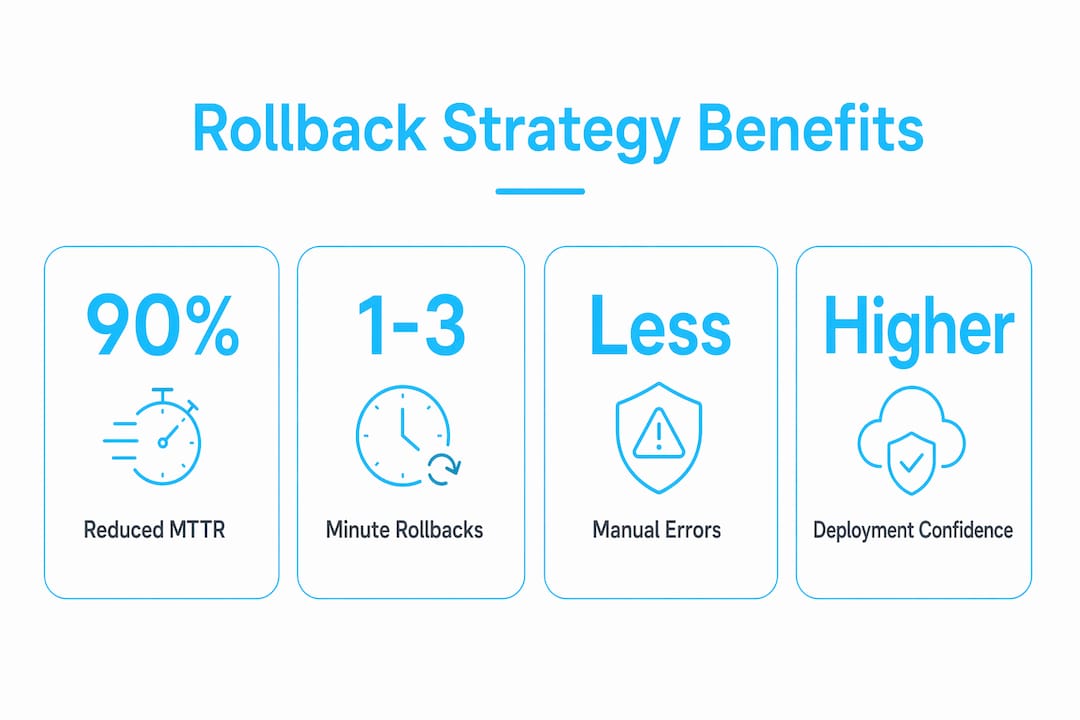
Dedicated rollback stages in CI/CD pipelines execute in 1–3 minutes. Manual recovery, by contrast, can stretch from minutes to hours depending on who is on call and what documentation exists. That gap is the difference between a minor incident and a customer-facing outage that makes the news.
Automated rollback also changes the human equation. When rollback is a one-command, low-permission operation, any on-call engineer can execute it without escalating to a senior engineer at 2 a.m. That is a meaningful operational win. It reduces stress, speeds recovery, and keeps your incident timeline clean.
Pro Tip: Test your rollback scripts in staging on a regular cadence, not just when you write them. A rollback script that has never been exercised in a realistic environment is not a rollback script. It is a hypothesis.
The most important thing automation does is make rollback boring. When rollback is boring, teams stop fearing deployments. That confidence leads to smaller batch sizes, more frequent releases, and faster feedback loops. All of those outcomes improve your DORA metrics.
How do rollback strategies integrate with progressive delivery and deployment workflows?
Progressive delivery and rollback are not separate concerns. They are two parts of the same risk management system.
Canary releases and blue-green deployments convert rollback from a code operation into a traffic-shifting operation. Instead of redeploying an old artifact, you redirect traffic back to the stable environment. This is faster, cleaner, and carries less risk of introducing new errors during the recovery itself.
Feature flags add another layer. You can disable a broken feature at runtime without touching your pipeline at all. For application-level bugs that do not require infrastructure changes, this is often the fastest path to stability. Pair feature flags with canary analysis in Argo Rollouts and you get automated promotion and rollback based on real metrics.
The table below shows how rollback fits into each delivery model.
| Delivery model | Rollback mechanism | Typical recovery time |
|---|---|---|
| Standard redeployment | Redeploy previous artifact | 5–15 minutes |
| Blue-green | Traffic switch to stable environment | Under 1 minute |
| Canary release | Stop rollout, revert traffic percentage | 1–5 minutes |
| Feature flag | Toggle flag off at runtime | Seconds |
| Kubernetes rolling update | kubectl rollout undo | 1–3 minutes |
One important balance to maintain: rollback is not always the right answer. Sometimes a roll-forward fix is faster and safer, especially when a database migration has already run. System state awareness and understanding your data lifecycle determines which path to take. Build that decision into your runbooks before an incident, not during one.
What are the common pitfalls in rollback strategy implementation?
Most rollback failures are not technical. They are process failures that show up at the worst possible moment.
- Treating rollback as a manual emergency procedure. If rollback lives only in a runbook and requires senior engineer access, it will fail when you need it most. Rollback must be a product feature of your pipeline, not a fire drill.
- Never testing rollback in staging. Rollback mechanisms fail when teams skip testing. In Kubernetes, a rollback creates a new revision, which can complicate audit logs if your team is not prepared for that behavior.
- Destructive database migrations. Dropping columns or renaming tables before the new version is stable makes rollback impossible. The expand-and-contract pattern exists specifically to prevent this.
- Weak monitoring and trigger criteria. If you do not know when to roll back, automation cannot help you. Define specific error rate thresholds, latency limits, and health check failures that trigger rollback automatically.
- Partial and mixed-version rollbacks. Rolling back only some services in a microservices architecture while others remain on the new version creates version skew. Map your service dependencies before you design your rollback scope.
Pro Tip: Run a rollback fire drill quarterly. Pick a staging environment, deploy a deliberately broken version, and time how long it takes your team to detect and revert it. The results will tell you exactly where your process breaks down.
How to design and maintain an effective rollback strategy in 2026
Building a reliable rollback capability requires deliberate design across your pipeline, your artifacts, and your team’s operating procedures.
- Define rollback triggers before you deploy. Set specific, measurable criteria: error rate above 2%, p99 latency above 500ms, health check failures for 60 seconds. Use rollback decision criteria built into your pipeline so the decision is automatic, not reactive.
- Store versioned, immutable artifacts. Every build that reaches production must be retrievable. Tag artifacts with the Git commit SHA and store them in a registry with a retention policy that covers your rollback window.
- Make rollback a one-command operation. The engineer on call should be able to run a single command with low permissions and get a clean rollback. No SSH access required, no manual steps, no senior engineer approval needed at 3 a.m.
- Test rollback paths in staging on a schedule. Not once when you write the script. Regularly, as part of your release process. Treat it like a liveness probe for your recovery capability.
- Use expand-and-contract for every database migration. Add the new column, deploy the new version, validate, then remove the old column in a follow-up migration. This keeps the previous application version compatible throughout.
- Wire rollback into your alerting. Prometheus alerts and Grafana dashboards should surface the metrics that trigger rollback. If your monitoring cannot detect a bad deployment in under two minutes, your rollback automation cannot help you.
- Track rollback frequency as a metric. How often you roll back, and how fast, tells you more about your deployment health than deployment frequency alone. Review rollback events in blameless post-mortems and use them to improve your release process.
AI-generated rollback jobs for GitLab CI can accelerate this setup significantly, especially for teams building rollback pipeline stages from scratch.
Key Takeaways
A well-designed rollback strategy is the clearest signal of operational maturity in a DevOps team, and it directly reduces Change Failure Rate, MTTR, and deployment anxiety across the board.
| Point | Details |
|---|---|
| Rollback is a maturity signal | Teams with easy rollback ship more often and recover faster from incidents. |
| Automation cuts MTTR dramatically | Dedicated pipeline rollback stages execute in 1–3 minutes versus hours for manual recovery. |
| Progressive delivery simplifies rollback | Blue-green and canary deployments convert rollback into a traffic shift, not a redeployment. |
| Database migrations need special handling | The expand-and-contract pattern keeps previous app versions compatible during rollback windows. |
| Test rollback before you need it | Untested rollback scripts fail in production; schedule regular rollback drills in staging. |
Rollback as a confidence builder, not a safety net
I have worked with teams that treated rollback as an admission of failure. They avoided it, delayed it, and sometimes shipped hotfixes instead of reverting because reverting felt like giving up. That mindset costs real money in downtime and real morale in burned-out engineers.
The teams I have seen operate well treat rollback the same way they treat a liveness probe. It is not there because they expect failure. It is there because they are serious about recovery. When rollback is easy, engineers stop treating every deployment like a high-stakes event. They ship smaller changes, get faster feedback, and fix problems before they compound.
The biggest mistake I see in 2026 is teams that have automated their deployments but not their rollbacks. They have GitLab CI pipelines that deploy in two minutes, but their rollback still involves SSHing into a server and manually swapping symlinks. That asymmetry is dangerous. Your recovery path needs to be at least as fast and reliable as your deployment path.
Blameless post-mortems matter here too. Every rollback event is data. It tells you what your monitoring missed, what your tests did not catch, and where your deployment process has gaps. Teams that review rollback events without blame get better at shipping. Teams that hide them stay stuck.
Build rollback like a product feature. Test it, version it, and measure it. Your Friday deploys will start feeling like Tuesday.
— James
Devopsaitoolkit resources for rollback automation
Cloud engineers managing production infrastructure on GitLab, Kubernetes, and Prometheus need rollback to be fast, reliable, and low-friction.
Devopsaitoolkit provides AI workflows for cloud engineers that include prompt libraries for generating rollback pipeline stages, automated rollback job templates for GitLab CI, and guides for integrating progressive delivery with rollback decision criteria. The toolkit is built for engineers who manage real production systems, not demo environments. Pricing options are available at Devopsaitoolkit pricing for teams at every stage of rollback maturity. If you are building rollback capability from scratch or hardening what you already have, the resources there will save you significant time.
FAQ
What is a rollback strategy in DevOps?
A rollback strategy is a predefined, tested process for reverting a deployment to a previous stable version when a release causes failures. It reduces downtime and is a core part of any mature continuous delivery pipeline.
How does rollback affect MTTR?
Automated rollback reduces Mean Time To Recovery by enabling one-command reversals instead of manual debugging. Dedicated pipeline rollback stages execute in 1–3 minutes, compared to manual recovery that can take hours.
What is the best rollback technique for Kubernetes?
Kubernetes supports rollback natively through kubectl rollout undo, which reverts to the previous ReplicaSet. By default, Kubernetes retains 10 old ReplicaSets for rollback, so setting revisionHistoryLimit to 0 disables this capability entirely.
Why are database rollbacks so difficult?
Database rollbacks are difficult because schema changes persist independently of application code. The expand-and-contract migration pattern solves this by delaying destructive changes until the new version is confirmed stable.
How often should teams test their rollback procedures?
Teams should test rollback procedures in staging on a regular schedule, not just when scripts are first written. Quarterly rollback drills are a practical minimum for teams running frequent production deployments.
Frequently asked questions
What is the difference between a rollback and a roll-forward?
A rollback returns the system to the previous known-good version; a roll-forward ships a new version that fixes the defect. Rollback is usually faster and lower-risk during an incident, so it should be the default reflex. Roll-forward becomes the only option once a change is irreversible — most commonly a database migration that has already destroyed or rewritten data.
Can you roll back a database migration?
Additive changes usually, destructive changes rarely. Adding a nullable column or a new table can be reversed cleanly. Dropping a column, renaming one, or backfilling with a lossy transformation cannot be, because the previous state no longer exists. This is why the expand/contract pattern matters: deploy the schema change and the code change separately, keep the old shape readable for at least one release, and only contract once the rollback window has closed.
How fast should a rollback be?
Fast enough that nobody debates whether to use it. If a rollback takes 40 minutes, engineers will try to diagnose instead — which is exactly the wrong instinct mid-incident. Treat rollback duration as a service-level objective of the deployment pipeline itself, measure it, and rehearse it on a normal day rather than discovering it during an outage.
Should rollbacks be automated?
The detection and the mechanism should be; the decision often should not. Automating the mechanics — one command or one button, no manual steps — removes the hesitation that costs minutes. Fully automatic rollback on an alert works well where the health signal is unambiguous, and badly where it is noisy, because a flapping metric can trigger a rollback loop. Start with automated detection plus a one-action rollback, and automate the trigger only once the signal has earned trust.
What makes a deploy safe to roll back?
Three properties. The previous artefact still exists and is runnable, so you are not rebuilding under pressure. The change is backward-compatible for at least one version in both directions, so old and new can run side by side during the transition. And the change is small enough that reverting it does not revert six unrelated things — which is the real argument for small, frequent deploys.
Recommended
- Automated Rollback Strategies for Safe Deploys
- AI-Generated Rollback Jobs for GitLab CI Deployments
- Knowing When to Roll Back Your Automation — DevOps AI
- Btrfs Subvolumes and Snapshots: Instant Rollback for Linux
Get 500 Battle-Tested DevOps AI Prompts — Free
500 battle-tested, copy-paste AI prompts engineered by a senior systems engineer — every one with fill-in placeholders and safety/back-out notes. Drop your email and it's yours.
- 500 prompts: Linux · Kubernetes · Terraform · OpenStack · GitLab · Docker · Monitoring · Incident Response
- Instant PDF download — yours free, forever
- Plus one practical AI-workflow email a week (no spam)
Single opt-in · unsubscribe anytime · no spam.