
Operators: Avoid Silent Failures When Running OpenStack with Ansible
Operator first guide to running OpenStack with Ansible. Choose OSA or openstack.cloud, map inventory, and avoid silent failures.

Pick your path based on scale and intent: use the All-In-One quickstart for a proof-of-concept, OpenStack-Ansible (OSA) for a production build you deploy from source, and the openstack.cloud Ansible collection when you’re automating day-to-day operations on a cloud that already exists. Read the prerequisites section next. Then jump straight to the runbook that matches your situation.
TL;DR:
- Using the All-In-One quickstart is ideal for testing upgrades or validating configurations on a single node, but it does not replicate scale or production environment complexities.
- Deploying a full OpenStack cloud from bare metal requires setting
install_methodto source for maximum control or distro for faster setup, with switching later being unsupported.- Proper host mapping with unique hostnames and IPs in
openstack_user_config.ymlis critical; misconfigurations here are the most common failure point.- Backup strategies must separate configuration files, database dumps, and storage snapshots, with validation through regular restore tests; the code-based deployment simplifies rebuilds.
- Performance tuning involves adjusting resource ratios like
cpu_allocation_ratio, properly configuring network bonding, and tuning database and message queue buffers, not just relying on defaults.
Table of Contents
- When Should You Use OpenStack-Ansible vs. the Openstack.Cloud Collection?
- What Do You Need Before You Start?
- How Do You Prepare the Ansible Deployment Host?
- How Do You Map Hosts Into the OSA Inventory?
- Which Files Actually Drive the Deployment Configuration?
- What’s the Right Order to Run the Playbooks?
- How Do You Confirm OpenStack Is Actually Working?
- What Do Experienced Operators Check First When Something Breaks?
- How Do You Back Up and Recover an OpenStack Environment Deployed With Ansible?
- How Do You Upgrade or Patch an OpenStack Deployment Built With Ansible?
- How Do You Tune Performance for OpenStack Services Deployed via Ansible?
- What Security Practices Matter Most in an OpenStack-Ansible Deployment?
- What Hardware Do You Actually Need for an OpenStack Deployment?
- How Should You Handle Networking and Storage in Production?
- Author Perspective: OSA vs. Collection-Based Automation
- How Devops AI Toolkit Turns This Guide Into a Repeatable Workflow
- Key Documentation and Bookmarks
- Sources
- FAQ
When Should You Use OpenStack-Ansible vs. the Openstack.Cloud Collection?
These are two different jobs wearing the same Ansible badge. OSA builds the cloud itself. It installs Keystone, Nova, Neutron, Cinder, and every other service from source across your control plane, compute, and storage nodes. The openstack.cloud collection assumes the cloud already exists and gives you Ansible modules (openstack.cloud.server, openstack.cloud.network, and similar) to create instances, manage projects, and script API-driven operations against it.
The AIO quickstart is the fast lane through OSA: a single node, a few hours, and a working cloud for testing upgrades or validating a playbook change before it touches production.
Match the tool to the job:
- Standing up a new cloud from bare metal, multi-AZ, or Ceph-backed storage: OSA, full deployment guide.
- Kicking the tires on a config change or new OpenStack release: AIO quickstart.
- Managing projects, quotas, or instances on a cloud that’s already running: openstack.cloud collection.
- Team has strong Python/SDK skills but limited patience for source builds: lean collection first, OSA later if scale demands it.
What Do You Need Before You Start?
OSA and the openstack.cloud collection have overlapping but distinct requirements. Both assume a Linux control host, but the version floors matter more than most guides admit.
- Operating system: Ubuntu LTS releases are the best-tested target for OSA control and compute nodes; check the current deployment guide for the exact supported release before you provision hardware.
- Ansible: run a current ansible-core release matched to the OSA branch you’re deploying. Mismatched versions are a top cause of playbook failures that look like bugs but are really compatibility gaps.
- Python and openstacksdk: the openstack.cloud collection needs Python 3.6 or newer and openstacksdk 1.0.0 or newer on whichever host executes the modules, per Ansible’s collection documentation.
- Locale and SSH: set a consistent
en_US.UTF-8(or your standard) locale across every target host, and confirm passwordless SSH from the deployment host before you touch inventory.
Pro Tip: Run ansible --version and python3 -c "import openstacksdk" on your deployment host before writing a single line of inventory. Half the “playbook won’t run” tickets I’ve seen trace back to a stale Python interpreter or a missing SDK.
How Do You Prepare the Ansible Deployment Host?
Your deployment host is the brain of the operation, and its setup diverges hard depending on which path you picked.
- Clone or install. For OSA, clone the openstack-ansible repository and run its bootstrap script. For collection-based automation, run
ansible-galaxy collection install openstack.cloudinstead. - Install openstacksdk. Confirm it’s on the same Python interpreter Ansible actually uses, not just whatever
python3resolves to in your shell. This is the single most common silent failure point. - Configure clouds.yaml. Place it at
/etc/openstack/clouds.yamlor~/.config/openstack/clouds.yamlso openstacksdk can discover it automatically, as Ansible’s own collection docs specify. - Vault your secrets. For OSA, use the
osa_ops.encrypt_secretsrole or Ansible Vault directly onuser_secrets.yml. Never commit plaintext credentials to your deployment repo, even a private one.
Pro Tip: Keep a second, minimal clouds.yaml scoped to a read-only account for verification playbooks. It saves you from accidentally running a destructive module with admin credentials during a smoke test.
How Do You Map Hosts Into the OSA Inventory?
openstack_user_config.yml is where most first-time OSA deployments quietly fail, and it usually isn’t a syntax error. It’s a mismatch between what you think you assigned and what the host groups actually contain.
You’re mapping physical or virtual hosts into functional groups: deployment host, shared-infra (control plane services), compute, storage, and network-gateway. A single host can belong to multiple groups in smaller deployments, but every hostname and IP pair needs to be unique and consistent across every group it appears in.
- Double-check that hostnames in
openstack_user_config.ymlresolve to the exact IPs you expect onbr-mgmt, the management bridge OSA uses for internal communication. - Avoid duplicate IPs across groups. A host listed under both compute and storage with mismatched IP entries produces failures that look like network problems but are really inventory problems.
- Bond your NICs and enable VLAN offloading on production hardware. The OSA overview docs recommend this specifically for control-plane and network-gateway roles carrying east-west traffic.
- Run
openstack-ansible inventory-manage.pyafter editing to catch mapping errors before you run a single deployment playbook.
Which Files Actually Drive the Deployment Configuration?
Three files carry almost all the weight in an OSA deployment: openstack_user_config.yml (your infrastructure map), user_variables.yml (service-level overrides, like enabling Ceph or setting Neutron plugin options), and user_secrets.yml (credentials, ideally vault-encrypted).
The decision that quietly shapes everything downstream is install_method. Choosing source builds every OpenStack service from Git, which gives you granular control over exact commit points and patches, at the cost of longer initial deploy times. Choosing distro installs from OS packages instead, faster to stand up but tied to whatever version your distribution ships.
install_method: sourcesuits teams that need to pin specific patches or track upstream closely.install_method: distrosuits teams that want faster deploys and are fine tracking distro release cadence.- This setting is fixed at initial deployment. The OSA configuration docs are explicit that switching later isn’t supported.
Pro Tip: Decide on install_method in a design review, not during a late-night deployment. Rebuilding a cloud because you picked wrong is a far worse afternoon than the meeting would have cost you.
Role-specific tuning (Nova CPU allocation ratios, Neutron ML2 drivers) lives in individual role repositories under openstack-ansible/playbooks/roles. Check each role’s own README before assuming a variable exists globally.
What’s the Right Order to Run the Playbooks?
OSA’s playbooks run in a deliberate sequence, and skipping ahead is the fastest way to end up with a half-built cloud that fails in confusing ways.
- Setup hosts with
openstack-ansible setup-hosts.yml, which provisions containers and base networking. - Setup infrastructure with
setup-infrastructure.yml, bringing up databases, message queues, and shared services. - Setup OpenStack with
setup-openstack.yml, which deploys Keystone, Nova, Neutron, Cinder, and the rest. - For a PoC, skip the manual sequence entirely and run the AIO quickstart script, which chains all three automatically on one node.
- Add
-vvvfor verbose output when a play fails and the default error message doesn’t tell you enough.
For production changes, run playbooks with --limit and --serial to roll updates through compute nodes a batch at a time instead of all at once, and use delegate_to where a task needs to execute against a controller rather than the target host. This keeps a bad config change from taking down your entire compute fleet in one pass.
How Do You Confirm OpenStack Is Actually Working?
A deployment that finishes without errors isn’t the same as a cloud that works. Run a real smoke test before you call it done.
- Authenticate against Keystone with
openstack token issueand confirm you get a valid token back, not a connection timeout. - Run
openstack catalog listandopenstack service listto confirm every expected service registered correctly. - Boot a small test instance, attach it to a network, and confirm it gets an IP and responds to ping.
- Attach a Cinder volume to that instance and verify read/write works before you trust the storage backend.
- If you’re running Ceph, check
ceph healthfor aHEALTH_OKstatus, and check RabbitMQ queue depths for signs of a stuck service.
Logs for individual services live under /var/log/[service-name] on their respective containers or hosts. A failed smoke test almost always points you there first.
What Do Experienced Operators Check First When Something Breaks?
Most OSA failures I’ve walked through trace back to one of two things: a host mapping problem or an execution environment mismatch. Neither shows up as an obvious error message, which is exactly why they eat afternoons.
- Validate host group mappings in
openstack_user_config.ymlbefore running any playbook, not after the first failure. OSA’s own network group documentation confirms that mismatchedbr-mgmtIPs are a frequent, entirely preventable cause of silent service initialization failures. - Confirm openstacksdk lives in the same Python environment Ansible actually invokes. A
pip installinto the wrong virtualenv is invisible until a module fails with an unhelpful import error. - Make changes incrementally. Deploy one host group, verify it, then move to the next, rather than pushing a full inventory change across fifty nodes at once.
- Build a small smoke-test playbook you run after every change. Manual verification doesn’t scale past the third deployment.
Pro Tip: When a play fails with a vague Python traceback, run the same module manually with ansible -m openstack.cloud.server -a "..." target_host -vvv outside the playbook. Isolating the module call from the playbook logic cuts debugging time dramatically.
How Do You Back Up and Recover an OpenStack Environment Deployed With Ansible?
Backup strategy in an OSA environment splits into three layers, and treating them as one backup job is how recoveries fail.
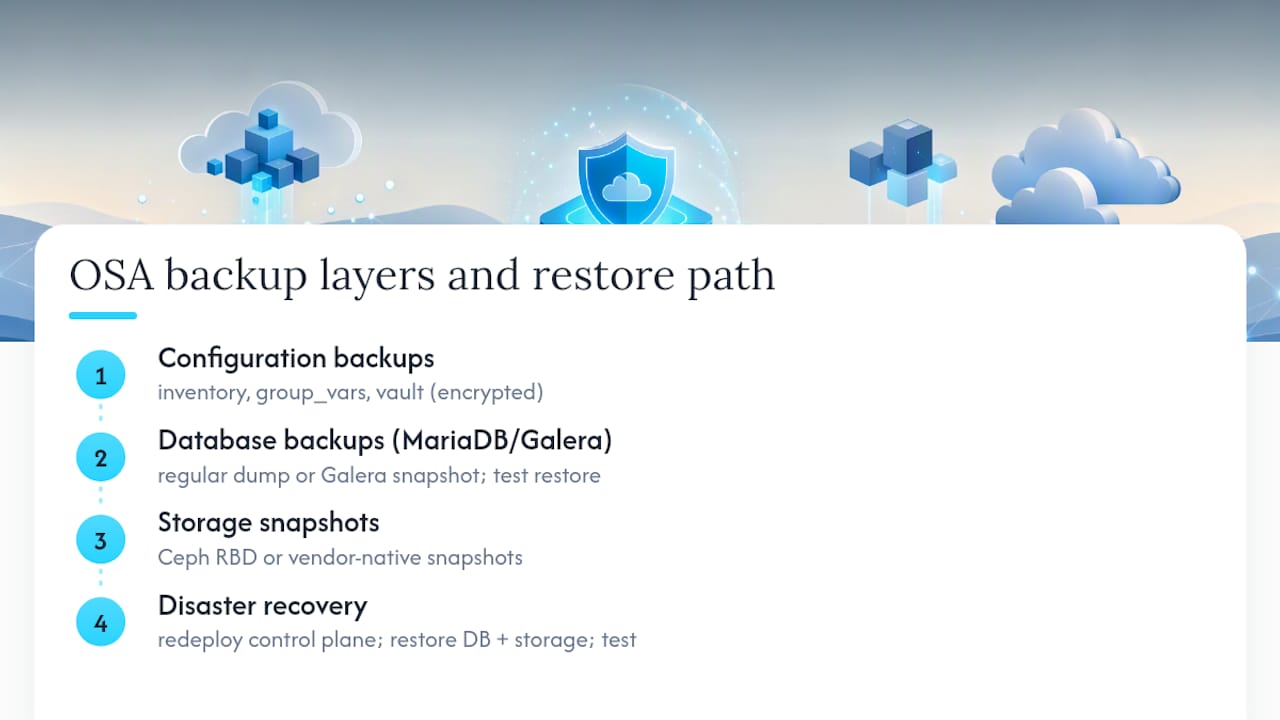
Configuration backups cover your /etc/openstack_deploy directory, including openstack_user_config.yml, user_variables.yml, and the vault-encrypted user_secrets.yml. Store these in version control (encrypted, never plaintext) so you can rebuild your deployment host’s exact state after a disaster, not just guess at it.
Database backups matter more than almost anything else in the stack. Keystone, Nova, Neutron, and Cinder all keep their state in MariaDB (via Galera in most OSA deployments). A regular mysqldump or Galera-aware snapshot, taken on a schedule and tested with an actual restore, is non-negotiable. A backup you’ve never restored is a hope, not a strategy.
Storage backups depend on your backend. If you’re running Ceph, RBD snapshots give you near-instant, low-overhead recovery points for volumes and images. If you’re on a simpler backend, look at your storage vendor’s native snapshot tooling instead.
For actual disaster recovery, OSA’s source-based deployment model works in your favor: because the entire build is codified in your configuration files, you can redeploy the control plane from scratch onto new hardware and restore database and storage backups into it, rather than restoring a full-server image. Practice this restore path in a staging environment at least once. The first time you need it for real is a bad time to discover a gap in your process.
How Do You Upgrade or Patch an OpenStack Deployment Built With Ansible?
OSA upgrades follow the same principle as the initial deployment: incremental, host-group by host-group, verified at each step rather than pushed everywhere at once.
Minor version upgrades within a release generally involve pulling updated code (or updated distro packages, depending on your install_method) and rerunning the relevant playbooks with --limit scoped to a small batch of hosts first. Watch service logs during that first batch before expanding to the rest of the fleet. A patch that breaks Nova on five compute nodes is a bad afternoon; the same patch breaking it on five hundred is a much worse one.
Major release upgrades (moving between OpenStack release names) are more involved and typically require following the specific upgrade guide for that release pair, since service APIs and database schemas can shift between versions. Read the release notes for every service you run, not just the headline OpenStack release notes. Neutron and Cinder driver changes in particular have a habit of hiding in the fine print.
A few habits reduce upgrade pain considerably:
- Snapshot or back up your databases immediately before any upgrade run, even a minor one.
- Upgrade a staging environment that mirrors production topology first, and run your smoke tests against it.
- Keep
install_methodconsistency in mind: source-based deployments give you more control over exactly which commit you’re upgrading to, which matters if you need to bisect a regression. - Stagger compute node upgrades using
--serialso a bad rollout only affects a fraction of your capacity at any moment.
Patching security vulnerabilities follows the same rolling pattern. Treat it with the same discipline as a feature upgrade, not as a rushed exception, even under CVE pressure.
How Do You Tune Performance for OpenStack Services Deployed via Ansible?
Performance problems in an OSA-deployed cloud usually trace back to configuration defaults that were never revisited after the initial build, not to Ansible itself.
Nova and CPU allocation. The default CPU and RAM allocation ratios in nova.conf (managed through user_variables.yml overrides) are conservative. If your workloads are lighter than the defaults assume, raising the cpu_allocation_ratio gets you more instances per compute node, but push it too far and you’ll see noisy-neighbor problems under load. Adjust incrementally and monitor.
Database and message queue tuning. Galera cluster performance and RabbitMQ queue behavior are frequent bottlenecks at scale. Control-plane hosts running these services need memory headroom specifically for database buffer pools, not just generic capacity. Undersized control-plane RAM shows up as slow API responses across every OpenStack service, since almost everything depends on Keystone and the shared database tier responding quickly.
Neutron and network throughput. Enabling VLAN offloading and confirming your NIC bonding configuration matches what OSA expects in openstack_user_config.yml avoids a surprising amount of throughput loss. A misconfigured bond can silently cap network performance well below what the hardware supports.
Ansible execution performance itself. Large deployments benefit from tuning Ansible’s own settings: raising forks for more parallel host processing, and using mitogen or pipelining where your environment supports it, cuts playbook run time meaningfully on bigger inventories.
Baseline your environment before tuning anything. Changing five variables at once makes it impossible to know which change actually helped, or which one quietly made something worse.
What Security Practices Matter Most in an OpenStack-Ansible Deployment?
Security in an OSA environment starts before the first playbook runs, with how you handle secrets, and continues through how you segment network traffic.
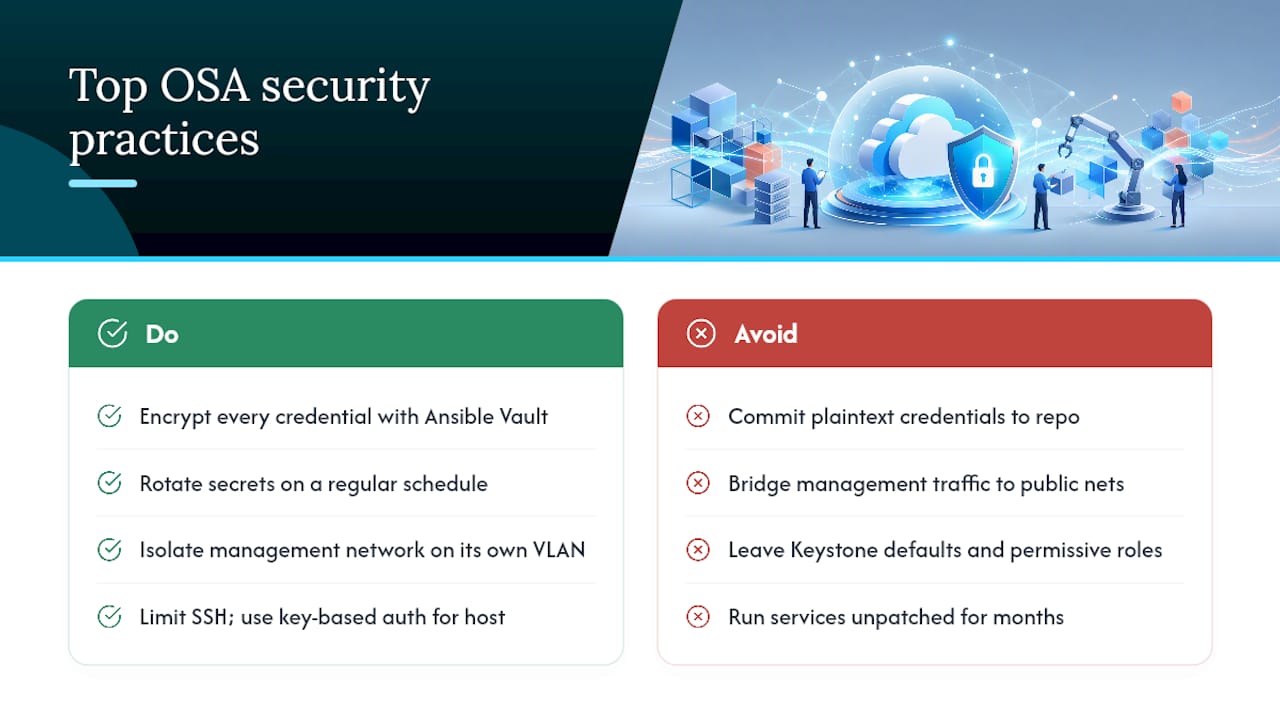
Secrets management is the first line of defense. Every credential in user_secrets.yml should be encrypted with Ansible Vault, never committed in plaintext, and rotated on a schedule rather than left static for the life of the deployment. Use the osa_ops.encrypt_secrets role to generate and encrypt secrets consistently rather than hand-editing them.
Network segmentation deserves real attention. OSA’s management network (br-mgmt) carries sensitive internal traffic between services and should never be reachable from your public-facing networks. Keep it isolated on its own VLAN, and confirm your bonded NIC configuration doesn’t accidentally bridge management traffic onto a network with broader access.
Access control for the deployment host itself matters as much as anything inside OpenStack. That host holds the keys, literally, to every service in your cloud. Limit SSH access to it, use key-based authentication exclusively, and treat it with the same rigor you’d apply to a domain controller, because functionally, it plays a similar role.
Keystone hardening is worth a dedicated pass: enforce strong password policies, set reasonable token expiration times, and audit which service accounts have admin-level roles. Default configurations tend to be permissive in ways that make sense for a lab environment and not for production.
Patch discipline closes the loop. Security patches for OpenStack services and their dependencies should follow the same staged rollout described in the upgrade section above. A cloud that’s otherwise well-configured but running unpatched services for months has a security posture worse than its architecture suggests.
What Hardware Do You Actually Need for an OpenStack Deployment?
Hardware sizing for OSA splits cleanly along role lines, and the control plane’s needs are easy to underestimate.
Control-plane (shared-infra) hosts run the databases, message queues, and API services that everything else depends on. These need meaningful RAM headroom for Galera and RabbitMQ, and fast storage (SSD, ideally) for database performance, since the OSA overview documentation specifically calls out control-plane sizing for database and telemetry workloads as a common underestimation point.
Compute nodes scale with your workload rather than a fixed formula: more RAM and CPU cores directly translate to more instance capacity, and your cpu_allocation_ratio setting determines how aggressively you oversubscribe those cores. Storage nodes, particularly if you’re running Ceph, need dedicated disks (not partitions shared with the OS) and benefit heavily from separating OSD journal or WAL/DB devices onto fast media when budget allows.
Network-gateway hosts carrying north-south traffic need reliable, well-bonded NICs more than raw CPU power, since their job is throughput and availability rather than compute density.
A small PoC via the AIO quickstart can run comfortably on a single server with adequate specifications. Production sizing is a different conversation entirely, and it’s worth treating as its own planning exercise rather than scaling a lab machine’s specs by guesswork.
How Should You Handle Networking and Storage in Production?
Networking mistakes in OSA deployments are almost always about the management network, br-mgmt, being under-provisioned or improperly bonded. Production deployments should use bonded NICs with VLAN offloading enabled, isolating management, tunnel, and storage traffic onto separate VLANs rather than letting everything share a flat network.
Storage integration typically means Ceph in serious OSA deployments, since OSA has mature playbooks for wiring Cinder, Glance, and Nova to a Ceph backend. Dedicate physical disks to Ceph OSDs rather than sharing them with OS or other workloads, and if budget allows, separate the OSD journal or WAL/DB onto faster storage media to reduce write latency under load.
Readers coming from container-based deployment models should note that these networking and storage patterns look different in Kolla-Ansible, where services run in containers rather than from source. Worth a look if you’re evaluating both approaches before committing to one.
Author Perspective: OSA vs. Collection-Based Automation
Standardize on OSA when your team owns the full lifecycle of the cloud itself. Keep Ansible-driven API automation with the openstack.cloud collection when you’re managing workloads on infrastructure someone else built. Trying to make one tool do both jobs is where teams overcomplicate their own tooling.
— James
How Devops AI Toolkit Turns This Guide Into a Repeatable Workflow
Reading a deployment guide once gets you through a PoC. Running OSA reliably across dozens of production changes a year needs something more durable than a bookmarked docs page. That’s the gap filled by prompt packs and playbooks built specifically around the inventory mapping, install_method decisions, and smoke-test patterns covered above, so you’re not reconstructing this workflow from scratch on every engagement.

The OpenStack AI prompt pack gives you copy-paste starting points for the exact troubleshooting scenarios that eat the most time: host group mapping errors, openstacksdk mismatches, and upgrade validation checks. If you’re also managing the underlying Linux hosts, the Linux admin prompt library covers the OS-level prep this article assumes you’ve already handled. For teams that would rather hand the whole deployment or audit off to someone who’s done it before, Devopsaitoolkit’s consulting and infrastructure audit services start with a review of your current OSA or collection setup and a concrete list of what to fix first. Start there if you want a second set of eyes on your inventory before your next production run.
Key Documentation and Bookmarks
- OpenStack-Ansible Deployment Guide for the canonical deployment workflow.
- Openstack.Cloud collection docs for module reference and SDK requirements.
- Rolling deploys with delegate_to and serial for safer playbook execution patterns.
Sources
- openstack/openstack-ansible
- OpenStack-Ansible Deployment Guide
- Openstack.Cloud — Ansible Community Documentation
FAQ
Does OpenStack Still Exist as an Active Project?
Yes. OpenStack remains an actively maintained open-source project with regular releases, and OSA is one of its official deployment methods, tracking new releases as they ship.
Does Ansible Work Over SSH for OpenStack Deployments?
Yes, Ansible’s default transport is SSH, and OSA relies on passwordless SSH access from the deployment host to every target host before you can run playbooks successfully.
Is Ansible Better Than Terraform for OpenStack?
They solve different problems: Terraform provisions and tracks infrastructure state, while Ansible configures and deploys services onto hosts. Many teams use Terraform to provision the underlying servers and Ansible (via OSA or the openstack.cloud collection) to deploy or manage OpenStack on top of them.
Is OpenStack Hard to Learn?
OpenStack has a real learning curve because it’s a collection of interdependent services rather than a single product, but starting with the AIO quickstart and the openstack.cloud collection for day-to-day tasks makes the learning curve considerably more manageable than jumping straight into a multi-node production build.
Can I Switch Install Methods After Deploying OpenStack With OSA?
No. The install_method setting (source or distro) is fixed at initial deployment, according to OSA’s own configuration documentation, so decide on it before your first production run rather than after.
Recommended
- Deploying OpenStack with Kolla-Ansible: A Practical Guide
- Troubleshooting Nova Compute Failures in OpenStack
- Automating OpenStack with the Python SDK and CLI
- Ansible Error: ‘Timeout when waiting for …’ (wait_for)
Get 500 Battle-Tested DevOps AI Prompts — Free
500 battle-tested, copy-paste AI prompts engineered by a senior systems engineer — every one with fill-in placeholders and safety/back-out notes. Drop your email and it's yours.
- 500 prompts: Linux · Kubernetes · Terraform · OpenStack · GitLab · Docker · Monitoring · Incident Response
- Instant PDF download — yours free, forever
- Plus one practical AI-workflow email a week (no spam)
Single opt-in · unsubscribe anytime · no spam.