
Four Traffic Planes for OpenStack Network Design With OVN First
OVN First OpenStack network design for production. Practical topology: four traffic planes, 2–3 NICs per compute, MTU, HA, and troubleshooting.
Build your OpenStack network design around a Layer-3 core paired with OVN as the mechanism driver, with VLANs segregating management, overlay, storage, and provider traffic. A minimum production topology needs four distinct roles (controller, database, compute, gateway) and 2 to 3 NICs per compute node. You get real traffic isolation, easier scaling past a single broadcast domain, and simpler day-two operations than OVS-agent setups. The trade-off is a learning curve around OVN’s northbound and southbound databases and disciplined MTU and bonding planning up front.
TL;DR:
- Proper separation of management, overlay, storage, and external traffic using dedicated VLANs and bonded interfaces is essential for security and performance.
- Deploying three or more controller and database nodes with clustered databases is crucial for high availability, while scaling compute and gateway nodes according to workload demands.
- Calibrating MTU to jumbo frames across entire physical paths prevents fragmentation issues that silently degrade network performance.
- Transitioning to OVN from OVS agents reduces node overhead and shifts focus to logical topology, but requires familiarization with databases and logical flow management.
- Implementing pre-flight checks and maintaining a known-good database state accelerates troubleshooting and reduces downtime during incidents.
Table of Contents
- What Are the Core Traffic Planes in OpenStack Network Design?
- How Does OVN Change Mechanism Driver Design?
- What Does a Production-Ready Node Topology Look Like?
- Provider Networks vs Tenant Networks: Which Overlay Fits?
- How Do You Tune MTU, QoS, and Throughput in Production?
- How Should You Plan for High Availability and Failure Domains?
- What Should Your OpenStack Network Troubleshooting Checklist Cover?
- Where Should Your Team Start This Week?
- The Gap Between OVN’s Reputation and Its Real Payoff
- Get Production-Ready Faster With DevOps AI ToolKit
- Sources
What Are the Core Traffic Planes in OpenStack Network Design?
Every production OpenStack cluster moves four distinct kinds of traffic, and treating them as one flat network is the single most common design mistake I see. Management traffic carries API calls, RabbitMQ messages, and database replication between controllers. Overlay (tunnel) traffic carries the encapsulated packets between compute nodes for tenant networks. Storage traffic handles Cinder and Ceph replication, which is bandwidth-hungry and latency-sensitive. Provider/external traffic connects instances to the outside world through physical VLANs.
Each plane is its own security and performance domain. Mixing storage replication with API traffic on the same interface means a Ceph rebalance can starve your Keystone token validation, and that’s the kind of outage that looks like “everything is slow” until you dig into sar output at 2 AM.
The OpenStack Ansible reference architecture segments these planes using dedicated VLANs across bonded interfaces. A typical mapping looks like this:
- Management VLAN: bonded pair (LACP), 1GbE minimum, 10GbE preferred for larger clusters
- Overlay/tunnel VLAN: bonded pair, 10GbE minimum, sized to tenant east-west volume
- Storage VLAN: dedicated bond, ideally isolated switches or at minimum isolated VLANs with jumbo frames
- Provider VLAN(s): trunked to top-of-rack switches, one or more per external network
Controllers typically need 2 NICs (management plus a redundant path). Compute nodes need at least 2 to 3: one for management/overlay, one for provider bridge mappings, sometimes a third dedicated to storage. Gateway nodes carrying floating IP traffic need their own provider-facing NIC separate from overlay traffic.
How Does OVN Change Mechanism Driver Design?
ML2 is the plugin framework that lets Neutron delegate the actual work of programming switches to a mechanism driver. For years, that meant an OVS agent running on every compute node, polling for port events and pushing flow rules through ovs-vsctl. It worked, but it meant a Python agent per hypervisor constantly reconciling state, and debugging it meant chasing agent logs across every node.
OVN replaces that model with a centralized logical abstraction. Instead of per-node agents, ovn-northd translates your logical network definitions into southbound flows that ovn-controller on each hypervisor consumes directly through Open vSwitch. Neutron talks to a northbound database (NB), OVN translates that into a southbound database (SB), and compute nodes pull from SB. Red Hat’s OpenStack networking documentation confirms ML2/OVN is now the default mechanism driver in modern RHOSP deployments, largely because it removes that agent layer and hands you native DHCP/metadata handling plus port-group mappings for security groups out of the box.
The operational shift is real. Instead of grepping neutron-openvswitch-agent logs, you’re running ovn-nbctl show and ovn-sbctl show to inspect logical topology, and checking whether ovn-controller has registered a compute chassis after a node join.
- OVN eliminates per-node Python agents for most workflows
- DHCP and metadata are handled natively rather than through separate agent processes
- Security groups map to OVN port groups instead of iptables chains per port
Pro Tip: Before you migrate a production cluster to OVN, run ovn-sbctl show against a test environment first, so the northbound/southbound query syntax is muscle memory before you need it during an incident.
If you’re running a legacy OVS-agent deployment today, plan the migration in stages rather than a big-bang cutover. Our OVN migration guide walks through the sequencing that avoids stranding tenant networks mid-cutover.
What Does a Production-Ready Node Topology Look Like?
The Neutron OVN reference architecture defines four distinct node roles, and conflating them is how small deployments turn into unmanageable ones the moment they need to scale.
- Controller nodes run
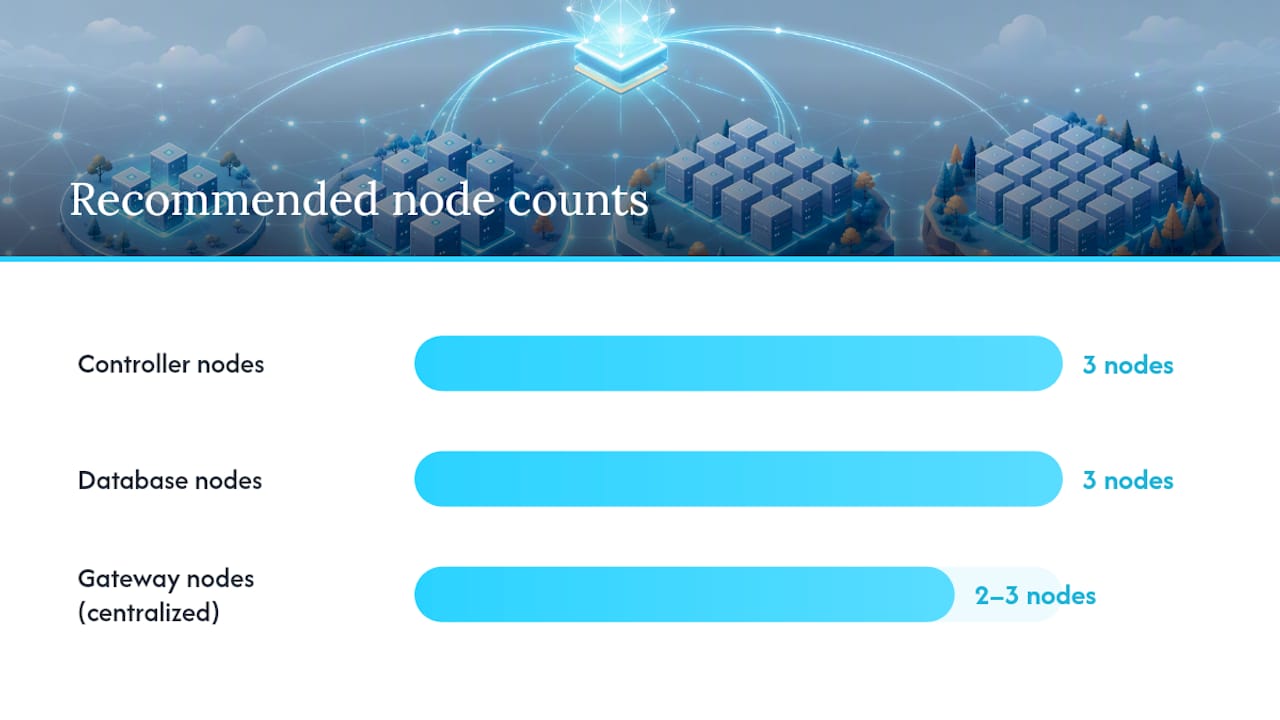
neutron-server,ovn-northd, Keystone, and the rest of the API layer. Plan for at least three in production to support quorum for clustered services; a single controller is fine for a proof of concept, never for anything customers touch. - Database nodes host the OVN northbound and southbound databases (often colocated with controllers in smaller deployments, split out separately once northbound query load grows). Three nodes running Raft consensus is the standard resilient pattern.
- Compute nodes run
ovn-controllerand Nova, with 2 to 3 NICs: one for management, one for overlay/tunnel traffic, and often a third dedicated to storage or provider bridge mappings. - Gateway nodes handle north/south traffic through OVN’s
ovn-controller-gwrole or dedicated network nodes, providing centralized SNAT and floating IP translation when you’re not running distributed routing.
A compact proof-of-concept can collapse controller and database roles onto three combined nodes plus a handful of compute nodes. Production deployments should keep those roles physically or at minimum logically separated, because database I/O contention from OVN’s SB churn will degrade API responsiveness if it shares hardware carelessly.
Gateway count is where centralized versus distributed routing diverges sharply. A centralized model needs two or three dedicated gateway nodes handling all north/south NAT, a real bottleneck under heavy floating IP churn. Distributed Virtual Routing (DVR) pushes that work onto every compute node instead, which removes the bottleneck but requires every compute node to have direct external network reachability and correct provider bridge mappings, a real constraint if your compute racks aren’t already wired to external VLANs.
Provider Networks vs Tenant Networks: Which Overlay Fits?
Provider networks map directly to physical VLANs your network team already manages. They’re simple to reason about and fast, because there’s no encapsulation overhead, but they consume physical VLAN IDs and don’t scale past roughly 4,094 segments. Tenant (self-service) networks live in an overlay, letting you create thousands of isolated project networks without touching switch configuration for each one, per Neutron’s networking overview.
For the overlay itself, you have three real options:
- VXLAN: widely supported, mature tooling, the long-standing default for OVS-agent deployments
- GENEVE: OVN’s preferred encapsulation, more extensible header format, generally the right default when you’re running ML2/OVN
- GRE: largely legacy at this point, rarely the right choice for new designs
Floating IP handling is the other fork in the road. Centralized gateways route all SNAT and floating IP traffic through dedicated network nodes, simple to operate and easy to monitor, but a throughput ceiling under load. DVR distributes that routing to every compute node, removing the bottleneck at the cost of requiring external connectivity on hardware that previously only needed overlay access.
How Do You Tune MTU, QoS, and Throughput in Production?
MTU mismatches are the quiet killer of OpenStack network design. Overlay encapsulation (whether VXLAN or GENEVE) adds header overhead, so if your physical path is set to a standard 1500-byte MTU, encapsulated packets fragment or drop silently. Set jumbo frames (9000 bytes is standard) consistently across every switch port, bond, and bridge on the overlay and storage paths, not just at the hypervisor.
Neutron’s built-in QoS extension supports bandwidth limiting and DSCP marking, but it’s genuinely limited for anything beyond basic per-port rate limits. For real traffic shaping under contention, OpenStack’s design guidance recommends pushing policing and shaping onto physical network hardware rather than relying on the hypervisor layer, and physically isolating east-west instance traffic from the management control plane so a noisy tenant workload never touches API responsiveness.
- Set identical MTU across physical NICs, bonds, bridges, and overlay interfaces
- Apply hardware-level QoS/shaping for anything beyond simple per-port caps
- Test on bare metal, not nested virtualization, since nested testbeds under-report fragmentation issues
Statistic Callout: The Neutron reference architecture specifies 2 to 3 NICs per compute node as the baseline for separating management, overlay, and provider traffic, a minimum worth validating against your own throughput requirements before finalizing rack design.
A quick MTU sanity check before go-live: ping between hypervisors with a large, non-fragmenting ICMP packet sized to your jumbo frame setting. If it fails, you’ve found your fragmentation problem before a tenant does. For QoS specifics, our Neutron QoS rate-limiting guide covers policy configuration in more depth.
How Should You Plan for High Availability and Failure Domains?
Design for realistic failure, not theoretical perfection. Full rack-level hardware duplication across an entire data center rarely pays for itself. OpenStack’s architecture guidance favors software resilience paired with a modest pool of spare hardware over blanket redundancy, and that’s the pragmatic call for most teams outside hyperscale budgets.
- Bond every critical network path with LACP across separate physical switches, not just separate ports on the same switch
- Use VRRP for gateway failover so a single network node’s death doesn’t take external connectivity with it
- Cluster controller services (Keystone, Neutron API) across at least three nodes for quorum
- Run OVN’s northbound and southbound databases in a Raft cluster rather than on a single node
- Scale Octavia load balancer amphorae horizontally rather than relying on one oversized instance
The pattern that fails repeatedly in practice: teams over-invest in duplicating switches while running a single, unclustered OVN database. Redundant hardware means nothing if the software layer sitting on top of it has a single point of failure.
What Should Your OpenStack Network Troubleshooting Checklist Cover?
Before any node joins production traffic, run this sequence in order:
- Verify MTU end-to-end with large, non-fragmenting ICMP packets across the overlay and storage paths.
- Confirm bridge mappings match your provider VLAN plan on every compute and gateway node.
- Check agent and
ovn-controllerheartbeats to confirm chassis registration completed. - Run an
ovn-nbctl/ovn-sbctlsync check to confirm northbound and southbound databases agree before live traffic hits the node.
When something breaks in production, the usual suspects are control-plane database saturation (check OVN SB query latency first), VLAN trunking misconfiguration on the top-of-rack switch (a classic “works on one compute node, not the other” symptom), and floating IP misrouting when DVR and centralized gateway configs get mixed accidentally.
Pro Tip: Keep a standing ovn-sbctl show output from a known-good state on hand. Diffing against it during an incident is faster than trying to reason about logical flows from scratch under pressure.
For the deeper triage workflow, including specific ovn-trace commands, see our Neutron and OVN debugging guide. Pair that with a managed network monitoring layer so heartbeat and chassis registration failures surface before they become tickets.
Where Should Your Team Start This Week?
Pick OVN, map VLANs to NICs, set jumbo frames consistently, then run the preflight checklist above on a small pilot before touching production traffic.
The Gap Between OVN’s Reputation and Its Real Payoff
Most teams treat OVN adoption as a checkbox: migrate because Red Hat defaults to it, because the community has moved past OVS agents, because it’s “where things are headed.” That framing undersells what actually changes. The real payoff isn’t the mechanism driver swap. It’s that OVN forces you to think in logical topology terms, northbound intent versus southbound flow state, before you ever touch a physical switch. Teams that skip that mental shift and just swap drivers keep debugging OVN the way they debugged OVS agents, chasing per-node logs instead of querying the database that actually holds the answer.
The conventional advice oversells hardware redundancy and undersells database clustering. I’ve seen more production incidents from a single unclustered OVN southbound database than from a failed top-of-rack switch. If you take one thing from a production reference architecture, make it this: cluster your control-plane databases before you worry about spare NICs. Get the MTU and VLAN mapping right on paper first. Everything else in this design is easier to fix after go-live than a fragmentation problem discovered under load.
— James
Get Production-Ready Faster With DevOps AI ToolKit
Designing the topology is the easier half. Operating OVN’s northbound and southbound databases under real traffic, catching a VLAN trunking mismatch before it takes down a rack, and diagnosing floating IP misrouting at 3 AM is where teams actually lose time. Devopsaitoolkit builds the prompt libraries, incident triage tools, and config validators that turn those diagnostic steps from something you remember under pressure into something you run in seconds.

If you’re mid-migration to OVN or planning a pilot from this design, the AI DevOps tools collection includes prompt packs built specifically for Neutron and OVN incident triage, and the Prometheus monitoring prompt library helps you wire up alerting on chassis registration and database sync health before you need it. Start by browsing the toolkit homepage for the packs that match your current stack, or reach out about an OpenStack network design audit if you want a second set of eyes on your topology before it goes live.
Sources
- Network architectures — openstack-ansible 32.1.0.dev253 documentation
- Configuring Red Hat OpenStack Platform networking | Red Hat OpenStack Platform | 17.1
Recommended
- Migrating Neutron to OVN Networking in OpenStack
- Debugging Neutron Networking in OpenStack
- OpenStack Architecture: A Practitioner’s Technical Guide
Get 500 Battle-Tested DevOps AI Prompts — Free
500 battle-tested, copy-paste AI prompts engineered by a senior systems engineer — every one with fill-in placeholders and safety/back-out notes. Drop your email and it's yours.
- 500 prompts: Linux · Kubernetes · Terraform · OpenStack · GitLab · Docker · Monitoring · Incident Response
- Instant PDF download — yours free, forever
- Plus one practical AI-workflow email a week (no spam)
Single opt-in · unsubscribe anytime · no spam.