
Kubernetes RBAC Explained: Roles, Bindings, and Access Control
Unlock the power of Kubernetes RBAC explained. Learn how roles and bindings control access and enhance your cluster security today!

Kubernetes RBAC (role-based access control) is the authorization framework that decides what authenticated identities can actually do inside your cluster. Authentication answers “who are you?” RBAC answers “what are you allowed to do?” The framework operates through four API objects in the rbac.authorization.k8s.io group: Role, ClusterRole, RoleBinding, and ClusterRoleBinding. Roles and ClusterRoles define permission sets expressed as verbs (get, list, create, delete, and so on) applied to specific resources. Bindings attach those permission sets to subjects, which can be users, groups, or service accounts.
A few things to internalize before you write a single manifest:
- Role grants permissions within a single namespace only.
- ClusterRole grants permissions cluster-wide, or acts as a reusable template bound per namespace.
- RoleBinding attaches a Role or ClusterRole to subjects within one namespace.
- ClusterRoleBinding attaches a ClusterRole to subjects across the entire cluster.
- RBAC permissions are additive and allow-only. There are no deny rules. A request is allowed if any binding that matches the caller permits it.
- The principle of least privilege is the foundation. Grant only what a subject needs, nothing more.
RBAC replaced ABAC as the standard Kubernetes authorization mechanism because it is dynamic, auditable, and manageable through the API without server restarts. In practice, every modern production cluster runs RBAC.
How Kubernetes RBAC API objects actually work
Understanding the four RBAC objects is the core of any kubernetes rbac tutorial. Two objects define permissions; two objects bind those permissions to identities. Getting the scope right between them is where most engineers trip up.

Roles vs. ClusterRoles
A Role is namespaced. It can only grant access to resources within the namespace where it lives. If you create a Role in the production namespace, it has zero effect in staging. Use a Role whenever the subject’s access should be scoped to a specific namespace, which covers the majority of real-world cases.
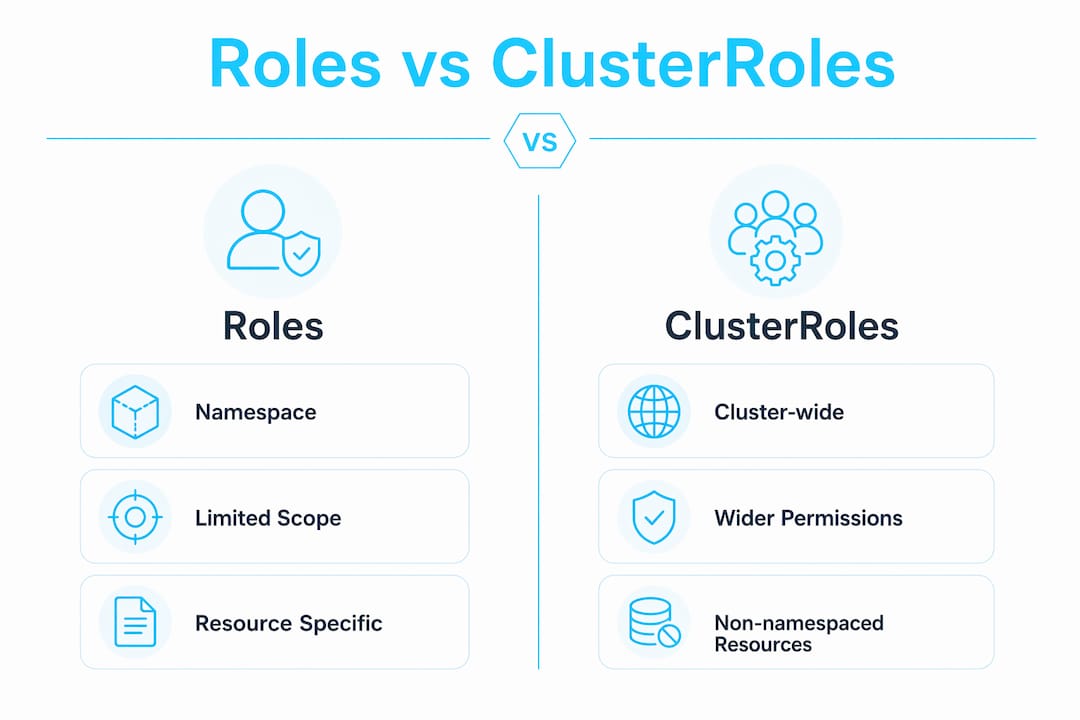
A ClusterRole is not namespaced. It can grant access to cluster-scoped resources like Nodes and PersistentVolumes, which have no namespace at all. It can also grant access to namespaced resources across every namespace simultaneously, or serve as a reusable permission template that RoleBindings reference per namespace. ClusterRoles act as permission templates that reduce duplication and centralize RBAC management when paired with namespace-scoped RoleBindings.
Here is a minimal Role manifest that grants read-only access to pods in the default namespace:
apiVersion: rbac.authorization.k8s.io/v1
kind: Role
metadata:
  namespace: default
  name: pod-reader
rules:
  - apiGroups: [""]
    resources: ["pods"]
    verbs: ["get", "list", "watch"]
The apiGroups: [""] means the core API group. The verbs field is where you express exactly what the subject can do.
RoleBinding and ClusterRoleBinding
A RoleBinding attaches a Role or ClusterRole to one or more subjects within a single namespace. Even if you reference a ClusterRole in a RoleBinding, the permissions only apply inside the binding’s namespace. That asymmetry is intentional and useful: define a ClusterRole once, bind it per namespace with RoleBindings, and you get consistency without granting cluster-wide access.

A ClusterRoleBinding attaches a ClusterRole to subjects across the entire cluster. Use it sparingly, and only when the subject genuinely needs cluster-wide access.
Here is a RoleBinding that connects the pod-reader Role to a user named api-user:
apiVersion: rbac.authorization.k8s.io/v1
kind: RoleBinding
metadata:
  name: read-pods
  namespace: default
subjects:
  - kind: User
    name: "api-user"
    apiGroup: rbac.authorization.k8s.io
roleRef:
  kind: Role
  name: pod-reader
  apiGroup: rbac.authorization.k8s.io
One critical detail: the roleRef field is immutable after creation. If you need to point a binding at a different role, you must delete and recreate the RoleBinding.
User accounts vs. service accounts
Subjects in RBAC are either user accounts or service accounts. User accounts represent human operators and are managed outside Kubernetes (via certificates, OIDC, or similar). Service accounts are Kubernetes objects, created and managed through the API, and designed for workloads running inside the cluster. By default, every pod gets a token for the namespace’s default service account, even if it never calls the Kubernetes API.
| Object | Scope | Purpose |
|---|---|---|
| Role | Namespace | Defines permissions on resources within one namespace |
| ClusterRole | Cluster-wide | Defines permissions cluster-wide or acts as a reusable template |
| RoleBinding | Namespace | Binds a Role or ClusterRole to subjects in one namespace |
| ClusterRoleBinding | Cluster-wide | Binds a ClusterRole to subjects across the entire cluster |
Pro Tip: When you bind a ClusterRole with a RoleBinding (not a ClusterRoleBinding), the ClusterRole’s permissions apply only inside the binding’s namespace. This is the cleanest pattern for consistent role definitions without granting global access.
How to enable RBAC and manage permissions in your cluster
RBAC is enabled by default in most Kubernetes distributions, but it pays to verify. Run kubectl api-versions and look for rbac.authorization.k8s.io/v1 in the output. If it is there, you are ready. To enable it manually on a cluster where it is not active, start the API server with:
--authorization-mode=RBACOr, using the newer config file approach, include RBAC in your --authorization-config file.
Creating roles and bindings with kubectl
You can create RBAC objects imperatively with kubectl or declaratively with YAML. The imperative approach is fast for testing:
kubectl create role pod-reader \
  --verb=get,list,watch \
  --resource=pods \
  -n default

kubectl create rolebinding read-pods \
  --role=pod-reader \
  --user=api-user \
  -n default
For production, always commit YAML manifests to version control. Imperative commands leave no audit trail and are hard to reproduce consistently across clusters.
Testing permissions with kubectl auth can-i
This command is the fastest way to verify that your RBAC configuration does what you think it does. Run it before you deploy, not after something breaks.
# Check if the current user can list pods in default
kubectl auth can-i list pods -n default

# Impersonate a service account to verify its permissions
kubectl auth can-i list pods \
  --as=system:serviceaccount:default:my-service-account \
  -n default
Use kubectl auth can-i with --as to simulate permissions for specific users or service accounts before deploying policies. The --list flag shows every verb and resource the impersonated identity can act on in a given namespace, which is invaluable during audits.
Common pitfalls when managing permissions:
- Default service account over-permissioning. Every pod in a namespace gets the
defaultservice account token by default. If that account has been granted broad permissions, every pod in the namespace inherits them. - Forgetting namespace scope. A Role in
stagingdoes nothing inproduction. Always specify-nwhen creating or checking namespace-scoped objects. - Immutable
roleRef. Changing what a binding points to requires deleting and recreating it, not patching it. - Wildcard verbs. Using
verbs: ["*"]in a role grants access to any verb, including future ones added to the API.
Pro Tip: Run kubectl auth can-i --list --as=system:serviceaccount:<namespace>:<name> -n <namespace> after creating any new binding. The output shows the computed union of all permissions for that identity, which is the ground truth for what it can actually do.
Best practices for Kubernetes RBAC security and maintainability
Over-permissioning is the most common security mistake in RBAC setups, and it almost always starts with the default service account. Engineers grant broad permissions to the default service account for convenience, and suddenly every pod in the namespace has those permissions. I’ve seen this pattern cause real incidents.
Enforce least privilege strictly
Grant only the verbs and resources a subject actually needs. If a monitoring agent only reads pod metrics, its role should list exactly get, list, and watch on pods and nothing else. Resist the urge to add extra verbs “just in case.” You can always expand a role later; shrinking one after a breach is a different conversation.
Kubernetes ships with four built-in ClusterRoles worth knowing: cluster-admin (full access to everything), admin (wide control within a namespace, no RBAC changes), edit (create and modify most resources), and view (read-only, no sensitive data). The view ClusterRole is a good starting point for developer access.
Avoid wildcards and overprivileged accounts
- Never use
resources: ["*"]orverbs: ["*"]unless you have an explicit, documented reason. - Minimize use of
cluster-admin. Bind it only to break-glass accounts, not to everyday operator identities. - Tightly control
secrets,pods/exec, andimpersonatepermissions. These are effectively cluster-admin in disguise if misused. - Watch for privilege escalation paths:
createonpodsinkube-systemlets a subject mount any secret;escalateandbindverbs on roles let a subject grant themselves permissions they do not hold.
Use dedicated service accounts for every workload
Create dedicated minimal-permission service accounts for each application rather than relying on the namespace default account. Pair each service account with only the verbs and resources it needs. For workloads that do not call the Kubernetes API at all, disable automatic token mounting:
automountServiceAccountToken: falseThis reduces the blast radius if a pod is compromised. A pod with no API token cannot be used to pivot into the cluster’s control plane.
Audit and prune on a fixed cadence
Regular audits and pruning of stale roles and bindings prevent privilege creep. Set a calendar reminder, quarterly at minimum, to review every ClusterRoleBinding and any RoleBinding that references a ClusterRole. Remove anything that is no longer tied to an active workload or user.
Pro Tip: Define ClusterRoles as your canonical permission templates and bind them per namespace with RoleBindings. This gives you a single source of truth for what “read-only access to pods” means across your entire cluster, and makes audits dramatically faster because you only need to review the ClusterRole definitions, not dozens of identical per-namespace Roles.
For engineers preparing for the CKA or CKS exams, both certifications test RBAC directly. The Kubernetes CKA materials cover imperative role creation and binding patterns that show up repeatedly in exam scenarios.
Expert guidance on testing and auditing RBAC permissions
RBAC is only one authorizer in a chain. The Kubernetes API server processes authorization modes sequentially, and if an earlier authorizer allows access, RBAC is bypassed. In a typical cluster, the order is Node, then RBAC, then any configured webhook. This means a request that RBAC would deny can still succeed if the Node authorizer or a webhook permits it. Your security posture depends on the entire chain being correctly configured, not just RBAC in isolation.
Simulating permissions with impersonation
The --as flag in kubectl auth can-i is your primary tool for verifying RBAC before it matters. The syntax for service accounts requires the full system:serviceaccount:<namespace>:<name> format. Spelling matters here; a typo silently fails to match the actual subject.
# Verify a service account can create deployments
kubectl auth can-i create deployments \
  --as=system:serviceaccount:production:deploy-agent \
  -n production

# List all permissions for a service account
kubectl auth can-i --list \
  --as=system:serviceaccount:production:deploy-agent \
  -n production
Testing RBAC effectively requires verifying permissions with precise impersonation before deploying policies. Do not assume a manifest is correct because it applied without errors. kubectl apply succeeds even if the resulting permissions are wrong.
Handling multiple roles and the additive model
A subject’s effective permissions are the union of every binding that matches them or their groups. If a user belongs to a group that has a RoleBinding granting get on secrets, and also has a personal RoleBinding granting list on pods, they can do both. There is no way to subtract. You cannot write “team-a can do everything except read Secrets.” You must construct the permission set additively, granting only what is intended from the start.
This additive model means privilege creep accumulates silently. A user who has been added to multiple groups over time may hold far more permissions than anyone realizes. The kubectl auth can-i --list output shows the computed union, which is the only reliable way to see what an identity can actually do.
Continuous review and automation
Manual audits catch obvious problems but miss drift over time. Automating least-privilege audits is the next step for teams managing RBAC at scale. Tools that diff current bindings against a declared baseline, or that flag any ClusterRoleBinding added outside a GitOps pipeline, catch the kind of incremental over-permissioning that manual reviews miss. Devopsaitoolkit covers AI-assisted RBAC auditing workflows that apply this approach in production environments.
Common RBAC testing pitfalls and troubleshooting tactics:
- Wrong namespace in
--ascheck. Always specify-nexplicitly; the default namespace assumption burns time. - Group membership not reflected. RBAC group bindings depend on the authenticator passing group claims. If your OIDC provider is not sending groups, group-based bindings silently do nothing.
- Stale bindings after role deletion. Deleting a Role does not delete its RoleBindings. Orphaned bindings clutter audits and can cause confusion when a role with the same name is recreated.
escalateandbindverbs overlooked. These verbs let a subject grant themselves permissions beyond what they hold. Treat them as high-risk and audit them explicitly.- Webhook authorizers granting unexpected access. If your cluster uses a webhook authorizer, RBAC denials may not be final. Audit the webhook’s policy alongside RBAC.
Pro Tip: Automate a periodic job that runs kubectl auth can-i --list for every service account in every namespace and diffs the output against a committed baseline. Any new permission that appears outside a pull request is an immediate alert. This is the closest thing to continuous RBAC compliance you can get without a dedicated policy engine like Open Policy Agent.
Key Takeaways
Kubernetes RBAC controls access through additive, allow-only permissions bound to subjects via Roles and ClusterRoles, and least privilege enforcement is the single most important practice for keeping clusters secure.
| Point | Details |
|---|---|
| Four core RBAC objects | Role, ClusterRole, RoleBinding, and ClusterRoleBinding define and attach all permissions in Kubernetes. |
| Permissions are additive | RBAC has no deny rules; a subject’s access is the union of every binding that matches them. |
| Use ClusterRoles as templates | Bind ClusterRoles per namespace with RoleBindings to reduce duplication and simplify audits. |
| Test before you deploy | Run kubectl auth can-i --as to verify permissions for any identity before applying policies. |
| Audit and prune regularly | Stale roles and bindings cause privilege creep; review and remove unused access on a fixed cadence. |
Recommended
- Kubernetes RBAC Without the Headaches: Roles, Bindings, and Least Privilege — DevOps AI ToolKit
- Kubernetes Security Hardening: Pods, RBAC, and Network Policy That Actually Contain a Breach — DevOps AI ToolKit
- AI-Assisted Kubernetes RBAC Least-Privilege Audits
- Securing a Kubernetes Cluster: Pod Security and Admission
Get 500 Battle-Tested DevOps AI Prompts — Free
500 battle-tested, copy-paste AI prompts engineered by a senior systems engineer — every one with fill-in placeholders and safety/back-out notes. Drop your email and it's yours.
- 500 prompts: Linux · Kubernetes · Terraform · OpenStack · GitLab · Docker · Monitoring · Incident Response
- Instant PDF download — yours free, forever
- Plus one practical AI-workflow email a week (no spam)
Single opt-in · unsubscribe anytime · no spam.