
Kubernetes Limits and Requests: A Practical 2026 Guide
Requests reserve resources for scheduling; limits cap runtime usage. Getting them wrong drives waste — average cluster CPU utilization now sits at just 8%. How to right-size.
- #kubernetes
- #resource-management
- #cost-optimization
- #sre
Summary: Requests reserve resources for scheduling; limits cap runtime usage. Setting them wrong drives waste, with average cluster CPU utilization now sitting at just 8%.
Here’s an uncomfortable truth: most production clusters are burning cash on resources nobody uses. Across tens of thousands of clusters measured in 2026, average CPU utilization sat at a dismal 8%, and memory at 20%. The culprit is almost always the same handful of YAML fields that teams copy, paste, and never revisit. Getting Kubernetes requests and limits right is the single highest-leverage change most platform teams can make. If you want a deeper walkthrough of the full lifecycle, start with our guide to resource requests, limits, and autoscaling.
The scale of the problem is genuinely eye-watering. A January 2026 study of 3,042 production clusters found that 68% of pods request three to eight times more memory than they actually use, a pattern the researchers pegged as a $50 billion problem. The fix isn’t complicated, but it does require understanding what these settings actually do.
Requests vs. limits: what’s really going on
The two concepts sound similar but serve opposite jobs. A request is the amount of CPU or memory Kubernetes reserves for your container when the scheduler decides where to place a pod. A limit is the runtime ceiling the kubelet enforces once the container is running. Preventing one container from starving its neighbors is exactly what kubernetes limits are built to do.
The Kubernetes documentation is precise about this split. The official docs explain that the scheduler uses requests to find a node with enough free capacity, while the kubelet enforces limits so a container can’t exceed what you set. If a node has spare capacity, a container is allowed to burst above its request, up to its limit.
Think of it this way: requests answer “where can this pod live?” while limits answer “how far can it stretch before Kubernetes steps in?” Confusing the two is where most sizing mistakes begin.
How CPU and memory limits actually behave
This is the part that trips people up. CPU and memory are enforced completely differently, and treating them the same causes real pain.
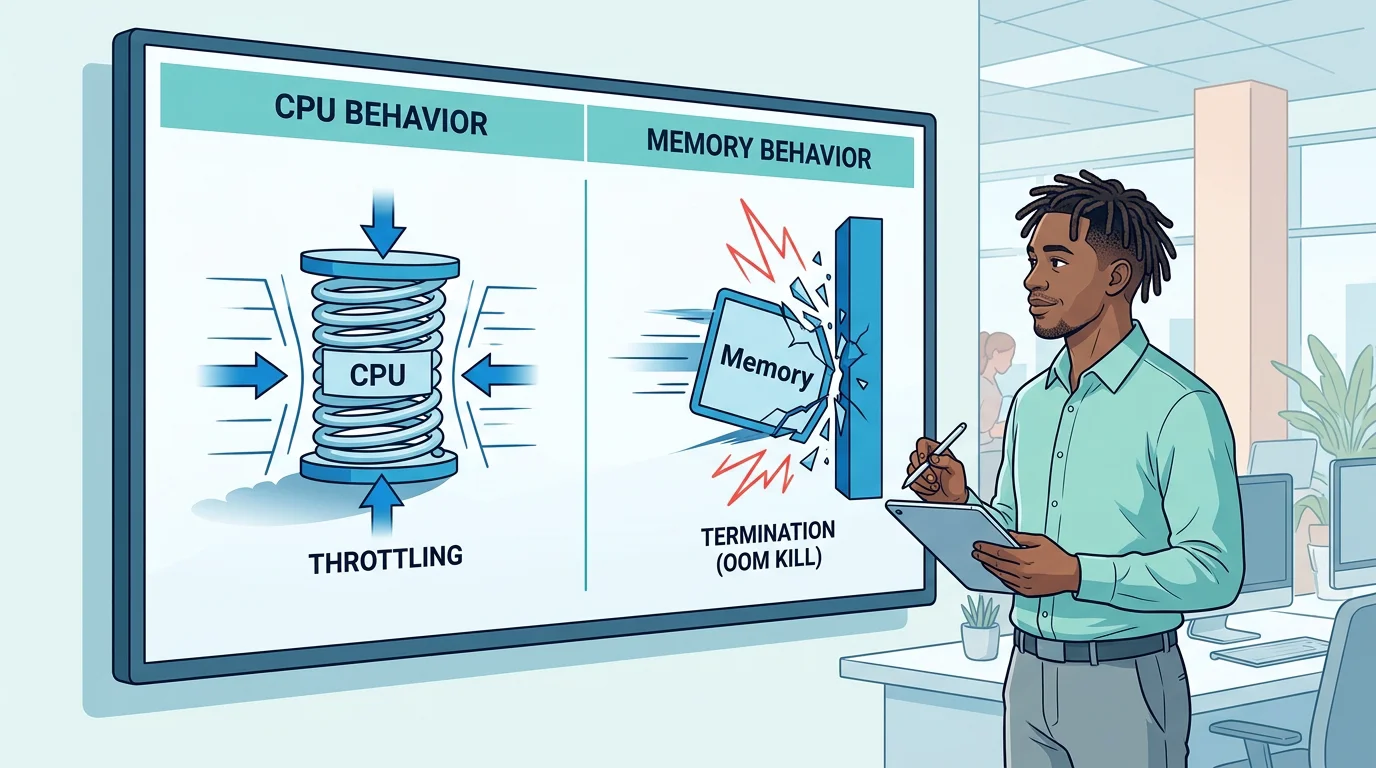
CPU is a compressible resource. When a container hits its CPU limit, the Linux kernel throttles it. Nothing crashes; the workload just slows down. That shows up as higher latency, slower processing, and more timeouts. For a latency-sensitive API, aggressive CPU throttling can be worse than the problem you were trying to solve.
Memory is non-compressible. You can’t throttle RAM. When a container exceeds its memory limit, the kernel’s out-of-memory subsystem kicks in and the process gets killed, an event you’ll see logged as OOMKilled. Because memory failures are hard failures, many practitioners set the memory request equal to the memory limit to give the scheduler a realistic signal and shrink the gap between what’s reserved and what triggers a crash.
The hidden cost of getting it wrong
Overprovisioning rarely starts as carelessness. It usually starts as a safety move after one bad incident. But the numbers show how quickly that caution compounds.
According to the 2026 State of Kubernetes Optimization Report, CPU overprovisioning across production clusters rose from 40% to 69% year over year, while memory overprovisioning reached 79%. Real utilization actually fell from 10% to 8%, meaning raw cloud waste grew by roughly a fifth in a single year. The trend is getting worse, not better, even as tooling improves.
Why does padding requests hurt so much? Because autoscalers provision nodes based on requested resources, not actual usage. Inflate your requests and the Cluster Autoscaler dutifully adds nodes you don’t need, and the cloud bill climbs. Set requests too low and the scheduler packs too many pods onto a node, triggering contention, throttling, and evictions. On the flip side, an over-provisioned pod can still hit an exceeded quota in Kubernetes if a namespace ResourceQuota caps total allocation.
How to right-size with real data
You can’t size a workload you haven’t measured. The reliable approach is boring and effective: profile actual usage, then set values against percentiles rather than gut feeling.
A practical recipe looks like this:
- CPU request = roughly the P95 of normal usage, so the pod is scheduled with enough headroom for typical load.
- CPU limit = often left off for latency-sensitive services, or set at two to five times the request to allow bursts.
- Memory request = the P99 of usage plus a 10-20% buffer, because memory spikes are dangerous.
- Memory limit = equal to or just slightly above the request, to keep behavior predictable.
The tooling to gather this is already in most clusters. kubectl top gives you live usage from the Metrics Server, PromQL queries let you compute P95 and P99 over 24 to 48 hours, and the Vertical Pod Autoscaler can generate lower-bound, target, and upper-bound recommendations without applying them. Running the VPA in recommendation-only mode is a safe way to get sizing guidance before you touch anything. To automate the loop entirely, see our vertical pod autoscaler for right-sizing.
One caution worth calling out: the sources don’t fully agree on CPU limits. Some argue you should drop CPU limits entirely to avoid throttling; others prefer a generous cap to prevent noisy neighbors. The right answer depends on your workload. Latency-sensitive services usually benefit from no hard CPU cap, while predictable batch jobs are fine with request equal to limit.
QoS classes decide who gets evicted first
The way you set requests and limits quietly assigns each pod a Quality of Service class, and that class determines eviction priority when a node runs short.
- Guaranteed: requests equal limits for every resource. These pods get the strongest eviction protection and are the last to go.
- Burstable: requests are set but limits differ or are missing. This is the most common class; eviction risk depends on usage and node pressure.
- BestEffort: no requests or limits at all. These are the first candidates for eviction under pressure.
A word of nuance here: QoS tells you eviction order, not whether a workload is sized correctly. A Guaranteed pod with inflated requests still wastes resources. And even a well-behaved Burstable pod can be shown the door during a node crunch, which is closely tied to pod eviction under disk pressure and other resource-shortage conditions.

Namespace guardrails: ResourceQuota and LimitRange
Sizing individual pods well is only half the battle. In a multi-tenant cluster, you also need guardrails so one team can’t quietly consume everything.
A ResourceQuota caps the total requests and limits across an entire namespace. Once a quota is set, every pod in that namespace must declare its own requests and limits, or Kubernetes rejects it with a quota error. A LimitRange works at the container level, applying default requests and limits to pods that don’t specify them and enforcing minimum and maximum boundaries. Together they prevent both the copy-paste giant and the resource-less BestEffort pod from slipping through.
These policies won’t right-size anything on their own, but they stop the worst outliers and give platform teams a sane baseline. Pair them with per-namespace ownership labels and cost visibility, and waste stops being invisible.
Best practices that hold up in production
Adoption has raced ahead of efficiency. The CNCF 2024 Annual Survey found that 80% of organizations now run Kubernetes in production, up from 66% the year before, yet BCG estimates up to 30% of cloud spending is wasted on over-provisioned or idle resources. The gap between running Kubernetes and running it well is where the money leaks.
A few habits consistently separate efficient teams from the rest:
- Measure before you set. Base requests on P95 and P99 telemetry, not on a tutorial you copied.
- Keep limits close to requests. Limits that are 40x the request cause scheduling chaos when pods all try to burst at once.
- Set memory request equal to memory limit for predictable, crash-resistant behavior.
- Profile each service individually. The copy-paste anti-pattern is the root of most waste.
- Revisit regularly. Traffic changes; static configs drift from reality within months.
None of this requires exotic tooling. It requires measurement, a bit of discipline, and a willingness to question the “safe” defaults everyone inherited.
Bringing it together
The economics are blunt: with average cluster utilization stuck around 8% for CPU, the default posture of most teams is to pay for capacity they never touch. Understanding that requests drive scheduling while limits govern runtime is the foundation, but the real wins come from measuring actual usage and sizing against it. Treat CPU throttling and OOM kills as signals, not surprises, and use QoS classes and namespace guardrails to protect what matters. When you tie those decisions to real telemetry, cost and reliability stop being a trade-off and start improving together. That’s exactly the kind of production-safe, evidence-first workflow our battle-tested DevOps prompts and validators are built to support. To go further, explore our automated right-sizing guide with the Vertical Pod Autoscaler.
Frequently Asked Questions
Should I always set CPU limits?
Not necessarily. For latency-sensitive services, a hard CPU cap can cause throttling even when the node has spare CPU. Many teams set a realistic CPU request and skip the limit, reserving hard caps for predictable batch workloads.
Why does my pod keep getting OOMKilled?
It’s exceeding its memory limit, since memory can’t be throttled like CPU. Raise both the request and limit based on P99 usage plus a buffer, and check your application for memory leaks. Our resource-sizing guides walk through detecting and fixing this safely.
What happens if I don’t set requests or limits at all?
The pod becomes BestEffort QoS, the first thing evicted under pressure. It can also be scheduled onto an already-crowded node, causing contention. A namespace LimitRange can apply sensible defaults automatically.
Get 500 Battle-Tested DevOps AI Prompts — Free
500 battle-tested, copy-paste AI prompts engineered by a senior systems engineer — every one with fill-in placeholders and safety/back-out notes. Drop your email and it's yours.
- 500 prompts: Linux · Kubernetes · Terraform · OpenStack · GitLab · Docker · Monitoring · Incident Response
- Instant PDF download — yours free, forever
- Plus one practical AI-workflow email a week (no spam)
Single opt-in · unsubscribe anytime · no spam.