
Kubernetes Backup Tools for DevOps & SREs: Shortlist
Discover essential Kubernetes backup tools to protect your resources, ensure compliance, and automate data management with ease.

For production Kubernetes, three categories cover most real-world needs: a CNCF-backed open-source tool for resource and persistent volume protection, an enterprise backup platform for regulated environments with SLA requirements, and a managed or automated implementation path for teams that need policy-driven coverage without a dedicated backup engineer.
- CNCF-native open-source: Velero backs up both Kubernetes resource manifests and persistent volumes, integrates with CSI snapshots and cloud object stores, and has the broadest community support in the ecosystem. It protects etcd-adjacent state through resource exports, though etcd itself needs a separate snapshot strategy.
- Enterprise platform: Kasten by Veeam or Trilio for regulated environments where you need immutability, ransomware protection, workflow automation, and vendor-backed SLAs.
- Managed/automated: Afi for teams that want a fully automated, policy-driven backup service with hosted storage and SSO, reducing the operational overhead of running backup infrastructure yourself.
Pick your category first, then use the comparison table below to narrow the shortlist.
Key Takeaways
The strongest Kubernetes backup strategy combines a CNCF-native tool for resource and PV protection, a tested etcd snapshot process stored off-cluster, and automated restore verification wired into your CI/CD pipeline.
| Point | Details |
|---|---|
| Start with Velero for OSS | Velero covers resource manifests and PVs with CSI snapshots or restic/kopia fallback for NFS and EFS. |
| Add etcd snapshots separately | Namespace-level tools do not protect etcd; store snapshots off-cluster with delete protection and test restores in isolation. |
| Match tool to RTO/RPO | Trilio’s Continuous Restore fits sub-hour RTO targets; Afi suits teams needing managed, policy-driven coverage with minimal overhead. |
| Automate and verify | Manual backup scripts become technical debt; wire restore smoke tests into CI/CD using CronJob patterns. |
| Devopsaitoolkit accelerates rollout | Prompt packs and consulting engagements from Devopsaitoolkit cover install scripts, restore playbooks, and CI/CD verification prompts. |
Table of Contents
- Which Kubernetes backup tools belong on your shortlist?
- What do Kubernetes backup tools actually protect?
- How do deployment models and storage backends affect your choice?
- How do you pick the right tool for your cluster?
- What most vendors skip: backing up etcd and control-plane state
- An SRE’s honest take on picking a backup stack
- Devopsaitoolkit has the automation playbooks to get this done faster
- Sources
Which Kubernetes backup tools belong on your shortlist?
The table below maps each tool to its deployment model, what it actually protects, and the pricing shape. Use it to cut your longlist to two or three candidates before going deeper.
A few standout notes worth calling out:
- Velero is the default starting point for most teams. It handles resource manifests, PV snapshots via CSI, and falls back to file-system-level backups using restic or kopia when CSI snapshot support is unavailable. Active community maintenance is visible on its GitHub releases page. The trade-off: you own the operational overhead.
- Trilio differentiates on Continuous Restore for fast RTO and immutable backups for ransomware protection, with support for both container workloads and VMs on OpenShift. That combination makes it the strongest fit for regulated industries.
- Afi removes the operational burden entirely. Its managed service handles incremental backups, policy automation, SSO integrations, and optional hosted storage, which matters when your team has no dedicated backup engineer.
What do Kubernetes backup tools actually protect?
The core job of any k8s backup solution is protecting two distinct layers: the cluster resource layer (manifests, CRDs, cluster-scoped objects, RBAC definitions) and the data layer (persistent volumes and their contents). Most tools handle both, but the mechanisms differ significantly.
Resource manifest capture serializes Kubernetes objects — Deployments, Services, ConfigMaps, CRDs, and cluster-scoped resources like ClusterRoles — into a portable format stored in object storage. This is fast and storage-efficient. Restoring from it rebuilds your cluster topology but does not recover application data unless PV protection is also in place.
Persistent volume protection is where the complexity lives. Two approaches exist:
- CSI snapshot-based: Fast and crash-consistent. The backup tool triggers a
VolumeSnapshotvia the CSI driver, which the storage provider handles at the block level. Restore is quick because it clones the snapshot rather than copying bytes. The catch: your storage provider must support CSI snapshots and you need a correctly configuredVolumeSnapshotClass. - File-system backup (restic/kopia): Storage-agnostic. Velero’s file-system backup mounts the volume and copies files directly. Slower and more resource-intensive, but it works on NFS, EFS, and local disks where CSI snapshots are unreliable or absent.
Scheduling, retention, and backup hooks round out the capability set. Hooks let you quiesce a database before a snapshot fires, which is the difference between a crash-consistent and an application-consistent backup. For PostgreSQL or MySQL on Kubernetes, a pre-backup hook that flushes WAL or runs FLUSH TABLES WITH READ LOCK is not optional. Velero documents scheduling and hook patterns alongside its restore granularity options, which let you restore a single namespace, a label-selected subset, or a full cluster.
Pro Tip: Schedule a restore drill into a staging namespace every two weeks. A backup you have never restored is a hypothesis, not a recovery plan. Automate the smoke test with a CronJob that checks pod readiness and a known data fixture after restore.
How do deployment models and storage backends affect your choice?
The deployment model determines how much cluster footprint you accept and how tightly the tool integrates with your GitOps or CI/CD workflow.
Most self-managed tools follow an in-cluster operator plus CLI pattern. Velero installs a server-side Deployment and a velero CLI; you interact via kubectl or the CLI directly. Kasten and Trilio add a richer in-cluster control plane with a web UI and policy engine. Stash uses Kubernetes CRDs as its primary API surface, which fits teams already operating heavily through kubectl apply workflows. Portworx Backup is tightly coupled to the Portworx storage layer, so it makes sense only if Portworx is already your storage fabric.
Afi takes the opposite approach: a SaaS connector that reaches into your cluster with minimal in-cluster footprint, handling scheduling, retention, and storage externally.
Storage backend compatibility is where most surprises happen:
- S3, GCS, and Azure Blob are universally supported across all major tools and are the recommended target for off-cluster object storage.
- CSI snapshot support requires a
VolumeSnapshotClassand a CSI driver that implements the snapshot interface. EKS with EBS CSI, AKS with Azure Disk CSI, and GKE with Persistent Disk CSI all work well. NFS, EFS, and localhostPathvolumes typically do not support CSI snapshots. - For NFS and EFS, fall back to restic or kopia file-system backups. Document this explicitly in your runbook because the restore path differs from a snapshot-based restore.
IAM and permissions are a common gotcha on cloud distributions. Velero on EKS needs an IAM role with S3 write permissions and EC2 snapshot permissions; the K8s Recipes Velero guide walks through the exact CLI flags and IAM policy shapes. On GKE, Workload Identity is the cleaner path over static service account keys.
For storage class behavior and snapshot support details by provider, that reference covers the practical differences between WaitForFirstConsumer and Immediate binding modes, which affect snapshot timing.
How do you pick the right tool for your cluster?
Work through this checklist before shortlisting vendors.
- Define your RTO and RPO targets. A reasonable RTO and RPO are achievable with scheduled CSI snapshots. A 15-minute RTO for a stateful database workload points toward Trilio’s Continuous Restore or Portworx’s storage-integrated snapshots.
- Audit your storage topology. List every PVC storage class and check whether its CSI driver supports
VolumeSnapshot. If a significant portion of your PVCs are on NFS or EFS, file-system backup support is necessary. - Check compliance and immutability requirements. Regulated environments (HIPAA, PCI-DSS, SOC 2) typically require immutable backups with delete protection and audit logs. Kasten and Trilio both address this; Velero alone does not provide immutability natively.
- Assess operational capacity. If your team has no dedicated backup engineer, a managed service like Afi reduces the risk of misconfigured schedules or missed retention policies.
- Verify Kubernetes distribution compatibility. OpenShift users should confirm operator certification. EKS, AKS, and GKE users should verify CSI driver versions and IAM integration paths before committing.
- Plan for restore granularity. Namespace-level restore covers most incidents. Label-selector restore is useful for recovering a single application stack. Confirm the tool supports both before signing a contract.
Vendor questions worth asking:
- Which
VolumeSnapshotClassconfigurations are supported and tested? - How is incremental backup implemented — block-level, file-level, or change-block tracking?
- Where are backups stored, and who has delete permissions on the backup repository?
- What is the restore SLA for a 500 GB PV from object storage?
Red flags to walk away from:
- Backup verification is manual only, with no automated restore smoke test capability.
- Backups land in the same region as the cluster with no cross-region copy or immutability option.
- No RBAC or SSO integration for backup operations in a multi-team environment.
- The vendor cannot demonstrate a tested etcd restore procedure.
Automated, policy-driven schedules are not a nice-to-have. Manual scripts become technical debt in large dynamic clusters, where namespace churn and new PVCs appear faster than any cron script can track.
What most vendors skip: backing up etcd and control-plane state
Namespace-level backup tools protect your workloads. They do not protect etcd, and that distinction has ended more than a few recovery attempts. If etcd is gone or corrupted, no amount of Velero restores will bring your cluster back cleanly.
The recommended control-plane protection approach is: scheduled etcd snapshots stored off-cluster in immutable object storage, plus a tested restore procedure run in an isolated environment. Here is the operational checklist:
- Schedule etcd snapshots aligned to your cluster-change windows. After a large rollout or a CRD schema migration is a natural trigger, in addition to time-based schedules.
- Store snapshots off-cluster in a separate S3 bucket or object store with versioning and delete protection enabled. Never store etcd snapshots only on the control-plane node.
- Test restores in an isolated cluster. Spin up a temporary cluster, restore the etcd snapshot, and verify that
kubectl get nodesandkubectl get pods -Areturn the expected state. - Check etcd and Kubernetes version compatibility before restoring. An etcd snapshot from a cluster running etcd 3.4 may not restore cleanly onto a cluster running 3.5 without a migration step.
- Automate verification: after restore, run API server health checks (
/healthz,/readyz) and confirm that critical CRDs and cluster-scoped resources are present.
For a full walkthrough of etcd snapshot commands and restore procedures, the etcd backup and restore guide on Devopsaitoolkit covers the exact etcdctl snapshot save and etcdctl snapshot restore flags, plus the API server restart sequence.
Tie etcd snapshot cadence to your CI/CD pipeline. A post-deploy hook in your GitOps workflow that triggers an etcd snapshot after a successful cluster-wide change gives you a clean recovery point that maps to a known cluster state, not just a time window.

An SRE’s honest take on picking a backup stack
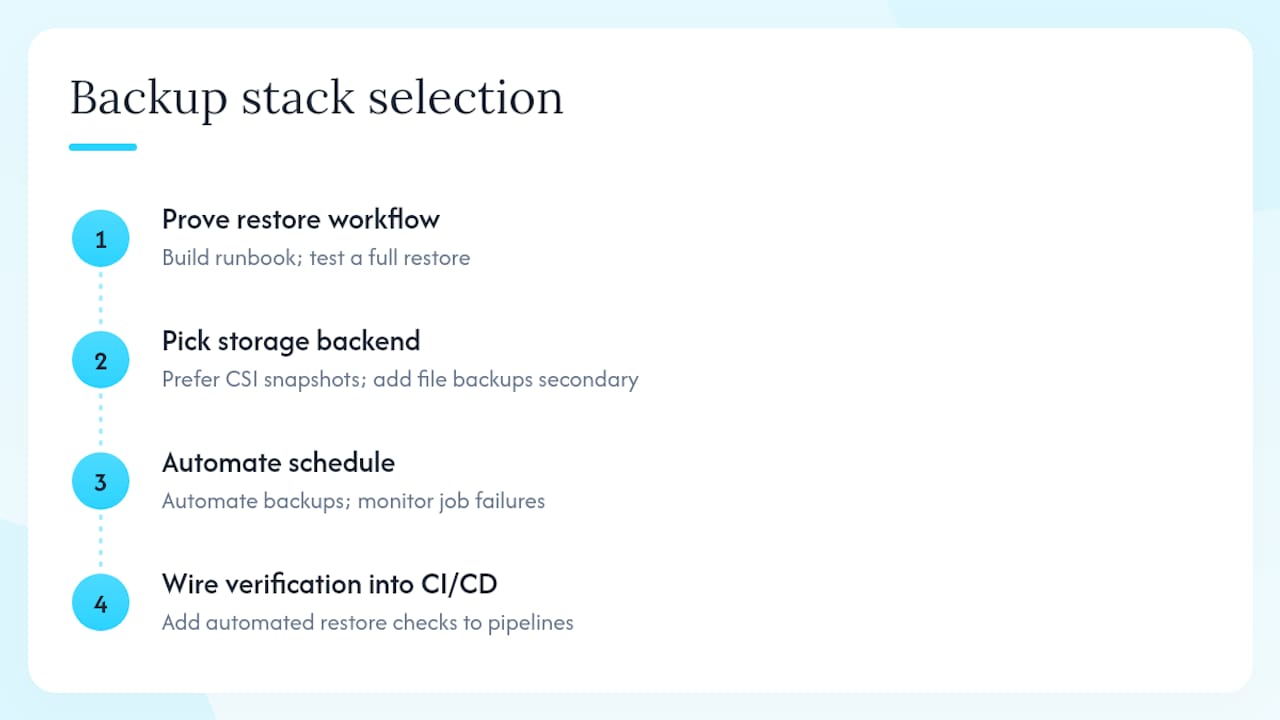
The selection sequence I follow in production is: prove the restore workflow first, then pick the storage backend, then automate the schedule, and finally wire verification into CI/CD. Most teams do this in the wrong order — they install a tool, configure a schedule, and never run a restore until an incident forces them to.
Snapshot-first strategies make sense when your storage provider supports CSI snapshots reliably. They are fast, consistent, and the restore path is predictable. Add file-system backups as a secondary layer for volumes on NFS or EFS, and accept that those restores will be slower. The cost of running both is real: more storage, more complexity, more things to monitor. But the alternative is discovering your NFS-backed PVCs were never actually backed up during a production incident.
Managed solutions like Afi make the most sense when compliance requirements demand audit trails and immutability but your team cannot justify a full-time backup engineer; see this Agent Web Tool Failure Handling: Production Patterns for patterns relevant to agent-based backup architectures. The operational overhead of maintaining Velero schedules, monitoring backup job failures, and rotating credentials across multiple clusters adds up. For multi-cluster environments, that overhead multiplies quickly.
The one thing I see teams consistently underestimate: the restore path for stateful applications is almost always more complex than the backup path. A PostgreSQL cluster restored from a PV snapshot may need WAL replay, replication re-initialization, and connection pool restarts before it is actually serving traffic. Build that runbook before you need it.
Devopsaitoolkit has the automation playbooks to get this done faster
The hardest part of Kubernetes backup is not picking a tool. It is the implementation work: writing reliable install scripts, configuring IAM, building restore smoke tests, and wiring verification into CI/CD without it becoming another manual checklist.

Devopsaitoolkit’s prompt packs and automation playbooks give you battle-tested AI prompts and scaffolded scripts for exactly this work. The Linux Admin Prompt Pack includes prompts for writing backup install scripts, CronJob schedules, and restore verification workflows you can adapt to Velero, Trilio, or any operator-based tool. For teams that want a consulting engagement, Devopsaitoolkit also offers infrastructure audits that cover your current backup posture, storage topology review, and a documented restore runbook. Start with the prompt packs to move fast, or book an audit to get a complete gap analysis and implementation plan.
Sources
- Velero
- K8s Backup and Disaster Recovery with Velero | K8s Recipes
- Afi Kubernetes Backup and Management
Recommended
- etcd Backup and Restore for Kubernetes Clusters
- CSI Volume Snapshots for Backing Up Stateful Kubernetes
- Cinder Volume Backups and Disaster Recovery in OpenStack
- Kubernetes Jobs and CronJobs Patterns That Hold Up
Get 500 Battle-Tested DevOps AI Prompts — Free
500 battle-tested, copy-paste AI prompts engineered by a senior systems engineer — every one with fill-in placeholders and safety/back-out notes. Drop your email and it's yours.
- 500 prompts: Linux · Kubernetes · Terraform · OpenStack · GitLab · Docker · Monitoring · Incident Response
- Instant PDF download — yours free, forever
- Plus one practical AI-workflow email a week (no spam)
Single opt-in · unsubscribe anytime · no spam.