
Recover Expired Kubelet Certs for SREs Without Control Plane Surgery
Operator runbook to diagnose and recover expired kubelet certificates: verify the cluster CA first, approve or re-bootstrap safely, and automate 30‑day...

If your kubelet client certificate expired, check for pending CSRs with kubectl get csr and approve or re-bootstrap. If the serving certificate expired instead, restart the kubelet or approve the serving CSR. Either way, confirm the cluster CA itself hasn’t expired before you touch anything else. A node restart or CSR approval usually fixes it; control-plane surgery is rare.
TL;DR:
- Certificates typically expire after one year, so it is common to see renewal issues around cluster anniversaries or provisioning dates.
- To diagnose an expired kubelet client certificate, check
/var/lib/kubelet/pki/kubelet-client-current.pemand approve pending CSRs withkubectl, then restart the kubelet.- Fixing an expired serving certificate depends on the
serverTLSBootstrapsetting; delete stale cert files and restart the kubelet if self-signed, or approve CSR requests if using cluster signing.- An expired cluster CA causes widespread issues and requires careful renewal with
kubeadm certs renew all, followed by component restarts and certificate updates in kubeconfig files.- Automate certificate rotation thresholds and monitor API server 401s or pending CSRs to prevent manual fixes from becoming cluster outages.
Table of Contents
- Symptoms of a Kubelet Certificate Issue
- How Do You Confirm Which Kubelet Certificate Expired?
- Fixing an Expired Kubelet Client Certificate
- How to Renew a Kubelet Serving Certificate
- What to Do When the Cluster CA Itself Has Expired
- Automating Kubelet Certificate Rotation and Monitoring
- Common Reasons Kubelet Certificate Renewal Fails
- Runbooks and Playbooks Worth Keeping On Hand
- The Real Lesson Behind Every Kubelet Certificate Incident
- Automate the Checks Before They Become Incidents
- Sources
Symptoms of a Kubelet Certificate Issue
The failure mode tells you which certificate is the culprit. A kubelet runs on two separate TLS credentials, one for talking to the API server and one for serving its own HTTPS endpoint, and they expire independently even though both typically carry a one-year lifetime.
- Client certificate expired: the node flips to
NotReadyinkubectl get nodesand stops accepting new pods. - Serving certificate expired: the node often stays
Ready, butkubectl logs,kubectl exec, and metrics scraping start failing with TLS errors.
Run these three checks first: journalctl -u kubelet -f for handshake or authentication errors, kubectl get csr for anything stuck in Pending, and a scan of API server logs for a spike in 401 responses. A sudden cluster of 401s across multiple nodes at the same hour is a strong signal you’re dealing with an expiration wave, not an isolated node problem.
How Do You Confirm Which Kubelet Certificate Expired?
Stop guessing and read the files directly. Three locations matter on every node:
/var/lib/kubelet/pki/kubelet-client-current.pem, the live client certificate./var/lib/kubelet/pki/kubelet.crt, the serving certificate./etc/kubernetes/pki/ca.crt, the cluster CA that signs everything above it.
Check any of them with openssl x509 -noout -dates -in <path>, which prints notBefore and notAfter timestamps. If notAfter is in the past, that’s your expired certificate, full stop.
Statistic Callout: Kubelet certificates typically carry a one-year validity window, which is exactly why expirations tend to cluster around cluster anniversaries or bulk node provisioning dates.
On kubeadm clusters, run kubeadm certs check-expiration for a full inventory of control-plane certs in one shot. For node-level CSR activity, kubectl get csr shows anything awaiting approval, and kubectl describe csr <name> reveals the requesting identity and signer, which matters a lot once you get into serving certificate recovery.
Fixing an Expired Kubelet Client Certificate
Kubernetes tries to save you from this scenario automatically. When rotateCertificates is enabled, the kubelet requests a fresh client certificate once it’s between 30% and 10% of its remaining validity, and the controller manager auto-approves it if the request matches the node’s existing identity. If that pipeline is broken, either because rotateCertificates was never turned on or the auto-approver stalled, the certificate lapses and the node goes dark.
Here’s the recovery sequence:
- Run
kubectl get csrand look for a request inPendingstate tied to the node’ssystem:node:<hostname>identity. - If you find one and it matches the expected node, approve it with
kubectl certificate approve <csr-name>. - If no CSR exists at all, the kubelet likely never attempted rotation. Re-bootstrap it using a fresh bootstrap token, or manually copy a valid client certificate from a working node with the same trust chain and restart the kubelet service.
- After approval or re-bootstrap, restart the kubelet (
systemctl restart kubelet) to force it to pick up the new credential.
Verify recovery in three places: the API server’s 401 spike stops, the node returns to Ready in kubectl get nodes, and openssl x509 -noout -dates on the client cert now shows a notAfter date in the future.
Pro Tip: Before approving any CSR blindly, check that its requested SAN and CN match the node’s actual hostname. Auto-approving a mismatched request just trades one certificate error for a security hole.
How to Renew a Kubelet Serving Certificate
Serving certificate recovery splits into two completely different playbooks depending on one setting: serverTLSBootstrap.
If serverTLSBootstrap is false (the default on most clusters), the kubelet self-signs its serving certificate and nothing rotates it automatically. Fix it by deleting the stale cert files under /var/lib/kubelet/pki/ and restarting the kubelet, which forces it to generate a fresh self-signed cert on boot. Confirm the fix with openssl s_client -connect <node-ip>:10250 and by retesting kubectl logs or kubectl exec against a pod on that node.
If serverTLSBootstrap is true, the cluster signer issues serving certs through the CSR pipeline instead, and expiration usually means an approver stalled:
- Check
kubectl get csrfor serving requests using thekubernetes.io/kubelet-servingsigner name. - Approve manually if safe, or confirm your approver controller is actually running.
- Validate the SANs on the issued certificate match the node’s real hostname and IP, especially on managed signers that generate names differently than expected.
Steps 1 through 3:
- Set
serverTLSBootstrap: truein the kubelet configuration if you want this automated going forward. - Confirm an approver process exists, either the built-in controller-manager approver or a custom one.
- Restart the kubelet after any configuration change so it re-registers with the new bootstrap behavior.
What to Do When the Cluster CA Itself Has Expired
This is the scenario that turns a routine fix into an incident. If the CA that signs kubelet, API server, and etcd certificates has expired, every certificate downstream of it is suspect at once, and the blast radius stretches across the entire control plane.

Detect it the same way you’d check any other cert: run kubeadm certs check-expiration for a full report, or point openssl x509 -noout -dates directly at /etc/kubernetes/pki/ca.crt.
Recovery needs a deliberate sequence, not a scramble:
- Take an etcd backup before touching anything.
- Regenerate the CA only if it’s truly expired, not just close to it, since a new CA invalidates every certificate it previously signed.
- Rotate control-plane certificates with
kubeadm certs renew all. - Restart every control-plane component (
kube-apiserver,kube-controller-manager,kube-scheduler,etcd) so they load the renewed certs. - Reissue node-level kubelet certificates and restart kubelets cluster-wide.
Do this inside a scheduled maintenance window, and after renewal, update every copied kubeconfig sitting on CI runners or monitoring agents, since embedded old certs will keep failing even after the cluster itself is fixed. Test the whole sequence in staging first if you have one.
Automating Kubelet Certificate Rotation and Monitoring
Manual fixes buy you time; they don’t buy you a quiet weekend next quarter. The real fix is closing the loop so expiration stops reaching your pager at all.
Start with configuration. Confirm rotateCertificates is enabled on every node pool, and decide deliberately whether serverTLSBootstrap should be on, since it isn’t the default. If you turn it on, make sure an approver, either the stock controller-manager approver or a custom one, is actually running and healthy, not just deployed.
Then build monitoring around three concrete thresholds:
- Alert when any kubelet certificate’s TTL drops below 30 days.
- Alert on any spike in API server 401 responses.
- Alert on any CSR sitting in
Pendingfor more than 10 minutes.
That last one catches the exact failure mode that turns a routine rotation into an outage: the kubelet requests renewal well before expiry, but if the approver is down, the request just sits there until the old cert dies.
For automation, cert-manager handles a lot of this natively if you’re already using it for other cluster PKI. If you’re scripting approvals yourself, a scheduled job that checks kubectl get csr, filters for legitimate node identities, and auto-approves matches is a reasonable middle ground between full manual review and blind automation.
Pro Tip: Relying on manual file swaps without ever fixing the underlying rotation settings is how teams end up fighting the same outage every certificate cycle. Fix the setting once, not the symptom every year.
Common Reasons Kubelet Certificate Renewal Fails
Renewal that “should have worked” usually fails for one of four boring reasons.
- CSR stuck in Pending for a wrong reason. Check the CSR’s requesting username and signerName against the node’s expected
system:node:<hostname>identity. A SAN or hostname mismatch is the most common cause, not simple expiry. - SNI and address-type mismatches. If the API server connects to the kubelet by IP rather than hostname, and
kubelet-preferred-address-typesisn’t aligned with the certificate’s SANs, the kubelet can serve a stale certificate on non-SNI requests even after rotation succeeds. - Kubelet didn’t reload the new cert. Replacing files on disk isn’t enough on most versions; the kubelet holds certs in memory and needs a restart unless the
ReloadKubeletServerCertificateFilefeature gate is enabled and working.
Statistic Callout: Auto-rotation triggers in a narrow window, between 30% and 10% of remaining certificate life, which means a busy approver queue can genuinely miss that window if it’s backed up for even a few hours.
- Clock skew. A node with drifted time can make a perfectly valid certificate look expired or not-yet-valid. Check
timedatectlorchronyc trackingbefore you assume the certificate itself is the problem.
Runbooks and Playbooks Worth Keeping On Hand
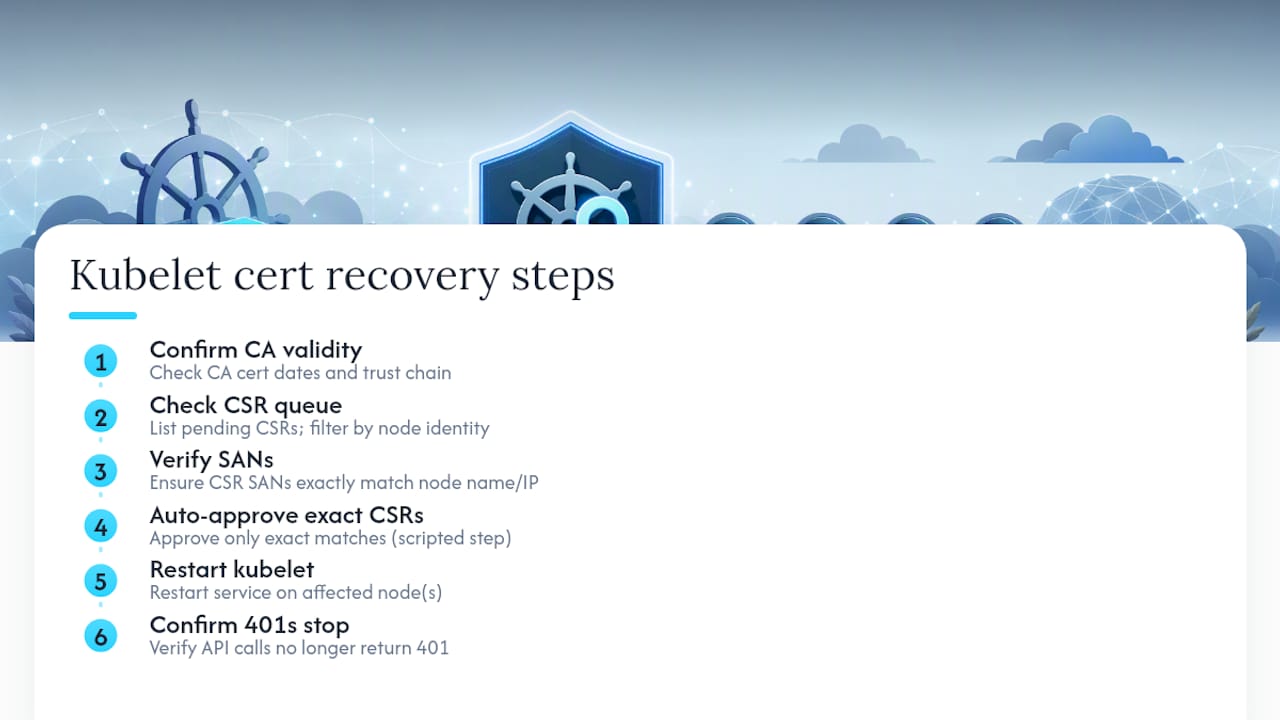
Devopsaitoolkit maintains a few assets worth pinning into your incident channel. The certificate lifecycle runbook walks through PKI management end to end, and the cert-manager automation guide covers scripted issuance. One practical use: a prompt-driven script that lists pending CSRs, filters by expected node identity, and auto-approves only exact matches. Paste this into your own runbook: confirm CA validity, check CSR queue, verify SANs, restart kubelet, confirm 401s stop.
The Real Lesson Behind Every Kubelet Certificate Incident
Most kubelet certificate emergencies are avoidable manual fixes in disguise. Set TTL alerts, adopt a yearly renewal cadence, and assign a named owner to the runbook, not “whoever’s on call.”
— James
Automate the Checks Before They Become Incidents
Chasing down expired certificates by hand across dozens of nodes is exactly the kind of repetitive, high-stakes work that eats a Friday afternoon. Devopsaitoolkit’s Linux Admin Prompt Pack gives you ready-made prompts for scripting certificate TTL checks, CSR queue audits, and safe approval workflows instead of building them from scratch under pressure.

If you’re already scripting rotation logic, the Automation AI Prompts library has free, copy-paste prompts you can adapt for monitoring alerts and routine approvals. For teams that want a guided setup rather than a DIY build, the AI DevOps Tools page covers incident response support and reviews. Start with the Linux Admin Prompt Pack, or check current pricing if you’re evaluating a broader rollout across your team.
Sources
- Configure Certificate Rotation for the Kubelet | Kubernetes
- Kubernetes kubelet certificate expired: detection, rotation, and recovery
Recommended
- Certificate Lifecycle and Internal PKI: Ending the 3 AM
- Kubernetes Security Hardening: Pods, RBAC, and Network Policy That Actually Contain a Breach
- Securing a Kubernetes Cluster: Pod Security and Admission
Get 500 Battle-Tested DevOps AI Prompts — Free
500 battle-tested, copy-paste AI prompts engineered by a senior systems engineer — every one with fill-in placeholders and safety/back-out notes. Drop your email and it's yours.
- 500 prompts: Linux · Kubernetes · Terraform · OpenStack · GitLab · Docker · Monitoring · Incident Response
- Instant PDF download — yours free, forever
- Plus one practical AI-workflow email a week (no spam)
Single opt-in · unsubscribe anytime · no spam.