
Five Hop Playbook to Fix Kube DNS Issues for Kubernetes Operators
Engineer-focused five hop runbook to diagnose and fix kube DNS issues, from CoreDNS and endpoints to resolv.conf, NetworkPolicy, NodeLocal cache, and...

Most kube DNS issues trace back to one of five places: the CoreDNS pods themselves, the kube-dns Service and its endpoints, a pod’s /etc/resolv.conf and dnsPolicy, an ndots/conntrack quirk, or a NetworkPolicy quietly dropping port 53. Skip the guesswork. Spin up a debug pod right now and run cat /etc/resolv.conf, then a quick nslookup or dig against a known hostname, to see which nameserver answers and what ndots value you’re working with.
TL;DR:
- Most DNS failures stem from CoreDNS pod issues, Service endpoint problems, or misconfigured pod resolv.conf and dnsPolicy, not CoreDNS itself.
- Running the structured five-hop debug sequence quickly isolates whether the problem lies in CoreDNS pods, network policies, or resolver configuration.
- Common root causes include high ndots settings causing latency, conntrack UDP race conditions, forwarding loops with systemd-resolved, or silent port blocking by NetworkPolicy.
- Implementing NodeLocal DNSCache, adjusting dnsConfig options, ensuring proper CoreDNS forwarding targets, and explicitly allowing DNS traffic in NetworkPolicies address the main causes.
- Verify DNS fixes with repeated
nslookupanddigchecks across nodes, while monitoring CoreDNS metrics and logs to confirm resolution stability.
Table of Contents
- Diagnosing Kube DNS Issues: The 8-Point Quick Check
- The Five-Hop Debug Flow for Kubernetes DNS Troubleshooting
- What Actually Causes Kubernetes DNS Failures
- Fixing Kube DNS Errors: Manifests and Config Snippets
- How Do You Verify a Kube DNS Fix Actually Worked?
- Monitoring Kube DNS Health After the Fix
- Lessons From Real Kube DNS Incidents
- Why Kube DNS Issues Keep Coming Back
- Get a Guided Kubernetes Health Check Instead of Debugging Alone
- Sources
- FAQ
Diagnosing Kube DNS Issues: The 8-Point Quick Check
Before you touch any config, run this shortlist. It takes about five minutes and tells you which of the five fault domains you’re dealing with.
- Confirm CoreDNS pods are Running and Ready.
kubectl get pods -n kube-system -l k8s-app=kube-dnsshould show every pod at1/1or2/2Ready, noCrashLoopBackOff, no recent restarts. - Read the logs before anything else.
kubectl logs -n kube-system -l k8s-app=kube-dns --tail=100surfacesSERVFAIL, forward timeouts, or loop-detection exits immediately. - Verify the Service exists and has endpoints.
kubectl get svc kube-dns -n kube-systemfollowed bykubectl get endpoints kube-dns -n kube-system— an empty endpoints list means the selector or readiness probe is broken, not DNS itself. - Launch a debug pod. A minimal manifest with
image: busybox:1.28andcommand: ["sleep", "3600"]gets you a shell fast. - Inspect that pod’s resolv.conf.
kubectl exec -it dnsutils -- cat /etc/resolv.confreveals the nameserver IP, the search list, and thendotssetting all at once. - Check dnsPolicy on the workload. Most pods default to
ClusterFirst; anything overridden toDefaultorNoneinherits the node’s resolver instead of CoreDNS. - Look for NetworkPolicy egress restrictions.
kubectl get networkpolicy -Aand check whether any default-deny rule omits an explicit allow for UDP/TCP 53. - Check NodeLocal DNSCache health, if deployed.
kubectl get pods -n kube-system -l k8s-app=node-local-dns -o wideshould show one healthy pod per node, with none stuck inPending.
If steps 1 through 3 all check out, the problem is almost always downstream in the pod’s own resolver config or in egress rules, not in CoreDNS.
The Five-Hop Debug Flow for Kubernetes DNS Troubleshooting
This is the sequence I fall back on for every ticket that starts with “DNS is broken.” A structured runbook like this, moving hop by hop from CoreDNS pods to endpoints to resolv.conf to a direct query to the logs, cuts diagnosis time dramatically compared to poking at random configs, according to a detailed CoreDNS troubleshooting walkthrough.
- Hop 1: Are the CoreDNS pods actually healthy? Run
kubectl get pods -n kube-system -l k8s-app=kube-dns -o wide. Expect all pods Ready, spread across nodes. If they’re crashing, checkkubectl describe podfor OOMKilled events before going further. - Hop 2: Does the Service have populated endpoints?
kubectl get endpoints kube-dns -n kube-system -o yaml. Zero endpoints with healthy pods usually means a label selector mismatch or a failing readiness probe, not a network problem. - Hop 3: What does the failing pod’s resolv.conf actually say?
kubectl exec <pod> -- cat /etc/resolv.conf. You’re looking for the correctnameserver(typically the kube-dns ClusterIP), a sanesearchlist, and thendotsvalue. - Hop 4: Query CoreDNS directly, bypassing the search list.
dig @<cluster-dns-ip> kubernetes.default.svc.cluster.local. A clean answer here proves CoreDNS itself works and points you back to the client-side resolver or search domain as the culprit. - Hop 5: Read the CoreDNS logs for forward errors. Look for
SERVFAIL,i/o timeout, or loop-detection messages, which map directly to specific fixes.
| Hop | What you check | Healthy result | Failure signal |
|---|---|---|---|
| 1 | CoreDNS pod status | All Ready, no restarts | CrashLoopBackOff, OOMKilled |
| 2 | Service/endpoints | Endpoints populated | Empty endpoints list |
| 3 | Pod resolv.conf | Correct nameserver, sane ndots | Wrong nameserver, missing search |
| 4 | Direct dig to CoreDNS | Clean answer | NXDOMAIN, timeout |
| 5 | CoreDNS logs | Quiet or normal query volume | SERVFAIL, forward i/o timeout, loop exit |
Each hop either clears CoreDNS as a suspect or hands you the exact error string to search next. That’s the whole value of running them in order instead of jumping straight to “restart CoreDNS and hope.”
What Actually Causes Kubernetes DNS Failures
Five root causes explain the overwhelming majority of tickets I’ve seen, and each one leaves a distinct fingerprint.
- ndots and the search list. Kubernetes sets
ndots:5by default, meaning any hostname with fewer than five dots gets tried against every entry in the search list before falling back to an absolute lookup. Resolving an external domain likeapi.stripe.comcan trigger four wasted queries before the real one succeeds, according to a practical ndots troubleshooting guide. That’s real latency stacking up on every cold lookup. - The conntrack UDP race. glibc fires simultaneous A and AAAA queries from the same source port, and Linux conntrack sometimes can’t insert both entries cleanly, producing a stalled query that only resolves after the default 5-second UDP timeout. This is one of the most misdiagnosed kube DNS issues because it looks like CoreDNS is slow when the kernel’s connection tracking table is the actual bottleneck.
- systemd-resolved forwarding loops. When a node’s
/etc/resolv.confpoints to the local stub resolver at127.0.0.53, and CoreDNS’s Corefile inherits that same address as an upstream, you get a forwarding loop. CoreDNS’s loop plugin detects this and exits deliberately rather than spin forever. - NetworkPolicy silently eating port 53. A default-deny egress policy that forgets an explicit allow rule for DNS traffic looks exactly like a CoreDNS outage from the pod’s side, but CoreDNS itself is perfectly healthy. Default-deny egress without a DNS carve-out is one of the most common self-inflicted kube DNS issues in hardened clusters.
- CoreDNS resource starvation and Corefile mistakes. Under-provisioned CoreDNS replicas get OOMKilled during traffic spikes, and a Corefile pointing
forwardat a stale or unreachable upstream produces the sameSERVFAILpattern as a genuine outage.
Pro Tip: Before touching the Corefile, run kubectl top pods -n kube-system -l k8s-app=kube-dns for a week’s worth of history. A pattern of restarts around traffic peaks means you need more replicas, not a different config.
Fixing Kube DNS Errors: Manifests and Config Snippets
Each root cause above has a corresponding fix. Here’s what to actually deploy.
- Deploy NodeLocal DNSCache. The DaemonSet runs a caching resolver on every node at a link-local address, so pod queries never cross the conntrack NAT path that causes the race in the first place. Verify with
kubectl get pods -n kube-system -l k8s-app=node-local-dns -o wideand confirm one Running pod per node. - Set
dnsConfigat the pod level. Addoptions: [{name: single-request-reopen}]and optionally reducendotsin the pod spec’sdnsConfig.options. Test in a non-critical namespace first since lowering ndots too aggressively can break SRV record lookups for internal services. - Fix the Corefile forward target. Point
forward . /etc/resolv.confat a verified, reachable upstream, add thecacheplugin to reduce redundant lookups, and scale CoreDNS replicas with pod anti-affinity so a single node failure doesn’t take out DNS cluster-wide. - Add an explicit egress allow for DNS. A NetworkPolicy rule permitting UDP and TCP on port 53 to the kube-dns Service (or the NodeLocal DNSCache address) closes the silent-drop scenario without disabling default-deny elsewhere.
To roll any of this out safely:
- Apply the change to a single namespace or canary deployment first.
- Watch CoreDNS logs and the debug pod’s
digoutput for 15 to 30 minutes. - Expand cluster-wide only after the canary shows zero
SERVFAILentries. - Keep the previous Corefile ConfigMap version saved so rollback is a one-line
kubectl applyaway.
Pro Tip: Never edit the Corefile directly in production. Change the ConfigMap in version control, diff it against the last known-good version, and apply through your normal deployment pipeline. Corefile edits made by hand at 2 AM are how forwarding loops happen.
How Do You Verify a Kube DNS Fix Actually Worked?
Don’t declare victory after one clean dig. Run this sequence:
- From the fix-target pod, run
nslookup kubernetes.default.svc.cluster.localand a short-name lookup likenslookup my-service, then compare against an FQDN with a trailing dot to confirm search-list behavior matches expectations. - Check the CoreDNS readiness endpoint and pull Prometheus metrics for
coredns_forward_responses_totalandcoredns_cache_hits_total. Forward errors should drop and cache hits should climb. - If NodeLocal DNSCache is in play, hit every node individually. A fix that works on nine of ten nodes and silently fails on the tenth is worse than no fix at all.
- Add a lightweight smoke test, a CronJob that runs
digagainst a known hostname every few minutes, with an alert rule if it fails twice in a row.
Monitoring Kube DNS Health After the Fix
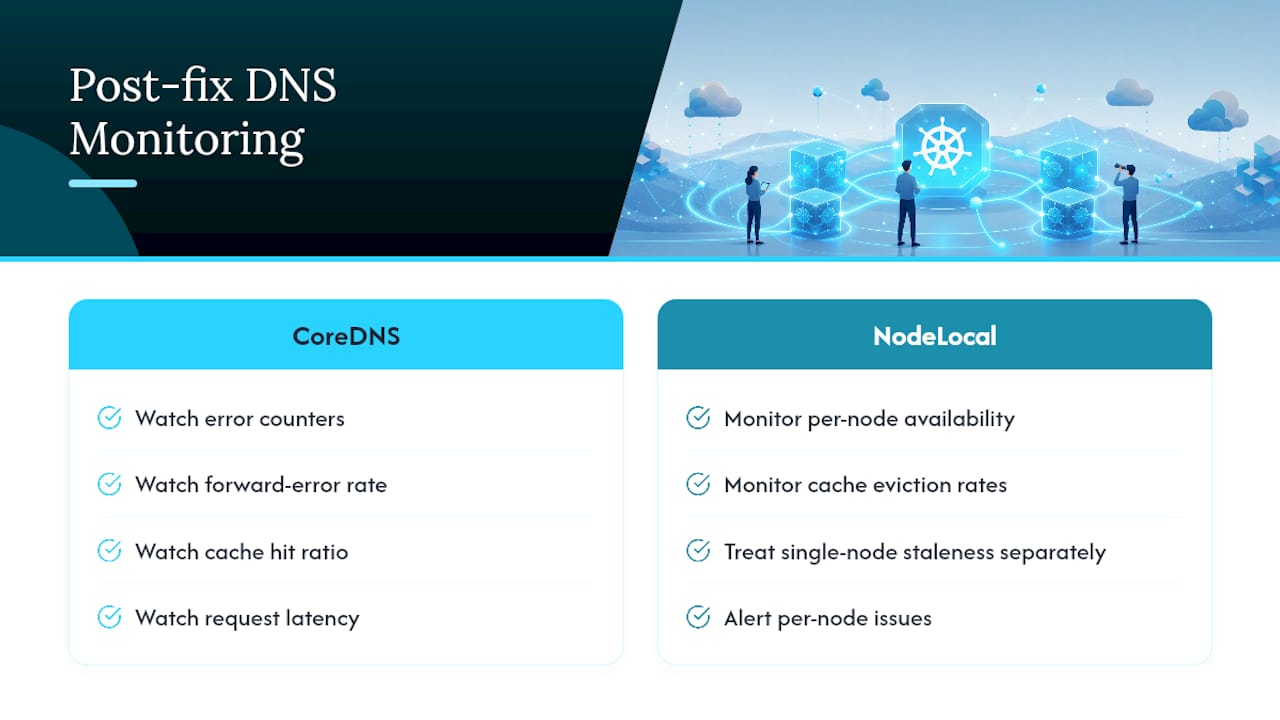
Watch CoreDNS’s error counters, forward-error rate, cache hit ratio, and request latency in Prometheus, and set an alert if forward errors climb for more than a few minutes straight. Turn on CoreDNS query logging only briefly during active incidents. On a busy cluster it generates enormous log volume fast, a point worth remembering before you leave it on overnight. For packet-level confirmation, run tcpdump -i any port 53 on a single suspect node rather than capturing cluster-wide.
Pro Tip: If you deploy NodeLocal DNSCache, shift your monitoring focus to per-node availability and cache eviction rates instead of just cluster-wide CoreDNS metrics. A single node’s cache going stale looks nothing like a CoreDNS problem.
Lessons From Real Kube DNS Incidents
The pattern I see most often: teams stage NodeLocal DNSCache rollout node-pool by node-pool rather than cluster-wide, and they test ndots changes in a scratch namespace before touching anything that talks to external APIs. The recurring misstep is editing the Corefile by hand under pressure. Our DNS and service networking playbook walks through both scenarios with real command sequences.

Why Kube DNS Issues Keep Coming Back
Most repeat incidents aren’t technical, they’re organizational. An unreviewed Corefile edit or a NetworkPolicy tweak lands without a second pair of eyes, and three weeks later the same SERVFAIL pattern resurfaces. Treat Corefile changes like code: require review, run a preflight test, and keep a runbook that shortens mean time to identification the next time it happens.
— James
Get a Guided Kubernetes Health Check Instead of Debugging Alone
If you’d rather have someone map your cluster’s fault domains before the next incident than reconstruct the five-hop flow under pressure at 2 AM, that’s exactly what Devopsaitoolkit’s Kubernetes Health Check covers: a full audit of CoreDNS configuration, NetworkPolicy egress rules, resource limits, and ndots behavior, priced at $300 one-off with a prioritized remediation plan you can hand straight to your team.

The check includes optional hands-on remediation if you’d rather have someone fix the Corefile and validate the rollout than do it yourself. For ongoing infrastructure work beyond DNS, hourly consulting starts at $150 per hour through the same work-with-me page. If you manage OpenStack alongside Kubernetes, the OpenStack Operations Toolkit is a one-off $79 resource worth a look too. Book a health check now and get the remediation plan in hand before the next DNS ticket lands.
Sources
For deeper reference, consult the Kubernetes DNS debugging guide, Microsoft’s pod-versus-node DNS mismatch walkthrough, and the conntrack and ndots deep dive referenced throughout this playbook.
- Kubernetes DNS troubleshooting: CoreDNS failures and resolution issues – Jorijn Schrijvershof
- How to troubleshoot Kubernetes DNS (CoreDNS) — OneUpTime blog
FAQ
Is Kube-DNS Deprecated?
Yes. Kubernetes replaced kube-dns with CoreDNS as the default cluster DNS provider starting in version 1.13, though some legacy clusters still run the older kube-dns add-on.
Why Is My Kubernetes DNS Having Issues?
The five most common culprits are unhealthy CoreDNS pods, missing Service endpoints, a misconfigured pod resolv.conf or dnsPolicy, the ndots/conntrack interaction, and NetworkPolicy egress rules blocking port 53.
How Do I Check Kube-DNS Status?
Run kubectl get pods -n kube-system -l k8s-app=kube-dns to confirm the pods are Running and Ready, then kubectl logs -n kube-system -l k8s-app=kube-dns to check for forward errors or loop-detection exits.
How Does Kubernetes Handle DNS Resolution?
CoreDNS runs as a cluster-internal Service, and each pod’s /etc/resolv.conf points to that Service’s ClusterIP by default, with a search list built from the pod’s namespace and cluster domain. NodeLocal DNSCache, when deployed, adds a per-node caching layer in front of that same CoreDNS Service.
Can Devopsaitoolkit Help Fix Kube DNS Issues Directly?
Yes. The Kubernetes Health Check service audits CoreDNS configuration, NetworkPolicy rules, and DNS-related resource limits, then delivers a prioritized remediation plan for $300 one-off.
Recommended
- Common Kubernetes Networking Mistakes and How to Fix Them
- Troubleshooting Kubernetes DNS and Service Networking
- DNS Egress Filtering: Closing the Exfiltration Channel
- Debugging Kubernetes Service Connectivity With an AI Copilot
Get 500 Battle-Tested DevOps AI Prompts — Free
500 battle-tested, copy-paste AI prompts engineered by a senior systems engineer — every one with fill-in placeholders and safety/back-out notes. Drop your email and it's yours.
- 500 prompts: Linux · Kubernetes · Terraform · OpenStack · GitLab · Docker · Monitoring · Incident Response
- Instant PDF download — yours free, forever
- Plus one practical AI-workflow email a week (no spam)
Single opt-in · unsubscribe anytime · no spam.