
3 AM Runbooks: Incident Response Playbooks SREs Can Copy Paste
Practitioner-first incident response playbooks for SREs: copy paste runbooks with exact CLI/API commands, verification checks, a ten-item checklist, and...

A working incident response playbook does three things: it tells everyone who owns which decision, it hands the on-call engineer exact commands instead of prose, and it defines success in numbers, not vibes. The moment an alert fires, the first move isn’t diagnosis. It’s confirming the alert is real with a quick check, opening the incident channel, and pulling up the runbook that matches the symptom. Everything that happens after should inform continuous updates to the runbook.
TL;DR:
- Attach runbook URLs directly to alert rules and index them by symptom rather than component names to ensure quick access during incidents.
- Write runbooks with clear, copy-pasteable commands, expected outcomes, and rollback steps to facilitate rapid resolution at 3 AM.
- Regularly test, review, and update runbooks through gamedays, postmortems, and version control to keep procedures current and reliable.
- Create runbooks that begin with the exact alert name and include a confirmation check, making them easy to follow under stress and near automation-ready.
- Focus on indexing procedures by symptom and attaching them to alerts, rather than extensive organizational charts or overly narrative documentation.
Table of Contents
- What Goes Into an Incident Response Playbook?
- Runbook Design That Works at 3 AM
- Testing and Maintenance: Gamedays and Runbook Edits
- Attaching Runbooks to Alerts and Automating Safely
- Ten Checks Every Runbook Should Pass
- Why Most Teams Overengineer Their Playbooks
- Skip the Blank Page: Ready-Made Playbooks and Prompts
- Sources
What Goes Into an Incident Response Playbook?
A playbook is not a runbook, and mixing them up is the fastest way to end up with a 40-page document nobody opens during an outage. The playbook holds the strategic layer: who’s in charge, how severity gets classified, and what gets communicated to whom. The runbook holds the tactical layer: the exact commands you run against Kubernetes, Prometheus, or your load balancer. ITOC360’s breakdown of the distinction puts it cleanly: playbooks answer “who and why,” runbooks answer “how.” If you want a longer treatment of that split, we’ve written a full comparison of runbooks versus playbooks worth bookmarking.
Every playbook needs a metadata block at the top, and skipping this is how teams end up running a stale procedure during a live outage:
- Title and version — so nobody debugs against an outdated copy.
- Owner and last reviewed date — a name, not a team alias that resolves to nobody.
- Services and dependencies affected — the exact microservices, databases, or clusters in scope.
- Trigger conditions — the specific alert names or thresholds that invoke this playbook.
Severity classification comes next, and it needs teeth, not adjectives. A common structure runs SEV1 through SEV4: SEV1 means full outage requiring prompt response as defined by your organization’s policies, SEV2 means degraded service for a subset of users requiring timely response as per your incident management guidelines, SEV3 covers minor issues with limited impact typically addressed within the business day, and SEV4 covers cosmetic or informational issues with low urgency. Our incident severity levels guide has copy-paste templates for this table if you’re building yours from scratch.
Roles need the same specificity. The incident commander owns decisions and pacing, not the fix itself. The technical lead drives the actual remediation. The communications lead owns the status page and stakeholder updates. The scribe timestamps every action for the postmortem. Atlassian’s incident management framework lays out escalation paths and communication templates that map well onto this structure, including a status page update template (“We are investigating reports of X affecting Y users, next update in 30 minutes”) that saves you from drafting language mid-fire.
Runbook Design That Works at 3 AM
A runbook that reads well in a design review usually fails in production, because design reviews happen when nobody’s heart rate is elevated. Write for the second version of the reader: half awake, one browser tab open, no patience for context.
Start every runbook with the exact alert name it resolves, followed by one confirmatory check that proves the alert is real before anyone touches production. Google’s SRE incident management guide frames this correctly: a runbook step is a command plus a check plus a decision, never an explanation. Skip the “why this happens” paragraph. Save that for the wiki page linked at the bottom.
Structure the body as a decision tree, not a narrative:
- Confirm the symptom. Run the check. Compare against a stated threshold.
- Branch on the result. “If error rate exceeds 5% for more than 3 minutes, proceed to step 3. If below, check upstream dependency X instead.”
- Execute the mitigation command. Paste the exact command, no placeholders left unresolved.
- Verify the fix. State the metric, the expected value, and the time window to observe it.
- Roll back if verification fails. Give the exact undo command, not “revert the change.”
A real example for a Kubernetes deployment stuck in CrashLoopBackOff under alert pressure:
kubectl rollout status deployment/api-gateway -n prod --timeout=30s
kubectl logs deployment/api-gateway -n prod --tail=50
kubectl rollout undo deployment/api-gateway -n prod
kubectl rollout status deployment/api-gateway -n prod
If it doesn’t, the runbook should point to the next branch, not a dead end.
OneUpTime’s guide to building incident playbooks recommends indexing runbooks by symptom rather than by the component that’s failing, which matters more than it sounds. Under pressure, engineers remember “checkout is slow,” not “payments-service-v3 is degraded.” For a deeper library of runbook formats by failure type, our field guide to on-call runbook types and our piece on building runbooks engineers actually trust at 3 AM both walk through real examples across Terraform, Docker, and OpenStack failures.
Pro Tip: Write the rollback command before you write the fix command. If you can’t articulate the undo step first, you don’t understand the blast radius of the fix well enough to run it during an incident.
Testing and Maintenance: Gamedays and Runbook Edits
A runbook you haven’t tested since it was written is a guess with good formatting. Treat every inaccurate step you find during a real incident as a failed test, not a footnote, and fix it before the postmortem meeting ends.
The maintenance loop that keeps runbooks trustworthy looks like this:
- Immediate edits. If a command was wrong or a threshold was off, fix it the same day, ideally before the incident channel closes.
- 24 to 48 hour postmortem. Make “was the runbook accurate?” a standing question, with a named owner assigned to any fix, exactly as Atlassian’s framework recommends.
- Monthly review rotation. Assign a rotating owner to re-walk the top five most-paged runbooks and confirm commands still match current infrastructure.
- Gamedays and chaos experiments. Simulate the failure on purpose and time how long a responder takes to find, follow, and resolve it against the runbook alone.
Google’s SRE practice calls gamedays like “Wheel of Misfortune” exercises among the most effective ways to test runbook clarity, because they expose the gap between what the document says and what a person under mild stress actually does with it. Our guide to running gamedays and chaos experiments without breaking production covers safe scoping for these drills, and running incident tabletop exercises that build real skill is the lighter-weight version if you can’t justify a full production drill yet.
Store runbooks in version control alongside your Terraform and Kubernetes manifests, not in a wiki that drifts silently out of sync. Pagerly’s research on runbooks that actually get used recommends starting maintenance by listing your noisiest alerts, confirming each has a working runbook, and rewriting the worst offenders first rather than trying to fix everything at once.
Attaching Runbooks to Alerts and Automating Safely
The highest-leverage fix most teams skip is shortening the distance between “alert fires” and “responder sees the right steps.” Attach the runbook URL directly to the alert rule definition in Prometheus, PagerDuty, or wherever your alerting lives, so the link travels with the page instead of requiring a search.
A few patterns make this concrete:
- Alert-to-runbook attachment. Every alert rule carries a
runbook_urlannotation pointing straight to the relevant doc. - Symptom-based indexing. File runbooks by what users experience (“checkout latency high”), not by internal service names.
- ChatOps shortcuts. Bind common low-risk fixes, like restarting a stateless pod or scaling a deployment, to a chat command the incident commander can trigger from the channel.
- Approval gates for high blast-radius actions. Anything touching a database, a production Terraform apply, or a multi-region failover requires a second human’s explicit sign-off before execution.
Pagerly’s research found that attaching runbooks to alert definitions directly is one of the most reliable ways to raise how often responders actually open and follow them during a live page, rather than defaulting to memory or Slack archaeology. For teams building this automation layer, our guide to AI tools for SRE teams covers which parts of triage can be safely handed to automation and which parts still need a human making the call.
Pro Tip: Reserve full automation for actions you’d be comfortable running blind at 3 AM with no review. If the action needs a second pair of eyes when a human does it, it needs an approval gate when a bot does it.
Ten Checks Every Runbook Should Pass
Run any runbook through this list before you trust it during a real page:
- Does it name the exact alert that triggers it?
- Is there a confirmatory check before any remediation step?
- Is every command copy-pasteable with no unresolved placeholders?
- Does each step state an expected output or threshold?
- Is there a stated rollback command, not just a fix?
- Does it name a verification metric and a time window?
- Is it indexed by symptom rather than internal service name?
- Is the owner’s name current, or does escalation resolve to whoever’s on-call now?
- Was it last tested in a gameday or a real incident within the past quarter?
- Could a new hire follow it at 3 AM without pinging a senior engineer?
That last one is the real bar. A runbook that only works because the author already knows the system by heart isn’t a runbook, it’s a memory aid. Runbook templates and Prometheus prompt packs are built around this exact checklist, and they’re worth pulling from rather than starting a blank document at 2 AM during your next incident review.
Why Most Teams Overengineer Their Playbooks
The conventional advice on incident response playbooks spends too much time on org charts and not enough on the fifteen seconds after the pager buzzes. Roles and escalation matrices matter, but they’re solved problems. What separates a playbook that shortens outages from one that just looks thorough in a compliance audit is whether the runbook underneath it has an exact command, a stated threshold, and a rollback path.
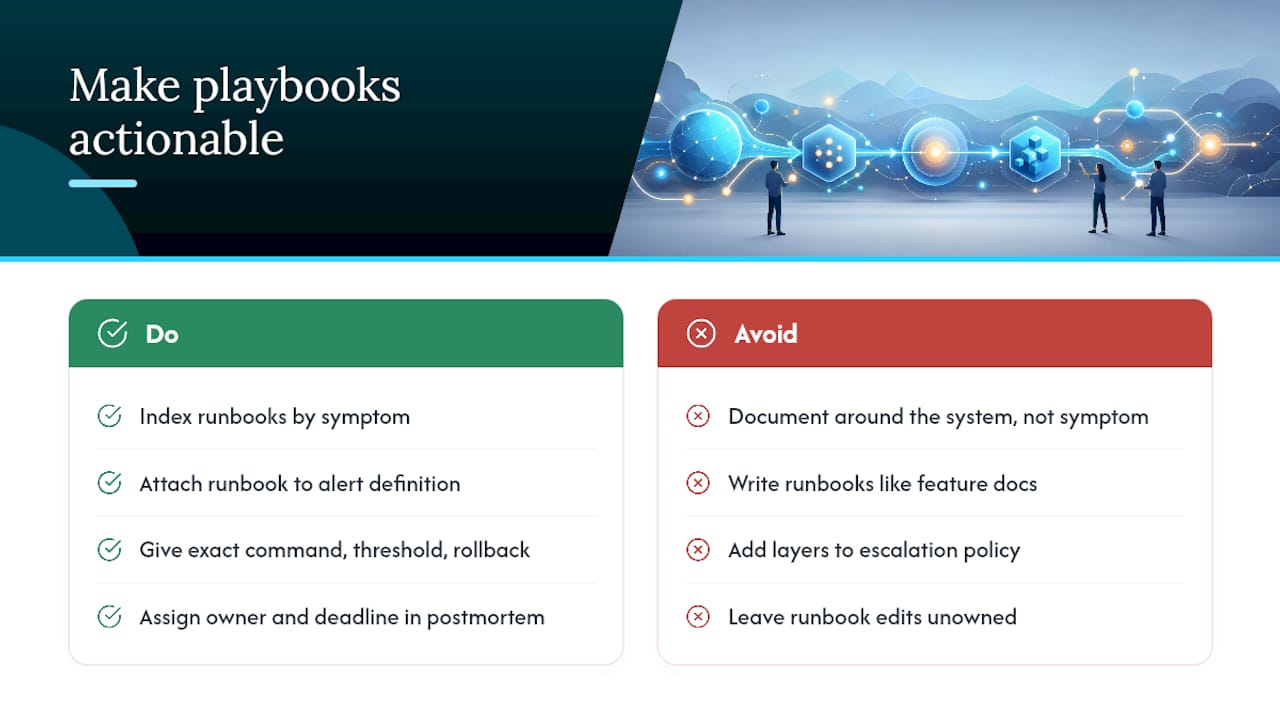
Most teams write runbooks the way they write documentation for a feature: comprehensive, narrative, and organized around the system rather than the symptom. That’s backwards. Under an active outage, nobody wants to understand the system. They want to know what to type next and how to know if it worked. If your playbook program has a single priority for this quarter, it should be indexing every runbook by symptom and attaching each one to its alert definition, not adding another approval layer to your escalation policy.
The maintenance loop is where most programs quietly die. Gamedays get scheduled once, postmortems get written, and the runbook edit that everyone agreed was necessary never actually lands because nobody owns it. Assign the edit an owner and a deadline in the postmortem itself, or it won’t happen.
— James
Skip the Blank Page: Ready-Made Playbooks and Prompts
You can get from zero to a tested runbook in an afternoon instead of a sprint, with templates built around the same command-check-decision structure covered above, not generic incident management theory.

The AI DevOps Tools collection includes playbook templates with the metadata and severity tables already scaffolded, runbook formats with rollback steps built in, and AI prompts that turn a messy postmortem into a clean runbook edit in minutes rather than a meeting. If your alerting runs through Prometheus, the 165 free Prometheus and monitoring prompts are a fast way to generate symptom-first alert descriptions and triage checklists without touching a blank document. For teams running security-adjacent workloads, pairing your incident cadence with a regular penetration testing schedule closes a gap most runbook programs leave open.
Start at the Devopsaitoolkit homepage to browse the full toolkit, or head straight to the AI DevOps Tools page to pull the templates before your next gameday.
Sources
Recommended
- Building Incident Runbooks Engineers Actually Trust at 3 AM
- DevOps On-Call Runbook Types: A 2026 Field Guide
- Runbook vs Playbook: The Ops Team Decision Guide
- Incident Severity Levels for SREs and Ops Teams: Playbook
Get 500 Battle-Tested DevOps AI Prompts — Free
500 battle-tested, copy-paste AI prompts engineered by a senior systems engineer — every one with fill-in placeholders and safety/back-out notes. Drop your email and it's yours.
- 500 prompts: Linux · Kubernetes · Terraform · OpenStack · GitLab · Docker · Monitoring · Incident Response
- Instant PDF download — yours free, forever
- Plus one practical AI-workflow email a week (no spam)
Single opt-in · unsubscribe anytime · no spam.