
126 GitLab Prompts and 9 Agents: Pasteable DevOps Prompt Packs
Explore 126 GitLab prompts and 9 agents with pasteable DevOps playbooks, local prompt management, and a glci validation ladder: glci lint, glci show, glci...

GitLab prompts are ready-to-use AI instructions for GitLab Duo and agent skills that automate code review, pipeline authoring, debugging, and security triage. Start with GitLab’s AI Resource Library, which now catalogs 126 prompts and 9 agents across the software lifecycle. Pair that catalog with the task-focused templates below and a validation step before anything touches a protected branch, and you have a repeatable system instead of a pile of one-off chat messages.
TL;DR:
- Prompts should be structured with clear delimiters, including full project context, and versioned like code to improve reliability and reduce errors.
- Validating AI-generated pipeline files involves outlining stages before YAML generation and running syntax checks with tools like glci lint and local simulation.
- Using a local prompt library or YAML files helps manage templates at scale while ensuring sensitive information is masked during reuse and sharing.
- AI supports automation of routine tasks such as code review checklists, test generation, and log summarization but requires human oversight for final approval, especially on protected branches.
- Starting with vetted prompt collections and adapting templates from official sources accelerates pipeline and security workflows, preventing common errors and ensuring safe deployment practices.
Table of Contents
- Where to Find Vetted GitLab Prompt Libraries and Skill Examples
- Prompt Examples for the DevOps Tasks You Actually Repeat
- Prompt Engineering Rules That Actually Reduce Errors
- CI/CD Prompt Patterns and the Validation Ladder That Keeps You Safe
- Managing Prompts Locally Before They Reach Production
- How DevOps AI ToolKit Applies These Prompts in Practice
- What Realistic Trust in AI-Generated Prompts Looks Like
- DevOps AI ToolKit: Prompt Packs, Playbooks, and Consulting
- Sources
- FAQ
Where to Find Vetted GitLab Prompt Libraries and Skill Examples
You don’t need to build a prompt collection from scratch. GitLab already maintains one, and a handful of open tools extend it for local use.
- GitLab’s AI Resource Library organizes its 126 prompts and 9 agents by lifecycle stage and complexity, so you can filter for planning, coding, testing, or security work instead of scrolling a flat list.
- GitLab Duo prompt examples in the official docs show concrete templates for refactoring legacy code, generating tests, debugging, and scanning for vulnerabilities. These read like starting points, not finished products.
- GitLab Duo Chat’s example prompts demonstrate how to reference multiple files, request project summaries, and pull merge request context into a single query.
- gitlab-ci-skill, an agent skill built for authoring and debugging
.gitlab-ci.ymlfiles offline, pairs well with theglcicommand line tool for local checks before anything reaches a runner. - Community projects like the Prompt Library (
plCLI) add a searchable, versioned home for the templates your team writes.
Some community templates carry a Creative Commons Attribution-ShareAlike license, which matters if you plan to redistribute a modified version internally or publicly.
Prompt Examples for the DevOps Tasks You Actually Repeat
The prompts below aren’t theoretical. They’re the shape of what you’d type into GitLab Duo Chat or an agent skill on a normal Tuesday.
-
Code review. Ask the model to return findings as a checklist rather than a paragraph: “Review this diff for logic errors, unhandled exceptions, and security issues. Return a checklist with severity (high/medium/low) and a one-line fix suggestion for each item.” Checklists are easier to triage than prose, and they map directly onto merge request comments.
-
Test generation. Feed the model a function signature and docstring, then ask for unit tests covering edge cases, null inputs, and expected exceptions. A pattern like “Generate pytest unit tests for this function, including at least one failure case” produces a usable first draft more often than a vague “write tests for this.”
-
Debugging failing pipelines. Paste the failing job log directly and ask: “List the three most likely root causes for this failure, ranked by probability, and suggest a fix for each.” Logs are noisy; ranking cuts the guesswork.
-
CI/CD generation. Split this into two prompts instead of one. First: “Outline the stages and jobs this pipeline needs for a Node.js app with test, build, and deploy phases.” Second, after you approve that outline: “Generate the
.gitlab-ci.ymlfor the approved stages, usingextends:for shared job config and explicit job names.” -
Security triage. Ask the model to prioritize a vulnerability scan’s output by exploitability and blast radius, then propose remediation steps for the top three items only. Trying to fix everything at once buries the real risks.
-
MR summarization and release notes. Prompt for a summary grouped by “what changed,” “why,” and “risk,” pulling from commit messages and diff context.
Pro Tip: Never paste raw credentials or internal hostnames into a prompt, even in a private chat session. Mask them first or use placeholder variables. The pattern is worth automating once, not remembering every time.
For test generation specifically, tools like the AmmarAI code generator apply a similar signature-to-test pattern if you want a dedicated tool outside GitLab Duo.
Prompt Engineering Rules That Actually Reduce Errors
There’s no universal prompt that works across every model and task, according to GitLab’s own Prompt Engineering Guide. What changes outcomes consistently is structure and context, not cleverness.
- Use delimiters or XML-like tags when the model benefits from clearly separated sections. Anthropic’s Claude models, for example, respond well to
<context>and<task>tags that keep instructions distinct from the code being analyzed. - Ask for stages before code. For CI/CD tasks, request a plain-language outline of stages and jobs first. Confirm it, then ask for the YAML. This chain-of-thought step catches structural mistakes before they become fifty lines of broken pipeline config.
- Include real project context. Full file paths, the merge request ID, and the exact output format you want (JSON, a table, a checklist) produce more reliable results than a bare question. Context-heavy prompts consistently outperform vague ones for DevOps tasks, per the same guide.
- Version your prompts and test them like code. A prompt that worked last month against last month’s model may drift. Keep templates in source control and re-run a small regression set before you rely on a change.
If your team is running the same five prompts across ten repositories, the case for a shared, versioned template store gets stronger fast.
CI/CD Prompt Patterns and the Validation Ladder That Keeps You Safe
Generating a .gitlab-ci.yml file with AI is fast. Trusting it without checking is how you break a deploy at 5 p.m. on a Friday. The safest pattern splits generation from validation and never skips a rung.
- Outline first. Ask the model to list pipeline stages and jobs in plain language, referencing job naming conventions your team already uses and any shared config via
extends:. - Generate the YAML only after you’ve confirmed the outline matches what you actually need. This is where explicit job names and inherited configuration blocks pay off. Vague job names make debugging the next failure harder for whoever inherits the file.
- Run the validation ladder. The gitlab-ci-skill project recommends
glci lintto catch syntax errors,glci showto preview the resolved pipeline configuration, andglci runto simulate execution locally before anything hits a shared runner. Ifglciisn’t available,glab ci lintis a reasonable fallback for basic syntax checks.
Pro Tip: Don’t prompt a model to add interactive input mid-pipeline. GitLab’s own CI pipeline documentation treats blocking a run for manual input as an anti-pattern. Use manual jobs or pipeline variables instead, both of which the model can generate correctly if you specify them in the prompt.
The GitLab CI/CD prompt collection and the pipeline automation examples guide both work as reference patterns if you want to see this two-step approach applied to real pipeline structures before you write your own.
Managing Prompts Locally Before They Reach Production
Storing prompts in scattered chat histories doesn’t scale past two or three people. A local prompt manager fixes that without adding much overhead.
- The Prompt Library (
plCLI) stores templates in a local SQLite database, supports variable substitution so you can render the same template against different projects, and uses FTS5 full-text search to find a prompt by keyword instead of memory. - YAML files work fine for small teams who want prompts under version control alongside their code; a local database pays off once you’re managing dozens of templates across multiple repositories.
- Whichever method you choose, strip credentials and hostnames from stored templates and substitute them from environment variables at render time. A shared prompt library is a liability if it also shares secrets.
- Keep
glciandglabin the same toolchain as your prompt manager. Rendering a prompt, generating YAML, and validating it should feel like one workflow, not three disconnected tools.
How DevOps AI ToolKit Applies These Prompts in Practice
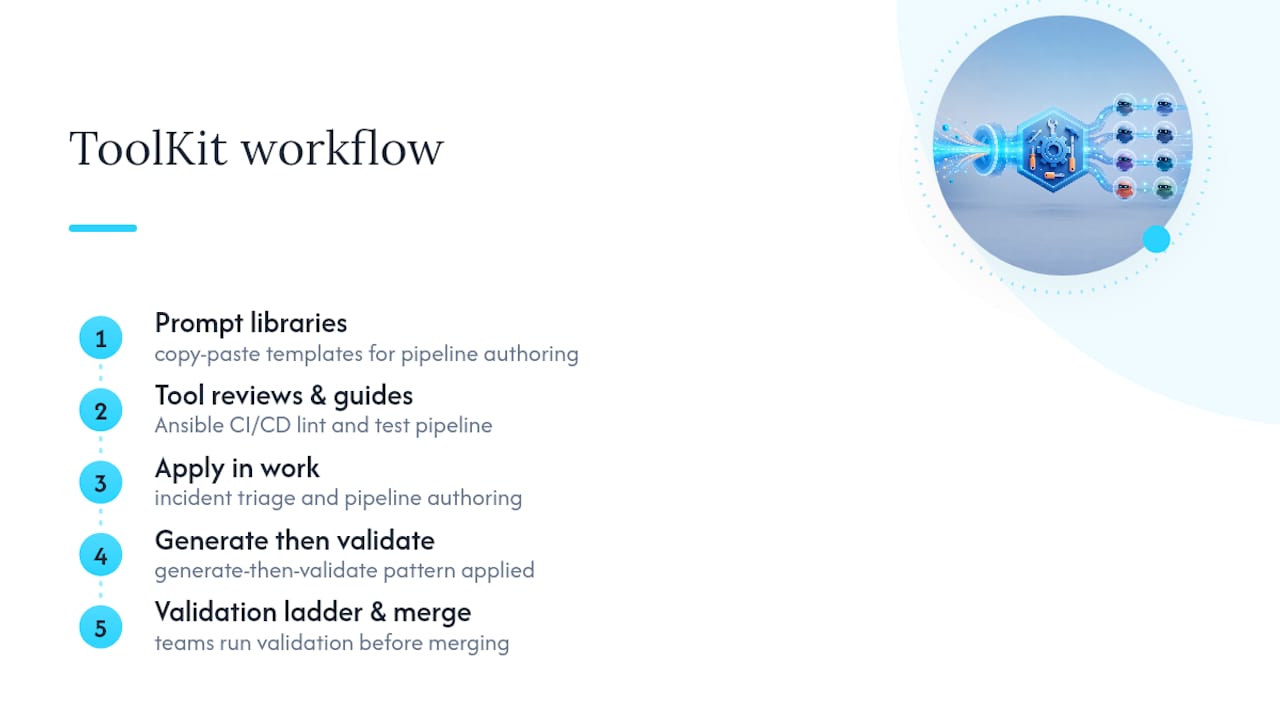
DevOps AI ToolKit builds on exactly this workflow: prompt libraries, tool reviews, and automation guides written for engineers who manage GitLab, Kubernetes, and production infrastructure daily. The GitLab CI/CD prompt collection packages copy-paste templates for pipeline authoring, while the Ansible CI/CD lint and test pipeline prompt shows the same generate-then-validate pattern applied outside GitLab-native jobs. Teams typically pull these into incident triage and pipeline authoring work when they need a working starting point faster than a blank prompt window allows, then run their own validation ladder before merging anything.
What Realistic Trust in AI-Generated Prompts Looks Like
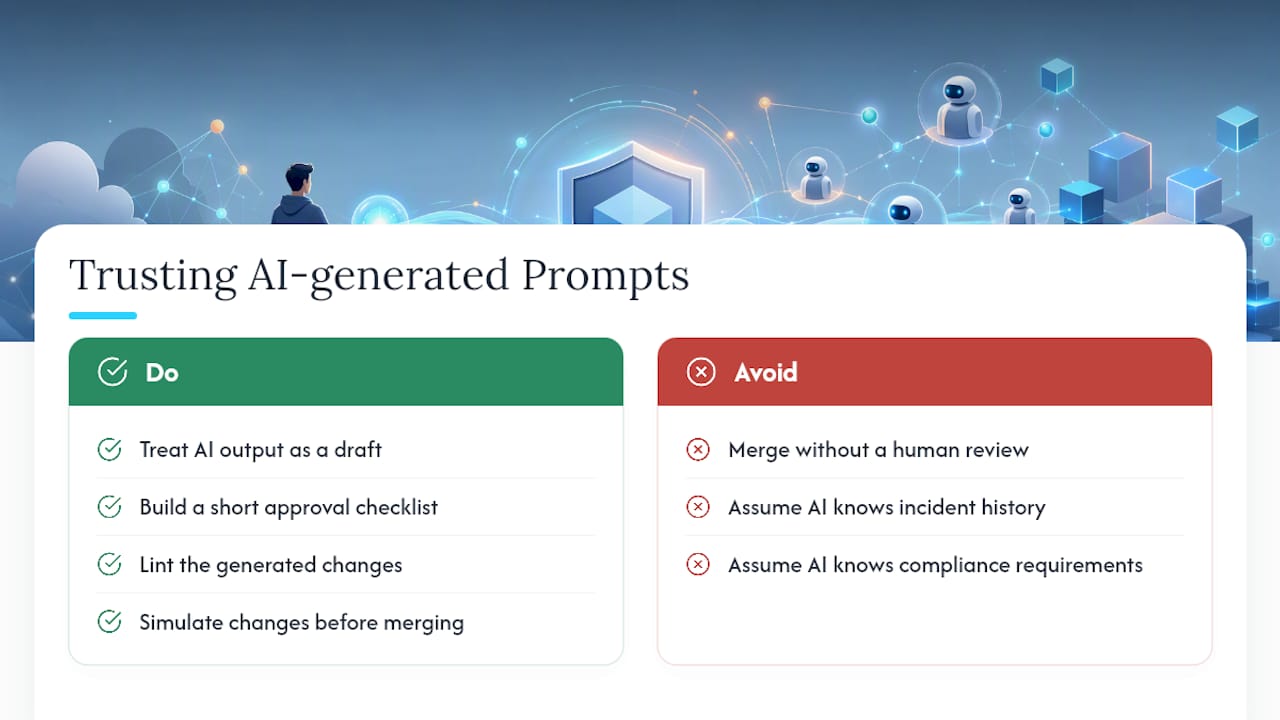
AI speeds up the boring parts. Routine test scaffolding, first-draft pipeline outlines, and log summarization all get faster with a well-structured prompt. None of that means the output is ready to merge.
Treat every generated .gitlab-ci.yml, every security remediation list, and every MR summary as a draft that needs a second set of eyes. Build a short approval checklist for anything touching protected branches: lint it, simulate it, and require a human review before it merges. AI catches patterns fast. It doesn’t know your incident history, your compliance requirements, or which “quick fix” broke production last quarter.
— James
DevOps AI ToolKit: Prompt Packs, Playbooks, and Consulting
Some providers offer faster routes to working prompt libraries than reverse-engineering templates from scattered documentation and trial-and-error chat sessions. Instead of assembling your own CI/CD prompts one failed pipeline at a time, you get downloadable prompt packs, validation playbooks, and troubleshooting guides built specifically for GitLab, Kubernetes, and production infrastructure work.

The AI Workflows landing page walks through the full catalog of prompt libraries and automation guides, and the AI DevOps tools page covers turnkey tooling for incident response and review workflows if you want something more hands-off than copy-paste templates. Teams running into recurring pipeline errors can also start with the GitLab CI ‘Invalid CI config’ error guide for a targeted fix. Check the pricing page for prompt pack and consulting details, and pull the first template that matches a pipeline you’re rebuilding this week.
FAQ
What Are GitLab Prompts Used For?
GitLab prompts are structured instructions given to GitLab Duo or agent skills to automate tasks like code review, test generation, pipeline authoring, debugging, and security triage.
Where Should I Start Looking for GitLab Prompt Examples?
Start with GitLab’s AI Resource Library, which lists 126 prompts and 9 agents, then check the Duo prompt examples docs for task-specific templates you can adapt.
How Do I Validate an AI-Generated .gitlab-ci.yml File Safely?
Run it through glci lint to catch syntax errors, glci show to preview the resolved configuration, and glci run to simulate execution before it reaches a shared runner; glab ci lint works as a fallback.
Can AI Handle Interactive Input Mid-Pipeline?
No. Blocking a pipeline run for interactive input is an anti-pattern in GitLab CI; use manual jobs or pipeline variables instead to collect approvals or extra data.
Does Devopsaitoolkit Offer Ready-Made GitLab Prompt Packs?
Yes. Some providers publish downloadable prompt packs for GitLab CI/CD, security scanning, and pipeline troubleshooting, built for teams that want validated templates instead of starting from a blank prompt.
Recommended
- Prompt Packs — Expert AI Prompts for DevOps & Security
- DevOps Security Prompt Pack — 100 Battle-Tested AI Prompts
- Building Reusable Prompt Libraries for DevOps Teams
Get 500 Battle-Tested DevOps AI Prompts — Free
500 battle-tested, copy-paste AI prompts engineered by a senior systems engineer — every one with fill-in placeholders and safety/back-out notes. Drop your email and it's yours.
- 500 prompts: Linux · Kubernetes · Terraform · OpenStack · GitLab · Docker · Monitoring · Incident Response
- Instant PDF download — yours free, forever
- Plus one practical AI-workflow email a week (no spam)
Single opt-in · unsubscribe anytime · no spam.