
Feature Flags Explained for DevOps Engineers
Discover how feature flags explained for DevOps streamline releases without redeploying code, enhancing your development workflow.
- #feature-flags
- #ci-cd
- #deployment
- #release-management
- #devops

Feature flags are a software mechanism that enables or disables features at runtime without redeploying code. Also called feature toggles, they give DevOps teams granular control over what users see and when, completely independent of the deployment pipeline. Tools like LaunchDarkly, ConfigCat, and GitLab CI have made feature flags a core part of modern continuous delivery. If you’ve ever wanted to ship code on Friday without losing sleep, feature flags explained in a DevOps context are exactly what you need.
What are feature flags in DevOps?
Feature flags in DevOps are runtime configuration switches that decouple deployment from release, treating them as two distinct events. Deployment pushes code to production. Release is the decision to expose that code to users. Keeping these separate is the core paradigm shift that makes progressive delivery possible.
Without feature flags, every deployment is also a release. That coupling forces teams into risky big-bang launches or complex branching strategies. With flags, you can merge incomplete features into the main branch safely, hiding them behind a toggle until they’re ready. This supports trunk-based development without the chaos of long-lived feature branches.

Feature flags are often confused with configuration management, but they differ in one critical way. Configuration management handles static environment settings. Feature flags support high-frequency, targeted runtime toggling aimed at specific users, cohorts, or traffic percentages. That distinction matters when you’re managing a live production system.
What are the main types of feature flags?
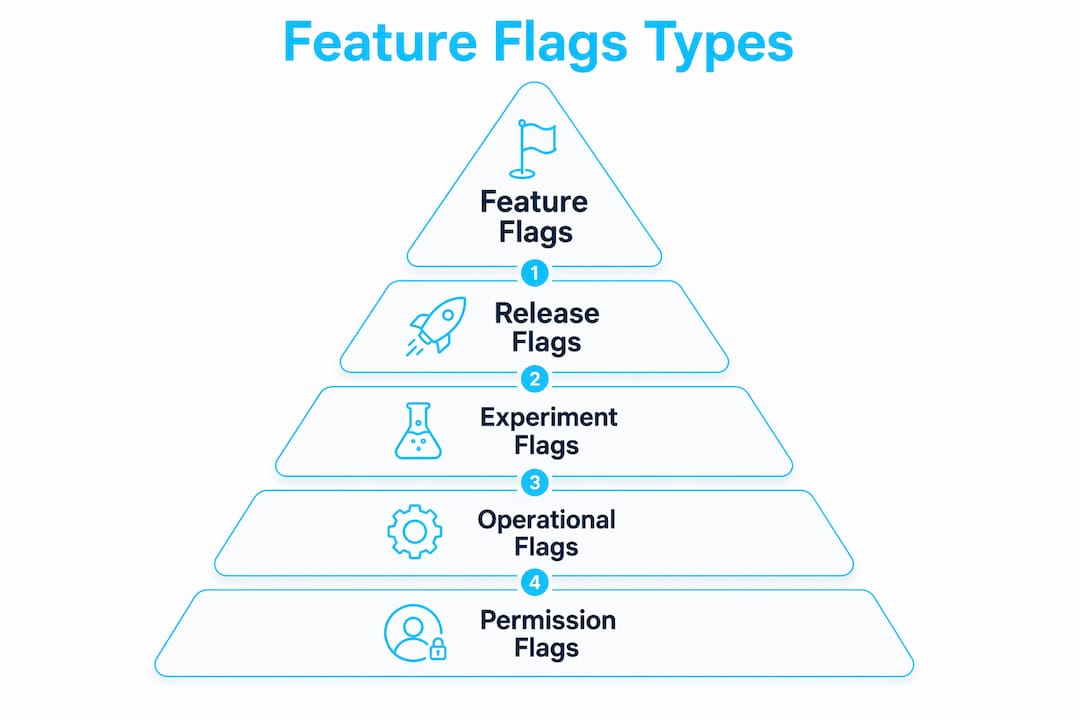
Feature flags fall into four categories, each with a different purpose and expected lifespan. Mixing them without discipline is one of the fastest ways to accumulate technical debt in your codebase.
Release flags and experiment flags are temporary by design. You create them for a specific purpose, ship the feature, and then remove the flag. Operational and permission flags are long-lived because they serve ongoing runtime control needs, like disabling a third-party integration under load or gating premium features by subscription tier.
The danger is when teams start using release flags as permanent operational switches. That misuse creates orphaned code paths, confuses future engineers, and makes the codebase harder to reason about. The fix is simple but requires discipline: treat flag type as a first-class attribute from the moment you create the ticket.
Pro Tip: Assign an expiry date to every release and experiment flag at creation time. Add it to the Jira ticket or GitLab issue so cleanup is a scheduled task, not an afterthought.
How do feature flags improve DevOps performance?
Feature flags directly improve all four DORA metrics: Deployment Frequency, Lead Time for Changes, Change Failure Rate, and Time to Restore Service. The most dramatic impact is on incident recovery. Flipping a flag off can turn a Severity-1 incident into a minor event by disabling the faulty feature in seconds, without triggering a full rollback or hotfix deployment.
That speed matters. A traditional rollback requires a new deployment pipeline run, which can take minutes to tens of minutes depending on your infrastructure. A flag toggle propagates in under a minute. For a production incident, that difference is the gap between a brief blip and a full-scale outage.
Feature flags also reduce the blast radius of failures. Instead of rolling back an entire release, you disable only the specific feature causing the problem. Everything else keeps running. This is especially valuable in microservices architectures where a single deployment often contains changes across multiple features.
Here’s what that looks like in practice:
- A new checkout flow causes payment errors for 2% of users. You flip the release flag off. The old checkout flow resumes instantly.
- A new recommendation engine hammers your database under load. You toggle the operational flag off. Load drops immediately.
- An A/B test produces unexpected results. You disable the experiment flag. All users revert to the control experience.
“Feature flags reduce the risk and complexity of feature integration, supporting continuous delivery and faster feedback cycles.” — askantech.com
How to implement feature flags in modern DevOps pipelines
The technical implementation of a feature flag system has a few core components. Understanding how they fit together helps you avoid common pitfalls around latency, stale state, and emergency scenarios.
At the most basic level, a feature flag is a conditional branch in your code controlled by an external configuration value. Instead of if (newFeatureEnabled) hardcoded to true, the value comes from a flag evaluation service or SDK. The SDK fetches the flag configuration and evaluates it locally against targeting rules.
Modern SDKs like those from LaunchDarkly and ConfigCat cache flag values locally to avoid adding network latency to every request. The SDK syncs with the flag service in the background. This means toggles typically propagate within under a minute, but not instantaneously. That delay matters when you’re using a flag as an emergency kill switch during an active incident.
A typical flag system includes these components:
- Flag store: A database or config service holding flag definitions, targeting rules, and current state.
- SDK: Embedded in your application, evaluates flags locally using cached config.
- Control panel: The UI or API where engineers toggle flags and configure targeting rules.
- Audit log: A record of every flag state change with timestamp and actor identity.
- Targeting engine: Evaluates user attributes, percentage rollouts, and segment membership.
Targeting rules are where the real power lives. You can roll out to 1–5% of traffic for a canary release, then expand to 25%, 50%, and 100% as confidence grows. You can also target by user ID, region, account tier, or any custom attribute your application passes to the SDK. This gives you canary delivery at the application layer without dual deployments or database migration complexity.
Pro Tip: Always test your flag evaluation path with the flag both enabled and disabled in your CI pipeline. A flag that breaks the disabled code path is just as dangerous as a broken feature.
What are best practices for managing feature flags?
Flag management is where most teams fall down. The implementation is straightforward. The discipline to keep flags clean over time is harder. These practices keep your flag inventory from becoming a maintenance burden.
- Set expiry dates at creation. Every release and experiment flag should have a removal date baked into the creation ticket. This makes cleanup a scheduled engineering task, not a crisis.
- Use audit logs for every production change. Recording who changed a flag and when is critical for post-incident analysis and compliance reviews. If a flag flip caused an outage, you need that metadata.
- Separate flag types clearly. Keep release flags, operational flags, and permission flags in distinct namespaces or labeled categories. This prevents accidental misuse and makes lifecycle management easier.
- Automate cleanup. Manual flag removal gets skipped under deadline pressure. Use scripts or tools to scan your codebase for flags past their expiry date and open tickets automatically. Devopsaitoolkit covers automated flag cleanup strategies that work well in GitLab and GitHub workflows.
- Never use release flags as permanent kill switches. A release flag that lives for 18 months is an operational flag in disguise. Reclassify it or replace it with a proper operational toggle that has defined ownership and a documented purpose.
Strict flag taxonomy and expiration prevent the buildup of unwieldy flags that obstruct codebase maintenance. Teams that skip this step end up with hundreds of flags, no one knows which are active, and removing any of them feels risky. That’s the flag debt spiral, and it’s avoidable from day one.
Key Takeaways
Feature flags decouple deployment from release, giving DevOps teams runtime control over feature exposure without redeployment, which directly improves DORA metrics and incident recovery speed.
Why feature flags changed how I think about shipping software
I used to treat deployment and release as the same thing. Every merge to main was a release. Every release was a moment of anxiety. Feature flags broke that mental model for me, and I haven’t shipped the old way since.
The biggest shift wasn’t technical. It was psychological. When you know you can flip a flag off in 30 seconds, you ship with more confidence. You stop gold-plating features before launch because you can iterate on them in production with a small user segment. You stop avoiding Friday deploys because a bad release is now a recoverable event, not a weekend incident.
What I’ve seen trip teams up most often is the cleanup discipline. The implementation is easy. LaunchDarkly and ConfigCat both have solid SDKs that take an afternoon to integrate. The hard part is the 90-day-old release flag that nobody wants to touch because “it might be doing something.” That flag is a symptom of a process problem, not a technical one. Build the expiry date into your ticket template and the problem mostly solves itself.
My prediction for where this goes: flag evaluation will move closer to the infrastructure layer. We’re already seeing progressive delivery in GitLab CI with canary and blue-green deploys that blur the line between infrastructure-level rollouts and application-level flags. The teams that understand both layers will have a real operational advantage.
— James
DevOps AI prompts for feature flag workflows
Feature flag management involves a lot of repetitive tasks: writing cleanup scripts, drafting flag audit queries, building targeting rule templates, and documenting rollout plans.
Devopsaitoolkit’s Linux Admin Prompt Pack gives you 100 battle-tested AI prompts built for exactly this kind of operational work. The pack covers automation scripts, incident response workflows, and CI/CD pipeline tasks that map directly to the flag management practices covered here. If you’re managing flags across GitLab, Kubernetes, or OpenStack environments, the full prompt pack library has specialized packs for progressive delivery and release engineering workflows worth checking out.
FAQ
What is a feature flag in simple terms?
A feature flag is a conditional switch in your code that enables or disables a feature at runtime without redeploying. You control it from an external config panel or API.
How are feature flags different from feature branches?
Feature branches isolate code in version control until it’s ready to merge. Feature flags let you merge code immediately and control its visibility in production through runtime configuration, which supports trunk-based development.
What tools are commonly used for feature flags in DevOps?
LaunchDarkly and ConfigCat are the most widely used dedicated feature flag platforms. GitLab also provides built-in feature flag support integrated with its CI/CD pipelines.
How do feature flags affect DORA metrics?
Feature flags improve all four DORA metrics by enabling more frequent deployments, reducing lead time, lowering change failure rate, and dramatically cutting time to restore service through instant flag toggling.
When should you remove a feature flag?
Remove release and experiment flags as soon as the feature is fully rolled out or the experiment concludes. Flag expiry dates should be set at creation to enforce this discipline automatically.
Recommended
- Automating Feature Flag Cleanup With AI — DevOps AI ToolKit
- CI/CD Pipeline Supply-Chain Hardening Prompt — DevOps AI ToolKit
- Orchestrating NFV with OpenStack Tacker and VNFs
- Argo Rollouts Progressive Delivery & Canary Analysis Prompt — DevOps AI ToolKit
Get 500 Battle-Tested DevOps AI Prompts — Free
500 battle-tested, copy-paste AI prompts engineered by a senior systems engineer — every one with fill-in placeholders and safety/back-out notes. Drop your email and it's yours.
- 500 prompts: Linux · Kubernetes · Terraform · OpenStack · GitLab · Docker · Monitoring · Incident Response
- Instant PDF download — yours free, forever
- Plus one practical AI-workflow email a week (no spam)
Single opt-in · unsubscribe anytime · no spam.