
Disaster Recovery Runbooks as Code: Copyable Templates for Engineers
Hands on, copyable disaster recovery runbooks in Git, with versioned templates, a PostgreSQL skeleton, drill evidence, and AI prompt packs.

A disaster recovery runbook is an executable, owner-assigned sequence of steps for restoring a specific service, with measurable recovery targets baked in. If you don’t have one yet, the immediate fix is simple: write it down, put it in version control, and run a drill against it before you need it for real.
TL;DR:
- A disaster recovery runbook must include clear triggers, stop conditions, and exact commands with expected outputs for effective execution during outages.
- Validation should occur at four levels: infrastructure, application, data, and actual business transactions, with evidence stored in a durable, searchable location.
- Testing runbooks through tabletop exercises and full drills at least twice yearly ensures they remain accurate and effective before real incidents occur.
- Automated recovery scripts require explicit manual override procedures to prevent trust in faulty outputs, especially under automation bias.
- Maintaining runbooks in version control, with review workflows, minimizes drift and ensures that recovery procedures stay aligned with current infrastructure changes.
Table of Contents
- What Is a Disaster Recovery Runbook, and When Do You Use One?
- The Components Every Runbook Template Needs
- How to Execute Failover, Restore, and Failback Safely
- What Counts as a Successful Recovery?
- How Often Should You Test Your Runbooks?
- Who Communicates What During a Recovery?
- Treat Your Runbook Like Production Code
- A Copyable Runbook Skeleton: PostgreSQL Primary Failure
- Why I Think Most Runbooks Fail Before the Outage Even Starts
- How Devopsaitoolkit Speeds Up Runbook Creation
- Sources
What Is a Disaster Recovery Runbook, and When Do You Use One?
A runbook is the “how.” A DR plan is the “what.” A playbook is the coordination layer that ties both to people and communication. Confusing them is why so many teams discover their documentation is useless at 2 a.m.
Your DR plan states which services matter, what recovery time and recovery point you’re targeting, and why. The runbook is the literal script: exact commands, exact order, exact expected output. Think of the plan as the budget and the runbook as the checkbook register. A business impact analysis should drive both, since IT recovery priorities only make sense when they’re tied to what the business actually needs restored first.
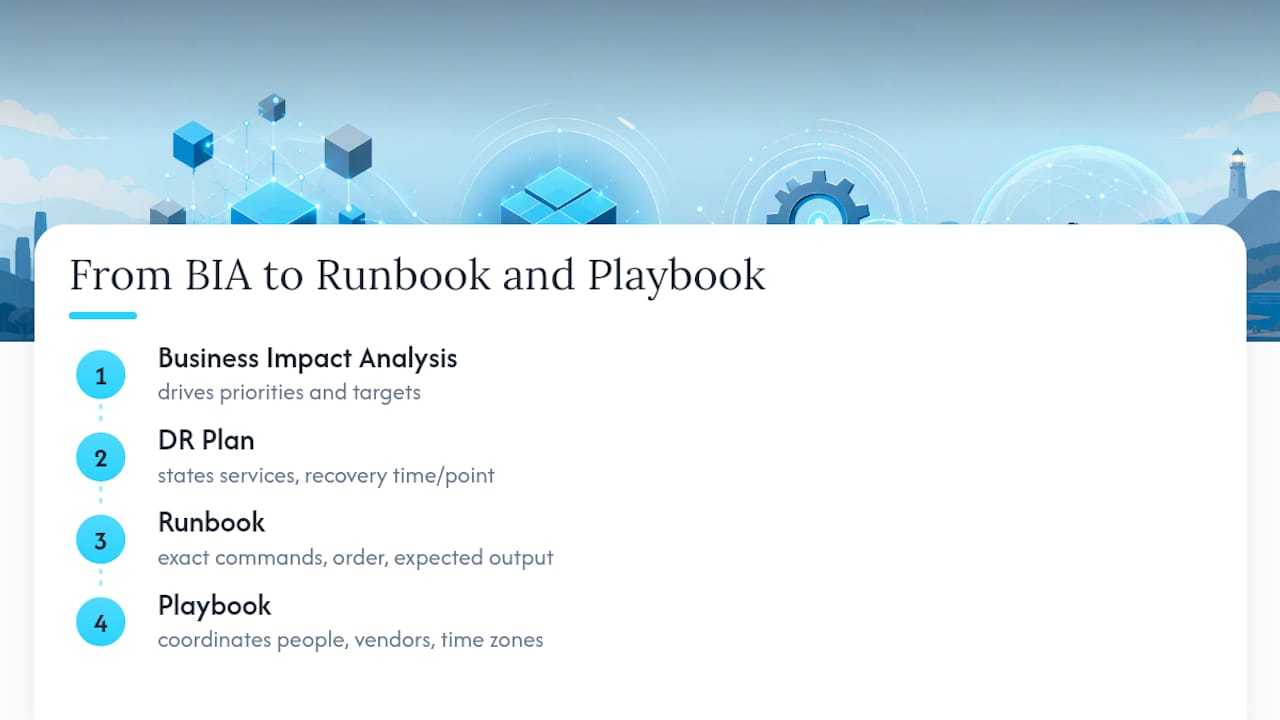
Reach for a runbook whenever recovery is executable and repeatable: a database failover, a Kubernetes cluster rebuild, a ransomware recovery from clean backups. Reach for a playbook when the incident is mostly about coordinating humans across teams, vendors, and time zones. A runbook vs. playbook comparison is worth bookmarking if your team still uses the terms interchangeably in Slack.
The Components Every Runbook Template Needs
Skip a field here and you’ll find out during an actual outage, which is the worst possible time to discover it. Every disaster recovery runbook template needs a recovery contract up front: the service name, business impact if it’s down, target RTO and RPO, and severity classification. This is what Microsoft’s disaster recovery design guidance calls out as a prerequisite for any real failover decision.
Beyond the contract, a working runbook needs:
- Named roles, not job titles: incident commander, recovery operator, business validator, scribe, and comms lead, each with a backup person listed.
- Triggers, the specific conditions that justify starting recovery (not “when things look bad”).
- Stop conditions, the specific conditions that mean abort and escalate instead of pushing forward.
- Approved recovery sources, meaning which backup, snapshot, or replica is sanctioned for restore, and which are not.
- Dependency order, so you don’t bring up the application tier before the database is confirmed healthy.
- Exact commands and expected output, copy-paste ready, with a note on where evidence gets logged.
- Credential and key locations, pointing to a vault or secrets manager, never a plaintext note in the runbook itself.
Stop conditions matter more than most teams give them credit for. Automated recovery scripts run into what researchers call automation bias, where an operator trusts a script’s output even when something looks wrong, because the script “usually works.” Every automated step needs an explicit manual override, documented in the runbook template on GitHub, which builds break-glass procedures directly into its structure.
Pro Tip: Write your stop conditions before you write your happy-path steps. If you draft the abort criteria first, you’re far less likely to bury them as an afterthought at the bottom of the document.
How to Execute Failover, Restore, and Failback Safely
Recovery execution needs decision gates, not just a list of commands. Before doing anything irreversible, confirm three things: the candidate recovery source is valid and recent enough, your RTO and RPO targets are still achievable given the data age, and no stop condition has been triggered.
Once that gate clears, follow this sequence:
- Detect. Confirm the failure with at least two independent signals (monitoring alert plus manual check), not one flapping dashboard.
- Assess. Identify blast radius: which services, which regions, which customers.
- Declare. The incident commander formally declares a DR event, starting the clock on your RTO.
- Execute. Isolate writes to the failed system first, then restore, promote, or scale the standby, in that specific order. This prevents split-brain, where two systems both think they’re the primary and accept writes.
- Validate. Run your technical and business checks before telling anyone the service is back.
- Cutover. Update DNS, routing, and any hardcoded endpoints, confirm secrets and certificates are valid in the new environment, and watch for a fencing window where the old system genuinely cannot accept traffic anymore.
- Close. Document the timeline, notify stakeholders, and schedule the post-incident review.
Azure’s well-architected DR guidance frames failback the same way in reverse: don’t cut back to primary until it passes the same health validation the standby did. A safe restore also isolates the recovered environment before re-enabling writes, which keeps you from reintroducing a compromised state and preserves forensic evidence if this was a security incident.
Pro Tip: If step 4 doesn’t have a clear “isolate writes first” instruction, your runbook has a split-brain risk hiding in it. Fix that before your next drill, not during it.
What Counts as a Successful Recovery?
A green health check on a virtual machine tells you almost nothing about whether customers can actually use the service. Validation needs to happen at four levels, and skipping any one of them is how teams declare victory too early.
- Infrastructure level: nodes up, network reachable, storage mounted and writable.
- Application level: services started, dependencies connected, smoke tests passing.
- Data level: consistency queries confirm no corruption, replication lag is acceptable, row counts match expectations.
- Business transaction level: a real, end-to-end sample transaction, like a test order or login, actually completes.
A disaster recovery runbook guide from IT Perfection makes this point directly: application-level and business-transaction checks are non-negotiable, not a nice extra layer on top of infrastructure monitoring. For database-backed services, this often means running a point-in-time recovery validation against a known-good checkpoint rather than trusting that “the database process is running” means the data is intact.
Record your actual measured RTO and RPO against the target you set, with timestamps, and store the evidence, logs, command outputs, and scribe notes, somewhere durable and searchable, not in someone’s personal notes app.
How Often Should You Test Your Runbooks?
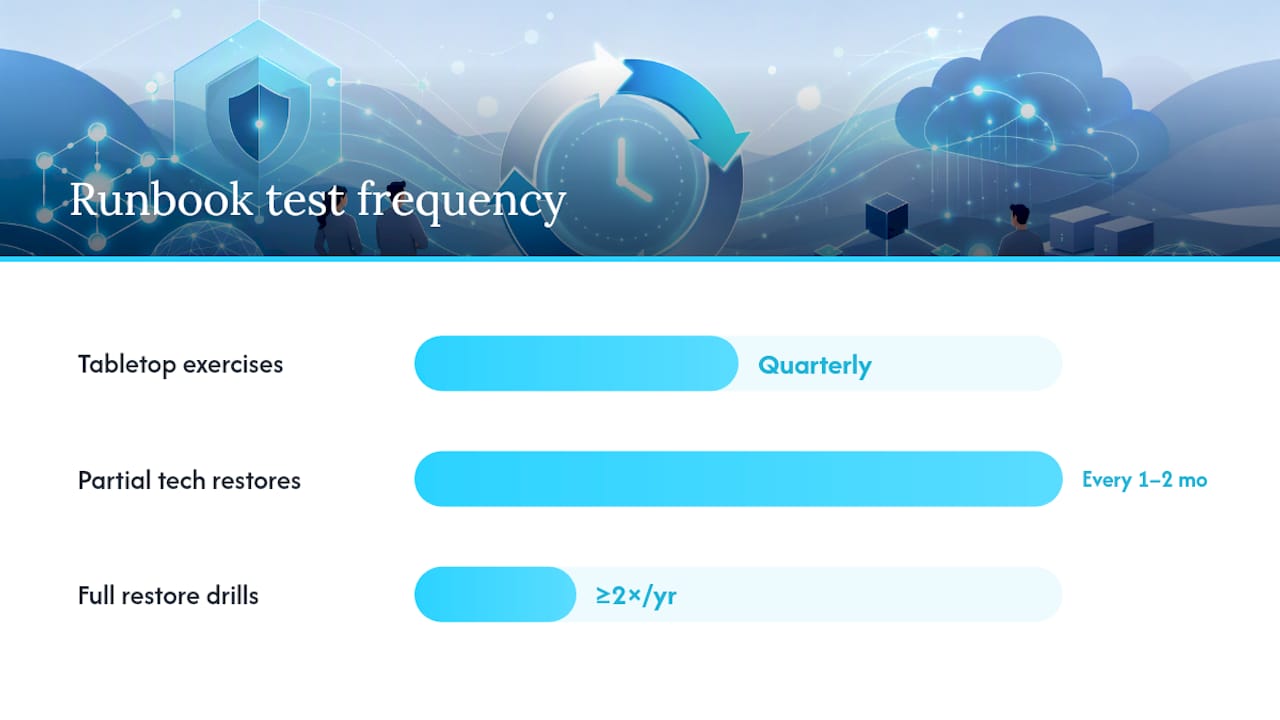
A runbook nobody has drilled is a hypothesis, not a plan. Testing should escalate in realism over time, and each level catches different failure modes.
- Tabletop exercises, run quarterly, where the team walks through the runbook verbally and flags anything unclear or outdated.
- Partial technical restores, run every one to two months, where you actually execute a subset of steps, like restoring a database to an isolated environment.
- Full restore drills, run at least twice a year, where you execute the entire runbook end to end against a real or near-real environment.
Atlassian’s disaster recovery framework treats testing as one of seven required steps, not an optional finishing touch, and stresses measuring results rather than just completing the exercise.
Every drill has to produce evidence: timestamped command outputs, the measured RPO and RTO against your target, and confirmation that business validation actually passed. Without that record, you can’t prove the runbook works, and you can’t prove it to an auditor, a customer, or your own leadership either. Turn every gap the drill surfaces into a tracked, owned remediation item with a deadline, the same way you’d track any other engineering bug.
Who Communicates What During a Recovery?
Communication failures during an outage rarely come from lack of information. They come from the wrong person deciding what to say, or nobody deciding at all. Assign this explicitly in the runbook, not in the moment.
- The incident commander owns the incident channel and decides when to escalate externally.
- The comms lead owns customer-facing statements and executive summaries, using pre-approved language templates so nobody improvises during a crisis.
- Every message at detection, decision, execution, business validation, and closure needs a minimum content standard: what happened, what’s being done, and when the next update arrives.
- Vendor escalations need their own checklist: incident timestamp, error signatures, and the specific evidence needed to invoke an SLA.
Coordinating notification across on-call, executives, and vendors is exactly the kind of workflow that benefits from incident response automation, especially when severity levels need to trigger different escalation paths automatically instead of relying on someone remembering the chain.
Treat Your Runbook Like Production Code
Runbooks decay the same way code does when nobody maintains them. The fix is the same discipline you already apply to infrastructure: store runbooks in Git next to the infrastructure they recover, require pull requests for changes, and run CI checks that catch broken command syntax or leftover placeholder text before it ships.
Every drill or real incident should generate a report with the same shape: what triggered it, what commands ran, what the measured RPO and RTO were, and what gaps surfaced. Feed that report directly into the next runbook revision. Practitioner-maintained templates exist specifically for this: a recovery-validation file, an incident-timeline file, and a drill-report file, all versioned alongside the runbook itself.
- Require a PR review before any runbook change becomes the active recovery artifact.
- Run a linter or CI check against placeholder fields before merging.
- Reference a backup and ransomware resilience review when auditing whether your restore sources are actually safe to trust.
Pro Tip: If your last runbook update predates your last infrastructure change, assume the runbook is wrong until proven otherwise in a drill.
A Copyable Runbook Skeleton: PostgreSQL Primary Failure
Here’s a skeleton you can fork for almost any stateful service, followed by a tight worked example.
service: name and tierimpact: business consequence if downowners: incident commander, recovery operator, business validatortriggers: conditions that start recoveryapproved_sources: sanctioned backups or replicas onlydependencies: ordered list of upstream/downstream servicesstop_conditions: when to abortcommands: exact, copy-paste stepsvalidation: the four-level checklistevidence_location: where outputs and timestamps get stored
Worked example: Postgres primary goes unreachable in Kubernetes. The recovery operator confirms via read-only replica queries whether data loss would occur from promoting the replica versus restoring from the last verified snapshot. If replication lag is under your RPO target, promote the replica and repoint the service DNS. If lag exceeds RPO, restore from snapshot into an isolated namespace first. Either path ends with a real transaction test, not just a pg_isready check, before you call the incident closed. For storage-backed OpenStack environments, the same logic applies to Cinder volume backup and restore procedures.
| Skeleton field | Why it matters |
|---|---|
approved_sources | Prevents restoring from a stale or unverified backup |
stop_conditions | Forces a manual abort before data loss compounds |
validation | Confirms business usability, not just process uptime |
evidence_location | Makes the drill or incident auditable afterward |
Why I Think Most Runbooks Fail Before the Outage Even Starts
Most disaster recovery runbooks fail not because the commands are wrong, but because nobody drilled them since the infrastructure changed underneath. That’s the uncomfortable truth: a runbook is a snapshot of a system that stopped existing the moment someone shipped a new deployment pipeline or swapped a database version. Treating it as a living, versioned artifact, reviewed the same way you review a pull request, is the only defense against that drift.
AI prompt libraries won’t replace the judgment an incident commander needs at 3 a.m., but they’re genuinely useful for the tedious parts: drafting the first version of a runbook skeleton, generating validation queries, or writing consistent drill-report language so nobody’s improvising documentation format mid-incident. The quick win most teams can do this week: pick your single most critical service, write its stop conditions down, and run a tabletop exercise against them before the quarter ends.
— James
How Devopsaitoolkit Speeds Up Runbook Creation
Writing a disaster recovery runbook from a blank page is where most teams stall out, not because they lack technical skill, but because starting from zero eats an afternoon before you’ve written a single real command. Prompt packs give you a structured starting point instead: runbook skeletons, validation-check prompts, and drill-report templates you can adapt to your actual environment in minutes rather than hours.

The Linux Admin Prompt Pack includes prompts built for exactly this kind of documentation work, drafting recovery steps, generating expected-output checks, and structuring evidence logs so your drill reports stay consistent from one exercise to the next. If you’re building automation into your recovery steps, the automation prompt library helps generate and validate the commands themselves before you ever run them against production. Both slot directly into a Git-based workflow, so what you draft becomes the pull request your team reviews, not a separate document that drifts out of sync. Check the pricing page to see which pack fits your team’s next drill cycle.
Sources
- Ready
- Microsoft Learn — Disaster recovery design guide
- steadyops-best/disaster-recovery-runbook-template (GitHub)
- Atlassian — Data disaster recovery plan: steps & strategies
- IT Perfection — Disaster recovery runbook guide
Recommended
- Building Incident Runbooks Engineers Actually Trust at 3 AM
- Runbook vs Playbook: The Ops Team Decision Guide
- Ransomware-Resilient Backups: Immutability and Recovery
- Cinder Volume Backups and Disaster Recovery in OpenStack
Get 500 Battle-Tested DevOps AI Prompts — Free
500 battle-tested, copy-paste AI prompts engineered by a senior systems engineer — every one with fill-in placeholders and safety/back-out notes. Drop your email and it's yours.
- 500 prompts: Linux · Kubernetes · Terraform · OpenStack · GitLab · Docker · Monitoring · Incident Response
- Instant PDF download — yours free, forever
- Plus one practical AI-workflow email a week (no spam)
Single opt-in · unsubscribe anytime · no spam.