
DevOps Runbook Automation with AI: 2026 Guide
How to build AI-driven runbook automation in 2026 — intelligent runbook selection, confidence-gated execution, tiered autonomy, and the governance to run it safely.
- #automation
- #runbook
- #incident-response
- #ai
- #sre
- #agentic-ai

DevOps runbook automation with AI is the autonomous selection and execution of operational procedures using AI models to match live incident data to the correct workflow. Systems like SentienGuard’s platform select the right runbook in approximately 165 milliseconds with roughly 95% accuracy, then execute autonomously when confidence scores reach 0.85 or higher. Tools like PagerDuty, Rundeck, and AWS DevOps Agent now connect alerting, execution, and AI reasoning into a single incident response loop. The industry term for this practice is intelligent runbook automation, and it sits at the intersection of agentic AI and traditional operations. Getting it right means faster recovery, fewer 3 AM pages, and a system you can actually trust.
What infrastructure do you need for AI runbook automation?
Three layers make up a working AI runbook automation system: incident detection, an execution engine, and an AI selection layer. Skip any one of them and you get a fragile pipeline that breaks under real production pressure.
Detection and orchestration is where PagerDuty fits. It receives alerts from Prometheus, Datadog, or your monitoring stack and triggers the automation pipeline via webhook. PagerDuty’s event rules let you filter noise before anything reaches the AI layer, which matters more than most teams realize.

Execution engines handle the actual work. Rundeck, Ansible, and StackStorm are the three most common choices. Rundeck gives you a clean API and job scheduling. Ansible handles configuration and remediation steps. StackStorm adds event-driven logic with built-in sensor packs. Pick based on what your team already knows.
The AI layer sits between detection and execution. It receives the incident payload, queries a vector store of runbook embeddings, and returns the closest match. Libraries like FAISS or ChromaDB handle the vector search. Your runbook documentation becomes the training corpus, so quality here directly determines selection accuracy.
Before you write a single line of automation code, gather these prerequisites:
- Structured service logs accessible via API or log aggregator (Loki, Elasticsearch, Splunk)
- An existing runbook library in Markdown or Confluence, even if incomplete
- Infrastructure-as-code repos so the AI agent has system context
- API credentials and webhook endpoints for your alerting and execution tools
- A decision on execution environment: cloud sandbox or Hybrid Runbook Workers
Azure Automation sandboxes work for short, stateless tasks. Long-running remediations or steps that depend on internal network resources require Hybrid Runbook Workers, which support restart-on-failure and longer runtimes. Plan your environment before you build.
Pro Tip: Start with your five most common incident types. Map each one to an existing runbook before touching any AI tooling. The AI layer is only as good as the runbook library it searches.
How to architect AI-driven runbook selection and execution
The architecture that works in production separates three concerns: retrieval, decision, and execution. Collapsing them into one monolithic script is the fastest path to an incident caused by your incident automation.
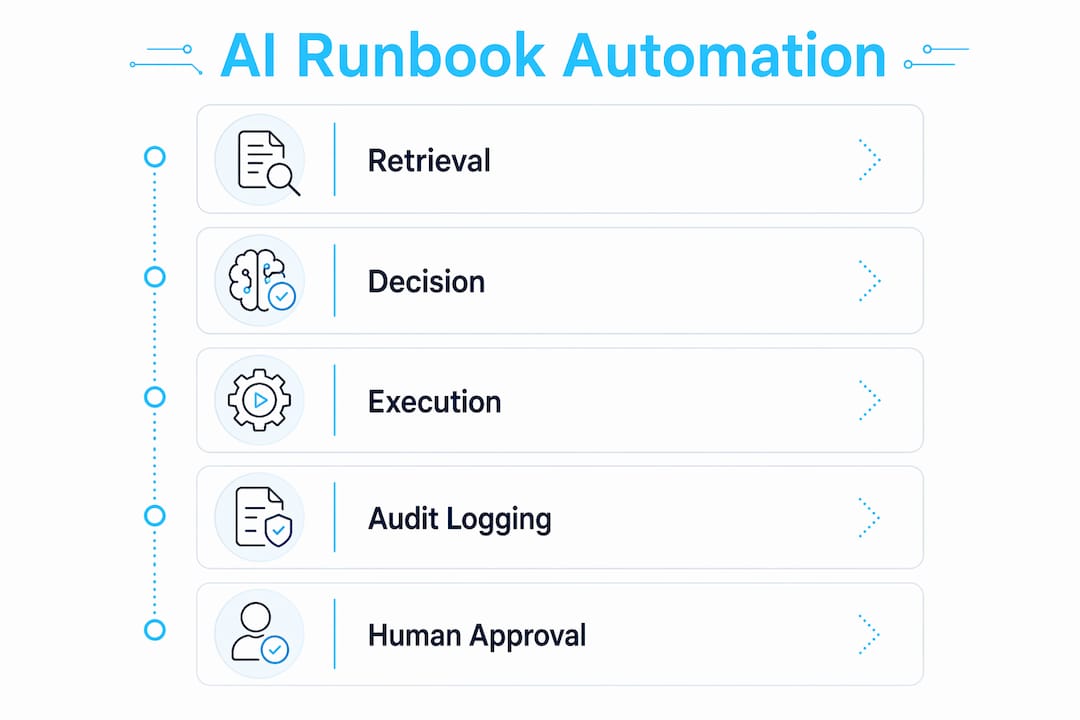
Retrieval uses retrieval-augmented generation (RAG). When an alert fires, the system converts the incident description into a vector embedding and runs a similarity search against your runbook index. Sentry’s open-source ask-runbooks project demonstrates this well. It uses chunking, vector embedding, cosine similarity filtering at a threshold of 0.7, and rank fusion to combine keyword and semantic results. That hybrid approach reduces false matches significantly compared to pure semantic search alone.
Decision is where confidence gating lives. A tiered autonomy model works like this:
- Manual tier (confidence below 0.60): The AI surfaces the top three runbook matches and a summary. A human picks the runbook and approves execution.
- AI-assisted tier (confidence 0.60–0.84): The AI selects the runbook and drafts an execution plan. A human reviews and approves before any action runs.
- Autonomous tier (confidence 0.85 and above): The AI selects, validates, and executes. Notifications go to the on-call channel. No human approval required.
Execution is where Claude Managed Agents and similar frameworks shine. Production AI agents separate investigation tools from execution commands. The agent uses bash, grep, and read tools freely for log analysis. Any action that changes system state, like creating a pull request or restarting a service, routes through a human-gated approval step via an external action executor.
| Runbook Step Type | Execution Model | Human Approval Required |
|---|---|---|
| Log investigation | Agentic (free tool use) | No |
| Service restart | Deterministic script | Conditional (tier-based) |
| Config change | Agentic with diff review | Yes |
| Rollback deployment | Deterministic script | Yes |
| Notification dispatch | Deterministic | No |
Audit logging belongs at every layer. Log the runbook selected, the confidence score, the steps executed, and the outcome. That data feeds your continuous improvement loop and satisfies any compliance requirements your team faces.
Pro Tip: Classify every runbook step as deterministic or agentic before you automate it. Deterministic steps run scripts with known outputs. Agentic steps let the AI reason through the problem. Mixing them without clear boundaries is where things go sideways.
Best practices for governing AI runbook automation safely
Safe deployment is not a one-time configuration. It is an ongoing practice that requires structure, especially as you increase autonomy over time.
The NIST AI Risk Management Framework gives you a practical governance structure with four functions: Govern, Map, Measure, and Manage. Applied to runbook automation, Govern means defining escalation policies and role-based access. Map means identifying which runbooks carry high blast radius. Measure means quantifying false selection rates and execution failures. Manage means treating those failures with updated runbooks, tighter thresholds, or additional human checkpoints.
Key safety practices for production deployments:
- Separate AI decision from execution. The model that selects the runbook should not directly invoke the execution engine. An intermediary service enforces confidence thresholds and logs the decision before passing control to Rundeck or Ansible.
- Keep human checkpoints for high-risk steps. Any runbook step that touches databases, production traffic, or security configurations requires explicit approval regardless of confidence score.
- Roll out progressively. Start with deterministic triggers for your top incident types. Add AI-assisted selection after 30 days of log review. Introduce autonomous execution only after you have validated selection accuracy across at least 100 incidents.
- Enforce role-based access. Not every engineer should be able to modify runbooks or adjust confidence thresholds. Treat runbook changes like code changes: pull requests, peer review, and merge gates.
- Monitor execution outcomes. Track success rate, false selection rate, and MTTR per runbook. Review these weekly for the first three months.
“Treat automation as code. Test it, review it, and version it the same way you would application code.” — PagerDuty and Rundeck integration guidance
The AWS DevOps Agent demonstrates what this looks like at scale. It connects to Amazon Bedrock AgentCore and integrates memory, policies, and observability into a single operational loop. The result is reduced MTTR from hours to minutes by giving the agent real telemetry and enforcing guardrails at every decision point. That combination of context and constraint is what makes autonomous operation safe enough for production.
How to troubleshoot and optimize AI runbook workflows
Most teams hit the same three problems in their first 60 days: wrong runbook selected, execution failure mid-run, and over-automation of steps that needed human judgment. Each one has a clear fix.
Wrong runbook selected almost always traces back to runbook quality, not the AI model. Vague titles like “Database Issue” match too broadly. Rewrite runbook titles and summaries to include specific symptoms, affected services, and error patterns. The hybrid retrieval approach from ask-runbooks, combining keyword and semantic search with rank fusion, reduces false matches more than tuning the embedding model alone.
Execution failures mid-run usually mean the runbook has undocumented dependencies or environment assumptions. Add a validation step at the start of every runbook that checks prerequisites: service availability, credential validity, and network connectivity. Log the failure with full context so you can diagnose without reproducing the incident.
Over-automation is the quietest risk. Teams raise confidence thresholds too fast and start auto-executing runbooks that should have human review. Watch your incident response triage metrics closely. If autonomous executions are generating follow-up incidents, lower the threshold and add a review gate.
Additional optimization practices worth building into your workflow:
- Review execution logs every 30 days and retire runbooks with zero successful executions
- Use chunking strategies that preserve runbook step context rather than splitting mid-procedure
- For Azure Automation, route any runbook exceeding five minutes or requiring internal network access to Hybrid Workers rather than cloud sandboxes
- Build reusable integration modules for common actions like Slack notifications, PagerDuty acknowledgment, and Git operations so runbook authors don’t rewrite the same logic repeatedly
Pro Tip: Run a monthly “runbook audit” where you pull the 10 most-executed runbooks and verify they still match current system architecture. Infrastructure drifts fast. Stale runbooks are a bigger risk than a low confidence threshold.
Key takeaways
Intelligent runbook automation works when AI-driven selection, tiered autonomy, and human approval checkpoints operate as a single governed system rather than independent components.
| Point | Details |
|---|---|
| AI selection accuracy matters most | Use hybrid keyword and semantic retrieval with cosine similarity thresholds to reduce false runbook matches. |
| Tiered autonomy reduces risk | Separate manual, AI-assisted, and autonomous tiers by confidence score to keep humans in the loop for high-risk steps. |
| Governance requires structure | Apply NIST AI RMF functions to define policies, measure failure rates, and manage escalation paths. |
| Runbook quality drives outcomes | Rewrite runbook titles and summaries with specific symptoms and services before indexing them for AI retrieval. |
| Progressive rollout builds trust | Start with deterministic triggers, validate over 100 incidents, then expand autonomous execution incrementally. |
Where I’ve seen teams get this wrong
I’ve watched more than a few teams treat AI runbook automation as a drop-in replacement for human judgment, and it costs them every time. The teams that get it right treat the AI layer as a very fast, very consistent first responder, not a replacement for the engineer who knows why that particular service behaves oddly on Tuesday mornings.
The most common mistake I see is skipping the runbook quality phase entirely. Engineers spend weeks wiring up PagerDuty, Rundeck, and a vector store, then point the AI at a library of runbooks that were written in 2021 and never updated. The selection accuracy tanks, confidence scores cluster around 0.6, and the team concludes that AI runbook automation doesn’t work. It works. The runbooks were just garbage.
The second mistake is raising autonomy thresholds too fast because the demo looked clean. A demo uses curated incidents. Production uses everything. I’d keep the autonomous tier locked to your three or four most predictable, lowest-blast-radius incident types for at least 90 days before expanding. That patience pays off in trust, and trust is what lets you eventually hand more to the system.
The future I’m watching is agents that maintain memory across incidents. Right now most systems treat each incident as stateless. An agent that remembers “this service had a similar failure 12 days ago and the fix was X” is genuinely useful. AWS DevOps Agent is moving in that direction with AgentCore. That’s the capability that will make incident runbooks feel less like static documents and more like institutional knowledge that acts.
— James
Build your AI runbook automation stack with DevOps AI ToolKit
DevOps AI ToolKit is built for engineers who are actually doing this work, not reading about it. The platform includes prompt libraries for PagerDuty and Rundeck integration, workflow guides for confidence-gated runbook selection, and AI automation workflows designed for production infrastructure running on Kubernetes, GitLab, Prometheus, and OpenStack.
If you’re building out your runbook automation pipeline, the ChatOps incident automation prompt is a practical starting point. It covers AI-based runbook selection, confidence gating, and escalation logic in a format you can adapt to your stack. You can also explore the Ansible AWX automation prompts for teams using Ansible as their execution engine. Everything on DevOps AI ToolKit is written for real cloud engineers managing real production systems.
FAQ
What is AI runbook automation in DevOps?
AI runbook automation is the use of AI models to select and execute operational runbooks based on live incident data. Systems like SentienGuard’s platform select the correct runbook in approximately 165 milliseconds with 95% accuracy using vector similarity search.
How does confidence gating work in runbook automation?
Confidence gating sets a threshold score that determines whether the AI executes autonomously or routes to a human for approval. A common threshold for autonomous execution is 0.85 or higher, with lower scores triggering AI-assisted or manual review tiers.
Which tools are best for AI runbook automation?
PagerDuty handles alerting and orchestration, Rundeck or Ansible manages execution, and Claude Managed Agents or AWS DevOps Agent provide the AI reasoning layer. Combining these three layers gives you detection, selection, and execution in a single governed pipeline.
How do you improve runbook selection accuracy?
Use hybrid retrieval that combines keyword and semantic search with a cosine similarity threshold around 0.7, as demonstrated by Sentry’s ask-runbooks project. Rewriting runbook titles and summaries with specific symptoms and service names improves accuracy more than tuning the embedding model.
What governance framework should you use for AI runbook automation?
The NIST AI Risk Management Framework provides four functions: Govern, Map, Measure, and Manage. Applied to runbook automation, these functions cover escalation policy definition, blast-radius mapping, failure rate measurement, and ongoing treatment of identified risks.
Recommended
- DevOps & AI Guides
- The Best AI Tools for DevOps Engineers in 2026
- Building Incident Runbooks Engineers Actually Trust at 3 AM
Get 500 Battle-Tested DevOps AI Prompts — Free
500 battle-tested, copy-paste AI prompts engineered by a senior systems engineer — every one with fill-in placeholders and safety/back-out notes. Drop your email and it's yours.
- 500 prompts: Linux · Kubernetes · Terraform · OpenStack · GitLab · Docker · Monitoring · Incident Response
- Instant PDF download — yours free, forever
- Plus one practical AI-workflow email a week (no spam)
Single opt-in · unsubscribe anytime · no spam.