
Common Kubernetes Networking Mistakes and How to Fix Them
Discover how to identify and fix common Kubernetes networking mistakes. Improve your cluster's performance and reliability with these straightforward checks.

Most Kubernetes networking incidents trace back to eight repeat offenders: broken CoreDNS resolution, IP pool exhaustion, MTU mismatches on overlay networks, CNI plugins that never initialize, NetworkPolicy rules that silently block traffic, misrouted Services or Ingress, and kube-proxy/iptables rules buckling under scale. Each one has a fast first check.
- DNS failures: Check CoreDNS pods and logs, then run
digfrom a debug pod. - IPAM/CIDR exhaustion: Run
kubectl get pods -o wideacross nodes to spot allocation gaps. - MTU mismatch: Test with
ping -M do -s 1472between nodes. - CNI init failures: Check
kubectl get nodesforNotReadyand inspect the CNI DaemonSet logs. - NetworkPolicy blocking traffic: Temporarily test with an allow-all policy.
- Service/Ingress misconfig: Run
kubectl get endpointsto confirm pods are actually attached. - kube-proxy/iptables issues: Check
iptables-save | grep KUBEfor rule bloat or conntrack pressure.
Key Takeaways
Most Kubernetes networking incidents resolve fastest when teams triage in a fixed order: DNS, then Service endpoints, then NetworkPolicy, then kube-proxy and MTU.
| Point | Details |
|---|---|
| Triage order matters | Check DNS first since it explains roughly half of connectivity issues, then NetworkPolicy, then conntrack. |
| Empty endpoints signal selector mismatch | Run kubectl get endpoints before assuming a deeper network fault exists. |
| MTU failures are silent | Test MTU end to end on overlay networks; mismatches cause retransmits, not clean failures. |
| Segmentation needs default policies | Apply namespace-scoped NetworkPolicies as a baseline in multi-tenant clusters, not as an opt-in. |
| Devopsaitoolkit speeds triage | Its prompt libraries and in-browser tools automate the same DNS-first, endpoint-second diagnostic sequence covered here. |
Table of Contents
- Common Kubernetes Networking Mistakes You’ll Actually Hit
- Why DNS Resolution Breaks Inside Your Cluster
- What Causes CNI, IPAM, and MTU Failures
- When NetworkPolicy or Firewalls Silently Drop Traffic
- Why Ingress and LoadBalancer Traffic Gets Misrouted
- Why Nodes Go NotReady and Pods Get Stuck
- A Step-by-Step Triage Playbook You Can Copy
- Preventing Repeat Incidents Before They Start
- How Cloud Load Balancer Misconfigurations Cause Outages
- Debugging Techniques Beyond kubectl Basics
- How Segmentation Mistakes Break Multi-Tenant Clusters
- What Actually Causes Repeat Networking Incidents
- How Devopsaitoolkit Speeds Up Networking Triage
- Frequently Asked Questions
- Sources
Common Kubernetes Networking Mistakes You’ll Actually Hit
Every one of these shows up in production clusters with enough regularity that they deserve a permanent spot in your incident playbook. Here’s the pattern of symptom, diagnostic, and fix for each.
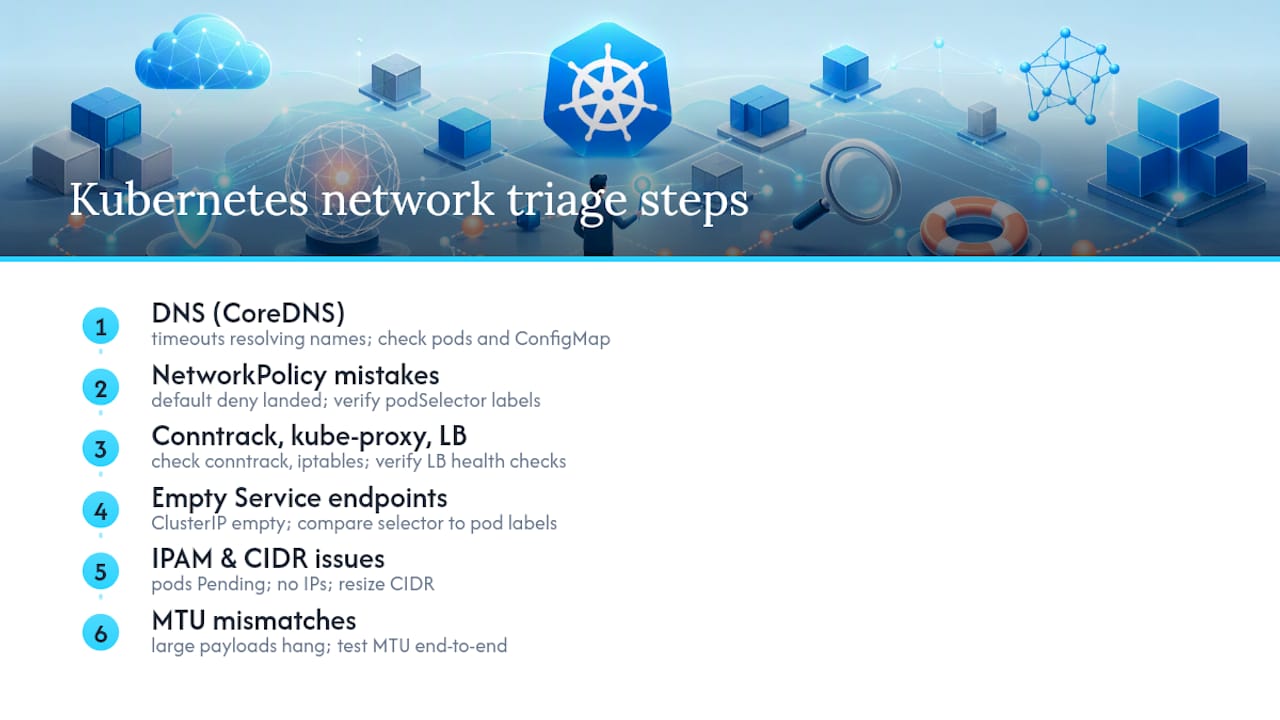
DNS/CoreDNS failures. Symptom: intermittent NXDOMAIN or timeouts resolving internal service names. Check kubectl get pods -n kube-system -l k8s-app=kube-dns and kubectl logs on the CoreDNS pods. Fix: restart CoreDNS if it’s OOMKilled, and check the ConfigMap for a bad forward directive.
Empty Service endpoints. Symptom: connections to a ClusterIP hang or refuse. Run kubectl get endpoints <service> — if it’s empty, your Service selector doesn’t match any pod labels, a mismatch that silently strands traffic with no error at the Service level. Fix: compare spec.selector against actual pod labels.
IPAM/pod IP exhaustion. Symptom: pods stuck in ContainerCreating with “no available IP addresses” in events. Check kubectl describe pod and cross-reference your CNI’s IPAM range against node capacity. Fix: resize the pod CIDR or reduce max-pods-per-node.
Overlapping CIDRs. Symptom: pods in different clusters (or a cluster and an on-prem VPN) can’t reach each other, or worse, silently reach the wrong host. Fix: audit your pod CIDR, service CIDR, and node network for overlap before you ever provision a cluster.
MTU mismatches. Symptom: small packets work, large payloads hang or fragment badly. This is one of the sneakiest causes of Kubernetes networking failures because everything looks fine until a real payload moves. Fix: test MTU end to end and set your CNI’s MTU below the underlay’s to leave room for encapsulation.

NetworkPolicy mistakes. Symptom: a deployment worked fine until a “default deny” policy landed with no matching allow rule. Fix: check kubectl get networkpolicy -A and confirm podSelector labels line up exactly.
kube-proxy/iptables issues. Symptom: connections drop under load with no clear cause. Check conntrack usage and rule count. Fix: consider IPVS mode if you’re running services with dozens of endpoints.
NodePort/load-balancer misconfig. Symptom: some client requests succeed, others time out, seemingly at random. Fix: check externalTrafficPolicy and confirm the cloud LB’s health checks target the right port.
Pro Tip: During an active incident, work DNS first, then NetworkPolicy, then conntrack and iptables. That order alone resolves roughly half of connectivity issues before you ever touch the CNI config.
Why DNS Resolution Breaks Inside Your Cluster
DNS is the first thing to check because it’s the most common source of failure, and CoreDNS problems tend to show up as flaky, not dead. Start with kubectl get pods -n kube-system -l k8s-app=kube-dns to confirm the pods are running and not crash-looping, then kubectl logs to catch errors like SERVFAIL spikes or upstream forward failures.
From a debug pod, run:
dig kubernetes.default.svc.cluster.local
nslookup <service-name>.<namespace>.svc.cluster.local
If lookups are slow rather than failing outright, check ndots in /etc/resolv.conf. Kubernetes defaults to ndots:5, which means short names get appended with every search domain before falling through, and that behavior combined with negative caching multiplies query volume fast. Also check CoreDNS memory limits. It OOMs quietly under query storms.
Pro Tip: Deploy NodeLocal DNSCache so each node caches responses locally. It cuts CoreDNS load dramatically and survives brief CoreDNS restarts without every pod noticing.
What Causes CNI, IPAM, and MTU Failures
IPAM exhaustion happens when your CIDR math doesn’t account for real-world node counts. Check available IPs with kubectl get pods -o wide | wc -l against your CNI’s configured range, and inspect CNI logs (usually in /var/log/ on the node or via the CNI DaemonSet pods) for “no IP addresses available” errors.
- Reserve pod CIDR blocks per node with real headroom, not the exact pod count you expect today.
- Separate cluster network space from node network space explicitly. Overlapping ranges are a top cause of pods that can reach some services but not others.
- Document your CIDR plan before scaling, not after you hit an allocation wall.
MTU problems are quieter. Symptoms are intermittent: small requests succeed, large payloads (bulk uploads, gRPC streams) hang or retransmit. Test with ping -M do -s <size> <target> incrementing size until you find the breaking point. For VXLAN, Geneve, or IPIP overlays, the pod-facing MTU needs to account for encapsulation overhead, typically 50 bytes lower than the underlay interface.
When NetworkPolicy or Firewalls Silently Drop Traffic
The most common NetworkPolicy mistake is applying a default-deny policy and forgetting the matching allow rule, which drops traffic with zero error message on either end. The second most common is a podSelector label typo that matches nothing.
- Run
kubectl get networkpolicy -Aand checkspec.podSelectoragainst actual pod labels withkubectl get pods --show-labels. - Check cloud security groups and host-level
iptables -L INPUTfor rules blocking node-to-node traffic outside Kubernetes’ own rules. - Test connectivity between the same two pods with policies removed to confirm NetworkPolicy is the actual blocker before you start editing rules.
Pro Tip: Apply a temporary allow-all NetworkPolicy scoped to the affected namespace, confirm traffic flows, then narrow it back down one rule at a time. Guessing at the wrong podSelector wastes far more time than testing your way there.
Why Ingress and LoadBalancer Traffic Gets Misrouted
A 502 or 504 from your Ingress controller almost always means the upstream pod isn’t responding the way the controller expects, not that the controller itself is broken. Check NGINX Ingress Controller logs for upstream timed out or connection refused, both of which point to stale endpoints or pods still starting.
- Run
kubectl get endpoints <service>to confirm the Ingress is routing to pods that actually exist and are ready. - Check buffer size and timeout annotations on the Ingress resource if large responses fail.
- Remember NodePort traffic can double-hop: the external load balancer picks a node, but that node might not run the backend pod, adding a hidden network hop unless
externalTrafficPolicy: Localis set.
Confirm kube-proxy rules are current with iptables-save | grep <service-name> if traffic reaches the node but never the pod.
Why Nodes Go NotReady and Pods Get Stuck
Nodes drop to NotReady for a handful of predictable reasons: kubelet crashes, VM shutdown from the cloud provider, or a genuine network partition cutting the node off from the control plane. The Kubernetes documentation recommends designing workloads to tolerate node restarts precisely because this happens more often than teams expect.
kubectl describe node <node>andkubectl get events --sort-by=.lastTimestampshow the immediate trigger.- Check kubelet logs and
dmesgon the node itself for OOM kills or driver errors. - Check the CNI DaemonSet pod on that node specifically. A crashed CNI pod leaves new pods stuck in
ContainerCreatingwith “network plugin not ready.”
Cordon the node to stop new scheduling, then restart kubelet or the CNI pod before uncordoning. If underlay routing between availability zones is involved, escalate to your cloud provider rather than chasing it inside the cluster.
A Step-by-Step Triage Playbook You Can Copy
Run this in order. It’s built around the same finding that DNS problems account for roughly half of connectivity incidents, with NetworkPolicy issues coming in second, so don’t skip the queue.
- DNS first. From a debug pod (netshoot works well):
dig <service>.<namespace>.svc.cluster.local. If this fails, stop here and fix CoreDNS. - Service endpoints.
kubectl get endpoints <service>. Empty results mean a selector mismatch, not a network problem. - NetworkPolicy.
kubectl get networkpolicy -A, cross-check podSelector against labels. Test with a temporary allow-all if unsure. - kube-proxy/CNI health.
kubectl get pods -n kube-systemfor CNI DaemonSets,iptables-save | grep KUBEfor rule integrity. - MTU/underlay.
ping -M do -s 1472between nodes; checkip routeandip neighfor stale entries. - Ingress/load balancer. Check controller logs, then confirm the cloud LB’s health check target matches the actual readiness port.
At each step, capture output before moving on. If DNS and NetworkPolicy both check out clean, pull packet captures with tcpdump on both source and destination pods, plus conntrack -L to catch kernel-level connection drops that never surface in application logs.
Pro Tip: Save every tcpdump capture and kubectl describe output from the incident into a timestamped folder. Post-incident reviews go from guesswork to five minutes when you have the actual packet trace instead of someone’s memory of what happened.
Know your escalation triggers ahead of time: if ip route shows the correct path but packets still vanish, that’s a network team or cloud provider problem, not something you’ll fix from inside the cluster. If a recent rollout correlates with the incident start time, roll it back before you keep debugging forward.
Preventing Repeat Incidents Before They Start
Most Kubernetes networking incidents are repeats of the same handful of mistakes, which means most of them are preventable with a short list of standing practices.
- Plan CIDR ranges with real headroom, not exact current pod counts, and document the split between pod, service, and node network space.
- Deploy NodeLocal DNSCache and monitor CoreDNS error rate as a standing alert, not something you check only during an incident.
- Align kube-proxy mode (iptables vs IPVS) to your actual endpoint count. Large services benefit from IPVS’s better scaling under load.
- Set readiness probes and preStop hooks correctly so Services stop routing to pods before they actually terminate.
- Monitor
nf_conntrack_countagainstnf_conntrack_max, and watch for CNI pod restarts and endpoint population discrepancies as early warning signs.
Pro Tip: Add config validators to CI so a bad NetworkPolicy or malformed Service selector never reaches production. Run short chaos tests against your policies quarterly. It’s cheaper to catch a bad default-deny rule in staging than at 2 a.m.
How Cloud Load Balancer Misconfigurations Cause Outages
External load balancers add a layer most engineers underestimate until it breaks. The cloud provider’s LB doesn’t know anything about your pod’s actual readiness. It only knows what its own health check tells it, and that health check often targets a different port or path than your Kubernetes readiness probe.
A common failure mode: the LB health check passes because the node responds on the NodePort, but the specific pod behind that node just restarted and isn’t ready yet. Traffic gets forwarded, the connection stalls, and nothing in kubectl get pods looks wrong because the pod comes back healthy seconds later. Setting externalTrafficPolicy: Local avoids the double-hop entirely by only routing to nodes that actually host a ready backend pod, though it does mean uneven load distribution if pods aren’t spread evenly across nodes.
Annotation mismatches are another frequent trap. Cloud-specific annotations for SSL termination, idle timeout, or connection draining vary between providers, and copying an annotation set from one cloud’s example manifest into another provider’s cluster silently does nothing, since the controller ignores annotations it doesn’t recognize. Always confirm the annotation prefix matches your actual cloud controller before assuming a setting took effect. When TLS is involved, check that cert-manager issued a valid certificate and that the Ingress resource references the correct Secret name. A mismatched Secret reference produces a working Ingress with a broken handshake, which looks like a load balancer problem but is actually a certificate configuration problem.
Debugging Techniques Beyond kubectl Basics
Once kubectl describe and kubectl logs stop giving answers, the next layer is your CNI’s own debug tooling. Calico ships calicoctl node status and calicoctl get workloadendpoint to show BGP peering state and per-pod endpoint data that kubectl never surfaces. Flannel’s troubleshooting mostly happens through its ConfigMap and the flanneld logs on each node, checking for backend type mismatches (VXLAN vs host-gw). Weave exposes a status API through weave status inside its pod that reports peer connectivity and IP allocation directly.
For anything below the CNI abstraction, tcpdump on both the source and destination pod’s network namespace remains the ground truth. Pair it with conntrack -L to catch entries expiring under load, and ip route plus ip neigh to confirm the kernel’s actual routing table matches what your CNI thinks it configured. A mismatch between the two is a strong signal of a stale route left behind after a node restart.
For deeper packet-level tracing across nodes, tools like mtr or a distributed trace of ICMP hops can isolate whether a drop happens at the pod veth, the node’s bridge, or the underlay network. This matters most in multi-cloud or hybrid clusters, where an underlay routing issue outside Kubernetes’ control plane can look identical to a CNI bug until you trace the actual hop where packets vanish.
How Segmentation Mistakes Break Multi-Tenant Clusters
Namespace isolation alone was never a network boundary. Traffic between two namespaces flows freely by default unless a NetworkPolicy explicitly restricts it, a fact that catches teams off guard the first time a “test” namespace gets full access to production database pods it was never supposed to reach.
Multi-tenant clusters compound this because segmentation mistakes affect more than one team at once. A default-deny policy applied cluster-wide without per-namespace allow rules can lock out every tenant simultaneously, turning what should be an isolated fix into an all-hands incident. The inverse mistake, an overly permissive baseline policy meant to “get things working,” quietly removes the isolation the whole multi-tenant model depends on.
CIDR planning mistakes hit multi-tenant clusters harder too. If tenant namespaces share a pod CIDR pool without per-namespace quotas, one noisy tenant’s deployment spike can exhaust IP addresses for everyone else on the same node. The fix isn’t complicated: apply namespace-scoped NetworkPolicies as a baseline for every tenant, not as an opt-in, and treat IP quota per namespace as a capacity planning input rather than an afterthought. Segmentation done right is invisible when it works. Done wrong, it either blocks everything or protects nothing, and there’s rarely a middle ground you stumble into by accident.
What Actually Causes Repeat Networking Incidents
The pattern I keep seeing isn’t a knowledge gap. It’s sequencing. Teams treat NetworkPolicy as a security afterthought bolted on after the app works, skip MTU testing entirely when adopting a new overlay, and never model kube-proxy’s iptables rule count against real endpoint growth until conntrack starts dropping connections under load.
The fix isn’t more documentation. It’s putting network validation into CI the same way you’d gate a bad manifest, and writing NetworkPolicies by label contract before the first pod ships, not after an incident forces the conversation. Versioned manifests and a runbook you’ve actually rehearsed beat tribal knowledge every time production networking breaks at 2 a.m.
How Devopsaitoolkit Speeds Up Networking Triage
Devopsaitoolkit gets you from symptom to root cause faster than manually working through kubectl output line by line, because the triage sequence in this article, DNS first, then endpoints, then NetworkPolicy, is exactly what its prompt libraries and in-browser tools are built around.

Instead of rebuilding your diagnostic checklist from memory during an active incident, the automation prompt pack gives you copy-paste prompts that walk an AI assistant through gathering kubectl describe, log, and endpoint output in the right order. If you want tool-assisted triage without waiting on a full incident review cycle, the AI DevOps tools page covers in-browser options for incident response and config validation. Start with the free automation prompts and drop the DNS and NetworkPolicy checks from this article straight into your next on-call rotation.
Frequently Asked Questions
What is the most common Kubernetes networking mistake? DNS resolution failures top the list. CoreDNS misconfiguration, OOM crashes, and ndots-driven query storms account for roughly half of reported connectivity issues, making DNS the right place to start every investigation.
How do I check if NetworkPolicy is blocking my traffic?
Run kubectl get networkpolicy -A and compare podSelector labels against your actual pod labels with kubectl get pods --show-labels. Apply a temporary allow-all policy in the affected namespace to confirm NetworkPolicy is the actual blocker before narrowing it back down.
Why are my pods stuck in ContainerCreating?
This usually means the CNI plugin hasn’t initialized on that node, or IPAM has run out of available pod IPs. Check kubectl describe pod for the exact error and inspect the CNI DaemonSet logs on the affected node.
What causes MTU mismatches in Kubernetes?
Overlay networks like VXLAN or IPIP add encapsulation overhead that the pod’s MTU setting doesn’t always account for. Test with ping -M do -s <size> between nodes to find the actual breaking point, then adjust the CNI’s configured MTU accordingly.
Should I use iptables or IPVS mode for kube-proxy? IPVS scales better for services with dozens of endpoints, since iptables mode creates one rule per endpoint and can strain conntrack under heavy load. Smaller clusters with few endpoints per service rarely notice a difference.
How does NodePort cause misrouted traffic?
An external load balancer can route a request to a node that doesn’t host the target pod, adding a hidden extra network hop. Setting externalTrafficPolicy: Local avoids this by only sending traffic to nodes with a ready backend pod.
Sources
- Debugging a cluster — Kubernetes
- Network debugging tools | Kubernetes recipes
- Troubleshooting Kubernetes networking: 6 proven causes and fixes — FossKit
- Kubernetes networking deep dive: debugging DNS, CNI, and Ingress failures — Zak Hassan
Recommended
- Kubernetes Network Policies: Default-Deny and Beyond — DevOps AI ToolKit
- Troubleshooting Kubernetes DNS and Service Networking
- Kubernetes Security Hardening: Pods, RBAC, and Network Policy That Actually Contain a Breach — DevOps AI ToolKit
- Debugging Kubernetes Service Connectivity With an AI Copilot
Get 500 Battle-Tested DevOps AI Prompts — Free
500 battle-tested, copy-paste AI prompts engineered by a senior systems engineer — every one with fill-in placeholders and safety/back-out notes. Drop your email and it's yours.
- 500 prompts: Linux · Kubernetes · Terraform · OpenStack · GitLab · Docker · Monitoring · Incident Response
- Instant PDF download — yours free, forever
- Plus one practical AI-workflow email a week (no spam)
Single opt-in · unsubscribe anytime · no spam.