
CI/CD Pipeline Explained for Developers and DevOps Teams
Discover the ci cd pipeline explained. Learn how automated workflows enhance speed and reduce errors in code deployment for developers and DevOps.
- #ci-cd
- #pipelines
- #devops
- #gitlab-cicd
- #automation

A CI/CD pipeline is an automated workflow that takes code from a developer’s commit through build, test, and deployment stages with minimal manual steps. The industry terms are Continuous Integration (CI) and Continuous Delivery or Continuous Deployment (CD). Tools like GitHub Actions, Jenkins, GitLab CI, and Azure DevOps all implement this pattern. The core promise is simple: faster releases with fewer manual errors, achieved by running the same automated checks on every change. If you want a ci cd pipeline explained in terms you can actually act on, this article covers the full picture: stages, triggers, approval gates, and deployment strategies.
What does a CI/CD pipeline actually look like?
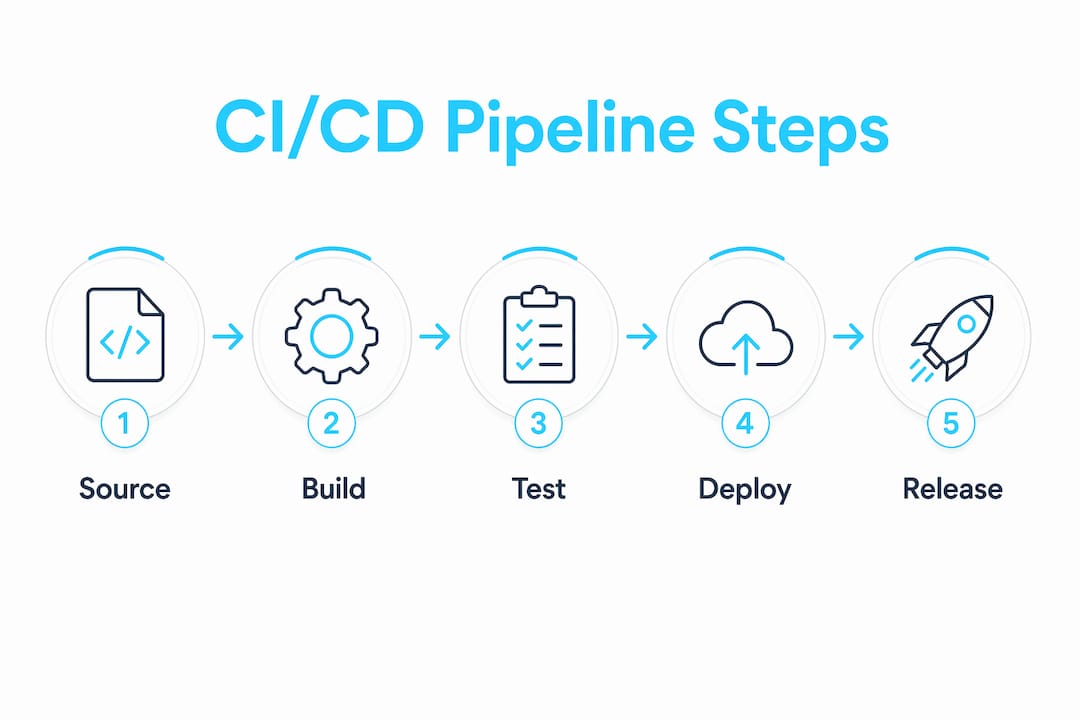
A practical CI/CD pipeline follows a fixed sequence of stages, each building on the output of the previous one. That sequence is not arbitrary. Every stage exists to catch a specific class of problem before it reaches production.
The typical order looks like this:
- Clone repo — Pull the exact commit that triggered the pipeline.
- Install dependencies — Restore packages from a lock file to keep builds reproducible.
- Build — Compile or bundle the application into a deployable artifact.
- Static code analysis — Run linters, SAST scanners, or type checkers against the source.
- Unit tests — Verify individual functions and modules in isolation.
- Integration and end-to-end tests — Test the system with real dependencies or a full browser stack.
- Package artifact — Bundle the tested build into a container image, JAR, or binary.
- Deploy to staging — Push the artifact to a staging environment for final validation.
- Promote to production — Release the same artifact to live traffic.
The distinction between step 8 and step 9 is where continuous delivery and continuous deployment diverge. Continuous delivery stops at staging and requires a human to approve the production push. Continuous deployment removes that gate and ships automatically once all tests pass.
Pro Tip: Build once, promote the same artifact through every environment. Rebuilding in CD introduces hard-to-debug inconsistencies between what you tested and what you shipped.

How do triggers and events drive pipeline automation?
Pipeline triggers are the events that start a pipeline run. Your trigger strategy directly controls how fast your team gets feedback and how often the pipeline runs.
The four most common trigger types are:
- Pull request trigger — Runs CI on every proposed change before merge. This is the fastest feedback loop. The downside is high pipeline volume on active repositories.
- Merge to main trigger — Fires when code lands on the default branch. This is the standard gate for deploying to staging. It runs less often than PR triggers but carries higher stakes.
- Scheduled trigger — Runs on a cron schedule regardless of code changes. Useful for nightly security scans or dependency audits. The risk is that failures are not tied to a specific commit, making diagnosis slower.
- Artifact creation trigger — Fires when a new container image or package is published. Common in multi-repo architectures where a downstream service needs to react to an upstream release.
Understanding different triggers helps you tune feedback speed and avoid wasted compute. A team running full end-to-end tests on every pull request commit will burn through runner minutes fast. A better pattern is to run unit tests on every commit and reserve integration tests for merge triggers.
Pro Tip: Use reusable GitLab CI components to define trigger rules once and share them across pipelines. This prevents teams from accidentally misconfiguring trigger conditions on new repos.
What safety mechanisms and approval gates ensure reliable CD workflows?
Automated gates and human approval gates serve different purposes. Automated gates check objective criteria: test pass rates, code coverage thresholds, or security scan results. Human gates handle judgment calls that automation cannot make reliably, such as approving a database migration or signing off on a compliance checkpoint.
Platform-level enforcement is the correct place to configure approval requirements. Putting gate logic inside pipeline scripts creates a bypass risk. A developer who controls the pipeline definition can remove the gate. A protected environment configured at the platform level, in GitHub Actions, GitLab, or Argo CD, requires an authorized reviewer regardless of what the pipeline script says.
“Approval enforcement should be managed via platform configuration with segregation of duties, ensuring the person deploying code cannot arbitrarily remove approval requirements.” — Securing CD Promotion Gates
Recommended security and governance practices for your CD workflow:
- Configure protected environments in GitLab or GitHub Actions so production deployments require a named approver.
- Separate the role that writes pipeline definitions from the role that approves production deployments.
- Require manual signoff for any pipeline job that runs database migrations or modifies IAM policies.
- Use supply chain hardening prompts to audit your pipeline for dependency injection risks and unsigned artifact promotion.
- Set objective thresholds, such as 80% code coverage, as automated gates that block promotion without human intervention.
Segregation of duties enforced at the platform level prevents a single engineer from both writing and approving a production deployment. This is not bureaucracy. It is the minimum viable control for any team operating in a regulated environment.
What advanced deployment strategies improve release safety?
Rolling, canary, and blue-green deployments are the three patterns that reduce the blast radius of a bad release. Each trades deployment speed for a different kind of risk control.
Deployment strategies like rolling, canary, and blue-green reduce risk by controlling how much traffic hits the new version before you commit to a full release. A canary that receives 5% of production traffic will surface errors in real conditions without affecting 95% of your users.
Environment modeling matters here. You need staging, canary, and production defined as distinct environments in your CD platform. That separation lets you apply different approval gates, monitoring thresholds, and rollback policies to each tier. For a deeper look at implementing these patterns in GitLab, the progressive delivery guide covers canary and blue-green deploys with working pipeline examples.
Combining rolling deployments with canary phases and explicit environment modeling improves release confidence. The pattern is not complex, but it does require your monitoring to be good enough to detect a bad canary before you promote it.
Key Takeaways
A CI/CD pipeline is only as reliable as its artifact strategy, trigger discipline, and platform-enforced approval gates working together.
What I’ve learned from running CI/CD in production
The framing that finally made CI/CD click for me was treating it as a reproducibility problem. The question is not “did the tests pass?” The question is “can I prove that the exact binary running in production is the one I tested?” Immutable, versioned artifacts are the answer. Once you build that discipline in, a whole class of “it worked in staging” bugs disappears.
The second lesson took longer to learn: continuous deployment is not the goal for every team. Many teams evolve CI/CD adoption incrementally, starting with manual approvals and moving toward full automation as test coverage and monitoring mature. Rushing to remove human gates before your automated tests are trustworthy just moves the risk from the deployment step to the monitoring step.
The third thing I’d tell any team starting out: your approval gates are only as strong as where you configure them. I’ve seen pipelines with elaborate gate logic in YAML that a developer could comment out in 30 seconds. Platform-level protected environments exist precisely to close that gap.
The balance I aim for is this: automate everything that has an objective pass/fail answer, and keep human review for decisions that require judgment. Database migrations, IAM changes, and releases to regulated environments all warrant a second set of eyes. Everything else should ship without waiting for a human.
— James
Devopsaitoolkit has the prompts to harden your pipelines
If you’re building or auditing a CI/CD setup, the right prompts cut hours off the work.
Devopsaitoolkit offers AI-powered DevOps workflows built for engineers managing real production infrastructure, not toy examples. The prompt packs include CI/CD pipeline hardening, Linux administration, and Kubernetes operations, each prompt tested against production scenarios. Check the pricing page to see which tier fits your team’s workflow. If you’re spending afternoons debugging pipeline failures or writing approval gate configs from scratch, these prompts give you a faster starting point.
FAQ
What is a CI/CD pipeline in simple terms?
A CI/CD pipeline is an automated sequence of steps that builds, tests, and deploys code every time a developer pushes a change. It replaces manual build and release steps with a repeatable, auditable workflow.
What is the difference between continuous delivery and continuous deployment?
Continuous delivery stops at staging and requires a human to approve the production push. Continuous deployment removes that gate and ships to production automatically once all tests pass.
What triggers a CI/CD pipeline to run?
Pipelines are triggered by events like pull requests, merges to the main branch, scheduled cron jobs, or the creation of a new artifact. The trigger type controls how often the pipeline runs and how fast developers get feedback.
Why should artifacts be built once and not rebuilt during CD?
Rebuilding an artifact during the CD phase can introduce differences between what was tested and what gets deployed. Building once and promoting the same artifact through every environment eliminates that class of inconsistency.
What is the safest way to configure production approval gates?
Configure approval requirements at the platform level using protected environments in GitHub Actions, GitLab, or Argo CD. Platform-level enforcement prevents developers from bypassing gates by editing pipeline scripts.
Recommended
- CI/CD Pipeline Supply-Chain Hardening Prompt — DevOps AI ToolKit
- Using AI to Explain and Document an Inherited GitLab
- Best DevSecOps Security Tools for CI/CD Pipeline Protection — DevOps AI ToolKit
- Orchestrating Multi-Project Pipelines in GitLab Without the
Get 500 Battle-Tested DevOps AI Prompts — Free
500 battle-tested, copy-paste AI prompts engineered by a senior systems engineer — every one with fill-in placeholders and safety/back-out notes. Drop your email and it's yours.
- 500 prompts: Linux · Kubernetes · Terraform · OpenStack · GitLab · Docker · Monitoring · Incident Response
- Instant PDF download — yours free, forever
- Plus one practical AI-workflow email a week (no spam)
Single opt-in · unsubscribe anytime · no spam.