
Building Cloud Automation Scripts with AI: 2026 Guide
Discover how to enhance efficiency by building cloud automation scripts with AI. This 2026 guide covers tools and best practices for success.

AI-driven cloud automation scripting is the practice of using large language models and AI APIs to generate framework-ready infrastructure code from validated structured inputs, such as manual test cases, Terraform definitions, or CloudFormation templates. Building cloud automation scripts with AI cuts the time from requirement to runnable scaffold from hours to seconds. The NIST AI Risk Management Framework and Microsoft Azure Cloud Adoption Framework both treat AI-generated code as a governed artifact, not a shortcut. This guide walks you through the tools, generation workflow, safe execution architecture, governance integration, and drift management you need to run AI scripts reliably in production.
What tools and prerequisites do you need for AI cloud automation scripts?
Start with validated structured inputs. AI generates better scaffolding when it reads existing manual test cases, infrastructure definitions, or API specs rather than a blank prompt. Validated manual test steps preserve requirement-to-script traceability and produce version-linked outputs that teams can audit. That traceability matters when a compliance review asks you to prove a script maps to a specific requirement.
Automation frameworks to have in place
Your AI tool needs a target framework to generate code for. The most common choices for cloud infrastructure scripting are:
- Terraform and CloudFormation for infrastructure-as-code provisioning
- Selenium and Playwright for UI and integration test automation
- Cucumber for behavior-driven test scaffolding
- Bash and Python for operational and remediation scripts
Pick your framework before you prompt. AI generates cleaner, more usable code when the prompt specifies the exact framework, version, and file structure expected.
AI tools and API interfaces
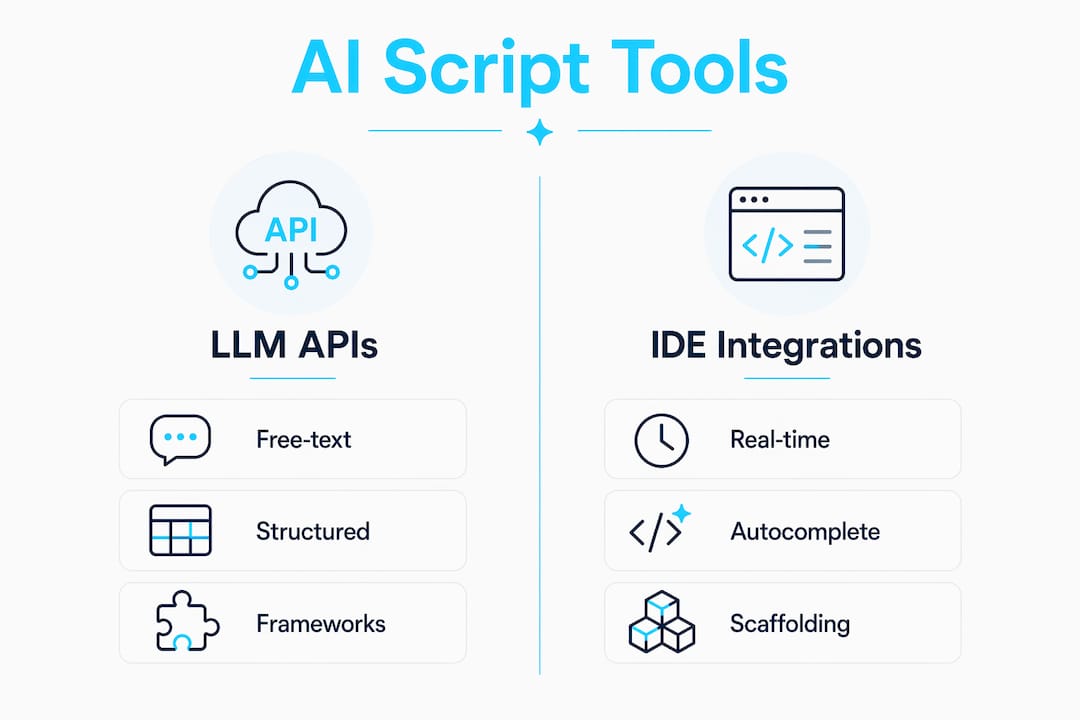
AI script generation falls into three categories: general-purpose LLM APIs (used directly via prompt), IDE-integrated AI assistants, and purpose-built test automation AI tools. Each category produces editable scaffold outputs. The key differentiator is how well the tool reads your existing structured inputs. Tools that ingest Jira test steps or OpenAPI specs produce more accurate scaffolds than tools that work from free-text descriptions alone.

The Model Context Protocol (MCP) is worth understanding here. MCP enables AI agents to dynamically discover OpenAPI endpoints and execute generated API calls inside sandboxed environments. That means your AI agent can read your cloud API catalog and generate calls it has never seen before, without hardcoded knowledge of your specific setup.
| Tool category | Primary input | Output type |
|---|---|---|
| LLM API (general) | Free-text prompt or structured spec | Raw code scaffold |
| IDE AI assistant | Codebase context + prompt | Inline code suggestion |
| Test automation AI | Manual test cases or Jira steps | Framework-linked scaffold |
| Infrastructure AI | Terraform/CloudFormation templates | IaC diff or new module |
How do you generate and refine AI-driven automation scripts?
The most reliable path is converting validated structured knowledge rather than prompting from scratch. Starting from scratch produces generic code that needs heavy rewriting. Starting from your existing test cases or infrastructure definitions produces code that already knows your naming conventions, resource types, and expected behaviors.
Here is the generation and refinement workflow I use:
- Export your validated inputs. Pull manual test cases from your test management tool or export your existing Terraform module as context. The richer the input, the better the scaffold.
- Write a framework-specific prompt. Specify the target framework, language version, file structure, and any config injection patterns your project uses. Vague prompts produce vague code.
- Generate the scaffold. AI generates production-quality scaffolding in roughly 30 seconds with well-commented code and configuration placeholders. That speed is real, but the output is a starting point, not a finished artifact.
- Run the refinement loop. Review the generated code for framework fit, placeholder accuracy, and alignment with your project conventions. Adjust variable names, inject real config values, and remove any hallucinated method calls.
- Integrate and version control. Commit the refined script to your repository with a clear commit message linking it to the source requirement or test case. This preserves the traceability you started with.
- Run CI checks before any execution. Treat the script as untrusted until it passes linting, static analysis, and a dry-run in a non-production environment.
Both leading approaches to AI script generation emphasize editable scaffold outputs and a human-in-the-loop refinement phase. Skipping that phase is where teams get burned.
Pro Tip: Standardize placeholder comments in your prompt template, such as # TODO: inject from env or # CONFIG: replace with actual endpoint. Consistent placeholders make the refinement pass faster and reduce the chance of a hardcoded secret slipping into version control.
What are the safest architectures for executing AI-generated scripts?
Running AI-generated code without strong isolation is a production risk. Standard Docker containers are insufficient for isolating untrusted AI-generated scripts. A compromised container can still reach the host kernel through shared namespaces. The risk is not theoretical; AI-generated code can contain hallucinated API calls, unintended destructive operations, or logic errors that behave correctly in tests but cause cascading failures in production.
Recommended sandbox architectures
The two most proven isolation layers for AI-generated cloud scripts are microVM-based sandboxes and gVisor. Firecracker and Kata Containers both provide microVM isolation with a minimal attack surface. gVisor intercepts system calls in user space, adding a layer between the container and the host kernel.
| Isolation method | Isolation level | Performance cost | Best for |
|---|---|---|---|
| Standard Docker | Low | Minimal | Dev/test only |
| gVisor | Medium-high | Low-medium | General AI script execution |
| Firecracker microVM | High | Medium | Production AI agent workloads |
| Kata Containers | High | Medium | Regulated or multi-tenant environments |
Separating the control plane from the execution plane is the architectural principle that makes this work. The control plane decides what to run. The execution plane runs it in isolation. Neither plane should have the ability to modify the other’s policies.
Sandbox configurations must be immutable code. Agents must never modify their own approval or execution policies. That rule sounds obvious, but it is easy to violate when you give an AI agent broad IAM permissions to “make things work.”
Pro Tip: Apply default-deny filesystem and network policies at the sandbox level, then explicitly allow only the API calls your script needs. Scope permissions to specific S3 buckets, specific Lambda ARNs, or specific CloudFormation stacks. Broad permissions in a sandbox defeat the purpose of having one. For a deeper look at securing AI-generated scripts before execution, Devopsaitoolkit has a practical walkthrough.
How do you incorporate governance into AI-driven cloud automation?
AI governance frameworks require translation into automated enforcement mechanisms to realize operational consistency. A governance document that lives in a wiki does nothing at runtime. The NIST AI Risk Management Framework defines four core functions: Govern, Map, Measure, and Manage. For cloud automation, the Govern function is the one you operationalize first.
Microsoft’s Azure Cloud Adoption Framework integrates the NIST AI RMF with automated policy enforcement via Azure Policy and Microsoft Purview. Azure Policy enforces governance rules consistently across workloads in real time. Purview adds data classification and lineage tracking. Together, they give you a live enforcement layer rather than a periodic audit.
Essential governance steps for any AI automation project:
- Define which script categories require human approval before execution.
- Assign IAM roles with least-privilege scopes to every AI-generated script.
- Tag all AI-generated resources with a provenance label for audit traceability.
- Set up real-time policy alerts for any script that attempts out-of-scope API calls.
- Review AI script outputs against your organization’s security baseline before promotion to production.
- Log every AI-generated action to a centralized, tamper-evident store.
Governance automation is not a one-time setup. As your AI tooling evolves, your policy rules need to evolve with it. Build policy-as-code into the same CI/CD pipeline that handles your infrastructure changes.
How do you handle configuration drift in AI-automated cloud infrastructure?
Infrastructure drift is the gap between your declared infrastructure state and what is actually running in your cloud environment. Drift is the silent killer of automation reliability. An AI-generated script that worked perfectly last week may fail or produce incorrect results today if the underlying infrastructure has drifted from the state the script assumed.
AWS CloudFormation drift detection can be automated via EventBridge, Lambda, and AWS Config rules to maintain operational baselines. A daily cadence is the recommended minimum for production environments. More frequent checks are appropriate for high-change environments or regulated workloads.
Key practices for drift management in AI-automated environments:
- Define reconciliation contracts. Decide upfront whether a detected drift triggers auto-remediation or a manual review ticket. Not all drift is equal. A changed security group rule warrants immediate auto-remediation. A changed instance tag may not.
- Automate the detection trigger. Use EventBridge rules to kick off CloudFormation drift detection on a schedule or on specific API events. Pair with Lambda to process results and route alerts.
- Handle non-remediable drift explicitly. Some drifts cannot be auto-remediated without risk. Your contract should define what happens in those cases, typically a PagerDuty alert and a freeze on further AI-generated changes to that stack.
- Version your reconciliation logic. Treat drift remediation scripts as first-class code artifacts with the same review and testing requirements as your primary automation scripts.
For a practical implementation of drift detection workflows using CloudFormation, EventBridge, and Lambda, Devopsaitoolkit covers the full setup with working examples.
Key Takeaways
Building AI-driven cloud automation scripts requires validated inputs, sandbox isolation, and automated governance enforcement to be safe and reliable in production.
| Point | Details |
|---|---|
| Start with validated inputs | Use existing test cases or IaC definitions as AI input to preserve traceability and improve scaffold quality. |
| Enforce sandbox isolation | Run AI-generated scripts in Firecracker microVMs or gVisor, never in standard Docker containers for production workloads. |
| Automate governance early | Implement Azure Policy or equivalent enforcement before scaling AI automation across workloads. |
| Build a refinement loop | Always review and refine AI-generated scaffolding before committing; treat raw output as a draft, not a finished artifact. |
| Detect drift on a schedule | Automate CloudFormation drift detection daily in production and define clear remediation contracts for every drift category. |
What I have learned building AI automation scripts in real environments
The biggest mistake I see teams make is treating AI script generation as a replacement for structured thinking. It is not. The quality of your output is directly proportional to the quality of your input. If you feed an AI a vague description of what you want, you get vague code back. If you feed it a validated test case with clear preconditions, expected results, and environment context, you get something you can actually use.
Sandbox selection is the other area where I have seen teams cut corners and regret it. The performance overhead of Firecracker or Kata Containers feels like a tax until the day a hallucinated API call tries to delete a production S3 bucket. At that point, the isolation layer is the only thing standing between you and an incident. I have started treating sandbox configuration as a non-negotiable part of any AI automation project, the same way I treat IAM least-privilege.
The human review step in the refinement loop is not a sign that AI is failing. It is the sign that your process is working. AI accelerates the scaffolding phase dramatically. Human review catches the edge cases that AI cannot know about: your team’s naming conventions, the config values that differ between staging and production, the API endpoints that changed last sprint. That combination is where the real productivity gain lives.
My practical advice: invest in governance automation before you scale. It is much easier to build policy enforcement into your pipeline from the start than to retrofit it after you have 50 AI-generated scripts running across three accounts. Start with a single workload, get the governance loop right, then expand.
— James
AI automation resources from Devopsaitoolkit
Cloud engineers building AI-driven automation workflows need more than a framework. They need battle-tested prompts that produce usable output on the first or second try.
The Linux Admin Prompt Pack from Devopsaitoolkit contains 100 proven AI prompts built specifically for Linux administration and cloud automation scripting. Each prompt is structured to produce framework-ready output with minimal refinement. For engineers who want better observability in their Bash scripts, the Bash Logging Library prompt adds leveled logging and structured debug output to any automation script. Both resources integrate directly into the AI script development workflows covered in this guide.
FAQ
What is AI-driven cloud automation scripting?
AI-driven cloud automation scripting is the process of using large language models to generate infrastructure code, test scripts, or operational Bash scripts from validated structured inputs like test cases or IaC templates. The AI produces editable scaffolding that engineers refine and version control before execution.
How long does AI take to generate an automation script scaffold?
AI can generate production-quality automation scaffolding in roughly 30 seconds when given well-structured inputs. The output includes comments and configuration placeholders, but always requires a human refinement pass before use.
Why are standard Docker containers unsafe for AI-generated scripts?
Standard Docker containers share the host kernel through namespaces, which means a compromised or misbehaving AI-generated script can potentially reach the host. MicroVMs like Firecracker or Kata Containers provide hardware-level isolation that eliminates that risk.
How often should you run drift detection in production?
A daily cadence is the recommended minimum for production cloud environments. High-change or regulated environments benefit from more frequent checks triggered by specific API events via EventBridge.
What is the NIST AI RMF and why does it matter for cloud automation?
The NIST AI Risk Management Framework defines four functions: Govern, Map, Measure, and Manage. For cloud automation, it provides the structure for treating AI-generated scripts as governed artifacts with defined risk controls, not ad hoc code.
Recommended
- DevOps Runbook Automation with AI: 2026 Guide
- AI Workflows for Real Cloud Engineers — DevOps AI ToolKit
- Converting CloudFormation to Terraform With AI Without
- Automating OpenStack with the Python SDK and CLI
Get 500 Battle-Tested DevOps AI Prompts — Free
500 battle-tested, copy-paste AI prompts engineered by a senior systems engineer — every one with fill-in placeholders and safety/back-out notes. Drop your email and it's yours.
- 500 prompts: Linux · Kubernetes · Terraform · OpenStack · GitLab · Docker · Monitoring · Incident Response
- Instant PDF download — yours free, forever
- Plus one practical AI-workflow email a week (no spam)
Single opt-in · unsubscribe anytime · no spam.