
Automating Helm Chart Deployments: A DevOps Guide
Discover the benefits of automating Helm chart deployments. Streamline your Kubernetes applications with tools like GitOps and CI/CD pipelines.

Automating Helm chart deployments is defined as replacing manual helm install and helm upgrade commands with declarative, version-controlled workflows that deliver Kubernetes applications consistently across every environment. Helm is the Kubernetes package manager, but the real shift happens when you combine it with GitOps controllers like Flux and ArgoCD, declarative managers like Helmfile, and CI/CD pipelines on GitHub Actions or GitLab CI. Git becomes the single source of truth. Every release, rollback, and configuration change flows through a pull request rather than a terminal session. That shift eliminates configuration drift, speeds up releases, and gives your team a full audit trail.
What tools are essential for automating Helm chart deployments?
The foundation is Helm itself, but Helm alone is not an automation system. It packages Kubernetes manifests into charts and handles templating, but it requires someone to run the commands. The automation layer sits on top.
Helmfile provides a single declarative YAML file to manage multiple Helm releases across environments. It integrates directly into CI/CD pipelines and reduces configuration drift by keeping every release definition in version control. If you manage more than three charts across two environments, Helmfile pays for itself in reduced maintenance within weeks.

GitOps controllers take this further. Flux and ArgoCD continuously compare the desired state defined in Git with the live cluster state and reconcile any differences automatically. You stop running helm upgrade by hand. The controller runs it for you, on every Git commit that changes a chart version or values file.
| Tool | Role in the pipeline |
|---|---|
| Helm | Packages charts, handles templating and release lifecycle |
| Helmfile | Declares multiple releases in one YAML, manages environments |
| Flux | GitOps controller, reconciles HelmRelease CRDs continuously |
| ArgoCD | GitOps controller with a UI, manages sync policies and rollbacks |
| GitHub Actions / GitLab CI | Runs linting, testing, dependency checks, and PR generation |
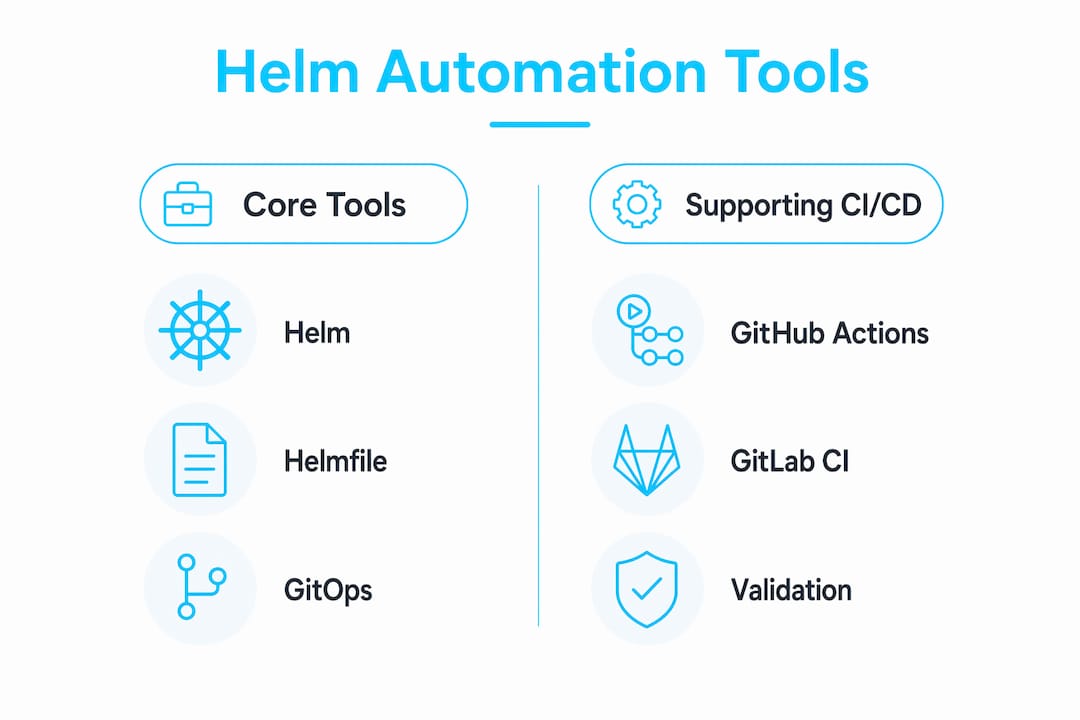
Supporting CI/CD tools handle the work that happens before a chart reaches the cluster. GitHub Actions and GitLab CI run helm lint, execute helm template validation, check dependency versions, and open pull requests for review. The cluster never sees an untested chart.
Pro Tip: Start with Helmfile even before adopting a full GitOps controller. It gives you declarative releases and environment separation immediately, with no cluster-side components to install.
How do you manage environment-specific values without duplication?
The standard practice is multiple values files with a layered merge strategy. Helm applies values files in order, with later files overriding earlier ones. That behavior is the foundation of a clean multi-environment setup.
A practical structure looks like this:
values/base.yaml: shared defaults for all environmentsvalues/staging.yaml: overrides for staging (replica counts, resource limits, feature flags)values/production.yaml: overrides for production (higher replicas, stricter resource quotas, production endpoints)
Flux’s HelmRelease CRD supports valuesFrom, which lets you pull values from ConfigMaps or Secrets rather than embedding them directly in the release definition. This separates configuration from source code and keeps secrets out of Git. You reference a Kubernetes Secret by name, and Flux injects the values at reconciliation time.
Layering values files before pushing to Git improves maintainability and reduces errors in automated deployments. The pattern to follow is defaults, then platform settings, then instance overrides. Each layer is reviewable, diffable, and auditable.
Pro Tip: Never store raw secrets in values files committed to Git. Use Sealed Secrets, External Secrets Operator, or SOPS to encrypt sensitive values before they enter version control.
What are the steps to automate Helm chart dependency updates in CI/CD?
Helm chart dependencies are declared in Chart.yaml under the dependencies key. Each dependency specifies a name, repository, and version constraint. The helm dependency update command resolves and downloads them into the charts/ directory. Automating this process in CI prevents the “it worked on my machine” problem that comes from engineers running dependency updates locally.
A well-structured dependency automation workflow follows these steps:
- Schedule the workflow. Run a cron job in GitHub Actions or GitLab CI daily or weekly. Scheduled pipelines catch upstream chart updates before they become security liabilities.
- Run
helm dependency update. The pipeline pulls the latest chart versions that satisfy your declared constraints. - Validate with
helm lintandhelm template. Catch breaking changes before they reach a cluster. - Generate a pull request. The CI job commits any changed
Chart.lockfiles and opens a PR for human review. - Require manual approval before merge. Auto-merging dependency updates is a security risk.
Semantic versioning constraints are the safety net here. Using ~1.2.0 allows patch updates only. Using ^1.0.0 allows minor and patch updates. Pinning to an exact version like 1.2.3 prevents all automatic updates. Most teams use ^ for internal charts and exact pins for third-party charts with breaking-change histories.
Manual PR review steps in CI prevent breaking changes from reaching production automatically. This is not optional. Dependency updates have introduced breaking API changes, removed default values, and changed resource naming conventions. A five-minute review catches what automation cannot.
Pro Tip: Add a helm template | kubeval or helm template | kubeconform step in your CI pipeline. It validates rendered manifests against the Kubernetes API schema without needing a live cluster.
How do GitOps workflows with Flux and ArgoCD automate the deployment lifecycle?
GitOps transforms deployments from active CLI commands to passive file-based configuration. You commit a change to Git. The controller detects it, reconciles the cluster, and reports the result. No SSH sessions. No manual rollbacks at 2 AM.
The core object in both Flux and ArgoCD is the HelmRelease custom resource. It replaces helm install entirely. A HelmRelease declares the chart source, version, target namespace, and values references. GitOps controllers reconcile these CRDs continuously, reverting manual edits and performing upgrades when the chart or values change in Git.
A production-grade GitOps setup for Helm includes:
- A
HelmRepositorysource pointing to your chart registry (OCI or HTTP). - A
HelmReleaseper application referencing the source and declaring values. - Sync policies with
prune: trueto remove resources deleted from Git, andselfHeal: trueto revert manual cluster edits. - Automated rollback configured in the
HelmReleasespec so failed upgrades revert without human intervention.
For multi-environment deployments, ArgoCD’s ApplicationSet controller generates one Application per environment from a single template. Flux achieves the same with Kustomize overlays that patch HelmRelease values per environment. Both approaches keep you from maintaining duplicate release definitions.
GitOps controllers do not execute imperative Helm commands. They reconcile HelmRelease custom resources defined declaratively in Git, providing automated lifecycle management with retry and rollback support. Controllers maintain cluster state automatically, reverting manual edits, and perform upgrades when chart or values change in Git.
A common pitfall is mixing GitOps-managed releases with manual helm upgrade commands. The controller will revert your manual change on the next reconciliation loop, usually within 60 seconds. That surprises engineers expecting a quick hotfix to stick.
For teams transitioning from manual Helm releases to GitOps-driven automation, the key is migrating one application at a time. Convert your least critical service first, validate the reconciliation behavior, then expand.
What troubleshooting steps should you follow when Helm automation breaks?
The most common failure mode in automated Helm deployments is a values mismatch between what CI tested and what the controller applies. This happens when environment-specific values files are not correctly layered or when a valuesFrom reference points to a Secret that does not exist in the target namespace.
Watch for these specific failure patterns:
HelmReleasestuck inReconcilingstate. Checkkubectl describe helmrelease <name>for the exact error. Missing chart versions and unreachable repositories are the top causes.- Manual
kubectl editchanges disappearing. GitOps controllers revert manual edits automatically. All changes must go through Git. - Dependency resolution failures in CI. A chart dependency pointing to a deprecated repository URL will break
helm dependency updatesilently in some versions. Pin repository URLs explicitly inChart.yaml. - Rollback loops. If a chart upgrade fails and the rollback also fails, the controller enters a loop. Set
maxHistoryin yourHelmReleaseand configure a remediation retry limit.
Testing before production is non-negotiable. The testing Helm charts step in CI should include helm lint, helm template validation, and ideally a deploy to an ephemeral namespace with helm test assertions. Catching failures in CI costs minutes. Catching them in production costs hours.
For a deeper look at specific error messages and their fixes, the guide on common Helm deployment errors covers the patterns that show up most often in production clusters.
Pro Tip: Enable Flux’s spec.install.remediation.retries and spec.upgrade.remediation.retries in your HelmRelease. Without retry limits, a broken chart can lock a controller into an infinite reconciliation loop.
Key Takeaways
Automating Helm chart deployments requires declarative tooling, layered configuration, and CI-enforced dependency management to produce reliable, repeatable Kubernetes releases.
| Point | Details |
|---|---|
| Replace imperative commands | Use Helmfile or GitOps controllers instead of running helm install manually. |
| Layer values files | Organize base, platform, and instance overrides to keep configuration DRY across environments. |
| Automate dependency checks | Schedule CI workflows to run helm dependency update, validate, and open PRs for review. |
| Use GitOps reconciliation | Flux and ArgoCD continuously sync cluster state to Git, providing automatic rollback and drift detection. |
| Test before production | Run helm lint, helm template, and helm test in CI before any chart reaches a live cluster. |
From manual releases to GitOps: what I’ve actually learned
I spent a long time running helm upgrade --install from CI scripts and calling it “automation.” It worked until it didn’t. The real problem was that the cluster state and the Git state were loosely coupled at best. A colleague would patch a Deployment directly, the CI pipeline would not know, and the next release would overwrite the fix or, worse, miss it entirely.
Switching to Flux-managed HelmRelease resources changed the operational model completely. Viewing a Helm chart as part of a continuous deployment system rather than a static packaging tool is the mindset shift that makes everything else click. The chart is not the artifact. The Git commit is.
The hardest part is not the tooling. It is convincing the team that you cannot hotfix a production pod by editing it directly anymore. That cultural adjustment takes longer than the technical migration. My advice: document the reconciliation behavior explicitly in your runbooks before you flip the switch. Engineers who understand why their edit disappeared are far less frustrated than engineers who just see it vanish.
Invest time in your values layering structure before you automate anything. A messy values setup that works manually becomes a debugging nightmare when a controller is reconciling it every five minutes. Get the structure right first, then automate.
— James
Devopsaitoolkit and Kubernetes Helm workflows
Devopsaitoolkit builds AI-powered workflows for engineers managing production Kubernetes infrastructure. If you are working through Helm automation, the platform offers prompt libraries and automation guides built specifically for GitOps pipelines, CI/CD integration, and Helm release management.

The guides cover Helmfile configuration, Flux HelmRelease setup, and CI dependency automation with real examples from production environments. Engineers using Devopsaitoolkit report faster iteration on deployment pipelines and fewer configuration errors reaching clusters. Visit Devopsaitoolkit to see the full catalog of Kubernetes and Helm workflows, or check the pricing page for subscription options that fit your team size.
FAQ
What is the difference between Helm and Helmfile?
Helm is the Kubernetes package manager that installs and upgrades charts. Helmfile is a declarative wrapper that manages multiple Helm releases and environment-specific values in a single YAML file.
How does GitOps automate Helm chart deployments?
GitOps controllers like Flux and ArgoCD reconcile HelmRelease CRDs defined in Git with the live cluster state, performing upgrades and rollbacks automatically without manual commands.
Should Helm dependency updates be merged automatically in CI?
No. Automated dependency updates should generate pull requests for manual review. Auto-merging skips validation of breaking changes and introduces security risks.
What happens if I manually edit a resource managed by a GitOps controller?
The controller reverts the change automatically on the next reconciliation loop, typically within 60 seconds. All changes must go through Git to persist.
How do I manage secrets in Helm values files with GitOps?
Use Sealed Secrets, External Secrets Operator, or SOPS to encrypt sensitive values before committing to Git. Reference encrypted secrets via valuesFrom in your HelmRelease spec to keep plaintext credentials out of version control.
Recommended
- GitLab CI + Helm: Repeatable Kubernetes Deploys Without the
- Common Helm Chart Deployment Errors: Fix Them Fast
- Reviewing a Helm Chart With AI Before You Ship It
- Using AI to Generate and Review Helm Charts — DevOps AI
Get 500 Battle-Tested DevOps AI Prompts — Free
500 battle-tested, copy-paste AI prompts engineered by a senior systems engineer — every one with fill-in placeholders and safety/back-out notes. Drop your email and it's yours.
- 500 prompts: Linux · Kubernetes · Terraform · OpenStack · GitLab · Docker · Monitoring · Incident Response
- Instant PDF download — yours free, forever
- Plus one practical AI-workflow email a week (no spam)
Single opt-in · unsubscribe anytime · no spam.