
How to Automate Kubernetes Upgrade Workflows Safely
Discover how to automate Kubernetes upgrade workflows safely with a GitOps-driven pipeline for repeatable, scalable upgrades across clusters.

The fastest safe way to automate Kubernetes upgrade workflows at fleet scale is a GitOps-driven pipeline that combines provider-specific upgrade APIs, declarative in-cluster controllers, and an automated preflight → watch → verify layer. That combination gives you something a manual runbook never can: repeatable, auditable, idempotent upgrades that scale across dozens of clusters without a proportional increase in human toil.
Here is the minimal toolchain to wire together:
- Provider CLIs and APIs:
eksctl/ AWS APIs for EKS,az aks upgradefor AKS,kubeadm upgrade applyfor self-managed clusters - In-cluster controllers: Rancher
system-upgrade-controllerwith Plan CRDs for cluster-native scheduling and node sequencing - GitOps engines: Argo CD or Flux to trigger upgrade plans from Git commits and maintain an audit trail
- Preflight and watch layer: tools like
kubectl-upgradeto scan manifests, emit provider commands, watch for stuck states, and verify post-upgrade conditions
The rest of this guide unpacks each layer in depth, with a concrete EKS example you can adapt today.
Table of Contents
- What does a complete Kubernetes upgrade lifecycle look like?
- Which automation architecture fits your environment?
- Which tools should you actually use?
- What automated safety checks should block an unsafe upgrade?
- How do you test upgrades before rolling them out to the fleet?
- A concrete EKS upgrade example you can adapt
- What happens when an upgrade goes wrong?
- How do you scale upgrade automation across a fleet?
- How do EKS, AKS, and kubeadm upgrades differ in practice?
- How do upgrades fit into a GitOps flow?
- What do staged rollouts look like for cluster upgrades?
- What should you monitor during and after an upgrade?
- How do you handle PDB deadlocks, CRD stalls, and stuck control planes?
- How do you scale upgrades across many clusters?
- What security considerations apply during automated upgrades?
- How should backup and rollback fit into your automation?
- How do you schedule upgrades to minimize workload impact?
- Why does a version compatibility matrix matter before you upgrade?
- Reusable automation scripts for common upgrade tasks
- Key Takeaways
- The part most teams underweight
- Devopsaitoolkit gives you the upgrade automation building blocks
- Useful sources
What does a complete Kubernetes upgrade lifecycle look like?
Every automated upgrade workflow must cover five stages in order. Skip one and you are setting yourself up for a 2 AM incident.
Pre-checks come first. Before touching the control plane, your pipeline should scan for deprecated APIs in running manifests, check Helm release compatibility, verify CRD migration readiness, detect PodDisruptionBudget configurations that would deadlock a drain, and confirm PV/PVC and CSI driver compatibility with the target version. Pre-flight assessment should also cover Argo/Flux reconciliation state, admission webhooks, and etcd health. These are the usual time bombs that surface mid-upgrade.
Control plane upgrade is next. For EKS, this is a two-step process: update the control plane first via AWS APIs, then update node groups so the kubelet version matches. For AKS, Azure Fleet Manager’s auto-upgrade profiles handle scheduling. For kubeadm clusters, kubeadm upgrade apply targets the primary control plane node first. In all cases, gate the next stage on API server health checks returning clean.

Node upgrades follow the control plane. The canonical sequence is cordon → drain → replace (or kubelet upgrade in place). One constraint that catches teams off guard: kubeadm does not support skipping minor versions, so your automation must enforce one-minor-at-a-time progression. Set concurrency limits to avoid draining too many nodes simultaneously, which can starve running workloads.
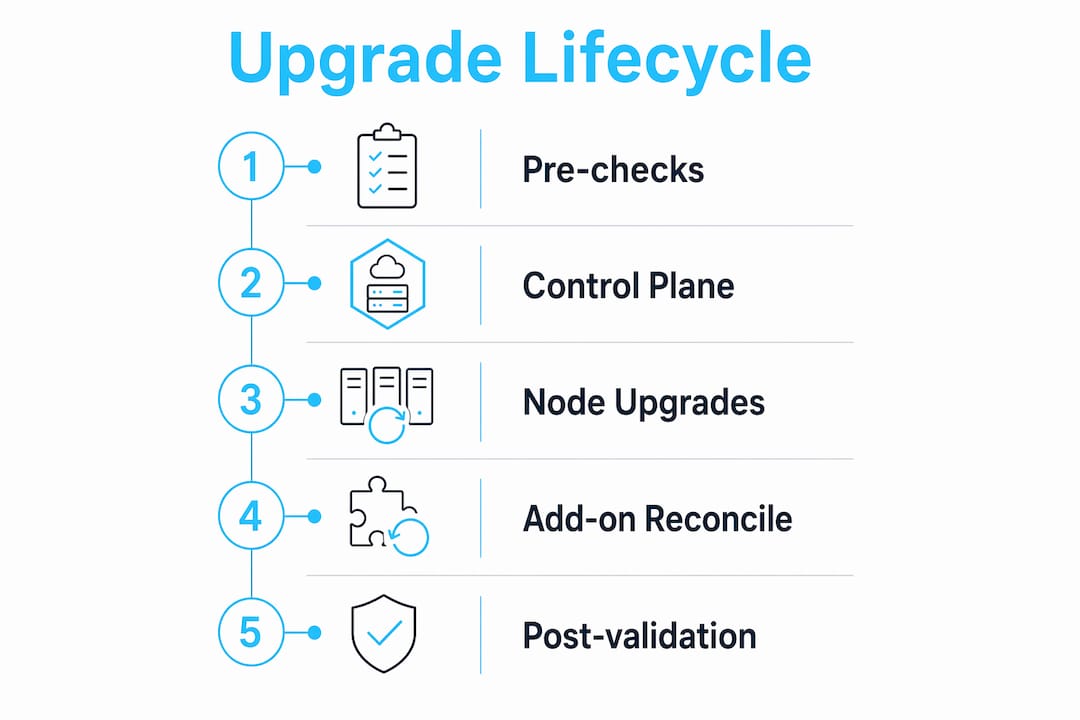
Add-on reconciliation is an explicit stage, not an afterthought. After the control plane is up, reconcile CoreDNS, kube-proxy, CNI plugins, cert-manager, and CSI drivers. Marking a control-plane upgrade complete without validating these produces the majority of post-upgrade incidents.
Post-validation closes the loop. Run smoke tests, confirm version alignment with kubectl version, check that all nodes report Ready, and emit a status artifact back into Git. Only then mark the upgrade complete.

Pro Tip: Gate each stage with a health check that must return clean before the next stage starts. A simple kubectl wait --for=condition=Ready nodes --all --timeout=300s after node upgrades catches partial failures before add-on reconciliation begins.
Which automation architecture fits your environment?
The right pattern depends on your scale, compliance posture, and whether you are running managed or self-managed clusters. Four architectures cover most real-world cases.
GitOps-driven pipelines are the preferred pattern for most teams. A Git commit or pull request merge triggers a CI/CD pipeline (GitHub Actions, GitLab CI, Tekton) that calls provider APIs or emits CLI commands. Argo CD or Flux reconciles the resulting state back into the cluster. Idempotency comes from the provider API itself: calling aws eks update-cluster-version with the same target version twice is safe. The audit trail is the Git history.
- Pros: Full audit trail, PR-based approval gates, easy rollback via revert, integrates with existing GitOps tooling
- Cons: Requires disciplined Git branching strategy; pipeline failures need their own alerting
Orchestrator-driven workflows use an external orchestration engine to sequence upgrade steps across multiple clusters. Tools in this category can run provider actions, wait for health gates, and branch on failure. This pattern suits fleets where upgrade sequencing across environments (dev → staging → prod) needs explicit dependency modeling.
- Pros: Explicit step visibility, easy to add human-in-the-loop gates, good for compliance-heavy environments
- Cons: Another system to operate; can become a bottleneck if the orchestrator is centralized
In-cluster controllers and operators like Rancher’s system-upgrade-controller use Plan CRDs to declaratively schedule node upgrades, enforce server-first ordering, set concurrency limits, and restrict execution to configured time windows. The controller labels each node with a hash of the plan configuration, so a plan runs exactly once per node per configuration. New nodes added to the cluster automatically receive the plan.
- Pros: Cluster-native, no external orchestrator needed, GitOps-friendly via CRD manifests in Git
- Cons: Scoped to node-level upgrades; control-plane upgrades on managed services still need provider APIs
CLI-wrapper and watch layer tools like kubectl-upgrade aggregate manifest and cluster scans, emit the exact provider commands to run, watch for stuck states, and verify post-upgrade conditions without auto-executing cloud CLIs. This is the right pattern when you want a human to approve the generated command set before execution.
- Pros: Low blast radius, good for teams building confidence in automation
- Cons: Still requires human execution step; not suitable for fully unattended fleet upgrades
Which tools should you actually use?
Each tool category maps to a specific stage in the upgrade workflow. Here is how they fit together.
| Tool / Category | Stage | Key Capability |
|---|---|---|
eksctl / AWS EKS APIs | Control plane + node groups | Two-step upgrade: control plane then node groups |
az aks upgrade / Azure Fleet Manager | Control plane + node images | Auto-upgrade profiles for scheduled AKS updates |
kubeadm | Control plane + worker nodes | Sequential minor-version upgrades, no skipping |
| Rancher system-upgrade-controller | Node upgrades | Plan CRDs, hash-based idempotency, time windows |
| Argo CD | GitOps reconciliation | Sync upgrade manifests and CRDs from Git |
| Flux | GitOps reconciliation | Image automation, Helm release upgrades, audit trail |
kubectl-upgrade | Preflight + watch + verify | Scan, emit commands, watch stuck states, verify |
| Kubegrade / KubeLift | Full lifecycle | Pre-check scoring, add-on reconciliation, rollback |
Integration points matter as much as the tools themselves. GitOps triggers call provider API actions by emitting CLI commands into a pipeline job or a Kubernetes Job. In-cluster controllers use CRDs to manage plan state, so you can store Plan manifests in Git and let Flux or Argo CD apply them. The watch/preflight layer sits between plan generation and execution, surfacing remediation actions as pull requests.
One caution: when controllers or Jobs run node-level changes, they need elevated privileges. Scope those RBAC permissions tightly. A ServiceAccount with cluster-admin for an upgrade Job is a significant blast radius if that Job is compromised. Use a dedicated namespace, a scoped ClusterRole, and short-lived credentials from your secrets manager.
Pro Tip: Store Plan CRDs and upgrade Job manifests in Git alongside your cluster configuration. When Flux or Argo CD applies them, you get a free audit trail of every upgrade attempt, including who merged the PR that triggered it.
What automated safety checks should block an unsafe upgrade?
Automated prechecks are not optional. They are the difference between a boring upgrade and a production outage.
The critical checks to run automatically before any upgrade:
- Deprecated API detection: scan running resources and Helm releases for APIs removed in the target version. Tools like
plutoorkubentdo this well. - Helm and manifest compatibility: check that all deployed Helm charts support the target Kubernetes version.
- CRD migration readiness: verify that CRD versions in use are not being removed and that conversion webhooks are healthy.
- PDB drain deadlock detection: identify PodDisruptionBudgets that would block a node drain entirely (e.g.,
maxUnavailable: 0with a single replica). - PV/PVC and CSI compatibility: confirm that storage classes and CSI drivers are compatible with the target version.
- Add-on version compatibility: check that CoreDNS, kube-proxy, and CNI plugin versions are within the supported range for the target Kubernetes version.
For policy enforcement, use maintenance windows to restrict when upgrade Jobs can start. The system-upgrade-controller supports scheduling windows with day, start time, end time, and timezone, so plans simply do not create Jobs outside the configured window. Combine this with concurrency limits to prevent simultaneous node drains across multiple clusters.
RBAC scoping for upgrade jobs deserves its own attention. Create a dedicated ServiceAccount per upgrade pipeline, bind it to the minimum ClusterRole needed, and rotate credentials after each upgrade run.
Pro Tip: Build an automated “unstick” remediation path for the three most common stuck states: force-delete a pod blocking a PDB drain (after verifying it is safe), pause a reconciliation loop that is cycling on a stale CRD, and delete a stuck webhook that is blocking API calls. Make each unstick action reversible and log it to your audit trail.
How do you test upgrades before rolling them out to the fleet?
The recommended testing posture is: dry-run → staging rehearsal → canary wave → progressive fleet rollout. Each stage narrows the blast radius before you commit to the full fleet.
- Dry run: run preflight scanners against the target version without making any changes. Generate the full command set and review it in a pull request. Use
kubectl diffto surface what would change in cluster state. - Staging rehearsal: upgrade a non-production cluster that mirrors production configuration as closely as possible. Run your full smoke test suite against it. This is where you catch add-on incompatibilities and admission webhook failures.
- Canary wave: upgrade one cluster (or one node pool) in production first. Run end-to-end smoke tests. Validate that application traffic behaves normally for a defined bake time before promoting.
- Progressive fleet rollout: promote the upgrade across remaining clusters in waves, gated by health checks after each wave. Halt automatically if any wave produces failures above a threshold.
For the test matrix at each stage, validate: API compatibility (no deprecated API calls in running workloads), admission webhook responses, storage mount behavior (PV attach/detach), operator and controller reconciliation loops, and application-level smoke tests (HTTP health endpoints, queue depth, error rates).
Canary and blue/green techniques apply at the node pool level. Upgrade a secondary node pool to the new version, migrate workloads to it via taints and tolerations, validate, then drain and replace the old pool. This gives you a clean rollback path: if the new pool has issues, drain it and reschedule back to the old pool before it is terminated.
For ephemeral rehearsal environments, vCluster lets you spin up a virtual cluster inside an existing cluster to test upgrade manifests without provisioning real infrastructure.
A concrete EKS upgrade example you can adapt
This example wires together a GitOps trigger, preflight checks, AWS API calls, a watch layer, and post-upgrade verification for an EKS cluster.
Step 1: Preflight. Run kubent and pluto against the cluster to surface deprecated APIs. Run kubectl-upgrade scan to aggregate manifest compatibility issues. Surface all findings as comments on a Git pull request so the upgrade plan is reviewable before execution.
Step 2: Plan. Merge the PR to trigger a pipeline. The pipeline generates the exact AWS CLI commands for the upgrade:
# Control plane upgrade
aws eks update-cluster-version \
  --name my-cluster \
  --kubernetes-version 1.31 \
  --region us-east-1

# Wait for control plane to be active
aws eks wait cluster-active --name my-cluster --region us-east-1
Step 3: Execute node group upgrade. After the control plane is active, update managed node groups:
# Get current node group version
aws eks describe-nodegroup \
  --cluster-name my-cluster \
  --nodegroup-name my-nodegroup \
  --region us-east-1 \
  --query 'nodegroup.releaseVersion'

# Update node group
aws eks update-nodegroup-version \
  --cluster-name my-cluster \
  --nodegroup-name my-nodegroup \
  --region us-east-1

aws eks wait nodegroup-active \
  --cluster-name my-cluster \
  --nodegroup-name my-nodegroup \
  --region us-east-1
Step 4: Watch layer. While node groups update, run a watch loop that checks for stuck drains (nodes in SchedulingDisabled for more than 15 minutes) and PDB deadlocks. If detected, the watch layer either runs the scripted unstick action or raises a human gate via a Slack alert and pauses the pipeline.
Step 5: Verify. After all nodes report Ready, reconcile add-ons and run smoke tests:
kubectl wait --for=condition=Ready nodes --all --timeout=300s
kubectl rollout status deployment/coredns -n kube-system
kubectl rollout status daemonset/kube-proxy -n kube-system
Emit a status artifact (a Git commit or a pipeline annotation) that records the upgrade version, timestamp, and health check results. This closes the GitOps audit loop.
Pro Tip: Design every step to be idempotent. Calling aws eks update-cluster-version when the cluster is already at the target version returns an error you can catch and treat as success. Build that check into your pipeline so a re-run after a partial failure does not double-upgrade.
What happens when an upgrade goes wrong?
Automation must be idempotent and must include detection → remediation → rollback decision logic. A pipeline that fails silently and leaves the cluster in a partial upgrade state is worse than no automation at all.
The core rule for automated remediation: auto-fix only what you can reverse. Force-deleting a stuck pod is reversible (the scheduler reschedules it). Deleting a PVC is not. Design your unstick rules with that boundary in mind, and escalate anything irreversible to a human gate.
Common failure modes and how to handle them:
- PDB deadlocks: a drain stalls because no pod can be evicted. Auto-remediation: identify the blocking PDB, check if the protected workload has more replicas than
minAvailablerequires, and if safe, force-evict one pod. Log the action. - CRD migration stalls: a CRD conversion webhook is unhealthy, blocking API calls. Auto-remediation: restart the webhook deployment, wait for it to become ready, then retry. Escalate if it fails twice.
- Stuck control plane (kubeadm):
kubeadm upgrade applyhangs. Check etcd health first. If etcd is healthy, the issue is usually a stale lock file. Remediation: remove/etc/kubernetes/tmp/kubeadm-upgrade-*and retry. - Add-on incompatibility post-upgrade: CoreDNS or kube-proxy fails to start after control plane upgrade. Auto-remediation: roll back the add-on to the previous version, alert, and halt further node upgrades.
- Node image failure: a new node fails to join the cluster. Auto-remediation: terminate the failed node, let the node group replace it, and retry.
The decision tree is straightforward: if the failure is in the watch layer’s known-fix catalog and the fix is reversible, auto-fix and continue. If the fix is irreversible or the auto-fix fails twice, roll back the affected component and halt with an alert. For managed services, rollback means reverting the node group to the previous AMI or image version. For kubeadm clusters, rollback means kubeadm upgrade apply to the previous version on affected nodes.
How do you scale upgrade automation across a fleet?
The recommended operating model for fleets is: centralized policy, local execution, GitOps audit trail. Central policy defines which versions are approved, what maintenance windows apply, and what concurrency limits are in force. Local execution means each cluster runs its own upgrade controller or pipeline agent, not a single centralized job that touches all clusters sequentially.
Sequencing strategies for fleet upgrades:
- Environment waves: dev → staging → prod, with automated promotion gates between waves
- Cluster groups by risk: group clusters by criticality and upgrade lower-risk groups first
- Tenant-aware sequencing: for multi-tenant hosts, sequence upgrades to minimize impact on high-traffic tenants
For managing upgrades across many clusters, Azure Kubernetes Fleet Manager provides a centralized control plane for scheduling update runs across AKS member clusters, including support for update groups and stages.
Metrics to track for fleet upgrade operations:
| Metric | What it tells you |
|---|---|
| Upgrade success rate per wave | Whether your prechecks are catching real blockers |
| Mean time to remediation (MTTR) | How effective your auto-fix rules are |
| Time blocked on PDB drains | Whether workload owners need to fix their PDB configs |
| Add-on reconciliation failures | Whether add-on version matrices are up to date |
| Clusters pending upgrade (age) | Version drift risk across the fleet |
Governance for fleet upgrades requires role separation: the team that defines upgrade policies should not be the same team that merges upgrade PRs. Use Git branch protection rules and CODEOWNERS to enforce this. Orchestration event logs and Git history together form your compliance audit trail.
How do EKS, AKS, and kubeadm upgrades differ in practice?
The upgrade mechanics differ enough between managed and self-managed clusters that a single generic workflow will not cover all three cleanly.
Amazon EKS separates control plane and data plane upgrades by design. The control plane is AWS-managed: you call aws eks update-cluster-version and AWS handles the rest. Node groups are your responsibility. Managed node groups support in-place rolling upgrades via aws eks update-nodegroup-version. Self-managed node groups require you to update the launch template AMI and trigger a rolling replace. eksctl upgrade cluster wraps both steps but still requires you to handle add-ons separately with eksctl utils update-coredns and similar commands.
Azure AKS with Fleet Manager takes a more declarative approach. You define an auto-upgrade profile that targets a specific minor version or “Latest,” and Fleet Manager schedules update runs across member clusters. Node image updates can be scheduled independently of Kubernetes version upgrades, which is useful for security patching without a full version bump.
kubeadm clusters require the most manual orchestration. The upgrade sequence is strict: primary control plane node first, then additional control plane nodes, then worker nodes. Skipping minor versions is not supported, so going from 1.28 to 1.30 requires two separate upgrade runs. Worker node upgrades require draining the node, upgrading kubelet and kubectl, and uncordoning. Automating this with system-upgrade-controller Plan CRDs works well: define a server plan and an agent plan, where the agent plan has a prepare step that waits for the server plan to complete.
How do upgrades fit into a GitOps flow?
GitOps treats upgrade plans as code. The Git repository is the source of truth for what version each cluster should be running, and the GitOps engine reconciles the cluster toward that state.
The practical flow looks like this: a version bump PR updates the target Kubernetes version in a cluster configuration file. The PR triggers preflight CI checks (deprecated API scans, compatibility checks). On merge, Argo CD or Flux detects the change and either applies a Plan CRD directly (for system-upgrade-controller) or triggers a pipeline that calls the provider API. The pipeline emits status back to Git as a commit or annotation.
Declarative, CRD-driven upgrade plans let you treat upgrades as code and integrate them into GitOps. This reduces drift, gives a clear audit trail, and ensures new nodes receive the same plan automatically. The Rancher system-upgrade-controller is purpose-built for this: store Plan manifests in Git, let Flux apply them, and the controller handles node sequencing. For auditing manifests before they reach the cluster, automated manifest checks surfaced into PRs catch compatibility issues before they become upgrade blockers.
What do staged rollouts look like for cluster upgrades?
Staged rollouts for cluster upgrades work at two levels: across clusters in a fleet, and within a single cluster across node pools.
Within a single cluster, the canary pattern means upgrading one node pool to the new version first. Taint the new pool with kubernetes.io/upgrade-canary=true:NoSchedule and add a toleration to a subset of workloads. Run smoke tests. If they pass, remove the taint, drain the old pool, and let the scheduler fill the new pool naturally. Blue/green at the cluster level means running two clusters in parallel, shifting traffic via DNS or a load balancer, validating on the new cluster, and decommissioning the old one. This is expensive but gives the cleanest rollback path.
Across a fleet, staged rollouts use wave groups. Wave 1 is dev clusters. Wave 2 is staging. Wave 3 is production, broken into sub-waves by cluster criticality. Automated promotion gates between waves check upgrade success rate, error rate on key endpoints, and add-on health. If any gate fails, the pipeline halts and alerts.
What should you monitor during and after an upgrade?
Health checks and observability during an upgrade are not just about knowing when something breaks. They tell you when it is safe to proceed to the next stage.
During node upgrades, watch: node Ready condition, pod eviction events, PDB violation counts, and the number of nodes in SchedulingDisabled state. A node stuck in SchedulingDisabled for more than your configured timeout is a signal for the watch layer to investigate.
After the control plane upgrade, check: API server response latency, etcd leader election health, and whether all control plane components report healthy via kubectl get componentstatuses (deprecated in newer versions, but kubectl get --raw /healthz works across versions).
Post-upgrade validation should cover: all nodes Ready, all system pods running (CoreDNS, kube-proxy, CNI), application smoke tests passing, and no increase in error rates on key services. Instrument these checks with Prometheus alerts so failures surface immediately rather than waiting for a human to notice.
For cluster troubleshooting workflows that integrate with your upgrade pipeline, AI-assisted diagnosis can accelerate root cause identification when post-upgrade health checks fail.
How do you handle PDB deadlocks, CRD stalls, and stuck control planes?
These three failure modes account for the majority of upgrade pipeline hangs. Each has a known remediation path.
PDB deadlocks happen when a node drain cannot evict a pod because the PDB’s minAvailable or maxUnavailable constraint would be violated. The fix is to identify the blocking PDB with kubectl get pdb -A and check whether the protected deployment has enough replicas to allow eviction. If it does, the PDB configuration is wrong and the workload owner needs to fix it. If it does not, you need to scale up the deployment before draining. Automate the detection; escalate the fix decision to a human for production workloads.
CRD migration stalls occur when a CRD’s stored version is being removed in the target Kubernetes version and the migration has not been completed. The fix is to migrate all existing custom resources to the new API version before upgrading. Tools like kubectl convert and the crd-migration pattern handle this. Build CRD migration as an explicit preflight step, not a reaction to a stall.
Stuck control planes on kubeadm clusters usually mean a stale lock or an etcd issue. Check etcd cluster health with etcdctl endpoint health before assuming the control plane is the problem. If etcd is healthy, look for stale kubeadm lock files and remove them. For managed services like EKS, a stuck control plane upgrade is an AWS support case, not something you can fix directly.
How do you scale upgrades across many clusters?
Fleet-scale upgrade automation requires a control plane that is separate from the clusters being upgraded. Azure Kubernetes Fleet Manager provides this for AKS. For multi-cloud or kubeadm fleets, a centralized GitOps repository with per-cluster directories and a fleet orchestration layer handles sequencing.
The key principle is that each cluster should be self-sufficient for execution. The central control plane defines policy and triggers; the cluster-local controller executes. This means a network partition between the central control plane and a cluster does not leave that cluster in a broken state. The local controller either completes the in-progress plan or halts safely.
For etcd backup before any fleet upgrade, automate the backup as the first step in every cluster’s upgrade pipeline. A failed upgrade with a clean etcd backup is recoverable. A failed upgrade without one is a much harder conversation.
What security considerations apply during automated upgrades?
Automated upgrades introduce specific security risks that manual upgrades do not. The pipeline has elevated access to cluster APIs and cloud provider APIs, and that access needs to be tightly controlled.
Credential management: upgrade pipelines need short-lived credentials. Use IRSA (IAM Roles for Service Accounts) for EKS pipelines, Workload Identity for AKS, and Vault dynamic secrets for kubeadm clusters. Never store long-lived cloud credentials in CI/CD environment variables.
RBAC impacts: a Kubernetes version upgrade can change the behavior of built-in RBAC policies. After upgrading, audit ClusterRoleBindings for any bindings that reference deprecated or changed built-in roles. Automate this check as part of post-upgrade validation.
Privileged Jobs: upgrade Jobs that run on nodes (like system-upgrade-controller Jobs) need host access. Scope the PodSecurityPolicy (or Pod Security Admission in newer versions) to allow only the specific capabilities needed. Run these Jobs in a dedicated namespace with network policies that restrict egress.
Supply chain: verify the container images used by upgrade Jobs against a known-good digest. A compromised upgrade Job image with cluster-admin access is a serious incident. Pin image digests in Plan CRDs and verify them in your preflight pipeline.
How should backup and rollback fit into your automation?
Backup and rollback are not afterthoughts. They are explicit stages in the upgrade pipeline with their own automation.
Before any upgrade, the pipeline should: take an etcd snapshot, snapshot node group configurations (AMI ID, launch template version for EKS; node image version for AKS), and record the current add-on versions. Store these artifacts in a durable location (S3, Azure Blob) tagged with the cluster name and upgrade timestamp.
Rollback automation should be able to: restore etcd from snapshot (for kubeadm clusters), revert a managed node group to the previous launch template version (for EKS), and roll back add-ons to their pre-upgrade versions. For managed services, the control plane rollback is not available after the upgrade completes, which is why the canary pattern and staged rollouts matter so much. You cannot undo an EKS control plane upgrade, but you can roll back node groups and add-ons.
For upgrade sequencing principles that apply across infrastructure types, the same backup-first, stage-gated approach that works for OpenStack applies directly to Kubernetes fleet upgrades.
How do you schedule upgrades to minimize workload impact?
Maintenance windows are the primary tool for minimizing workload impact. The system-upgrade-controller supports declarative scheduling windows that prevent Jobs from starting outside configured hours. For managed services, AKS Fleet Manager’s update runs support scheduling by time window and update group.
Beyond time windows, workload-aware scheduling means checking cluster utilization before starting node drains. If a cluster is running at 90% CPU utilization, draining a node will likely cause pod evictions that cannot reschedule. Build a utilization check into your preflight: if utilization is above a threshold, delay the upgrade or alert for human review.
For clusters with autoscaling via Karpenter or Cluster Autoscaler, coordinate the upgrade with the autoscaler. Temporarily increase the minimum node count before draining upgrade targets, so the autoscaler can provision replacement capacity before workloads are evicted.
Why does a version compatibility matrix matter before you upgrade?
A version compatibility matrix is the dependency graph for your upgrade. Kubernetes has a defined skew policy: kubelet can be at most one minor version behind the API server, and kubectl can be one minor version ahead or behind. Add-ons have their own compatibility ranges. Helm charts have their own Kubernetes version requirements.
Before any upgrade, generate a compatibility matrix that covers: target Kubernetes version, supported kubelet skew, compatible CoreDNS version, compatible kube-proxy version, CNI plugin compatibility range, cert-manager compatibility, and the Kubernetes version requirements for every Helm chart deployed in the cluster. Automate this check with a script that queries the Helm chart metadata and compares it against the target version.
For CRDs, check the x-kubernetes-preserve-unknown-fields and stored version fields. A CRD that stores resources in a version being removed in the target Kubernetes version will cause the upgrade to fail or data to become inaccessible.
Reusable automation scripts for common upgrade tasks
These snippets are starting points. Adapt them to your environment.
Preflight: detect deprecated APIs with pluto
pluto detect-all-in-cluster \
  --target-versions k8s=v1.31.0 \
  --output wide
Preflight: check PDB drain deadlocks
kubectl get pdb -A -o json | jq '
  .items[] |
  select(.spec.maxUnavailable == 0 or .spec.minAvailable == .status.currentHealthy) |
  {namespace: .metadata.namespace, name: .metadata.name, minAvailable: .spec.minAvailable}
'
Node drain with timeout and eviction fallback
kubectl drain <node-name> \
  --ignore-daemonsets \
  --delete-emptydir-data \
  --timeout=300s \
  --grace-period=60
Post-upgrade: verify all nodes ready
kubectl wait --for=condition=Ready nodes \
  --all \
  --timeout=600s
Post-upgrade: check CoreDNS and kube-proxy rollout
kubectl rollout status deployment/coredns -n kube-system --timeout=120s
kubectl rollout status daemonset/kube-proxy -n kube-system --timeout=120s
EKS add-on update via eksctl
eksctl utils update-coredns --cluster my-cluster --region us-east-1 --approve
eksctl utils update-kube-proxy --cluster my-cluster --region us-east-1 --approve
eksctl utils update-aws-node --cluster my-cluster --region us-east-1 --approve
For Job patterns that hold up under node-level execution, the same principles that apply to CronJobs apply to upgrade Jobs: set backoffLimit, use restartPolicy: OnFailure, and always emit structured logs.
Key Takeaways
A safe, repeatable upgrade pipeline requires GitOps-driven orchestration, provider-specific APIs, automated preflight checks, and a watch/verify layer working together as a single workflow.
| Point | Details |
|---|---|
| Preflight first, always | Run deprecated API scans, PDB checks, and CRD migration readiness before touching the control plane. |
| Enforce stage gates | Gate each lifecycle stage (pre-check → control plane → nodes → add-ons → post-validation) on passing health checks. |
| Idempotency is non-negotiable | Design every automation step to resume safely after partial failure; use provider APIs and kubeadm that support re-entrant calls. |
| Watch layer catches what preflight misses | A dedicated watch layer detecting PDB deadlocks and stuck drains prevents partial upgrades from going undetected. |
| Devopsaitoolkit resources | Upgrade readiness audits, AI-assisted manifest checks, and workflow templates at Devopsaitoolkit accelerate safe fleet upgrade adoption. |
The part most teams underweight
Most teams I see automate the happy path and call it done. They wire up the provider API calls, add a health check at the end, and ship it. The part that actually costs them is the middle: what happens when a node drain stalls at minute 12, or a CRD conversion webhook starts returning 500s mid-upgrade, or CoreDNS fails to start after the control plane comes up.
The watch layer is not a nice-to-have. It is the thing that separates an upgrade pipeline that works in staging from one that works in production at 11 PM on a Tuesday. Build it before you need it.
A few things I would tell any team starting this work: automate preflight before you automate execution. A pipeline that catches deprecated APIs and PDB deadlocks before touching the cluster is already worth more than one that blindly calls the upgrade API. Make every auto-fix reversible and log it. Codify upgrade plans as CRDs where possible, because that gives you GitOps integration for free. And start with one cluster, get the full loop working, then scale the pattern to the fleet.
The teams that do this well treat upgrades as a product, not a task. They have runbooks, they have metrics, they have on-call escalation paths baked into the pipeline. That is the operating model worth building toward.
Devopsaitoolkit gives you the upgrade automation building blocks
If you are wiring together preflight checks, GitOps triggers, and watch layers from scratch, Devopsaitoolkit cuts the setup time significantly. The platform provides AI-assisted manifest audit workflows that surface deprecated APIs and compatibility issues directly into pull requests, upgrade readiness audit templates you can run against any cluster before a version bump, and workflow guides covering EKS, AKS, and kubeadm upgrade patterns in detail.

The prompt libraries and automation guides are built for engineers who already know Kubernetes and want to move faster without cutting corners on safety. No generic tutorials. No hand-holding on the basics. Just the workflows that actually hold up in production. Check the Devopsaitoolkit pricing page to see which plan fits your team’s scale, or start with the free resources at devopsaitoolkit.com.
Useful sources
Primary documentation and reference repositories for implementing the patterns covered in this guide:
- Updating Amazon EKS clusters: official AWS documentation covering the two-step control-plane and node-group upgrade process, including managed and self-managed node group options.
- Update automation for Azure Kubernetes Fleet Manager: Microsoft’s reference for auto-upgrade profiles, update runs, and scheduled AKS cluster and node image updates across Fleet member clusters.
- Upgrading kubeadm clusters: the canonical Kubernetes documentation for sequential minor-version upgrades, control-plane-first ordering, and worker node drain/upgrade procedures.
- Automated upgrades with system-upgrade-controller (K3s docs): demonstrates Plan CRD structure, server-first sequencing, concurrency limits, and scheduling windows for cluster-native upgrade automation.
- kubectl-upgrade (GitHub): preflight → plan → watch → verify workflow tool that aggregates cluster scans, emits provider commands, and watches for stuck upgrade states.
- Rancher system-upgrade-controller (evoila blog): practical walkthrough of Plan CRD configuration, hash-based idempotency, and integration with GitOps tooling for host-level upgrade automation.
- AKS automated deployments (Microsoft Learn): covers CI/CD pipeline automation for AKS, including GitHub Actions and Azure DevOps integration for continuous deployment workflows.
Recommended
- Planning OpenStack Upgrades Safely Without Downtime — DevOps AI ToolKit
- Managing Multiple Kubernetes Clusters Without Losing Track
- AI Workflows for Kubernetes Cluster Troubleshooting
- Auditing Kubernetes Manifests With AI: A Practical Workflow — DevOps AI ToolKit
Get 500 Battle-Tested DevOps AI Prompts — Free
500 battle-tested, copy-paste AI prompts engineered by a senior systems engineer — every one with fill-in placeholders and safety/back-out notes. Drop your email and it's yours.
- 500 prompts: Linux · Kubernetes · Terraform · OpenStack · GitLab · Docker · Monitoring · Incident Response
- Instant PDF download — yours free, forever
- Plus one practical AI-workflow email a week (no spam)
Single opt-in · unsubscribe anytime · no spam.