
Automate GitLab Merge Request Reviews in 2026
Learn how to automate GitLab merge request reviews effectively. Reduce wait times, lighten senior engineers' workload, and catch bugs early.

Automating GitLab merge request reviews is the practice of using built-in GitLab features and AI-powered pipelines to assign reviewers, generate code feedback, and post inline comments without manual effort. Done right, it cuts the time your team spends waiting on reviews, reduces the cognitive load on senior engineers, and catches logic bugs before a human ever opens the diff. This guide covers three practical layers: GitLab’s native reviewer assignment, the GitLab Duo Code Review service, and custom AI agents built on CI pipelines. Each layer adds more power and more control.
What native GitLab features enable automatic merge request review automation?
GitLab’s automatic reviewer assignment is built directly into project settings and requires no external API or CI customization. You enable it under Settings > Merge Requests > Reviewers, and GitLab handles the rest. This is the fastest path to reducing manual overhead in review workflows.
The feature works in two modes:
-
Code Owners integration. GitLab reads your
CODEOWNERSfile and assigns the relevant owner when a file in their domain is touched. If yourCODEOWNERSfile mapssrc/auth/to@security-team, any MR touching that path automatically requests their review. The CODEOWNERS governance guide at Devopsaitoolkit walks through structuring this file for large monorepos. -
GitLab Duo Agent Platform assignment. This mode goes further. It analyzes reviewer workload and availability, then picks the best match from eligible owners. You get smarter distribution without a spreadsheet or a Slack message.
To enable either mode, follow these steps:
- Go to Settings > General > Merge Requests in your project.
- Scroll to the Reviewers section.
- Select Automatically assign reviewers and choose your preferred mode.
- Commit a valid
CODEOWNERSfile to the repository root or.gitlab/directory. - Open a test MR and confirm the reviewer appears in the sidebar.
Auto-assignment does get skipped in a few scenarios. If no Code Owner matches the changed files, GitLab leaves the reviewer field empty. The same happens when all eligible reviewers are marked unavailable or when the MR author is the only Code Owner for the changed paths.
Pro Tip: Keep your CODEOWNERS file lean. Assigning entire teams to broad directories creates noise. Map specific subdirectories to two or three named engineers so assignment stays meaningful.
How does GitLab Duo Code Review work for automated feedback?
GitLab Duo Code Review is an official AI-powered review service launched in may 2026 that posts MR summaries and code suggestions directly inside the GitLab UI. It requires no pipeline configuration. You enable it at the group or project level, and it activates on every new MR automatically.
Key capabilities include:
- MR summaries. Duo generates a plain-language description of what the MR does, which saves reviewers the time of reading every commit message.
- Inline code suggestions. It posts threaded comments on specific lines, flagging potential issues and proposing fixes.
- Usage monitoring. GitLab surfaces usage metrics through Tableau and Snowflake dashboards, so you can track adoption and measure whether the suggestions are being acted on.
The monitoring piece matters more than most teams realize. If your engineers are dismissing every Duo suggestion, that is a signal your prompt configuration or scope needs adjustment, not that AI review is useless.
Duo Code Review works best on focused MRs under 400 lines of change. Larger diffs produce longer summaries that reviewers tend to skim. Pair it with a branch strategy that enforces small, single-purpose MRs and the feedback quality improves noticeably.
How to build a custom AI-powered review agent in GitLab CI
Custom AI agents give you full control over what gets reviewed, which model runs the analysis, and how feedback appears in the MR. The tradeoff is setup time. Here is the architecture that works reliably in production.

Step 1: Filter the diff to added lines only
Sending only added lines to your AI model prevents excessive token usage and reduces hallucinations. Pull the MR diff via the GitLab API, then strip everything except lines prefixed with +. Map each line to its file path and line number before sending. That mapping is what lets you post comments on the correct line later.
GitLab enforces a 10MB diff cap. Filtering to added lines keeps your payload well inside that limit even on large MRs.
Step 2: Configure a CI job with a scoped access token
Create a project access token with api scope and store it as a CI/CD variable. Your CI job calls the GitLab API using that token. Scoped tokens also serve as an idempotency mechanism: checking for a label like ~ai-review-triggered before running prevents the job from posting duplicate comments on re-runs or force pushes.
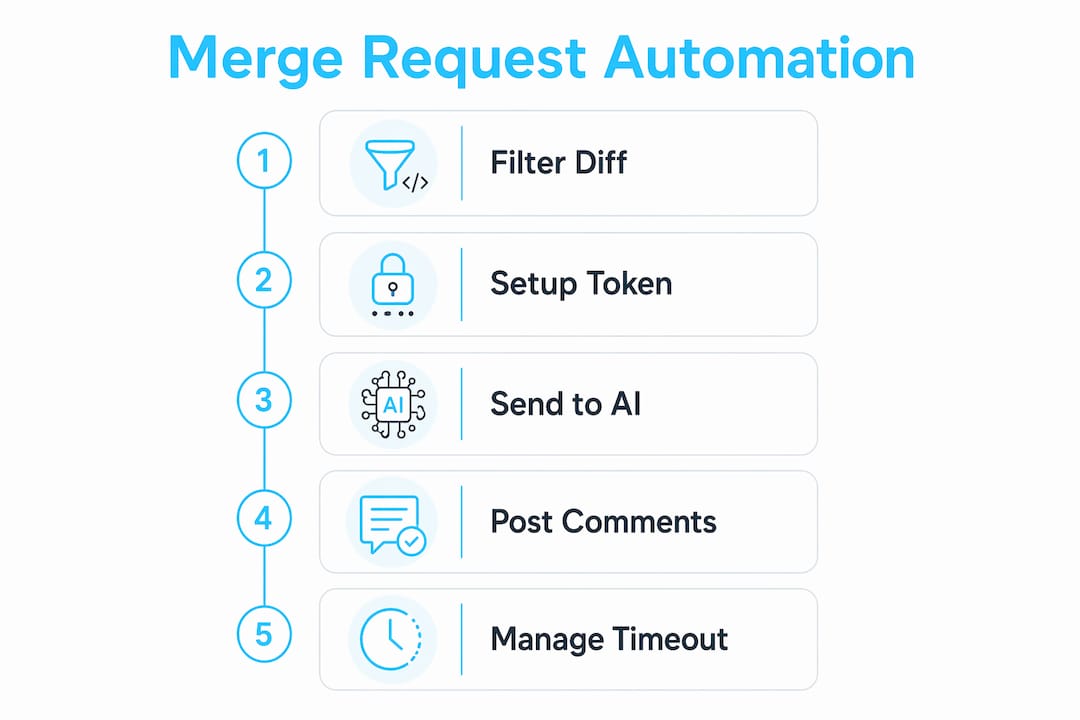
Step 3: Send the filtered diff to an AI API
Tools like the Gemini API accept your filtered diff and return structured JSON output that maps directly to file paths and line numbers. Structure your prompt to focus on logic bugs, security issues, and missing error handling. Ignore style and formatting at this layer. Your linter handles style.
Step 4: Post comments via the Discussions API
Posting via the Discussions API creates threaded conversations rather than flat notes. Threaded comments keep the activity feed clean and let engineers reply directly to AI feedback. Use the position object in the API payload with the file path and line number from your mapping in Step 1.
Step 5: Handle the webhook timeout
GitLab’s 10-second webhook timeout means your webhook receiver must return a 200 OK immediately and hand off processing to a background worker. The worker runs the AI analysis and posts comments asynchronously. Skipping this step causes webhook failures and silent review gaps.
Pro Tip: Add a commit SHA check before posting. If the MR has received a new commit since your job started, skip posting. Stale comments on outdated code confuse reviewers more than no comments at all.
The table below compares the three automation approaches by effort and control:
| Approach | Setup effort | Control level | Best for |
|---|---|---|---|
| Native reviewer assignment | Low | Limited | All teams, immediate wins |
| GitLab Duo Code Review | Low | Medium | Teams on GitLab Ultimate |
| Custom CI AI agent | High | Full | Teams with specific review requirements |
What are common challenges when automating GitLab MR reviews?
Automation breaks in predictable ways. Knowing the failure modes ahead of time saves hours of debugging.
- Large diffs exceed the 10MB cap. Filter aggressively. If a single file exceeds the limit, skip it and log a warning comment on the MR so the author knows.
- Comments land on the wrong line. This happens when your line number mapping uses the raw diff index instead of the actual file line number. Use the
new_linefield from the GitLab diff API, not the sequential diff position. - Duplicate comments on re-runs. Implement label-based idempotency by checking for a trigger label before running. Add the label at job start and remove it only if the job fails.
- AI noise drowns out real feedback. Rule-based prompt filters that focus on logic bugs and security issues reduce unnecessary comments. Instruct your model to skip minor style issues entirely.
- Security exposure on cloud AI services. Self-hosted AI review systems keep all code and review data inside your infrastructure. For proprietary codebases, this is the right call. Cloud services are fine for open-source work.
Automated review comments should feel like a junior engineer who read the diff carefully, not a linter that ran on the whole repo. The moment your AI starts flagging indentation on a 500-line security patch, engineers stop reading it.
The GitLab CI security scanning guide at Devopsaitoolkit covers the self-hosted security angle in more depth if your team handles sensitive code.
Key Takeaways
Automating GitLab merge request reviews requires combining native assignment features, AI-powered review services, and custom CI agents to cover speed, quality, and security at each layer.
| Point | Details |
|---|---|
| Start with native assignment | Enable Code Owners and Duo Agent assignment in project settings before building custom pipelines. |
| Use Duo Code Review for fast wins | GitLab Duo posts summaries and inline suggestions with no pipeline work required. |
| Filter diffs before sending to AI | Send only added lines to prevent token overuse and keep comments accurate. |
| Post via Discussions API | Threaded comments keep feedback organized and easier for engineers to act on. |
| Prevent duplicate reviews | Use label checks and commit SHA verification to stop re-runs from spamming the MR. |
Where I’d focus first if I were starting today
Most teams I talk to want to jump straight to custom AI agents because they sound impressive. I get it. But the signal-to-noise problem bites almost everyone who skips the basics. If your CODEOWNERS file is a mess and reviewers are already ignoring assignment notifications, adding an AI layer just creates more noise on top of a broken process.
My honest recommendation: spend one afternoon getting Code Owners right and enabling native auto-assignment. Then turn on Duo Code Review and watch what your engineers actually do with the suggestions for two weeks. That data tells you whether a custom agent is worth the investment.
When you do build a custom agent, resist the urge to review everything. The AI-assisted Ansible MR review example at Devopsaitoolkit shows how scoping the review to a specific file type produces far cleaner feedback than a blanket diff review. Narrow scope, high signal.
The future of this space is agents that understand your codebase’s conventions, not just generic best practices. GitLab’s Duo platform is moving in that direction. For now, the teams getting the most value are the ones who treat AI review as a first pass, not a replacement for human judgment.
— James
AI-powered GitLab workflows at Devopsaitoolkit
Devopsaitoolkit publishes practical AI workflow guides built for engineers running real production infrastructure on GitLab, Kubernetes, and Linux.

If you want to go deeper on GitLab CI automation, the CI test and coverage jobs guide shows how AI assistance extends beyond MR reviews into pipeline authoring. For engineers ready to put a full automated review workflow into practice, the Devopsaitoolkit AI workflow library covers prompt libraries, tool reviews, and step-by-step automation guides across the GitLab stack. Pricing plans for full access are listed at devopsaitoolkit.com/pricing.
FAQ
What is the fastest way to automate GitLab merge request reviews?
Enabling automatic reviewer assignment via Code Owners in GitLab project settings is the fastest path. It requires no external tools or pipeline configuration.
Does GitLab Duo Code Review require a specific plan?
GitLab Duo Code Review is available on GitLab Ultimate. It activates at the group or project level and posts AI-generated summaries and inline suggestions automatically on new MRs.
How do I prevent duplicate AI review comments on re-runs?
Use label-based idempotency by checking for a trigger label before running your review job. Adding a commit SHA check before posting comments adds a second layer of protection.
Should I use a self-hosted or cloud AI service for MR reviews?
Self-hosted AI review systems keep all code inside your infrastructure, which is the right choice for proprietary codebases. Cloud AI services are acceptable for open-source or non-sensitive repositories.
Why are my AI review comments appearing on the wrong lines?
Wrong-line placement happens when your diff mapping uses the sequential diff index instead of the actual file line number. Use the new_line field from the GitLab Discussions API position object to map comments correctly.
Recommended
- GitLab Review Apps: Ship a Live Preview for Every Merge Request — DevOps AI ToolKit
- AI-Assisted Review of an Ansible Merge Request
- AI-Assisted .gitlab-ci.yml Refactors That Don’t Break Prod
- GitLab Releases and Changelog Automation From Your Pipeline
Get 500 Battle-Tested DevOps AI Prompts — Free
500 battle-tested, copy-paste AI prompts engineered by a senior systems engineer — every one with fill-in placeholders and safety/back-out notes. Drop your email and it's yours.
- 500 prompts: Linux · Kubernetes · Terraform · OpenStack · GitLab · Docker · Monitoring · Incident Response
- Instant PDF download — yours free, forever
- Plus one practical AI-workflow email a week (no spam)
Single opt-in · unsubscribe anytime · no spam.