
AI Tools for Cloud Resource Rightsizing That Actually Work
Discover how AI tools can optimize cloud resource rightsizing, saving costs and enhancing performance with actionable strategies.

If you’re trying to shrink a cloud bill without breaking production, the fastest path is this: connect your provider’s native recommender, layer an AI-powered multi-metric scan on top of it, and roll out changes in stages with rollback baked in. That combination catches what CPU-only checks miss and gives you a confidence score before you touch anything live.
Here’s what to do in the next hour:
- Turn on your native recommender (AWS Compute Optimizer, Azure Advisor, or GCP Recommender) if it isn’t already running.
- Run an AI-driven multi-metric scan across CPU, memory, network, and disk to catch what the native tool alone won’t see.
- Tag your protected, high-priority workloads before either tool gets anywhere near automation.
- Recommendations are only as good as the metrics behind them.
- High-confidence, low-risk changes can move fast; everything else needs a human in the loop.
Pro Tip: Start with your native recommender’s High confidence items only. Save Medium and Low confidence recommendations for the AI-scan phase, where multi-metric correlation gives you the extra evidence to act with confidence.
Key Takeaways
Safe, high-confidence cloud rightsizing comes from pairing native provider recommenders with AI-driven multi-metric analysis, staged validation, and FinOps-level tracking of realized savings.
| Point | Details |
|---|---|
| Combine native and AI tools | Use Compute Optimizer, Azure Advisor, or GCP Recommender first, then layer AI multi-metric scans for prioritization. |
| Require multi-metric evidence | CPU-only scans produce low-confidence results; validate with memory, network, disk, and IOPS data. |
| Validate before acting | Run 30-day lookback checks, staging canaries, and acceptance tests before any production change. |
| Reconcile savings to invoices | Directional savings estimates must be confirmed against actual billing, not assumed. |
| Use Devopsaitoolkit for implementation | Devopsaitoolkit’s prompt packs and automation guides provide ready-made CI/CD and rollback templates for rightsizing workflows. |
Table of Contents
- What Cloud Resource Rightsizing Means for Engineers
- The Rightsizing Cycle: Discover, Prioritize, Validate, Act
- Which Metrics Tell You a Recommendation Is Trustworthy
- Native Recommenders From AWS, Azure, and GCP: Where to Start
- Beyond Native Tools: What AI-Powered Scans Actually Add
- Validating and Rolling Out Rightsizing Changes Safely
- Common Rightsizing Mistakes and How to Avoid Them
- Turning Rightsizing Into a Continuous FinOps Practice
- When to Trust the Recommender vs. the AI Scan
- Get Your Rightsizing Automation Running Faster
- Where to Go Deeper on Rightsizing and FinOps
- Frequently Asked Questions
- Sources
What Cloud Resource Rightsizing Means for Engineers
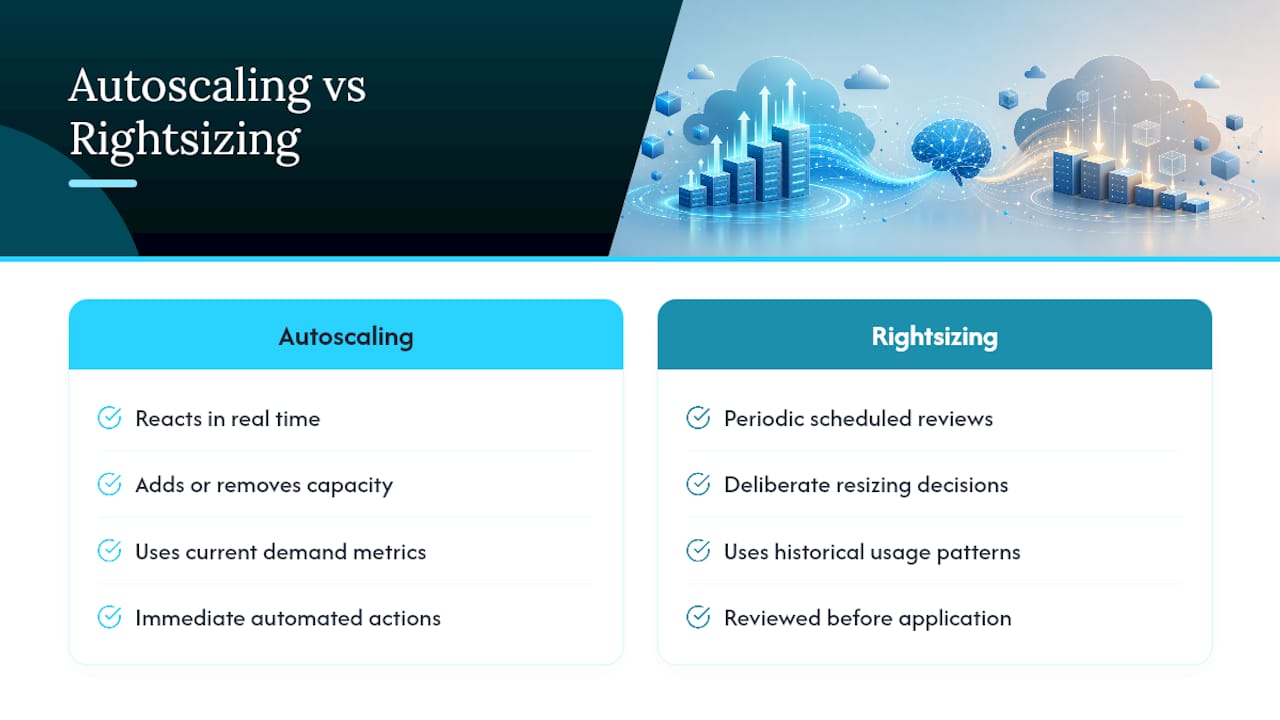
Rightsizing means matching provisioned compute, memory, storage, and database throughput to what a workload actually consumes, based on sustained usage patterns rather than peak-hour guesses. It’s not the same thing as downsizing, which just cuts capacity, or autoscaling, which reacts to demand in real time. Rightsizing is a deliberate, evidence-based resizing decision made from historical data.
Reliable rightsizing depends on a specific set of signals:
- CPU utilization over a meaningful window, not a single snapshot
- Memory headroom, since CPU alone hides memory-bound workloads
- Network throughput and disk IOPS
- RU/s (request units per second) for provisioned databases like Cosmos DB or DynamoDB
Every credible recommendation should carry a confidence label: High, Medium, or Low. Default rightsizing scans that lean on CPU-only heuristics tend to produce low-confidence output, which is exactly why multi-metric analysis matters before you act in production.
The Rightsizing Cycle: Discover, Prioritize, Validate, Act
Rightsizing isn’t a one-time cleanup. It’s a loop you run continuously, and AI tools speed up every stage of it.
- Discover. Pull recommendations from your native tool, then run an AI scan across CPU, memory, network, and disk to surface what the native tool’s simpler heuristics missed.
- Prioritize. Let an AI layer score and rank opportunities by potential savings versus risk, and generate a natural-language explanation of why each item made the list.
- Validate. Test the change against 30 days of historical load in staging or a canary environment before it touches production.
- Act. Execute with an audit log and a rollback path ready to go, not something you improvise after an alert fires.
AI earns its place mostly in steps 1 and 2, where correlating multiple signals and explaining the reasoning in plain language saves you from digging through dashboards by hand.
Pro Tip: Reach for a fast, CPU-only scan when you’re triaging hundreds of instances for a quick first pass. Switch to a detailed multi-metric scan the moment a resource is tagged production, customer-facing, or stateful.
Which Metrics Tell You a Recommendation Is Trustworthy
A recommendation is only as trustworthy as the data behind it. Five signals matter most: sustained CPU utilization, memory headroom, network throughput, disk IOPS, and RU/s for provisioned databases.
- CPU alone tells you almost nothing about memory-bound or I/O-bound workloads.
- A single day of data can hide weekly batch jobs or month-end spikes.
- Database RU/s and IOPS need their own lookback window, separate from compute metrics.
Default, fast scans that rely on CPU-only heuristics routinely generate low-confidence recommendations, which is exactly why detailed multi-metric analysis is the standard for anything touching production.
Confidence labels map directly to how much evidence backs a recommendation. High confidence usually means consistent multi-metric data over 30 days or more. Medium means the pattern holds but with gaps or shorter history. Low means you’re looking at a single metric, a short window, or conflicting signals, and it needs a human before it goes anywhere near an apply button.
Pro Tip: Never let an automation pipeline execute a Low confidence recommendation unattended. Route it to a human reviewer, always.
Native Recommenders From AWS, Azure, and GCP: Where to Start
Every major cloud provider ships a recommender, and each one is a reasonable place to start before you bring in anything else.
- AWS Compute Optimizer analyzes CPU, memory (when the CloudWatch agent is installed), network, and disk to suggest instance type and size changes across EC2, Lambda, and EBS.
- AWS Cost Explorer doesn’t generate rightsizing recommendations on its own, but its usage reports validate whether a Compute Optimizer suggestion lines up with actual spend patterns.
- Azure Advisor issues cost, performance, reliability, security, and operational recommendations, and its cost tab is a standard starting point for Azure rightsizing work.
- GCP Recommender, through Active Assist, surfaces machine-type and idle-resource recommendations based on Compute Engine usage history.
The common limitation across all three: native tools generally default to CPU-centric analysis unless you’ve explicitly enabled memory agents or deeper telemetry. That’s fine for a first pass. It’s not enough evidence for a production change.
Pro Tip: Pull the native recommender’s list first, then run an AI scan against the same resources. Where both tools flag the same instance, you’ve got a high-confidence action. Where they disagree, that’s your validation queue.
Beyond Native Tools: What AI-Powered Scans Actually Add
Native recommenders are a strong baseline, but they weren’t built to correlate five metrics at once or explain their reasoning in plain English. That’s where AI-enabled tools earn their keep, across a few capability categories: multi-metric correlation, anomaly detection, scheduling and parking for idle resources, auto-remediation with guardrails, and natural-language explanations of why a recommendation exists.
Open-source projects illustrate the pattern well. CLI-based scanners like cloud-cost-cli run multi-metric analysis and produce directional savings estimates, often in the range of plus or minus 20 percent, useful for prioritizing where to look first, not as a final number. Agent-based tools such as digitaltap-oss detect idle clusters, schedule hibernation windows, and fall back to rule-based logic when no LLM is available, which keeps the system running even without a model call.
Combining native recommender outputs with an AI prioritization layer cuts through noisy, low-confidence suggestions and lets your team focus human review time on the handful of items that are both high-impact and genuinely uncertain.
A basic workflow for wiring this into CI/CD looks like this:
- Pull recommendations from the native API on a schedule.
- Run an AI scan for multi-metric correlation and scoring.
- Post high-confidence, low-risk items to a staging pipeline for automated validation.
- Flag Medium and Low confidence items for a Slack or ticket-based human review.
On credentials: give scanning tools read-only, scoped IAM roles, nothing more. If sending telemetry to a third-party LLM is a concern, local models via Ollama keep the natural-language explanation layer in-house while the raw metrics never leave your network.
Pro Tip: Before granting any AI tool write access, run it read-only for two weeks. Compare its recommendations against what actually happened to those workloads, then decide what it’s earned the right to automate.
Validating and Rolling Out Rightsizing Changes Safely
A recommendation is a hypothesis, not an order. Before anything ships to production, run it through a checklist:
- Confirm a detailed, multi-metric scan backs the recommendation, not a CPU-only heuristic.
- Require at least 30 days of lookback data as evidence.
- Deploy the change to staging or a canary group first.
- Run acceptance tests that mirror real traffic patterns.
- Set monitoring alerts on latency and error rate before the canary goes live.
Rollback needs to be pre-built, not improvised. A simple runbook item, automated where possible, should revert the instance type or database tier the moment latency or error rate crosses a defined threshold post-change.
- Keep a dry-run mode as the default for any automation pipeline.
- Log every recommendation, decision, and action to an audit trail you can replay.
- Tie every executed change back to the next billing cycle’s invoice to confirm the savings actually landed, since directional estimates need reconciliation against real billing data.
For AWS-specific rollout mechanics, including how Savings Plans interact with rightsizing decisions, the deeper workflow is covered in AWS cost optimization with AI.
Pro Tip: Build your rollback script before you build your automation script. If you can’t answer “how do I undo this in under five minutes,” the change isn’t ready for production.

Common Rightsizing Mistakes and How to Avoid Them
Most rightsizing regressions trace back to the same handful of mistakes.
- Trusting CPU-only scans in production. Fix: require multi-metric evidence (CPU, memory, network, disk/IOPS) before any change ships.
- Missing protected-resource tags. Practitioners recommend explicit tag-driven guardrails so AI agents skip high-priority or critical workloads automatically rather than relying on someone remembering to exclude them.
- Acting on Low confidence recommendations. Fix: route anything below High or Medium confidence to a human, every time, no exceptions.
- Never reconciling savings to the actual invoice. A projected 20% savings estimate means nothing until next month’s bill confirms it.
On permissions: scanning tools should get read-only access scoped to exactly the resources they need to evaluate. Anything with write or execute permissions belongs behind a separate approval step, not the same credential doing discovery and action.
Pro Tip: Add a pre-change acceptance test to your pipeline that fails the deploy if p99 latency moves more than 10% from baseline. Cheap insurance against a rightsizing mistake reaching customers.
Turning Rightsizing Into a Continuous FinOps Practice
Rightsizing that happens once a quarter leaves money on the table between cleanups. Making it continuous means building governance into the process itself: different risk profiles for dev, staging, and production, approval gates scaled to that risk, and policy-driven execution for anything below a defined blast radius.
- Track recommendations generated, recommendations executed, and savings realized on the actual invoice, three separate numbers that rarely match.
- Assign clear ownership across engineering and finance, since cross-functional practice materially increases how much identified savings actually gets captured.
- Build in cost allocation and showback so teams see the direct impact of the resources they own.
The FinOps Foundation’s framework formalizes exactly this kind of cross-functional accountability, turning rightsizing from a one-off project into a repeatable operating motion. For the engineering-side playbook on making this stick across a team, how DevOps teams use AI to reduce cloud costs walks through the workflow in more depth.
When to Trust the Recommender vs. the AI Scan
Use the native recommender for quick wins. It’s fast, it’s free, and it catches the obvious cases. Reach for AI-powered scans when you need to correlate multiple signals, prioritize across hundreds of resources, or explain a decision to a skeptical teammate. Automate only what’s High confidence and low blast radius; everything else stays behind human approval until it’s earned otherwise.
Get Your Rightsizing Automation Running Faster
Building the workflow above from scratch, the CLI scans, the CI/CD hooks, the rollback runbooks, takes real engineering time most teams don’t have to spare. Devopsaitoolkit closes that gap with prompt packs and automation guides built specifically for engineers wiring AI into infrastructure decisions, not generic cost-savings advice repackaged for a broader audience.

Inside, you’ll find prompt templates for generating multi-metric scan scripts, CI/CD examples for gating rightsizing changes behind acceptance tests, and audit-ready runbook templates you can drop straight into a validation pipeline. The automation prompt library covers the exact scan-and-score workflow described above, and the broader AI DevOps tools collection extends into incident response and review for when a rightsizing change doesn’t go as planned. Check pricing and start with the pack that matches your provider stack.
Where to Go Deeper on Rightsizing and FinOps
- Azure Advisor covers how Microsoft frames cost, performance, and reliability recommendations natively.
- The Microsoft Q&A thread on AI-driven cloud cost optimization walks through combining Cost Management APIs with ML models.
- The FinOps Data 2025 report quantifies why cross-functional process matters for capturing savings.
- Microsoft Learn’s Tech Community blog documents architectures for predictive scaling and anomaly detection alongside rightsizing.
- For internal-tooling teams building dashboards around these recommendations, Rule27 Design’s guidance on optimizing internal tools is worth a read.
Frequently Asked Questions
What are the best AI tools for cloud resource rightsizing? The strongest approach combines provider-native recommenders (AWS Compute Optimizer, Azure Advisor, GCP Recommender) with AI-powered multi-metric scanning tools that correlate CPU, memory, network, and disk data to score and prioritize opportunities.
Is rightsizing the same as autoscaling? No. Autoscaling reacts to demand in real time by adding or removing capacity. Rightsizing is a deliberate resizing decision based on historical usage patterns, typically reviewed and applied on a scheduled cycle.
How much can rightsizing actually save? Savings vary widely by workload and environment, and provider and third-party tools typically present them as directional estimates rather than guarantees. Always reconcile projected savings against the actual invoice after execution.
What confidence level should trigger automated action? Only High confidence recommendations with a low blast radius are reasonable candidates for automation. Medium and Low confidence items should route to human review, backed by dry-run mode and a full audit log.
How do I handle rightsizing across multiple cloud providers? Run each provider’s native recommender independently, since AWS, Azure, and GCP score differently, then normalize the outputs through an AI scan that applies consistent multi-metric thresholds across all three before prioritizing.
Sources
- Azure Advisor
- FinOps Data 2025 report
- FinOps Foundation framework
- Microsoft Learn blog (Tech Community)
Recommended
- AWS Cost Optimization With AI: Rightsizing and Savings Plans
- GCP Cost Optimization With AI: CUDs and Rightsizing
- Azure Cost Management With AI: Rightsizing, Reservations
- Right-Sizing Pods: Resource Requests, Limits, and Autoscaling That Works — DevOps AI ToolKit
Get 500 Battle-Tested DevOps AI Prompts — Free
500 battle-tested, copy-paste AI prompts engineered by a senior systems engineer — every one with fill-in placeholders and safety/back-out notes. Drop your email and it's yours.
- 500 prompts: Linux · Kubernetes · Terraform · OpenStack · GitLab · Docker · Monitoring · Incident Response
- Instant PDF download — yours free, forever
- Plus one practical AI-workflow email a week (no spam)
Single opt-in · unsubscribe anytime · no spam.