
AI-Assisted Network Topology Mapping for Engineers
Discover how AI-assisted network topology mapping streamlines network diagrams with efficient workflows. Start your project today!

AI-assisted network topology mapping reliably produces live-state diagrams when you combine protocol-based discovery with prompt-driven diagram generation. The practical workflow is straightforward: run a read-only SNMP/SSH discovery across a scoped CIDR, export a Draw.io XML or SVG master file, then iterate with prompt-driven refinements inside your CI pipeline or version control. Devopsaitoolkit’s prompt libraries are built specifically for this loop.
- Start here: scope a non-production CIDR, configure read-only SNMPv3 credentials, and run a single controlled discovery to generate your first topology file before touching production.
- Protocol stack: SNMP v2/v3 for inventory and interface data, LLDP and CDP for neighbor adjacency, ARP for Layer 2 reachability, and ICMP for host liveness.
- Output target: a
.drawioXML or SVG file committed to Git, not a screenshot or a PDF you’ll lose track of in a week. - Tooling anchor: Devopsaitoolkit’s network topology prompt packs give you the exact LLM prompts to drive diagram generation from a structured discovery JSON.
Pro Tip: Run your first discovery on a lab or staging segment. You’ll catch credential gaps and LLDP blind spots before they corrupt your production topology model.
Table of Contents
- How does AI-assisted network topology mapping actually work?
- What outputs do you get and how do you integrate them?
- How to implement AI-assisted mapping from discovery to production
- How do you evaluate AI-assisted mapping tools?
- Operational best practices and common pitfalls
- Copy-paste prompt library and workflow snippets
- Where does AI-assisted mapping fail?
- Devopsaitoolkit: prompt packs and consulting for topology mapping
- Key Takeaways
- Why the “generate once” mindset is the real problem
- Useful sources for engineers going deeper
How does AI-assisted network topology mapping actually work?
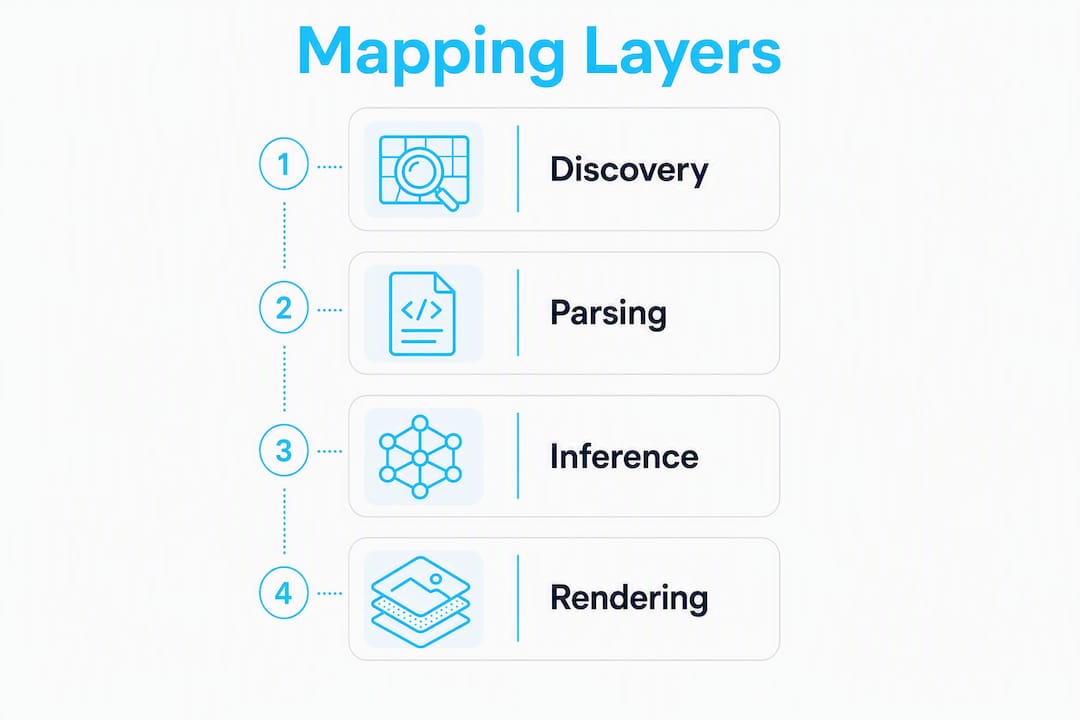
The process has four distinct layers, and understanding where each one can break saves you hours of debugging later.
Discovery layer
Automated discovery tools commonly use SNMP, ICMP, ARP, LLDP, and CDP to identify devices and infer links. SNMP v2/v3 pulls the ifTable, ipAddrTable, and sysDescr OIDs to build an initial device inventory. LLDP and CDP neighbor tables give you adjacency data: which interface on which device connects to which peer. ARP tables fill in Layer 2 reachability for hosts that don’t speak LLDP. ICMP sweeps confirm liveness and catch devices that SNMP misses due to ACL filtering.
The output at this stage is structured JSON, not a diagram. Here’s a compact example of what the AI actually consumes:
{
  "hostname": "core-sw-01",
  "mgmtIP": "10.1.0.1",
  "platform": "NX-OS 9.3(7)",
  "ifTable": [
    { "ifName": "Eth1/1", "ifDescr": "uplink-to-rtr-01", "ifSpeed": 10000 },
    { "ifName": "Eth1/2", "ifDescr": "to-access-sw-02", "ifSpeed": 1000 }
  ],
  "lldpNeighbors": [
    { "localPort": "Eth1/1", "remoteHost": "rtr-01", "remotePort": "Gi0/0" },
    { "localPort": "Eth1/2", "remoteHost": "access-sw-02", "remotePort": "Gi0/1" }
  ]
}
Parsing and enrichment
Raw discovery output is messy. Structured parsers (TxFsm-style, rather than brittle regex) extract device and interface fields from vendor show command outputs with far better accuracy. After parsing, the pipeline enriches each device record with MAC/OUI vendor lookups, deduplicates multi-homed devices that appear under multiple IPs, and filters ghost nodes — devices that appeared in a neighbor table but never responded to direct queries.

Secure Cartography handles this well: it parses CDP/LLDP neighbors, performs bidirectional validation, and exports position-matched Draw.io files. Bidirectional validation means the tool confirms that if device A claims device B as a neighbor, device B also claims device A. Links that fail this check get flagged rather than silently included.
Inference layer
Once the cleaned inventory JSON exists, an LLM or rules engine resolves ambiguous neighbor IDs (short hostnames vs. FQDNs, for example), infers logical topology layers (L1 physical, L2 VLAN, L3 routing), and classifies device roles. Tools like twNetMap integrate with Ollama, OpenAI, and Google Gemini to classify devices and use user edits as feedback to improve future inferences. That feedback loop matters: the model gets better at your specific naming conventions over time.
Rendering layer
The AI maps the cleaned model to a visual layout, applying opinionated conventions (WAN on the left, core in the middle, access layer on the right) and exports to editable formats. Diagrams.so generates Draw.io XML with device icons, VLAN grouping, and architecture warnings for exposed endpoints or missing security boundaries. Network Sketcher goes further with a Local MCP edition that lets LLM clients drive network design directly and export SVG, PPTX, and device tables.

Pro Tip: Prefer tools that support bidirectional link validation and two-pass LLDP resolution. A single-pass tool will silently drop asymmetric links, and you won’t notice until a troubleshooting session goes sideways.
What outputs do you get and how do you integrate them?
The files your toolchain produces determine whether your topology maps stay alive or go stale the moment you close the browser tab.
Common export formats
| Format | Use case | Editable? |
|---|---|---|
| Draw.io XML (.drawio) | Primary diagram editing, CI commits | Yes |
| SVG | Documentation sites, wikis, reporting | Yes (vector) |
| PPTX | Executive and architecture reviews | Partial |
| PNG | Inline docs, Confluence, Slack | No |
| GraphML / yEd | Graph analysis, path calculations | Yes |
| JSON / CSV | Inventory databases, CMDB sync | Yes |
| Config snippets (NX-OS, IOS-XE, JunOS, PAN-OS) | Direct device provisioning | Yes |
Network Sketcher and Diagrams.so both cover SVG, PPTX, and Draw.io exports alongside device tables for downstream use. DrawNet.ai adds port-level patch documentation with clickable port elements and a “Tidy Links” auto-routing feature that handles 50+ connections without overlap — useful when your diagram starts looking like a bowl of spaghetti.
Integration checklist
Before committing to any tool, verify these integration points:
- Editable native format: the tool exports
.drawioXML or SVG, not just a rendered PNG. - API or MCP support: programmatic access so your CI pipeline can trigger discovery and pull the model without manual clicks.
- Version control hooks: the model JSON and diagram file commit to Git on every rescan.
- Webhooks for change events: the tool can notify your alerting stack when topology drift is detected.
- Privacy controls: DrawNet.ai runs as a PWA with localStorage-only storage for diagrams, which matters when your topology data is sensitive. AI calls to third-party models remain an external consideration regardless of tool.
Sample API flow
discovery-agent → model.json → LLM prompt refinement
    → .drawio commit to Git
    → CI pipeline validates bidirectional links
    → push to documentation site
For enterprise AI integrations, pay attention to where your topology JSON is sent during the LLM enrichment step. Topology data often contains IP ranges, device roles, and credential hints that you don’t want leaving your network boundary.
How to implement AI-assisted mapping from discovery to production
This is the playbook I’d hand to any engineer starting from scratch.
- Scope and credential prep: define your target CIDR ranges, create read-only SNMPv3 credentials and a dedicated SSH service account with no write permissions. Document which VLANs and segments are in scope.
- Deploy distributed scanners: place scanner nodes inside each network segment rather than routing all discovery traffic through a single central host. This bypasses ACL limitations and reduces load on core links.
- Run initial discovery: execute SNMP, LLDP/CDP, ARP, and ICMP sweeps. Capture raw output to JSON before any enrichment.
- Validate and clean data: run bidirectional link checks, deduplicate multi-homed devices, and flag ghost nodes for manual review.
- Feed to AI diagram generator: pass the cleaned
model.jsonto your LLM or diagram tool with a structured prompt specifying layout conventions, export format, and any site-specific naming rules. - Review and refine: spot-check a subset of links against ground-truth (physical documentation, cable records, or a known-good segment). Correct errors and feed corrections back to the model.
- Export to version control: commit the
.drawiofile andmodel.jsonto Git with a meaningful commit message referencing the discovery timestamp. - Schedule rescans and drift detection: configure scheduled rescans so the model stays synchronized with live state. Set up drift alerts for unexpected topology changes.
Runtime estimates
| Environment size | Devices | Typical first-run discovery | Rescan cadence |
|---|---|---|---|
| Small | up to hundreds | short durations | frequent rescans |
| Medium | hundreds to thousands | moderate duration discoveries | periodic rescans |
| Large | thousands or more | longer initial discoveries | regular rescans with concurrency |
Large environments need concurrency controls and SNMP rate limiting to avoid overwhelming devices. Set a conservative max_concurrent_requests value and increase it only after confirming device CPU impact.
Pro Tip: Keep a small “ground-truth” validation set: 5–10 devices whose physical connections you know exactly. Run every discovery against this set first. If the output matches, your discovery is working. If it doesn’t, stop and fix the parser before scaling.
How do you evaluate AI-assisted mapping tools?
Accuracy and integration depth matter more than feature count. Here’s how to score tools before committing.
Must-have flags (score 0 or 1 for each):
- SNMP v2/v3 support with configurable community strings and auth/priv settings
- LLDP and CDP neighbor parsing with bidirectional validation
- ARP and ICMP discovery for hosts that don’t speak neighbor protocols
- Export to at least one editable format (Draw.io XML, SVG, or GraphML)
- API or MCP endpoint for programmatic access from CI pipelines
- Distributed scanner support for segmented networks
Nice-to-have flags:
- Port-level patch documentation (exact port-to-port physical connections)
- Configuration generation for target OSes (NX-OS, IOS-XE, JunOS, PAN-OS)
- Local/offline operation without sending topology data to external APIs
- Pre-built prompt packs or workflow templates
- Feedback loop that learns from user corrections to improve future inferences
Accuracy testing methodology:
- Build a seed set of known devices with documented physical connections.
- Run discovery and compare output against the seed set.
- Inject a controlled change (disconnect a cable, add a device) and rescan.
- Measure false-positive links (links the tool shows that don’t exist) and false-negative links (real links the tool missed).
- A tool that scores well on bidirectional validation will have near-zero false positives. False negatives usually trace back to missing LLDP support on access switches.
Weight accuracy and integration at roughly 60% of your total score. Bells-and-whistles features like voice-to-diagram or AI chat interfaces are nice, but a tool that produces a wrong diagram faster is worse than a slower tool that gets it right.
Operational best practices and common pitfalls
The engineers who get the most out of automated topology mapping treat it as a continuous process, not a one-time project.
Do:
- Run scheduled rescans and commit the updated model to Git on every run.
- Store
model.jsonalongside the.drawiofile so the source of truth is always recoverable. - Integrate mapping into your CI/CD pipeline so topology validation runs automatically on infrastructure changes.
- Use distributed scanner nodes for segmented networks rather than routing all traffic through a single jump host.
- Maintain a prompt history so the AI learns your layout preferences and naming conventions over time.
Don’t:
- Rely on one-time manual exports. A diagram that isn’t automatically refreshed is a liability, not an asset.
- Use privileged credentials for discovery. Read-only is sufficient and limits blast radius if credentials are compromised.
- Accept a diagram without bidirectional link validation. A tool that draws links based on one-sided neighbor claims will mislead you during an outage.
Common pitfalls:
- LLDP gaps on access switches: many access-layer switches have LLDP disabled by default. Discovery will miss these links entirely. Audit your LLDP configuration before running discovery.
- Virtual overlay vs. physical link confusion: VXLAN, GRE, and MPLS tunnels appear as logical links in discovery output. Make sure your tool distinguishes overlay from underlay, or your L3 diagram will look like a mess.
- LLM opinionation without discovery validation: AI diagram generators sometimes rearrange topology based on layout aesthetics rather than discovery data. Always verify that the tool’s output is grounded in actual neighbor data, not just a plausible-looking arrangement of shapes.
Pro Tip: Separate your visualization prompts from your configuration-generation prompts. Never let a config-generation prompt run against unvalidated discovery data. The cost of pushing a wrong config to a device is orders of magnitude higher than the cost of a wrong diagram.
Copy-paste prompt library and workflow snippets
These are ready to use. Adjust the variables in brackets for your environment.
One-liner prompts
Generate a Draw.io XML network diagram from the attached inventory JSON. Use WAN on the left, core in the center, access layer on the right. Group devices by site.Identify all devices in [inventory.json] that have no LLDP neighbors and flag them as potential discovery gaps.Convert the following LLDP neighbor table to a bidirectional adjacency list and highlight any asymmetric entries.
Multi-sentence template prompt
You are a network documentation engineer. Given the following inventory JSON for site [SITE_NAME]
covering CIDR [CIDR_RANGE], generate a Draw.io XML diagram that:
- Places WAN uplinks on the left
- Groups access switches under their upstream distribution switch
- Labels each link with interface names from both ends
- Flags any device with no LLDP neighbors as [DISCOVERY_GAP]
- Exports device metadata as a separate CSV table

Inventory JSON: [PASTE_JSON_HERE]
CI pipeline YAML snippet
stages:
  - discover
  - validate
  - generate
  - commit

discover:
  stage: discover
  script:
    - python3 discover.py --cidr $CIDR --creds $SNMP_CREDS --output model.json
  artifacts:
    paths: [model.json]

validate:
  stage: validate
  script:
    - python3 validate_links.py --model model.json --check bidirectional
    - python3 validate_links.py --model model.json --check ghost-nodes
  dependencies: [discover]

generate:
  stage: generate
  script:
    - python3 ai_diagram.py --model model.json --prompt prompts/topology.txt --output topology.drawio
  dependencies: [validate]

commit:
  stage: commit
  script:
    - git add topology.drawio model.json
    - git commit -m "topology: auto-update $(date -u +%Y-%m-%dT%H:%M:%SZ)"
    - git push
  dependencies: [generate]
For reusable CI components that handle the discovery and validation stages, Devopsaitoolkit’s GitLab CI prompt packs include pre-built job templates you can drop into this structure.
Draw.io XML fragment (example export preview)
<mxGraphModel>
  <root>
    <mxCell id="0"/>
    <mxCell id="1" parent="0"/>
    <mxCell id="2" value="core-sw-01" style="shape=mxgraph.cisco.switches.layer_3_switch;"
      vertex="1" parent="1">
      <mxGeometry x="300" y="200" width="60" height="60" as="geometry"/>
    </mxCell>
    <mxCell id="3" value="Eth1/1 — Gi0/0" style="edgeStyle=orthogonalEdgeStyle;"
      edge="1" source="2" target="4" parent="1">
      <mxGeometry relative="1" as="geometry"/>
    </mxCell>
  </root>
</mxGraphModel>
Load this fragment into Draw.io (or diagrams.net) via File → Import to verify the output before committing it to your documentation pipeline.
Where does AI-assisted mapping fail?
Knowing the failure modes upfront lets you design mitigations before they bite you in production.
- Missing LLDP/CDP on access switches: the most common gap. Devices appear in ARP tables but have no neighbor data, so the tool can’t infer physical links. Mitigation: enable LLDP globally on access switches, or deploy a distributed scanner in the same L2 segment to capture ARP-based adjacency.
- Devices behind NAT or in isolated VLANs: the scanner can’t reach them directly. Mitigation: deploy a scanner node inside each isolated segment.
- Incomplete credential coverage: SNMP community strings or SSH keys missing for a subset of devices. Mitigation: maintain a credential inventory and validate coverage before every discovery run.
- LLM hallucinations during diagram generation: the model invents plausible-looking links that don’t exist in the discovery data. Mitigation: always run bidirectional validation after AI diagram generation, before the file is committed.
- Stale diagrams from missed rescans: a topology that was accurate six months ago is actively misleading today. Mitigation: treat rescan failures as pipeline failures, not warnings.
Secure Cartography’s bidirectional validation approach directly addresses the hallucination and ghost-node problems. For the credential and segmentation gaps, distributed scanner deployment is the only reliable fix.
Pro Tip: Always separate visualization prompts from configuration-generation prompts. Require discovery validation before any config-generation run. A wrong diagram is embarrassing; a wrong config pushed to a production router is an outage.
Devopsaitoolkit: prompt packs and consulting for topology mapping
If you’ve read this far, you’re past the “should I do this?” stage and into “how do I do this without it becoming a maintenance nightmare?” That’s exactly the problem Devopsaitoolkit’s network topology prompt libraries and workflow packs are built to solve.

The prompt packs include battle-tested prompts for every stage of the workflow: discovery scoping, inventory JSON generation, diagram generation with layout conventions, bidirectional validation checks, and drift detection alerts. The CI-ready workflow packs give you a complete pipeline YAML you can drop into GitLab or GitHub Actions, including the validation job that catches ghost nodes and asymmetric links before they reach your documentation site.
For teams that need more than prompts, Devopsaitoolkit’s consulting engagements deliver an integration plan, a distributed scanner deployment guide, and a short runbook for rescan scheduling and drift detection. The AI DevOps tools page has the full catalog of downloadable packs and consulting options. Start with the automation prompt library to get a feel for the format before committing to a full workflow pack.
Key Takeaways
AI-assisted network topology mapping works reliably when you pair protocol-based discovery with bidirectional validation and commit the model to version control on every rescan.
| Point | Details |
|---|---|
| Protocol stack is non-negotiable | SNMP v2/v3, LLDP, CDP, ARP, and ICMP together cover inventory, adjacency, and liveness. |
| Bidirectional validation prevents bad diagrams | Any tool that skips this check will produce ghost nodes and phantom links. |
| Editable exports keep diagrams alive | Commit Draw.io XML or SVG to Git; PNG and PDF exports go stale and can’t be updated. |
| Distributed scanners solve segmentation gaps | Place scanner nodes inside isolated VLANs rather than routing all discovery through a single host. |
| Devopsaitoolkit | Prompt packs and CI workflow templates cover the full discovery-to-commit loop for production environments. |
Why the “generate once” mindset is the real problem
Most teams I’ve seen struggle with topology mapping don’t have a tooling problem. They have a cadence problem. They run a discovery, generate a beautiful diagram, and then treat it as done. Six months later, that diagram is actively misleading engineers during incidents because three switches were added, a WAN link was rerouted, and nobody updated the file.
The shift that actually fixes this is treating the network as a living model rather than a document. When your topology map is a Git-committed artifact that gets regenerated on a schedule, it stops being a snapshot and starts being a source of truth. The AI-assisted part matters less than the automation part. A mediocre diagram that’s always current beats a perfect diagram that’s six months old, every single time.
What I’d push back on is the instinct to wait for the “perfect” tool before starting. Run a scoped discovery on 20 devices today. Get one .drawio file into Git. Then build the automation around it. The prompt library and pipeline structure will follow naturally once you have something real to iterate on.
Useful sources for engineers going deeper
- arxiv.org: LLM-based network topology inference (2405.15793) — research on applying large language models to network topology inference tasks.
- arxiv.org: AI-driven network management survey (2308.11432) — broad survey of machine learning applications in network management, useful for understanding where topology mapping fits.
- IEEE Xplore: automated network topology discovery (8353122) — peer-reviewed treatment of discovery protocols and accuracy benchmarks.
- ACM DL: network documentation automation (3141251.3141261) — covers structured parsing and documentation pipeline design.
- Secure Cartography (GitHub) — open-source tool with bidirectional CDP/LLDP validation and Draw.io export.
- Network Sketcher (GitHub) — Cisco-open MCP-enabled diagram generator with multi-format export.
- twNetMap (GitHub) — LLM-integrated topology tool with Ollama, OpenAI, and Gemini support and user-feedback learning.
- Scanopy (GitHub) — infrastructure documentation platform with scheduled rescanning and continuous model maintenance.
- Devopsaitoolkit: automation prompt library — copy-paste prompts adaptable to topology mapping workflows.
- Devopsaitoolkit: CI/CD prompt packs — pipeline templates for discovery, validation, and commit stages.
Recommended
- Debugging VPC Connectivity With AI: Routes, NACLs, and
- Troubleshooting Linux Network Connectivity Layer by Layer
- Designing Node Affinity, Taints, and Tolerations With AI
- Newsletter — AI workflows for DevOps engineers
Get 500 Battle-Tested DevOps AI Prompts — Free
500 battle-tested, copy-paste AI prompts engineered by a senior systems engineer — every one with fill-in placeholders and safety/back-out notes. Drop your email and it's yours.
- 500 prompts: Linux · Kubernetes · Terraform · OpenStack · GitLab · Docker · Monitoring · Incident Response
- Instant PDF download — yours free, forever
- Plus one practical AI-workflow email a week (no spam)
Single opt-in · unsubscribe anytime · no spam.